

IPsec builds a two-way, encrypted site-to-site tunnel between your private network's dedicated gateway and a VPN concentrator on your side, your corporate network or a cloud VPC. Once the tunnel is up, traffic between the two networks is encrypted and authenticated, so SIMs can reach resources on your network and your network can reach SIMs.
For the private network architecture and WireGuard setup, see Private networks and WireGuard setup.
Overview
Most IoT deployments use an application server with a public IP address, and devices push data out to it over the public internet. A GPS tracker reporting its location every five minutes is the typical case, and it needs no tunnel at all.
IPsec is for deployments that need the opposite: a private path between your own network and the subnet your SIM cards sit on. Once the tunnel is up, SIMs can reach servers you never exposed to the internet, and your network can reach the SIMs.
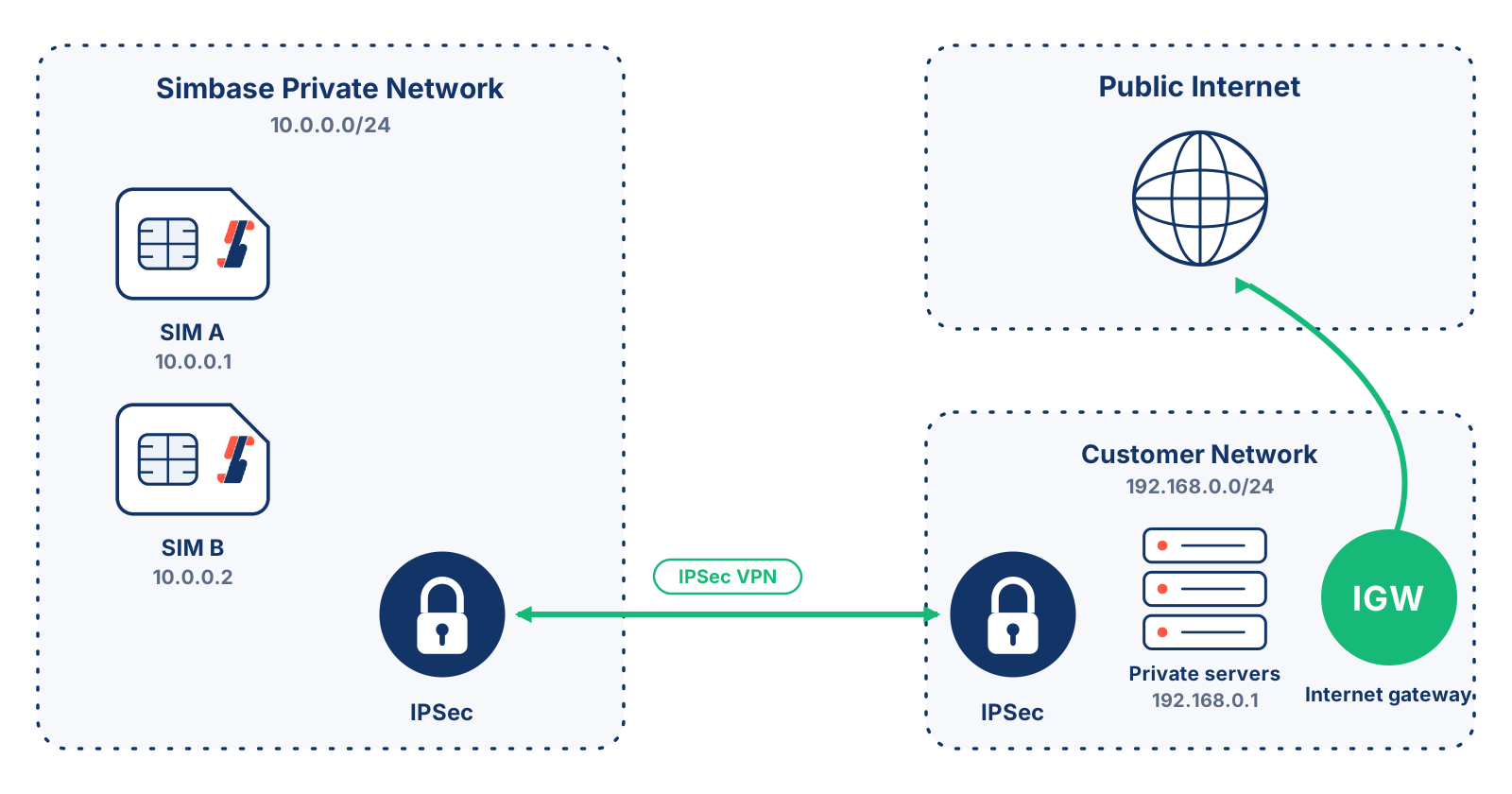
The Remote network setting in Phase 2 decides how much traffic takes that path. Left at 0.0.0.0/0, everything the SIMs send goes through the tunnel, so your own internet gateway handles their internet access and you control every packet in and out. Set to a specific subnet, only traffic bound for that network uses the tunnel and the rest reaches the internet through Simbase's gateway as normal.
The diagram below shows the 0.0.0.0/0 case, with all SIM traffic routed to the customer network.
Set up an IPsec tunnel
Before configuring the tunnel, deploy your private network and have a VPN concentrator ready. The basic steps are:
Deploy a private network. See Private networks and WireGuard setup.
Deploy a VPN concentrator in your corporate or cloud network with a public IP address. Simbase recommends pfSense if you don't already run one.
Configure the IPsec tunnel in the Simbase dashboard.
Configure the IPsec tunnel on your VPN concentrator to match.
Test the tunnel in a lab environment before using it in production. The exact steps depend on your concentrator's make and software, consult its documentation, and consider involving a network engineer for larger or more complex setups.
Configure IPsec (Simbase dashboard)
General
| Setting | Description |
|---|---|
Key exchange version | Negotiates the tunnel. IKEv2 is faster and more secure than IKEv1, and is preferred when your concentrator supports it. Use auto when unsure. |
Simbase IP address | The IP address of the Simbase VPN concentrator. Note this down, you'll need it when configuring your side. |
Remote IP address | The public IPv4 address of your VPN concentrator. |
Pre-shared key | Authenticates the two ends of the tunnel. Use a long, random key, or copy the proposed one. Avoid special characters. Never share it! Anyone with this key can compromise the tunnel. |
Key exchange version
Simbase IP address
Remote IP address
Pre-shared key
Phase 1 (Key exchange)
| Setting | Description |
|---|---|
Encryption algorithm | Encrypts key-exchange traffic. AES128-GCM (128-bit) is recommended for the best balance of security and performance. |
Hash algorithm | Verifies integrity of key-exchange traffic. SHA256 is recommended. SHA1 is generally considered unsafe and should be avoided. |
DH group key | Diffie-Hellman group for the key exchange. DH Group 14 (2048-bit) is recommended. |
Lifetime | How long the Phase 1 session lasts before re-negotiating, in seconds. 28800 is a sensible default. Set one endpoint to this value and the other at least 10% higher (e.g. 31680) to avoid overlap. Range: 20000–86400 seconds. |
Dead peer detection | Checks the peer is still alive using IKEv2 INFORMATIONAL exchanges or IKEv1 R_U_THERE messages. Only runs if no IKE or ESP/AH packet has been received for the configured delay. Set to disabled when unsure. |
Encryption algorithm
Hash algorithm
DH group key
Lifetime
Dead peer detection
Phase 2 (Data session)
| Setting | Description |
|---|---|
SIM network | The subnet used by your SIM cards. Fixed, cannot be changed. |
Remote network | The subnet on your side of the tunnel, in CIDR notation. Set to 0.0.0.0/0 to route all SIM traffic to your network. |
ESP | Encapsulating Security Payload: handles encryption and authentication of tunnel traffic. Cannot be changed. |
Encryption algorithm | Encrypts tunnel traffic. AES128-GCM (128-bit) is recommended. |
Hash algorithm | Verifies tunnel traffic integrity. SHA256 is recommended. SHA1 is generally considered unsafe and should be avoided. |
DH group key | Diffie-Hellman group for the data session. DH Group 14 (2048-bit) is recommended. |
Lifetime | How long the data session lasts before the Child SA expires, in seconds. Must be larger than the rekey time. Set one endpoint to this value and the other at least 10% higher, for example 5400, to avoid overlap. Range: 1800 to 7200 seconds. |
SIM network
Remote network
ESP
Encryption algorithm
Hash algorithm
DH group key
Lifetime
Configure IPsec (your side)
How you configure IPsec on your side depends on your concentrator. The demo below walks through the process in pfSense.
Common questions
Yes. The tunnel terminates on your private network's dedicated gateway, so deploy the network and assign SIMs to it first. See Private networks and WireGuard setup
Black, Green, and Red. IPsec runs on top of a private network, and private networks aren't yet available on Blue and Yellow.
Yes. Tunnels are billed per tunnel, per day, on top of the private network the tunnel connects to. See Billable items.
Any that supports standard IPsec, including Cisco ASA, Palo Alto, and Fortinet. Simbase recommends pfSense if you don't already run one.
Related
Private networks and WireGuard setup, the dedicated-gateway architecture and WireGuard setup
VPN for IoT, when a VPN is worth the added complexity
Network Address Translation (NAT), what it means for IoT
Public IPs, for inbound reachability to a single SIM without a private network
Compatibility check, ensure your devices are compatible before deployment


© 2026 Simbase Connect. All rights reserved.