
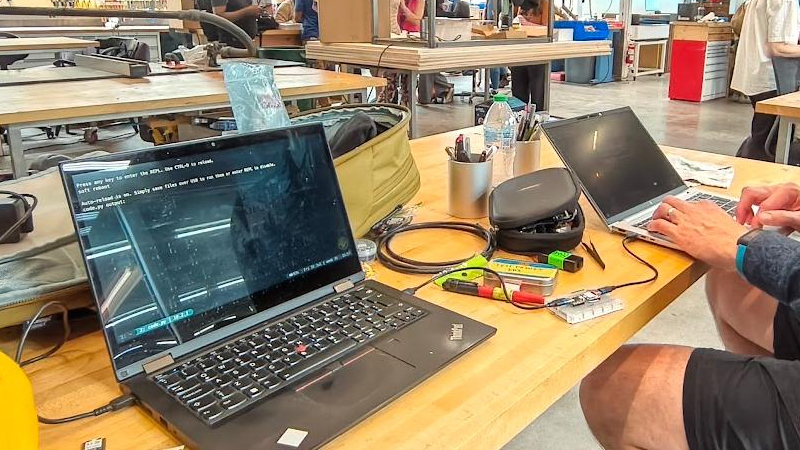
It’s likely many of us have been in the position of first set-up on a machine such as a Raspberry Pi, and had keyboard problems. Either no spare keyboard is to be found, or a cluttered desk has to find extra space for a full-size keyboard. [Þórarinn] and [Arni] have a handy solution: use the existing keyboard on your laptop.
His approach is both ingenious and simple, as it’s only the K part of a KVM. On the laptop end, it’s a serial terminal, without the receiving side. The serial port in question is an RP2040 board which implements a USB-to-serial port. This serial connection goes to another RP2040, which does the ingenious bit. It’s a serial-to-USB HID keyboard. All of this means that keystrokes on the laptop are sent down the serial connection, and appear on the Pi or whatever computer as a USB keyboard as though typed locally. The mildly annoying first set-up can be done, and then it can be run via SSH or whatever other remote access protocol as normal. The code is provided, so anyone with a couple of RP2040 boards can do it.
We like this hack, because we’ve had the annoyance of needing a keyboard to set up what would otherwise be a completely headless machine too many times. It’s one to store away at the back of your mind, for those rare improvisational need-an-extra-keyboard moments.
Thanks [Henk] for the tip.










I’ve been quite a while succesfully using a similar project from https://github.com/Flowm/etherkey as a remote keyboard together with a cheap HDMI to USB dongle as a “screen” by any video player . I also wrote a small desktop app that let you capture the mouse and keyboard and forward them to the remote device. See the gtk kvm client in https://github.com/dov/etherkey/tree/with-mouse .
Thanks! Very handy
Why not use an Arduino with
Keyboardlibrary? It’s open source so you can review codeand fix any potential issues.Exactly! I was thinking of something along the line. Using 2 RP2040 sounds like an overkill. I was thinking along the line of this:
Laptop USB-C -> ATtiny212 -> ATmega32U4 -> USB-C
Any thoughts?
It’d probably work, but you’ll need an Arduino with a USB interface. The RP2040s are maybe overkill in terms of processing power, but I think they’d be the cheaper option as long as you don’t plan to produce them commercially. Also easier, maybe?
And in the original context: Why not use a cheap wireless keyboard instead of all this hassle and rp2040’s and setup and what not.
…and for an even better setup, use and ESP32 and serial over WIFI and then ya got no wires to worry about either..
Hmm… ESP + wifi + a small webfrontend + websocket? I wish I had more spare time and a use for it.
A webfrontend is never small.
Mouse Without Borders
Once it’s booted, this is golden.
And if you need it:
https://github.com/lucky-verma/mwb-linux
Nice that this tries new methods still… I’ve become a fan of nano kvm boxes. They solve all of that KVM “I need a spare something” right out of the box, no software to be installed.
Quirk: The USB ones require internet for a static website to load. This might suck if you try to debug a router with connectivity issues
Missing feature: the virtual drive sounds nice, but file upload should happen though the browser – this is broken
I don’t see this getting any cheaper, smaller or more capable anytime soon. Available right off your favorite shopping plattform next day.
I don’t get it.
laptop => usb-c => Rp2040 => serial => rp2040 => usbc => pi or whatever
why not
laptop => usb-c => pi or whatever ?
because laptop can’t pretend to be a HID keyboard ?
Usually the USB ports of any PC are host only.
If you have a port that is a Dual Role Port (DRP, also known as OTG), then this should be possible.
So for most PCs and Laptops, no. Smartphones could work and might be even practical:
Plug in USB-C into phone and target machine, open app, start typing.
To add more:
A quick google tells me, that to enable this via cable, you would need root access to Android.
There are apps available that turn your phone into a Bluetooth keyboard and mouse that can be paired without root, but that does not solve the “fresh headless pi” problem.
I think at least some “PC” USB controllers have been capable of acting as a device rather than a host at various times; some of the win8-era ones that Intel put out during the brief period that they thought that Atom was going to be an actual thin in android or Win8 was going to be an actual thing in tablets were; mostly with some weird quirks along with it; but my understanding is that it’s not something you can rely on(even now that Type-C makes the wiring significantly less gross than Micro-B OTG); and you are talking kernel futzing plus potentially uneven compatibility across USB chipsets and potentially even platform firmware specific quirks.
Throwing the 2040s into the mix is ostentatious from a hardware perspective; but in small quantities it’s not like it’s actually expensive and it ensures that it’s going to be a much more reliably compatible setup.
pi doesn’t have serial console by default?
If you carry a smartphone with you, the inputstick can be very handy and takes very little space in your bag.
However I have never understood why they force you to use it from a phone and not from a PC as well :-(
CH9329 is an existing chip (readily available as a breakout board with USB connector) that does this exact function, supporting keyboard, mouse, and absolute pointer HID endpoints, with the reports sent to the chip over UART. For an example of a client for this chip, see https://github.com/sjmf/kvm-serial
I piggy-backed an ESP32 mini onto a CH9329, connected the 5V, RX, TX and ground nets, and can just plug the result in to a target computer and start “typing” on it.
Total cost: about $4-5.
One thing to note is that using a plain old serial terminal does limit the keys that can be sent. For example, Alt-F4 will kill your terminal program, and Ctrl-Alt-Del and other such keys will also not be available.
For this reason, I much prefer to have the receiving end implement a VNC server, which means you can use any VNC client to interact with it, and benefit from programs which are designed to be able to send “impossible” key combinations.
It’s always an option to proxy a TCP socket to UART using socat or similar, while the VNC absolute pointer coordinates map well to an absolute pointer endpoint in the CH9329. Trying to map absolute coordinates to relative movements when you don’t know the resolution of the target screen can be an exercise in frustration.
IMHO, pretty neat, USB hub to another USB hub. I’d program something like that if/when faced with similar scenario (though I am lazy, and I just have this neat wired compact USB keyboard; perhaps time to upgrade it to rp2040 keyboard and figure out its own USB hub while at it).
Having said that, rp2040 has two state machines, and each can run semi-independently, so theoretically it is possible to do USB throughout. I would imagine it is a matter of untangling the shared libraries’ specifics and making them work alongside nicely, but, if I already have multiple unused rp2040s sitting around collecting dust, that’s exactly how I would do it, too, two rp2040 : ]
I adjust my AirPods Max®, tighten my Apple Watch Ultra® wristband, push my Apple Vision Pro® to the side of my Apple Macbook Pro®. My fingertips rest against my Apple Magic Keyboard® as I gaze at my Apple Studio Display XDR® and prepare to type the bravest Hackaday comment ever written.
As long as I’m logged into the same Apple Account on both devices, my Macbooks will share keyboard and mouse by default.
It’s a nice feature, but it’s not really relevant in this case. There are applications that do this for other OSs as well, but the problem here specifically is with first time setup.
I usually do first setup on raspberry pi’s when the PI’s SD card is still in my computer. See steps 3-8 of https://iivq.net/making-a-nas-out-of-my-raspberry-pi-4/
i like to do it that way too, but when something goes wrong….
i recently reverse engineered an ipcam. it was nice enough to run a binary on an SD card so i had a good 30+ iterations of putting the SD card in my computer, examining what the ipcam put on it, writing a new shell script, and then putting the SD card back in the camera. a big pain in the butt. like printf debugging with physical media.
the worst part is, it had a serial console and it was even running getty on it, but there was some problem with the kernel interface and it stopped working at some point in the boot process. sigh.
That’s what I’d suggest as well. I have a Pi 4 I use as a NAS and I’m pretty sure I don’t even own the proper display cable for it. Still don’t agree with the Foundation’s decision to have 2 display outputs using an obscure connector instead of 1 that uses a ubiquitous one. Or the shitshow that finding a suitable power supply is.
Nice idea which might be handy for a machine that can’t use a Bluetooth keyboard. To take it further you could get one of the esp32 boards with 2 USB ports on. It could still be a UART to HID keyboard bridge, but you could also add WiFi or Bluetooth options and cut the hardware down to a single easily available board with no extra wiring requirements.
Personally I use an app called keypad on my mac which allows it to act as a Bluetooth keyboard and mouse, no extra hardware required. I know similar is available on android and I’d be surprised if something wasn’t available for Linux or Windows.
That’s exactly what I had in mind when making ToothPaste https://github.com/Brisk4t/ToothPaste.
Also since BLE is not very secure encryption + other media control-esque features.
It’s a really nice project, but I only need the keyboard once—if I forget to set the network settings in Pi Imager before flashing. After that, I can connect via SSH. If you’re not using your Raspberry Pi as a desktop system, that’s really all you need. Everything else can be done directly on the hard drive or SD card.
And if I need the keyboard, then of course I’ll need the monitor, too.