
For many developers beginning their journey in frontend engineering, the CSS “box model” can start to feel rather like a creative straitjacket. We lean heavily on the ubiquitous border-radius to soften our interfaces, yet the result often feels stagnant and predictable. When we attempt to add dynamism through shifting colour palettes, we frequently fall into a second, more subtle trap: “muddy” or dull colour transformations. You may have noticed that simply rotating a hue in standard CSS can leave certain elements looking inconsistently dark or washed out.
As architects of the web, we must look beyond these defaults. To create truly premium interfaces, we are seeing a shift toward parametric design: a philosophy where UI properties are defined by mathematical functions rather than static, hard-coded values. By exploring the experimental evolution of CSS corner shapes and the luma-preserving maths of the YIQ colour space, we can move away from rigid boxes and toward a more organic, scientifically precise digital environment.
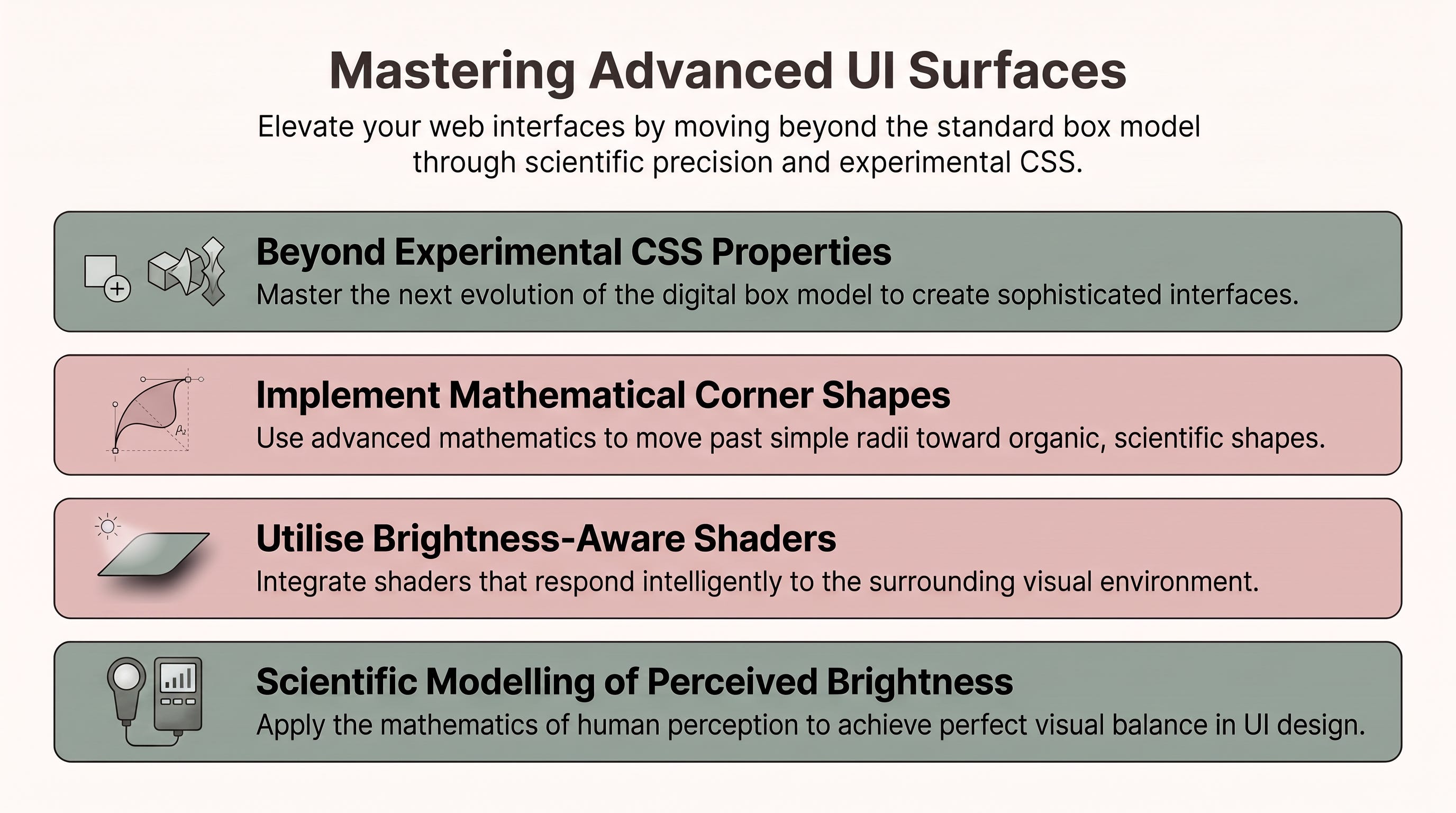
The traditional rounded corner is merely a single mathematical outcome of an ordinary ellipse. However, the future of the box model lies in the <corner-shape-value> data type and the corner-shape shorthand property. This new specification allows us to move beyond the circle, utilising the superellipse() function to define how corners transition between edges.
In this parametric model, the curvature is dictated by a numerical parameter: positive values create convex (outward) curves, while negative values produce concave (inward) curves.
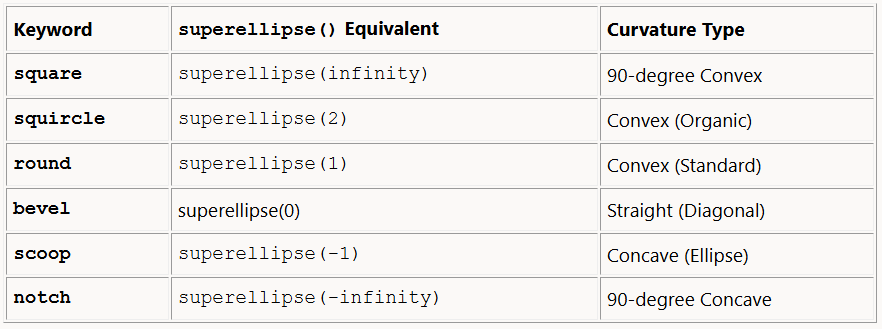
From an architectural perspective, the “squircle” (superellipse(2)) is the most significant aesthetic advancement. By sitting mathematically between a circle and a square, it offers a smoother transition than the standard round setting, which often appears “pinched” where the curve meets the straight edge. This smoother curvature is why squircles are preferred for high-end hardware and modern OS icons.
Architect’s Note: This technology remains experimental. You must meticulously check browser compatibility tables before considering these properties for production-level styling.
A common pitfall in technical design is the assumption that all colours are created equal. When developers shift hues using standard RGB or HSL/HSV models, they often ignore “perceived brightness”, the way the human eye actually interprets light.
To our eyes, pure yellow (R 255 G 255 B 0) appears far brighter than pure blue (R 0 G 0 B 255), despite both having the same mathematical saturation. If you apply a standard hue rotation to a vibrant yellow, the resulting blue will appear significantly “dimmer,” potentially breaking your visual hierarchy and making your UI feel inconsistent.
As noted by BackslashX_Dev (2024) regarding the limitations of HSL transformations:
“This way has a potentially undesirable side effect... some hues appear brighter than others to a person with typical color vision... the color’s perceived brightness won’t stay the same.”
To circumvent the brightness trap, we can implement hue-shifting shaders within the YIQ colour space. Unlike RGB, YIQ was designed to separate luma (the perceived brightness) from the chromatic information. The coordinates are defined as follows:
Y: Represents luma, the coordinate we must keep constant to preserve perceived brightness.
I and Q: Jointly encode the hue and saturation.
When building a shader to shift hue without distorting the visual weight of an element, the mathematical logic follows these precise steps:
Convert the original RGB coordinates into the YIQ colour space.
Treat the I and Q coordinates as a 2D vector. It is vital to note that the magnitude of this (I, Q) vector represents the colour’s saturation.
Apply a rotation matrix to the (I, Q) vector, controlled by a uniform variable such as
u_theta, to shift the hue.Convert the modified YIQ coordinates back to RGB for final output.
In professional implementations, we use a “modified” YIQ version that scales the I and Q dimensions to a uniform range of [-1.0, 1.0]. This scaling is the secret to architectural stability; because the standard YIQ dimensions have slightly different ranges, a raw rotation would cause the vector to “swing” out of the valid gamut, producing unwanted colour distortion. Scaling ensures the rotation stays within a uniform coordinate space, maintaining perfect chromatic integrity.
Even the most advanced mathematical models require human-centric validation. Our “antidote” to the brightness trap is a rigorous, parametric workflow that ensures accessibility is never left to chance.
The professional standard involves a multi-stage pipeline:
Initial Design: Drafting a colour scale in Figma by hand to establish the aesthetic direction.
Validation: Exporting those hex values into the EightShapes Contrast Grid.
Refinement: Checking for “uniform contrast values” along the entire scale.
The contrast grid is essential for ensuring that your new, sophisticated hue-shifted palettes remain functional. It allows you to scientifically verify which foreground and background pairings meet WCAG 2.1 AA and AAA standards. By moving away from “eye-balling” colours and toward this grid-based validation, you ensure your interface is accessible to all users, regardless of their visual acuity.
As we have explored, the limitations of the “boxy” web are increasingly a relic of the past. By combining experimental CSS corner shapes with the mathematical precision of YIQ-based shaders, we are entering an era of Functional UI. Both of these tools represent a move toward parametric design, where the boundaries and colours of an interface are not static pixels, but results of mathematical functions that respond intelligently to their environment.
The transition from default styles to these more sophisticated primitives allows us to treat UI elements as dynamic, living components. If the standard rounded box is no longer our only option, how will you choose to redefine the boundaries of your next interface?
Thank you for reading… :D
BackslashX_Dev. (2024). A hue-shifting shader that preserves colors’ perceived brightness. Reddit. https://www.reddit.com/r/gamemaker/comments/1bq0lul/a_hueshifting_shader_that_preserves_colors/
Intersections Design Lab. (n.d.). A preview of parametric color scales. https://intersections.design/scales
MDN contributors. (2026, April 20). <corner-shape-value> CSS type. MDN Web Docs. https://developer.mozilla.org/en-US/docs/Web/CSS/Reference/Values/corner-shape-value
Comments
Nothing yet. Say the first thing.
Sign in to join the conversation.