
HYROX, Gymrace and Spartan DEKA Fit or DEKA Strong are global and popular fitness competitions that combine endurance running with functional workout stations. Participants complete multiple rounds of running followed by strength and conditioning workouts in a structured race format. This standardized format enables global rankings and easy comparison. RaceClocker offers a tailor made manual timing solution.
Large events are usually happening at a big venue and are chip timed, yet many smaller events are taking place at the local level. To facilitate race managers with easy timing and to provide participants with live results and engaging insights in their performance, RaceClocker has developed a specific timing experience for this.

In this post, we have a look at manual timekeeping for HYROX and Spartan DEKA among others, as opposed to chip timing using transponders, antennas and bespoke hard- and software, operated by a timing professional. By leveraging our modern cloud-based timing tool RaceClocker, any gym or fitness club can easily run a semi-professional event.
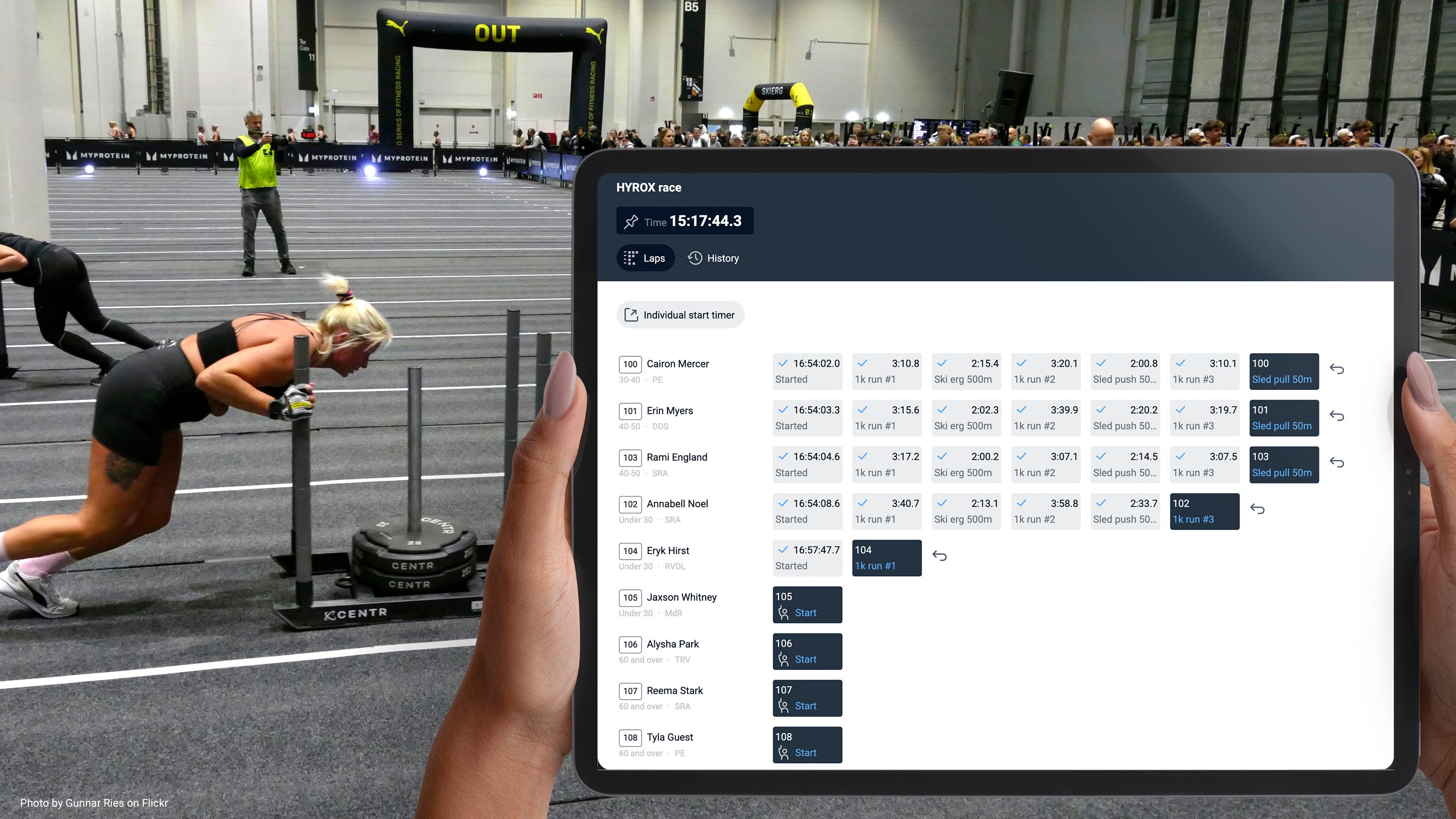
The RaceClocker web based timing system has been around and in continuous development for over a decade. Many basics that are relevant for a wide range of timed sports events are robust and proven in tens of thousands of events. Have a look at our video tutorials to better understand the RaceClocker core features with regard to:
Race formats including mass start, wave starts or individual ‘time trial’ starts
Manual or imported start list creation, do a randomized ‘draw’ and further participant seating, grouping, annotating, as well as auto bib number assignment
Using the timekeeper app in various modes
Monitoring timing by the race manager and make corrections if needed
Publish and share live results
Race set up and management is best done on a laptop or desktop computer - as a large screen and a keyboard are required for complex tasks like list editing and timing monitoring etc. The timing itself can be done on any device.
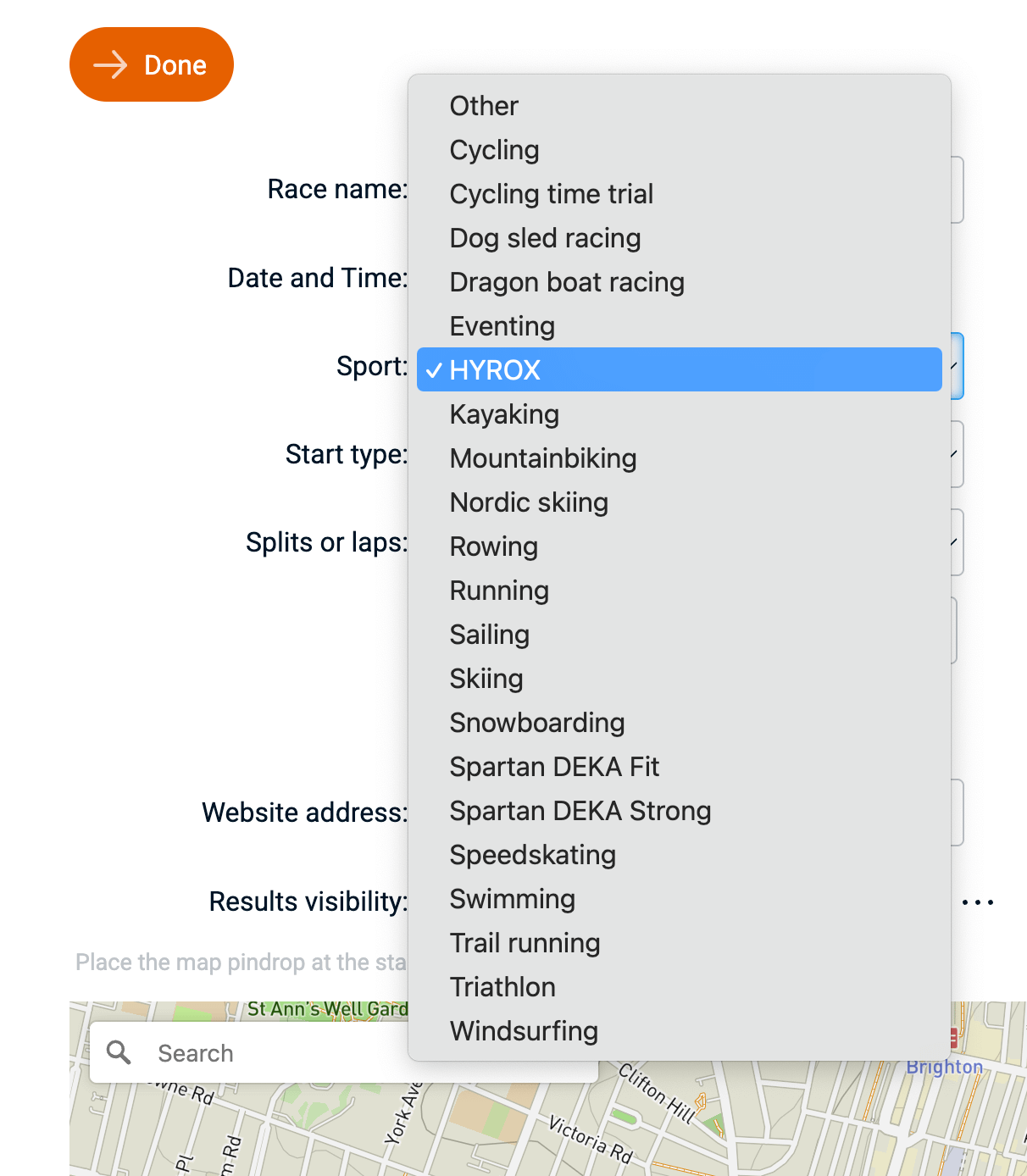
A new race in RaceClocker starts with setting up basic information of your race. This includes common input like race name, date, a Google maps based location, race web site URL etc. Among the alphabetic list of sports you’ll find both the HYROX race type as well two Spartan race formats: DEKA Fit (which includes running stages) and DEKA Strong (workouts only).
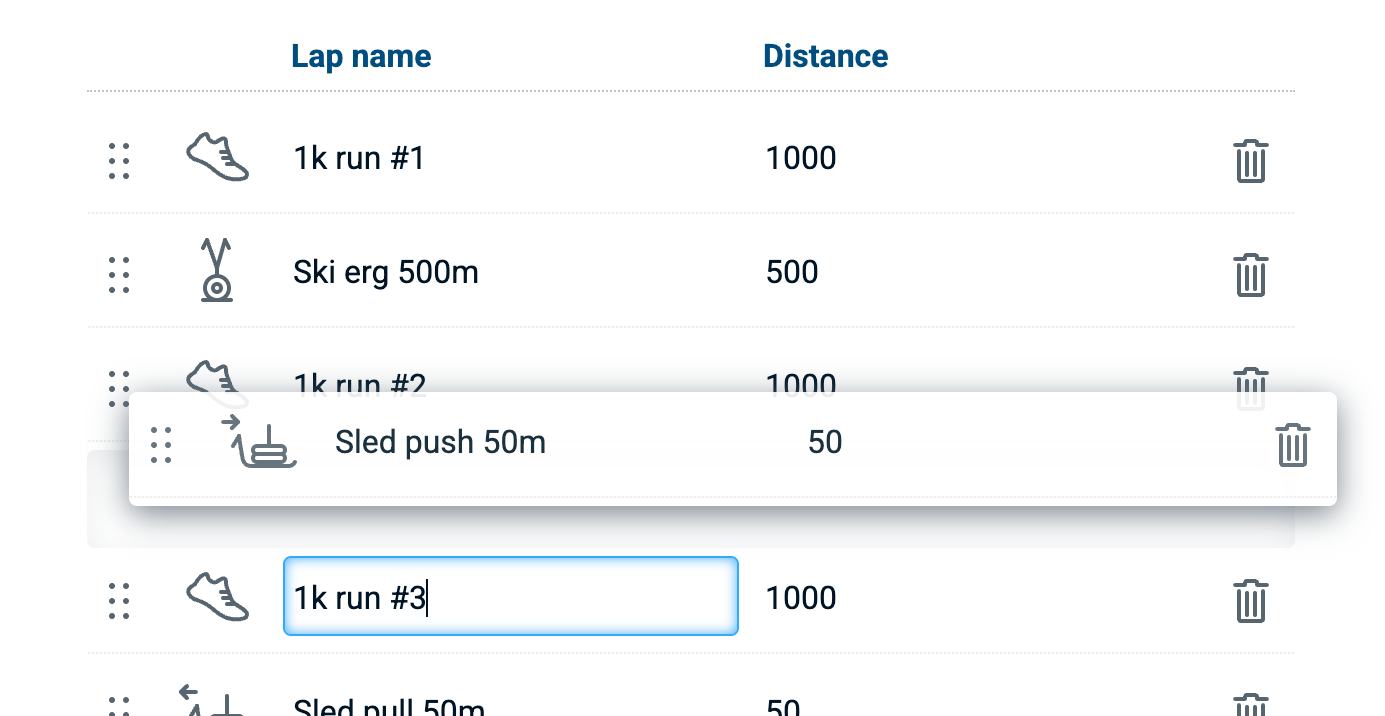
As soon as either of types is selected, a new page opens (the lap editor) that includes a predefined list of workout stages. These stages are defined and ordered according to the official structured format. Stages can easily be changed, added to or removed entirely if your race type follows a different pattern. Stages can also be re-ordered via drag/drop or be renamed. Each lap has an assigned distance set that may also be changed. Lap distance is used to calculate overall speed (which is more applicable for race formats that don’t include workout stages based on reps).
For the actual timekeeping, RaceClocker has a dedicated web application. Usually as a race manager you share an encrypted timer link from within the RaceClocker management environment with the people doing the actual timing at the race venue. An example is here where you can try making time stamps yourself: https://www.raceclocker.com/RaceClock.php?Split=5&Key=67i9a16ace6n77e6

The timer link can be shared via e-mail or pasted from the clipboard in a chat app. The timer app can also be opened on the management device itself (‘Open lap timer’) when timing is done by the race manager on the same device.
A timekeeper simply opens the received link to start timing. No app download or user sign in are required. Any device with a web browser can be used for timing, as long as it has an internet connection at the start of the session. More than one device (and thus multiple timekeepers) can open the same timer link simultaneously and collaborate on timing a single event.
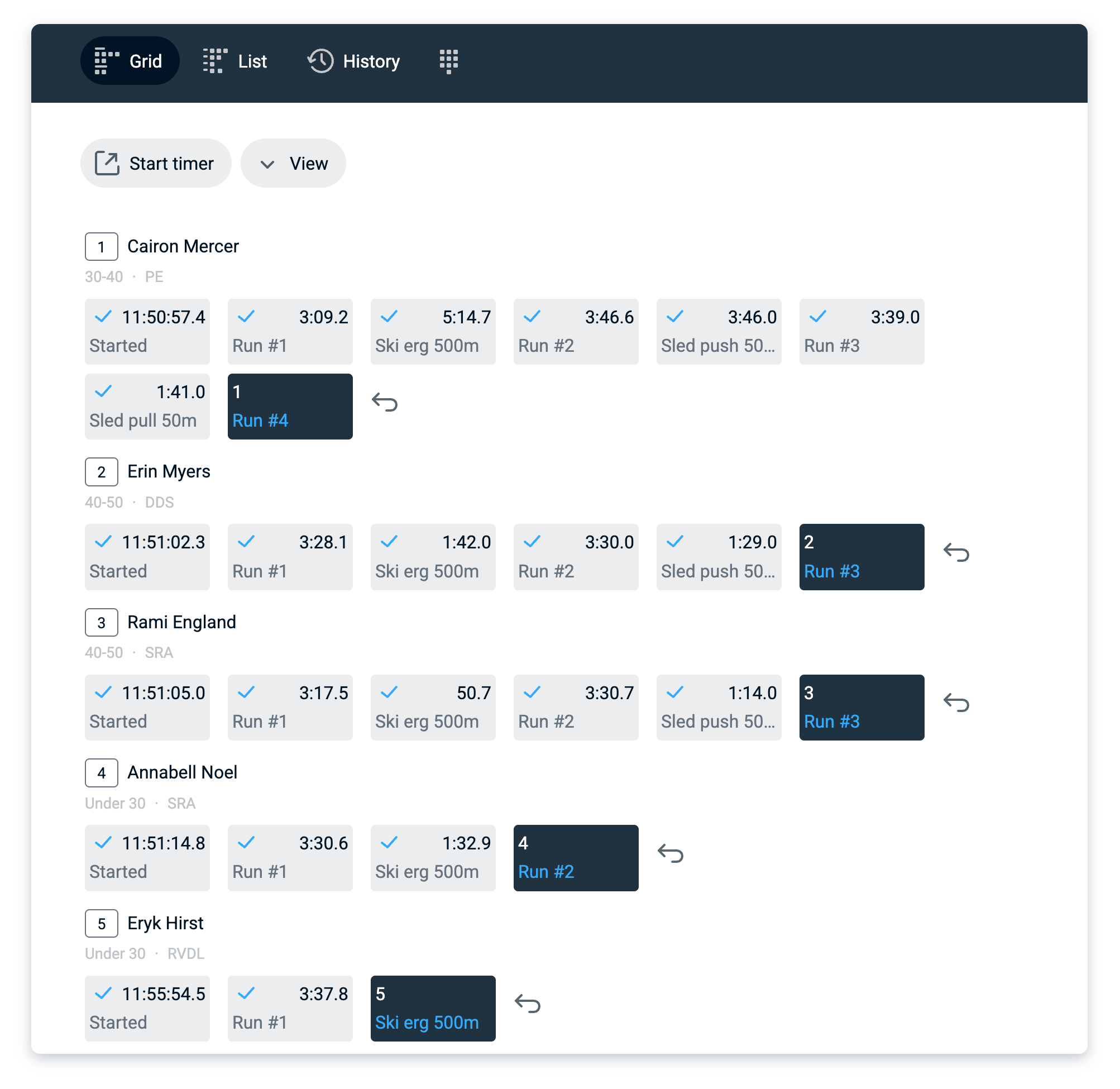
As long as the timekeeper’s device remains connected during timing, all time stamps are instantly visible in the live results. Other timing devices are kept in sync as well with real time time stamp updates.
A connected experience is best, however RaceClocker continues to work well when connectivity is lost or unavailable. In that case, time stamps are saved locally on the device, and sent to the race server as soon as connectivity is available again.
Since organizing a Hyrox simulation can be a logistical challenge, we propose to minimize the effort of manual timing. We suggest a set-up where you can time your event with all individual stage (runs and workout) times with just one or (for a bit better reliability) two volunteers.
Because every gym is different, it's up to you to set up all stations in a certain area, your personal Rox Zone. However, all the running will likely take place outside your Rox Zone area, for example outdoors. For the most efficient timing experience, we suggest that you set up a table in this transition area. Here, two volunteers with a laptop can handle all the timing, starts, finishes and lap counts from a single transition point! Without being overwhelming and with little room for error, as RaceClocker provides a real-time overview of what is going on and what lap each participant is in.
At this transition area, the "race timing headquarters," one timekeeper can watch all approaching running competitors and time them as they enter the Rox Zone. The other timekeeper can monitor the Rox Zone and time all competitors leaving the Rox Zone for their run. Both of them can then time the competitors as they pass by on their laptop or tablet timing device. This transition area is also the start and finish line of the Hyrox simulation. By timing here you can automatically keep track of how many laps a competitor has completed or what station they’re at. This can also be done with only a single timekeeping volunteer, but keeping track of competitors approaching from both sides might be stressful.
Using this setup you can give your competitors very accurate running lap times, which is great for measuring progress and race statistics. The station lap times all include a small portion of Rox Zone transition time, but this can be negligible as most spaces for Hyrox simulations are quite small compared to official race venues.
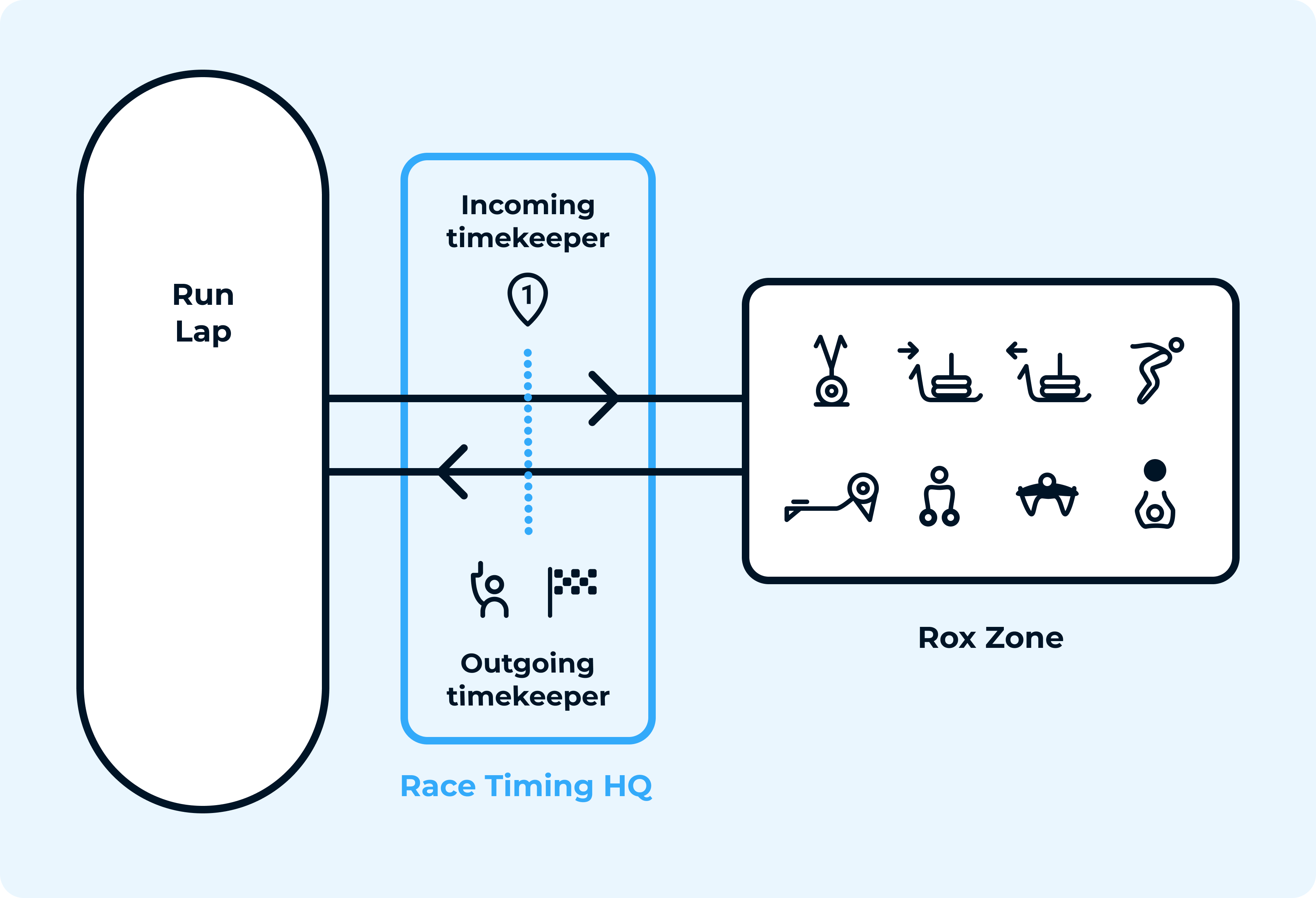
With just one or two volunteers, you can provide your athletes with a valuable timing experience. And at the same time, you can keep a clear overview of everything that is happening from your "Race Timing Headquarters"!
Real time results auto-update with each time stamp made. Results can be shared via a link or QR code, so followers can also monitor live results on their own device. Results can be grouped by gender or category and ‘auto scroll’ is a feature that makes sure results slowly scroll by to the bottom and back-up again.
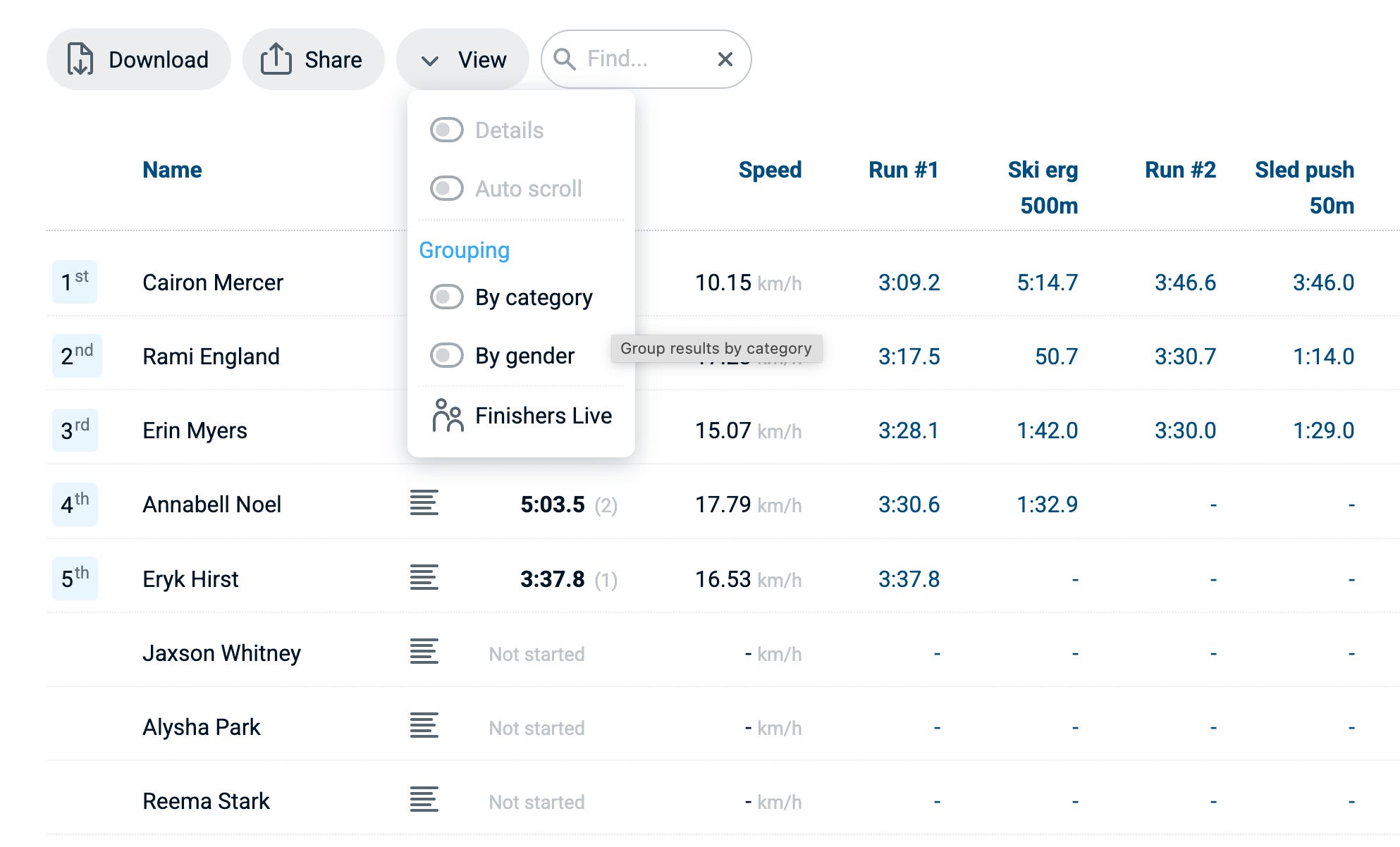
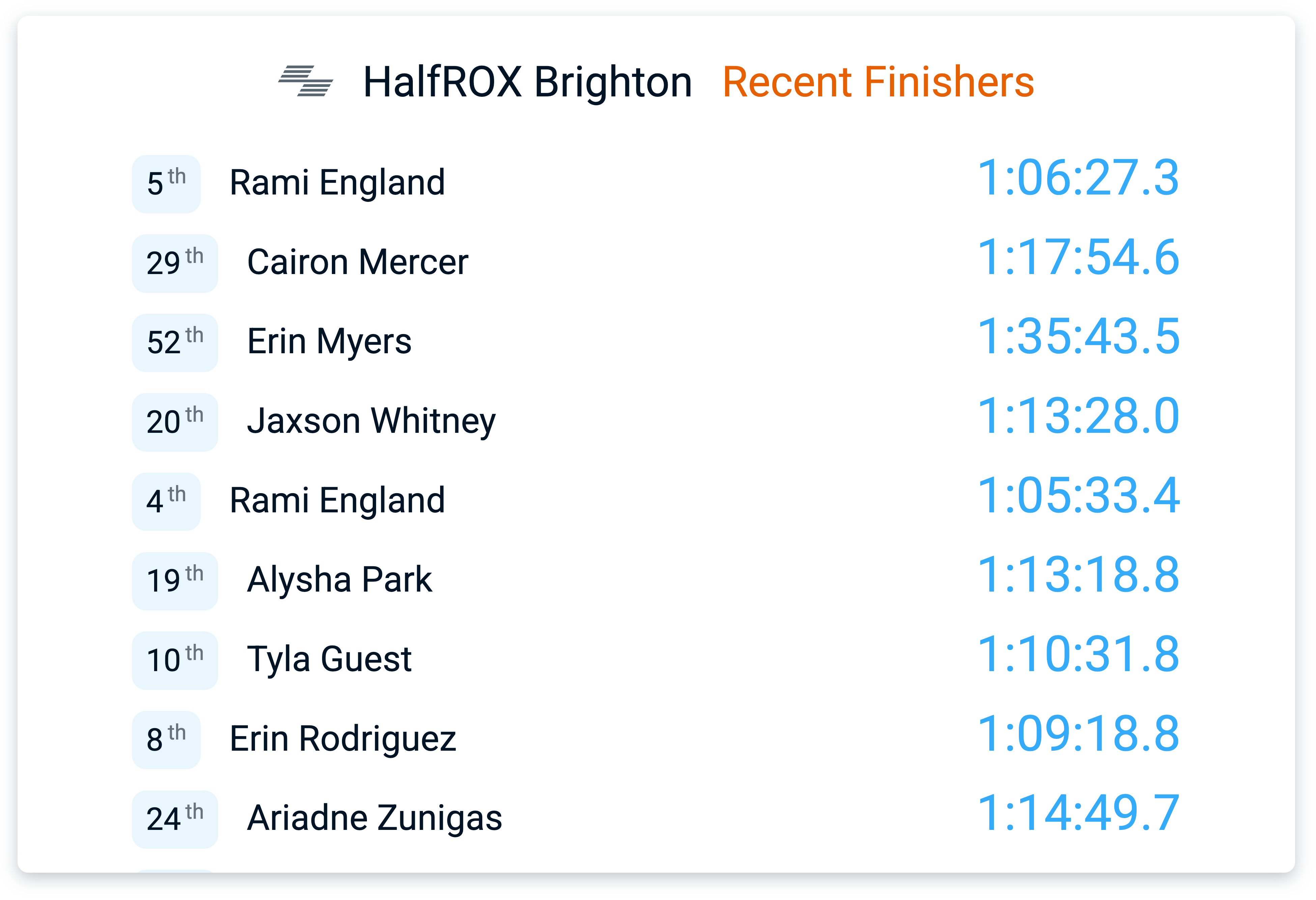
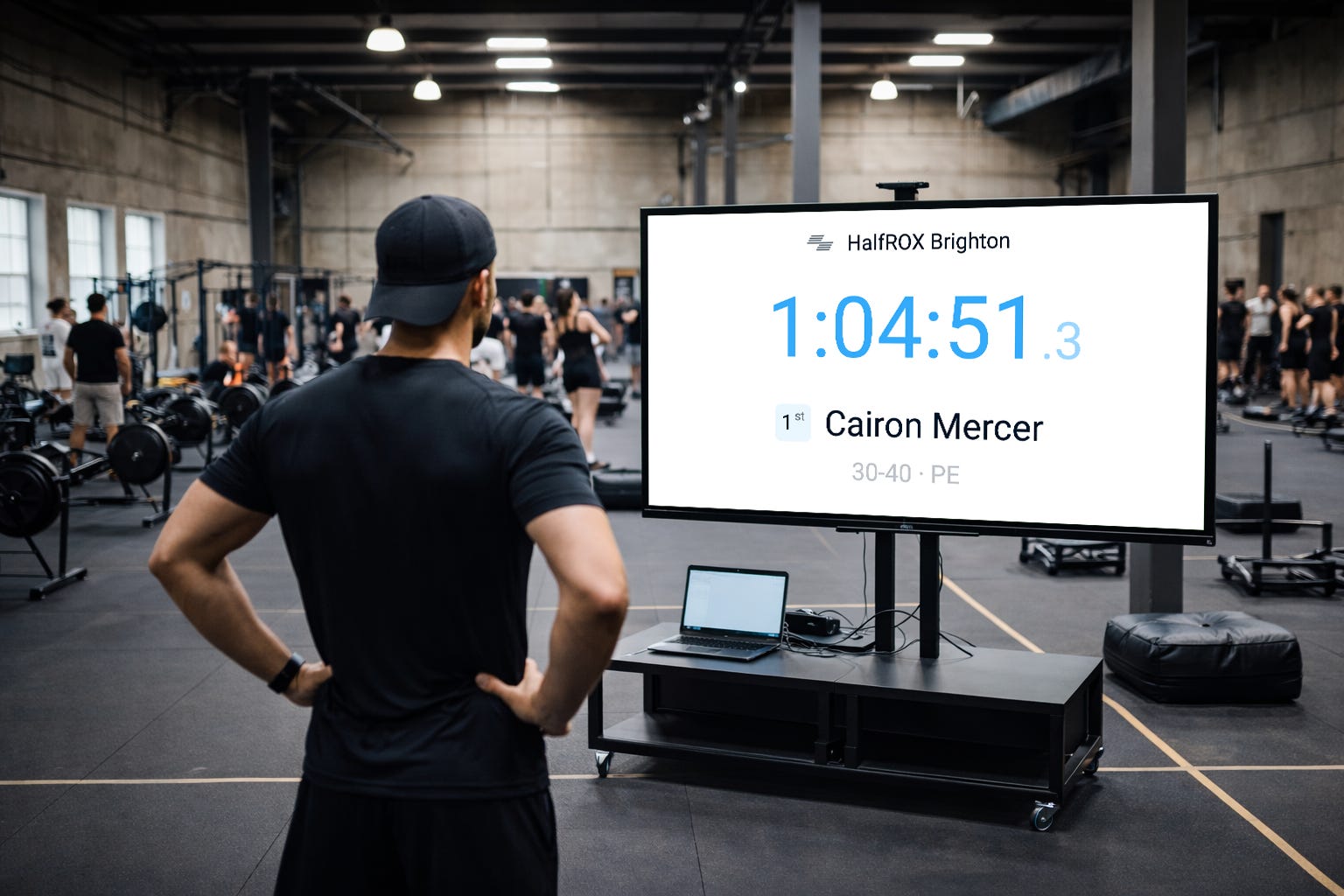
Results can also be displayed on a large screen or on a projector at the venue - so the audience as well as participants can track how everyone performs. A specific ‘Live Finishers’ view is optimized for display in the venue. It’s a dynamic list with the last participant finishing at the top, so participants can instantly see their results when done.
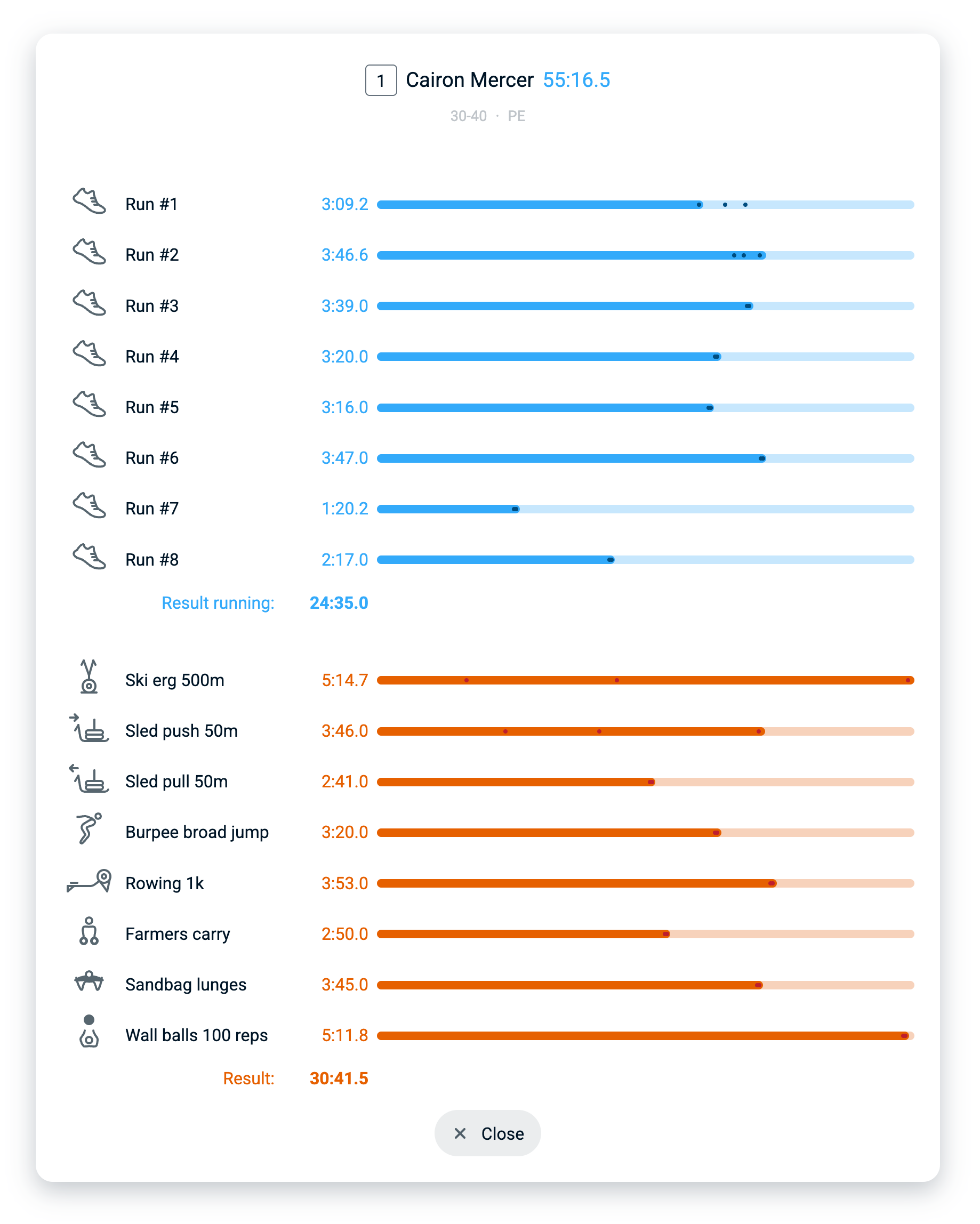
Individual results can also be reviewed graphically. A small icon in the results list brings up an overlay window with bar charts, indicating the time it took to complete each stage. In each bar, three subtle dot indicators are printed that represent the fastest, slowest and average time of all participants for that lap.
When participants have bib numbers assigned, then the bib number is included in the results URL, and can be used for sharing someone’s personal stats page on social media.

We also included an athlete’s individual end results, like end time and rank in category for display on a large TV screens. After crossing the finish line, participants can instantly see their race result displayed as a backdrop for a selfie or a pro shot by a photographer. No tags or chips are required, just a tap on the ranking badge, in the far left column of the results brings up this full screen page.
A few more general RaceClocker features can be of benefit for fitness races as well. Make sure to check out ‘hardware based timing’ and for example of ‘Finish Cam’ for iPhone.
Many gym and fitness clubs around the globe are starting to test or use RaceClocker for competitions and races. And we are committed to develop our app and its capabilities for supporting this race format further. If you’re a HYROX, Gymrace or DEKA small scale race manager in search for a solid manual timing solution, then make sure to create a free account on RaceClocker.com and start exploring! Don’t hesitate to get in touch in case of any questions or comments.

No posts
Comments
Nothing yet. Say the first thing.
Sign in to join the conversation.