
👋 I’m Diego. In every article, I document my journey exploring AI and Product Management. I share the hard lessons I’ve learned from my latest “side quests,” report back on what’s actually working, and answer your questions about building in this space.
Welcome to this guest post by Ayushman Jain
Ayushman Jain is a Product Leader at Microsoft. He built the PM Workspace template to solve a compounding problem on his own team — and open-sourced it so other PM teams could skip the setup cost. Over the past 10 years at Microsoft and Amazon, he has taken multiple products from 0 to 1, including Microsoft’s first AI agents, as well as scaled large $1B+ businesses. He’s passionate about the craft of product management and sharing his learnings with the community. Connect with him on LinkedIn.
Jensen Huang (Nvidia CEO) made a pointed observation at a recent conference: if a $500,000 engineer isn’t consuming at least $250,000 worth of AI compute, something is wrong. He was talking about engineers. The math is equally uncomfortable for product managers.
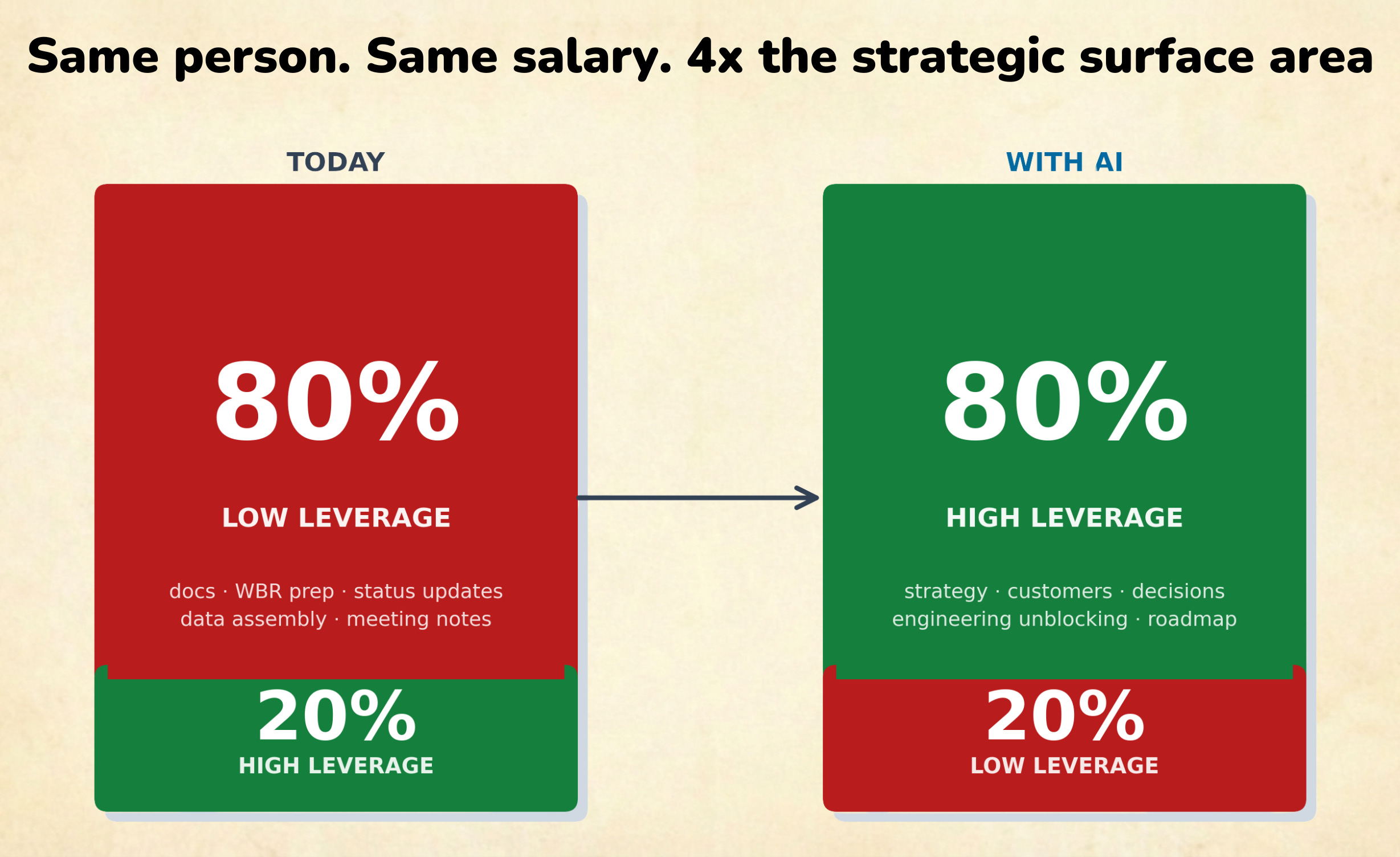
A senior PM costs $400–600K fully loaded. They sit at the center of customers, engineers, strategy, and execution and most of them spend the majority of their week on work that produces no lasting value: status updates, business review prep, PRD iteration cycles, manually assembling metrics. Maybe 20% of their time goes to the work that actually moves the needle.
AI hasn’t fixed this. Most AI tools make the 80% slightly faster.
A few months ago, I ran an informal audit of how the PMs on my team at Microsoft were using AI.
Every one of them had found a real edge. One had a detailed prompt library for writing PRDs. Another had trained herself to extract customer call themes in a single prompt. A third had figured out how to auto-generate his weekly status updates in five minutes flat.
But the team’s AI use had a structural flaw: ten separate workflows, ten separate prompt libraries, ten separate repositories of customer notes and product context. Zero compounding value across the team.
When the PRD expert went on holiday, her workflow went with her. When the customer-synthesis PM rotated to a new product area, his prompts didn’t transfer. Every customer call was being processed in isolation, in someone’s personal notes, going nowhere useful.
Each PM had built a personal AI productivity tool. The team had nothing.
Chat AI tools in Claude, ChatGPT, and Gemini reset every session. No memory of your product, your customers, your OKRs. You re-explain who you are every time and most PMs compensate by pasting context into prompts. It gets them useful outputs, but the knowledge doesn’t accumulate anywhere.
An AI operating system is different in 2 ways:
Agentic: The architectural shift is moving from a chat interface to an agentic workspace. A PM Workspace is a structured folder that holds everything relevant to your product: OKRs, customer history, competitive intelligence, team working principles. When you open it in an agentic runtime like Claude Code or Cowork, the AI reads that context automatically. Every session starts grounded in your actual situation.
Shared: When the workspace lives in a shared repository — GitHub, SharePoint, or Google Drive — something organizationally different happens. Every customer call logged, every PRD written, every decision documented by any team member becomes available to the whole team the next time anyone opens the workspace. One PM’s discipline compounds into institutional knowledge for the entire team. That knowledge doesn’t walk out the door when someone rotates.
Let’s walk through a few common PM scenarios…
A PM logs a customer call on Tuesday:
A pointed objection about a data mapping issue
An ask for template functionality
A renewal conversation that’s stalling
On Thursday, her teammate has a call with the same customer. He opens the workspace before joining, asks for account background, and gets a structured brief from Tuesday’s notes. He handles the renewal objection on the spot. No Slack message to the first PM, no “I’ll follow up,” no dropped context.
That same PM’s manager is preparing for a quarterly business review. She needs a shipping ETA and a product status summary. She opens the workspace, asks the question, and gets a structured answer drawn from the PRD, project notes, and the latest customer feedback report — without interrupting anyone. She walks into the review with the answer already in hand.
A new engineer joining mid-sprint needs to understand why a particular fix was prioritized. In the old model: three onboarding meetings and a Confluence rabbit hole. In the new model: they open the workspace, ask, and spend thirty minutes reading a structured answer covering OKRs, active customers, competitive context, and the customer evidence that drove the prioritization call.
None of these outcomes required extra process. They came from one PM maintaining one shared workspace.
You can find all the templates I’ll show you in my open-sourced repository. These should cover a full PM’s week.
The workspace is a simple global folder, nothing fancy. The core is a CLAUDE.md file, a configuration document you write once that tells the AI your product, OKRs, key customers, and team working principles.
Every subsequent session is grounded in that context automatically.
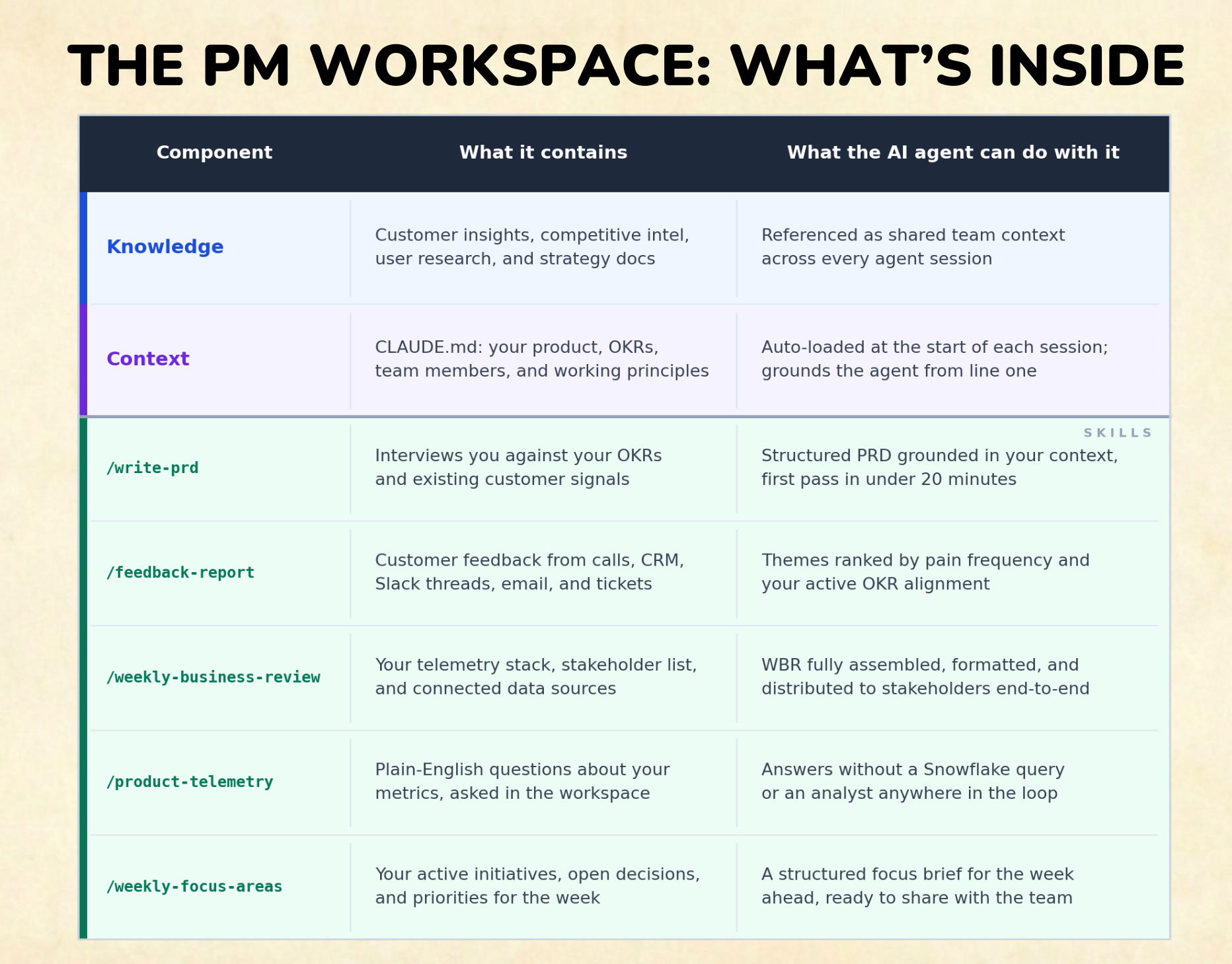
The folder structure organizes the rest: competitive intelligence, user research, active initiatives, customer history. Pre-built skills turn common PM workflows into repeatable, one-step operations.
Four simple skills we created changed how our team operated:
/feedback-report synthesizes customer feedback from any source such as call notes, CRM exports, Slack threads, and emails into structured themes ranked by pain frequency and OKR alignment. Run it on five months of messy, unstructured notes and it returns a prioritized brief with an evidence trail tied to your OKRs.
/write-prd interviews you against your OKRs and customer signals, then generates a structured PRD grounded in your product context. First draft in under 20 minutes. Combine with /write-eval-criteria for generative AI features to capture evaluation rubrics in the spec itself.
/weekly-business-review queries your telemetry stack, formats the business review, and can distribute it to stakeholders end-to-end. What used to take 3-4 hours of manual assembly becomes a 20-minute review and editorial pass.
/product-telemetry answers plain-English questions about your metrics such as “why did weekly active usage fall 15% last week?”, without a Snowflake query or a data analyst in the loop.
The workspace also connects to your existing tools via MCP connectors: Jira, Salesforce, Gong, GitHub, Snowflake, BigQuery. Your workflows don’t change — PRDs stay in Drive, tickets stay in Jira, calls stay in Gong. The workspace is the layer where the AI brings it all together.
On my team at Microsoft, we used Visual Studio Code to use this workspace as the entry point to anything we did. Our setup looked exactly like the concept below .
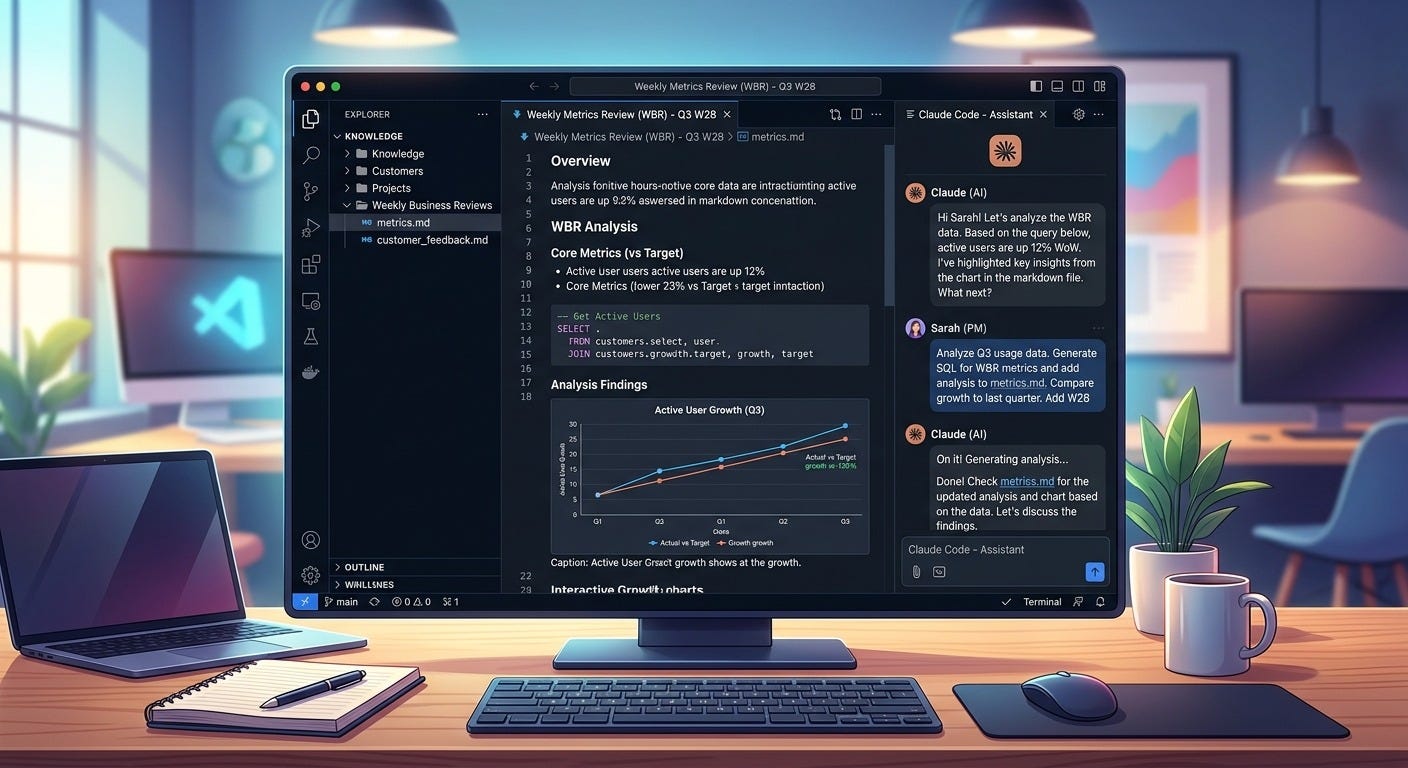
We are all familiar with this problem - we spend a lot of time with customers/users, yet the feedback in unstructured private notes isn’t always accessible or usable consistently across the team members.
Before building this, we had tried everything to make shared customer feedback work at a team level.
We built a shared CRM and asked everyone to keep it current. It stayed clean for about three weeks.
We created a shared folder and asked PMs to drop their call notes in. Most did it once, then stopped.
The problem was always the same: all the work was upstream, all the benefit was downstream, and the downstream benefit was too abstract to feel worth the extra step.
So when I set up the workspace, I tested /feedback-report on the worst possible input: months of raw, unstructured feedback that had accumulated across five PMs. Call notes. Customer emails. Slack threads someone had copy-pasted. Feedback from the sales team. Wildly different formatting. I pointed the workspace at the whole mess and ran it.
The report organized everything into clear themes, ranked by pain frequency, cross-referenced against my OKRs. At the bottom: the three things that would actually move the needle, with the evidence trail to back each one. A structured argument for what to do next, drawn from data no one would have read end to end.
We automated it to run every Monday morning and distribute to the whole team. That’s when upstream behavior changed - not because we asked harder, but because PMs could now see their notes showing up directly in a brief that influenced sprint planning. The downstream payoff became visible and immediate.
Key insight: High utility downstream created the behavior change upstream that no process or mandate ever could.
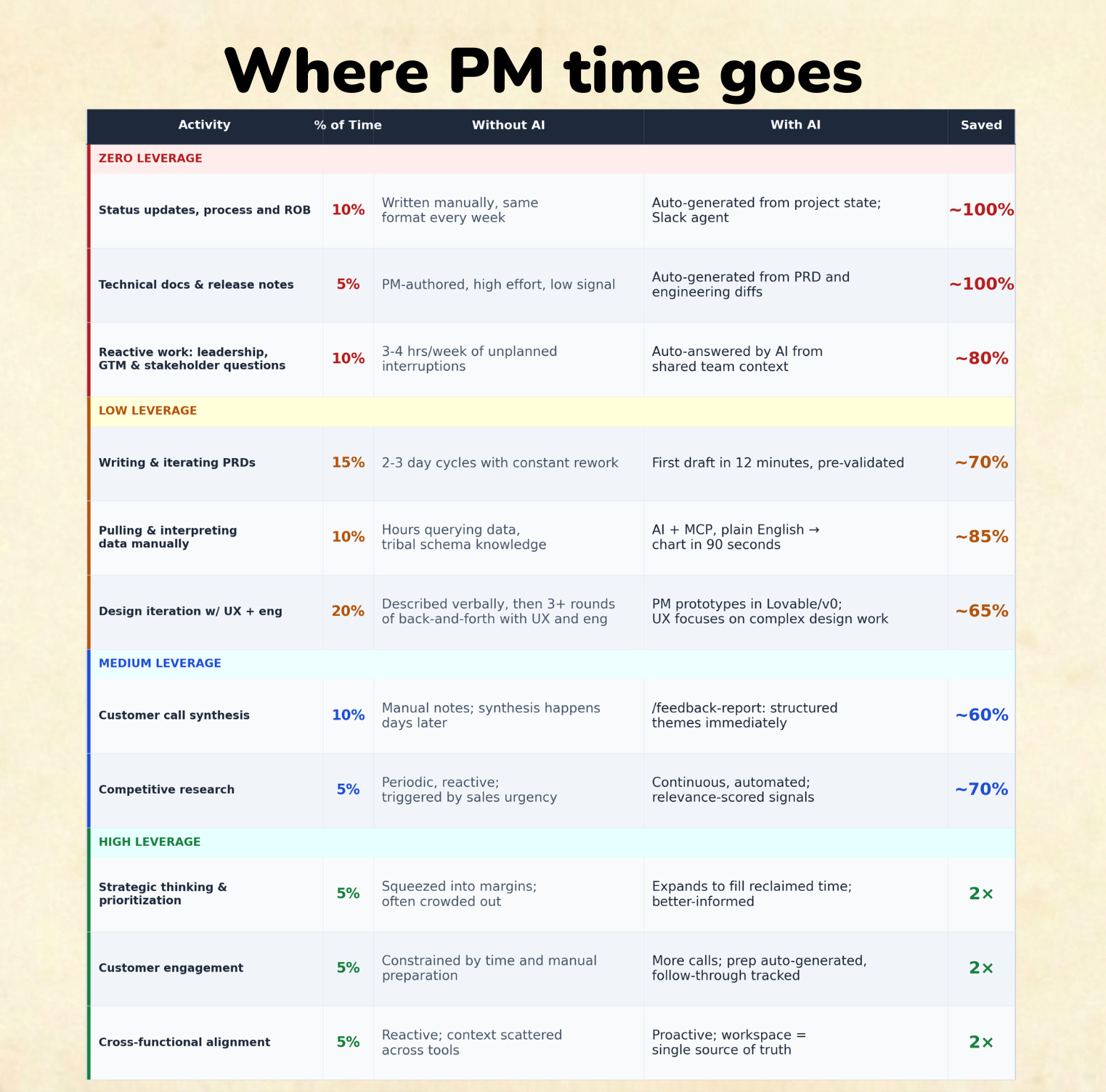
For individual PMs, the immediate math is blunt: running /feedback-report and /weekly-business-review on your team’s data reclaims 5–8 hours per week per PM. By month two, it produces roughly what a junior PM produces in capacity. That costs $100–$150K in hiring. The workspace costs roughly $200 per month for a team of five.
But the compounding value for PM leaders isn’t in hours reclaimed. It’s in what those hours go toward.
When the low-value 80% starts collapsing — status theatre, manual data assembly, documentation cycles — the time goes somewhere. Teams that redirect it well run more customer conversations, make prioritization calls backed by synthesized evidence, and write specs that reduce engineering rework. They build organizational memory that survives team rotation rather than losing institutional knowledge every time someone leaves or transfers.
The same headcount, the same salary budget, substantially more strategic surface area. That is what building AI into the team’s operating system actually produces.
The workspace template is free and open-sourced on Github.
Week 1 is the only one that matters for buy-in:
Install Claude Code or Cowork
Download the template
Fill in CLAUDE.md with your OKRs and team context.
Then point it at your existing customer feedback, however messy, whatever format, and run /feedback-report.
That first report is what converts skeptics.
It takes months of fragmented call notes and returns a prioritized brief with the three things that would move the needle, with the evidence to back each one. When your team sees their notes in it, they start contributing consistently. Not because you asked harder but because the feedback loop finally makes it worth doing.
The full setup steps, cost breakdown, tool connectors, and week-by-week ramp are in the FAQ below.
Have fun with this workspace - curate the workspace with skills to automate even more workflows. Watch your team start doing the same work they were before in a fraction of the time. Fire drills? Delegate to this workspace and go for a mid-day break. For my team, it felt like we magically spawned a junior PM!
The cost scales with usage.
A Claude Pro subscription covers individual use to start. Once you’re sharing the workspace across a team and running weekly automations, a team of five can expect to consume roughly 50M tokens per month by month two. Claude Pro subscriptions typically cover 2–3M tokens per PM per month, so the overage lands around $110/month in pay-as-you-go usage, or is covered entirely by a Claude Max subscription.
The useful frame is the value not the cost.
By month two, the workspace produces roughly what a junior PM produces in output capacity. Hiring one costs 100–150K annually. The workspace runs on approx $200/month for the team.
The workspace works across any agentic solution - Claude Code/Cowork, OpenAI Codex, Gemini cli, Github cli and even OpenClaw. Caveat: If you use anything other than Claude or OpenClaw, just ask the agent to update the claude/skill files to match its own taxonomy.
Step 1: Install Claude Code or Cowork.
Download from claude.ai/code. Desktop app for Mac and Windows — no terminal required.
Step 2: Get the template.
If you’re comfortable with git:
git clone https://github.com/aupsy/Product-Management-Claude-Workspace-template.git my-pm-workspace.
Otherwise: go to the GitHub repo, click Code → Download ZIP, unzip, and rename the folder. You can also drop this folder into a shared Google Drive or SharePoint for your team.
Step 3: Open the folder in Claude Code or Cowork.
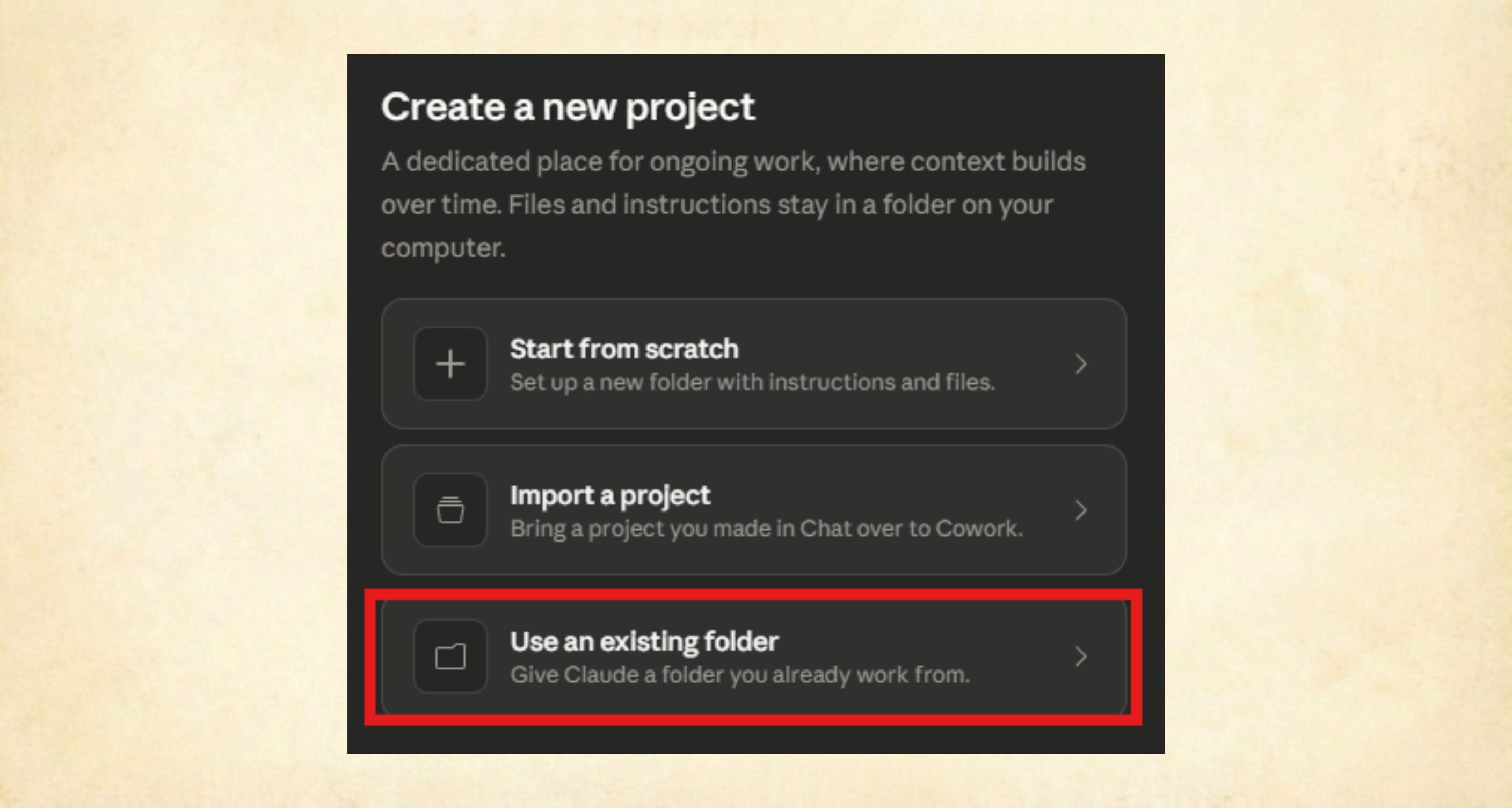
Claude reads CLAUDE.md automatically on startup. In the desktop app, create a new project using “Use an existing folder.” If you feel stuck at any point, just ask Claude what to do next — it will walk you through it.
Step 4: Run /hydrate-knowledge.
Point Claude at your existing product docs — a Confluence URL, a Notion export, a folder of PRDs. It scaffolds the Knowledge/ folder from whatever you already have, so you’re not starting blank.
Note: You don’t have to worry about these commands or use them as “/hydrate-knowledge”. Just ask Claude how you can setup the workspace initially with your product knowledge, and it will tell you what to do. This also applies for any step in the future where you feel stuck - just ask Claude.
Step 5: Fill in CLAUDE.md.
Add your OKRs, team members, key customers, and working principles. You don’t have to edit the file directly — paste the context into a prompt and ask Claude to remember it. This 20-minute step is the highest-value part of the entire setup.
Step 6: Point it at your customer feedback and run /feedback-report.
If feedback lives in a CRM or Jira, Claude will help set up a connector and prompt you to authenticate. If enterprise permissions block that, download a CSV export and point Claude at the file.
Put reference context in the workspace: OKRs, product strategy, competitive summaries, working principles, synthesized customer themes. Documents that don’t change often and don’t have an authoritative live source elsewhere.
Leave live, frequently-updated data in its existing systems: Jira tickets, CRM records, Gong transcripts, engineering specs in Confluence. These have proper access controls and update continuously — connect to them via MCP connectors rather than copying them into the folder.
MCP (Model Context Protocol) is an open standard built into Claude Code that lets the AI connect directly to external tools. Configure a connector once, and Claude can pull a Jira ticket, query Salesforce, or read a GitHub PR as naturally as it reads a local file. A growing directory of pre-built connectors is at modelcontextprotocol.io.
GitHub (recommended for git-comfortable teams): Fork the template to a private repo in your company’s internal Github. Everyone clones locally, works in Claude Code, and pushes updates. History is tracked, searchable, and survives team rotation.
SharePoint or Google Drive (no git required): Put the workspace folder in a shared drive everyone has mounted locally. Open it in Claude Code from there. Less version control, but it works — and it’s the fastest path for teams without git experience.
Either way: one folder, one source of truth, every team member contributing to and drawing from the same knowledge base.
Week 2: Set up the Monday /feedback-report automation and share output with your team.
To automate: use scheduled tasks in Claude Code (ask Claude to set it up), or use the scheduled task feature in the Claude Desktop app and route the output to a Slack channel via Claude’s Slack integration. Connect your most-used tools via MCP connectors.
Week 3: Use /write-prd for your next feature spec. Before writing a word, it interviews you against your OKRs and existing customer signals, surfacing tensions you hadn’t made explicit. If it’s a generative AI feature, combine with /write-eval-criteria to get evaluation rubrics into the PRD — this helps engineering make the right design decisions upfront.
Week 4: Run your metrics review with /weekly-business-review. Once connected to your telemetry, you can also ask Claude ad-hoc questions — “Why did weekly active usage fall 20% last week?” — and get a structured answer rather than a data analyst ti
Party up! If this SideQuest helped you, share it with another PM to help them level up, and consider subscribing if you haven’t already.
See you in the next Side Quest 👋,
Diego
Comments
Nothing yet. Say the first thing.
Sign in to join the conversation.