
Series: Part 1: Introduction & Motivation | Part 2: Understanding MCP | Part 3: The Agent Loop | Part 4: Inside the Codebase | Part 5: Operations & Extending | Part 6: Running It Yourself | Part 7: Observability | Building a Local AI Agent in Go -- Bonus: Agent Setup & Usage Guide | GitHub
Part 5 covered the operational shape of a running agent. This part zooms in on the question every reader has at this point: can I point it at my own LLM? The answer is yes -- not just at Lemonade, but at every backend that speaks OpenAI’s chat-completion shape, plus Gemini and Anthropic through native adapters. The same binary, the same MCP tool servers, the same agent loop -- only the endpoint URL, model name, and API key change.
This part is the practical companion to all the theory in Parts 1-4. If you have a model you want to use, you’ll find the three-line recipe here.
Check the code on GitHub. Let me know if and how you are using it in your projects.
The agent supports three provider adapters, and the right one is auto-selected from the endpoint URL:
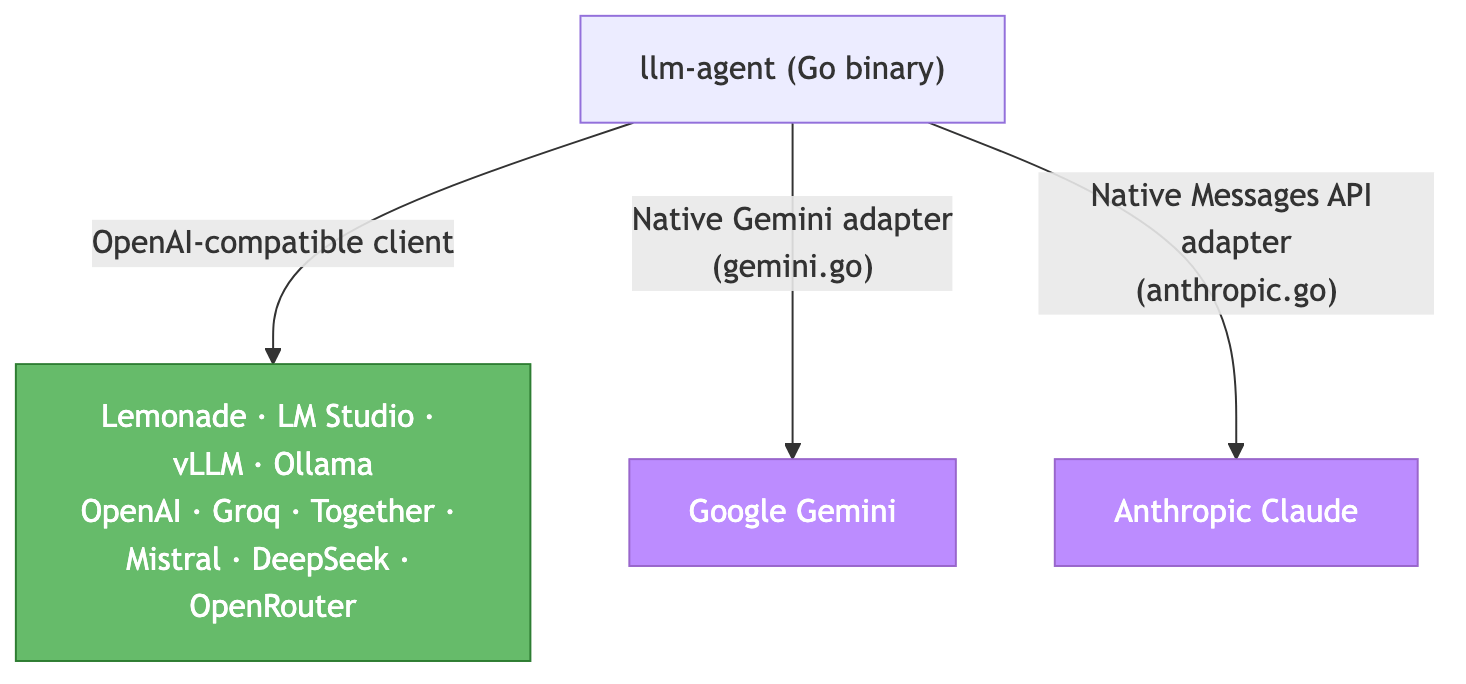
The routing logic in config.go::detectProvider is two lines: if the host contains googleapis.com or gemini, use the Gemini adapter; if it contains anthropic.com, use the Anthropic adapter; otherwise, treat it as OpenAI-compatible. That covers every endpoint listed above without a single conditional anywhere else in the codebase.
If auto-detection ever gets it wrong (a proxy that hides the real host, a local mock pointing at the production endpoint), -provider openai|gemini|anthropic forces the choice.
Every backend below uses the same recipe:
Start the backend (or have a cloud endpoint with an API key).
Run the agent with three flags:
-endpoint,-model, and (for cloud) an env var with the key.
The agent will:
Spawn the same MCP tool servers (Playwright, filesystem, fetch, ports).
Auto-detect the provider from the URL.
Auto-detect the tool-call style from the model name (Qwen →
text, Llama/GPT/Claude →native; see Part 3).Run the loop with the same safety limits, retries, parallel dispatch.
No code change, no separate build. The provider abstraction is real.

Run scripts/validate-setup.sh for a one-shot check that everything is wired up. Then build:
bash
cd go-agent
make build       # produces ./llm-agent with version stamped via -ldflags
./llm-agent -version
The four most common local options. All hit the OpenAI-compatible adapter.
This is what agent.json ships pointing at. The included management script handles startup, model loading, and context-size resizing:
bash
scripts/start-lemonade.sh start # server on :13305, loads default model with 32K ctx
./llm-agent -v                  # uses agent.json defaults; -v turns on verbose logs
What you get: /slots health check (the agent will warn at startup if the loaded model’s context window is too small for tool use), runtime model swap via start-lemonade.sh load , no API key needed, nothing leaves the machine.
Why this is the default: Lemonade ships a llama.cpp build configured for ROCm on AMD and CUDA on NVIDIA without forcing you to figure out the driver matrix yourself, and it has a clean runtime model-swap API. See Part 5: Lemonade Server Management for the operational details.
LM Studio’s local server is the easiest migration -- it implements the full OpenAI shape, including streaming and native tool calls. Start LM Studio, enable the server in settings, then:
bash
./llm-agent -endpoint http://localhost:1234/v1 \
            -model "qwen2.5-coder-32b-instruct"
Trade-offs: No /slots endpoint, so the startup context-size sanity check goes silent (you set context length in LM Studio’s UI before loading the model). No runtime model swap from the agent -- use LM Studio’s lms CLI or its GUI.
vLLM is the right choice for production deployments: full OpenAI compatibility, proper SSE streaming, and robust tool calling with structured outputs.
bash
python -m vllm.entrypoints.openai.api_server \
  --model Qwen/Qwen2.5-Coder-32B-Instruct \
  --max-model-len 32768 \
  --gpu-memory-utilization 0.9
# In another terminal:
./llm-agent -endpoint http://localhost:8000/v1 \
            -model "Qwen/Qwen2.5-Coder-32B-Instruct"
Trade-offs: vLLM is “configure at startup” rather than “configure at runtime” -- changing the model means restarting the server with a different --model flag. First boot pulls the model from Hugging Face (cached afterward). No /slots endpoint, same as LM Studio.
bash
ollama pull qwen2.5-coder:32b
./llm-agent -endpoint http://localhost:11434/v1 \
            -model "qwen2.5-coder:32b"
The streaming caveat: Ollama’s /v1/chat/completions endpoint sends ndjson on the wire instead of SSE. The go-openai library expects data: …\n\n framing, so -stream returns an empty result on the first chunk. The agent detects the empty stream and falls back to non-streaming automatically (you’ll see a streaming returned empty, falling back to non-streaming warning in -v mode), but you lose TTFT metrics. The cleanest fix is to just not pass -stream against Ollama.
The context caveat: Ollama’s default num_ctx is 2048 -- far too small for tool use. Build a Modelfile variant with a larger context:
FROM qwen2.5-coder:32b
PARAMETER num_ctx 32768
bash
ollama create qwen2.5-coder-32k -f Modelfile
./llm-agent -endpoint http://localhost:11434/v1 -model qwen2.5-coder-32k
For everything Lemonade/LM Studio/vLLM hide from you, point the agent at a vanilla llama-server from ggml-org/llama.cpp. It speaks the OpenAI chat-completion shape directly, so no adapter changes:
bash
# Build llama.cpp once (see its README for backend flags: CUDA, ROCm, Metal, Vulkan)
./llama-server \
  --model ~/models/Qwen3-Coder-30B-A3B-Instruct.gguf \
  --ctx-size 32768 \
  --n-gpu-layers 999 \
  --host 0.0.0.0 --port 8080
./llm-agent -endpoint http://localhost:8080/v1 \
            -model "Qwen3-Coder-30B-A3B-Instruct"
Trade-offs: Full control over the backend (custom quantization, batch sizes, KV-cache sharing), but you do the model management yourself — no /v1/load like Lemonade. The /slots endpoint is present (it’s llama.cpp’s own), so the startup context-size check works. Best fit when you’re tuning the inference stack itself.
See tool-migration.md for the deeper migration matrix, including what each backend supports for runtime model loading, streaming, and management APIs.
OpenAI, Groq, Together AI, Mistral, DeepSeek, and OpenRouter all expose the same OpenAI chat-completion shape. The provider adapter doesn’t change; you just supply a different host and a key.
bash
export LLM_API_KEY=sk-...
# OpenAI itself
./llm-agent -endpoint https://api.openai.com/v1 -model gpt-4o
# Groq (fast inference for open-weight models)
./llm-agent -endpoint https://api.groq.com/openai/v1 -model llama-3.3-70b-versatile
# OpenRouter (aggregator -- gives you access to dozens of models behind one key)
./llm-agent -endpoint https://openrouter.ai/api/v1 -model anthropic/claude-3.5-sonnet
LLM_API_KEY is the catch-all. The agent also picks up OPENAI_API_KEY, GEMINI_API_KEY, and ANTHROPIC_API_KEY so you can have multiple keys in your shell environment without conflict. Resolution order in config.go::LoadConfig: explicit apiKey field in JSON → -api-key flag → LLM_API_KEY → provider-specific env var → "not-set" (local backends don’t need a key).
For production: don’t put keys in agent.json or commit them to your shell config. Use a secret manager — direnv for per-directory env, sops for encrypted-at-rest files, HashiCorp Vault or your cloud’s secret store (AWS Secrets Manager, GCP Secret Manager) for centrally-managed keys. The agent only reads env vars at startup; how they get there is your deployment’s concern.
Both providers have rich tool-use semantics that don’t survive a translation through the OpenAI shape (function-call message ordering, content blocks, response IDs). So the agent ships native adapters: gemini.go translates to Google’s generateContent API, anthropic.go translates to the Anthropic Messages API. The agent loop itself doesn’t know the difference -- it calls LLMClient.ChatCompletion and gets back the same LLMResult shape regardless.
For the file-by-file walkthrough of how each adapter translates back and forth (and the specific quirks each one papers over), see Part 4 § gemini.go and Part 4 § anthropic.go.
Auto-detected when the URL contains googleapis.com or gemini.
bash
export GEMINI_API_KEY=AIza...
./llm-agent -endpoint https://generativelanguage.googleapis.com/v1beta \
            -model gemini-2.5-flash
Common models: gemini-2.5-flash (fast, cheap, good for tool use), gemini-2.5-pro (slower, higher quality, deeper reasoning). The agent’s native adapter handles Gemini’s functionDeclarations schema translation and functionCall/functionResponse message ordering automatically.
Auto-detected when the URL contains anthropic.com.
bash
export ANTHROPIC_API_KEY=sk-ant-...
./llm-agent -endpoint https://api.anthropic.com \
            -model claude-sonnet-4-5
The adapter translates to the Messages API, which uses content blocks rather than separate message roles for tool calls. Model selection matters: pick a Claude with a context window big enough for your tool schemas (anything from Sonnet 4 onward is fine).
agent.json is declarative -- everything below is also overridable on the CLI:
json
{
  "model": "Qwen3-Coder-30B-A3B-Instruct-GGUF",
  "endpointUrl": "http://localhost:13305/api/v1",
  "servers": [
    { "type": "stdio", "config": { "command": "npx", "args": ["-y", "@playwright/mcp@latest", "--headless"] } },
    { "type": "stdio", "config": { "command": "npx", "args": ["-y", "@modelcontextprotocol/server-filesystem", ".", "${HOME}/Documents"] } },
    { "type": "stdio", "config": { "command": "uvx", "args": ["mcp-server-fetch"] } },
    { "type": "stdio", "config": { "command": "../mcp-servers/ports/mcp-server-ports" } }
  ]
}
Key fields:
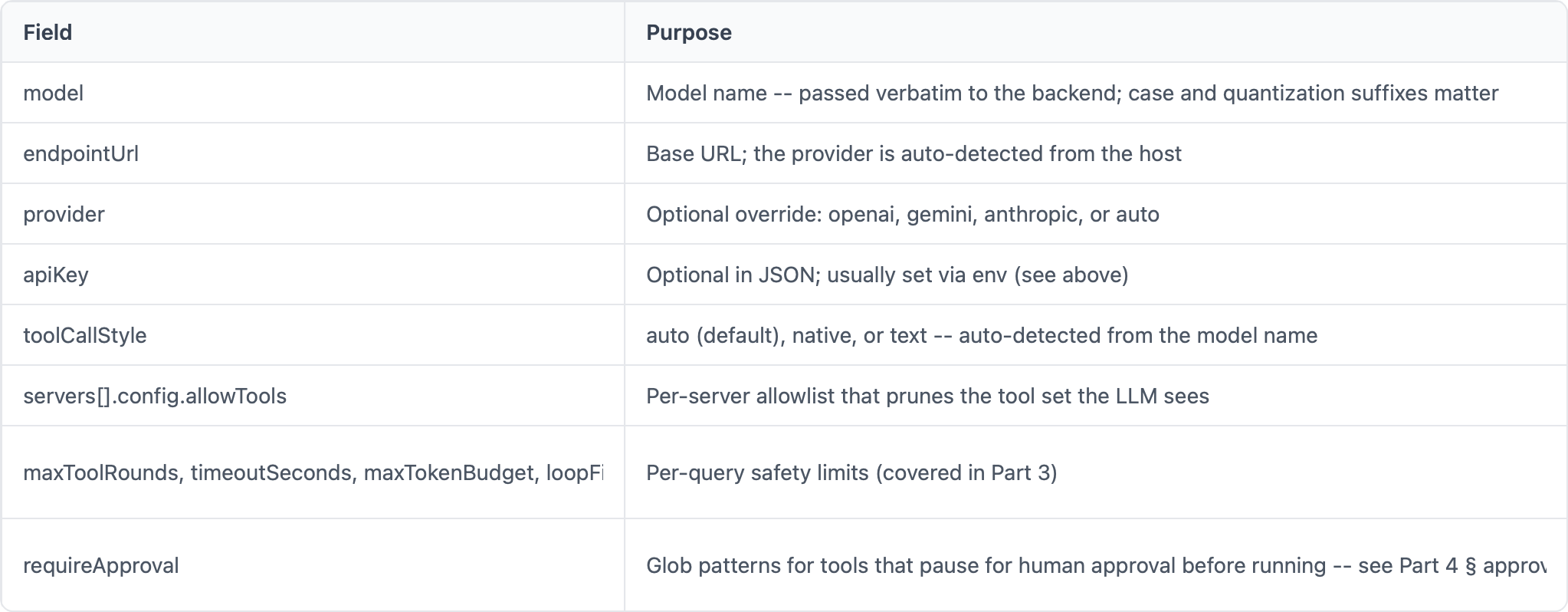
Environment variables in JSON strings expand at load time (${HOME}, etc.).
The CLI flags you’ll reach for most often:
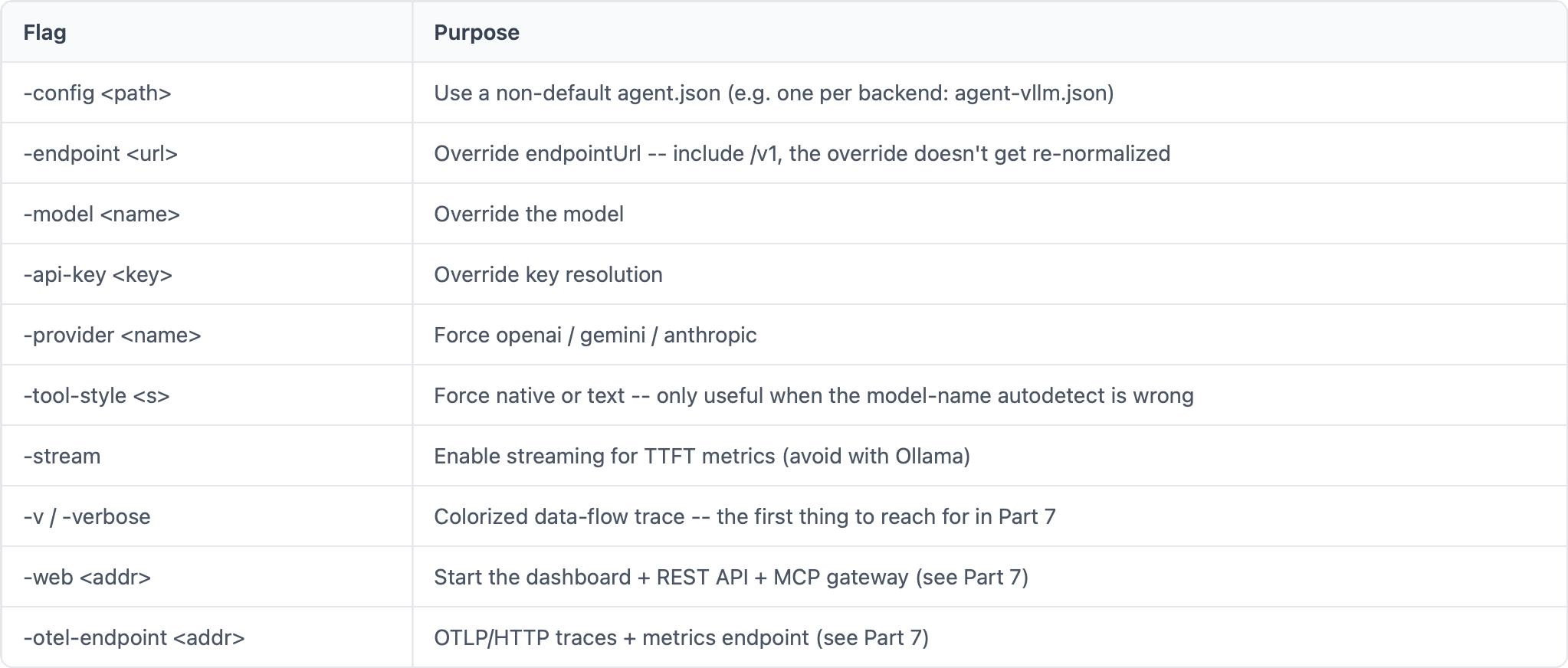
The conventional pattern is one agent-.json per environment you target, so you can swap with a single -config flag rather than juggling env vars:
bash
./llm-agent -config agent-vllm.json -v
./llm-agent -config agent-openai.json -v "your question"
The whole point of this architecture is that almost nothing has to change when you swap backends. To be concrete:
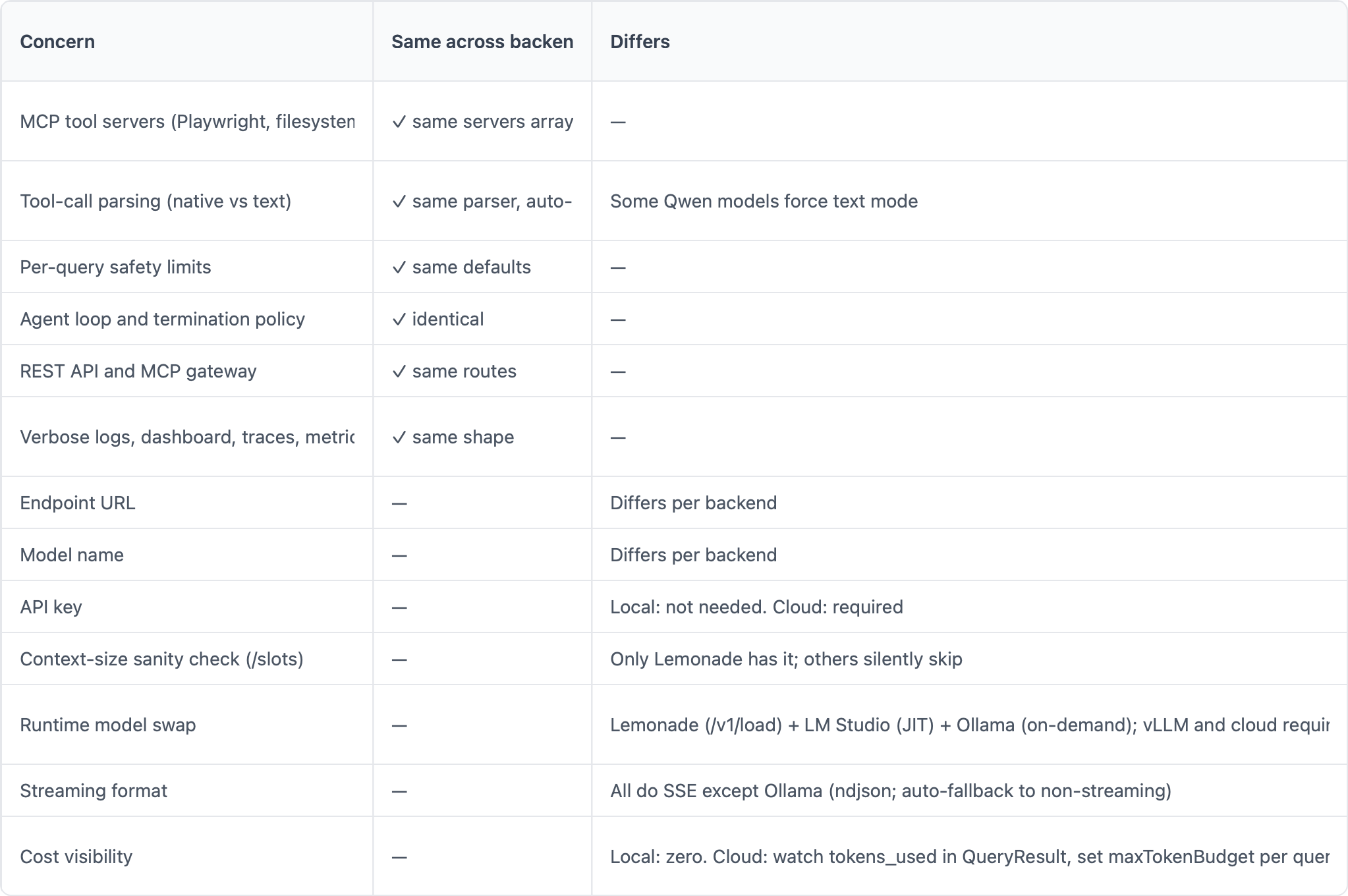
The cost column matters when you move to cloud. The agent’s per-query maxTokenBudget limit clamps a single query before it can burn through a quota; pair it with tokens_used in QueryResult (or the llm_tokens OTel attributes — see Part 7 § cost tracking) for real-time cost tracking.
Note that token accounting differs per provider and the numbers aren’t directly comparable: OpenAI counts BPE tokens; Anthropic counts input/output content blocks (including a small overhead for system + tool definitions); Gemini reports promptTokenCount + candidatesTokenCount derived from its own SentencePiece tokenizer. The agent surfaces whatever each provider returns in LLMUsage; convert to dollars at the dashboard layer using each provider’s published per-million-token rate.
To see the abstraction in action, here’s the same query run against four different backends. The output text will differ because the models differ, but the agent loop, the tool calls, and the response shape are identical:
bash
# Local: Lemonade
./llm-agent -v "Fetch https://modelcontextprotocol.io and tell me in two sentences what MCP is."
# Local: vLLM with a Qwen model
./llm-agent -config agent-vllm.json -v \
            "Fetch https://modelcontextprotocol.io and tell me in two sentences what MCP is."
# Cloud: Anthropic Claude
ANTHROPIC_API_KEY=sk-ant-... ./llm-agent -v \
  -endpoint https://api.anthropic.com -model claude-sonnet-4-5 \
  "Fetch https://modelcontextprotocol.io and tell me in two sentences what MCP is."
# Cloud: OpenAI gpt-4o
LLM_API_KEY=sk-... ./llm-agent -v \
  -endpoint https://api.openai.com/v1 -model gpt-4o \
  "Fetch https://modelcontextprotocol.io and tell me in two sentences what MCP is."
Each one spawns the same MCP servers, fetches the same URL through mcp-server-fetch, hands the markdown to a different LLM, and prints a two-sentence answer. The trace shape -- one agent.round span, one llm.chat_completion span, one tool.callspan for fetch, another llm.chat_completion for the final answer -- is identical across all four.
That’s the whole story of backend portability: the contract is the OpenAI chat-completion shape (or one of two native adapters), and everything above it -- tool routing, parsing, safety, observability -- is provider-agnostic.
Part 7: Observability covers the visibility layers you’ll lean on once a backend swap surfaces a difference you weren’t expecting -- verbose logs, the live web dashboard, the SSE event stream, OpenTelemetry traces, and OpenTelemetry metrics. Two of the diagnostic recipes in Part 5 forward-ref into it for exactly this reason: once configuration and backend reachability are ruled out, the answers live in the trace.
For a feature-by-feature comparison of every local backend (streaming formats, model management APIs, context detection), see tool-migration.md.
Previous: Part 5: Operations & Extending Next: Part 7: Observability -- the four visibility layers, the metric instruments that ship with the agent, and investigation walkthroughs that chain logs → events → traces → metrics.
Well, if you want to dig deeper, need more insights as part of a workshop or want to elevate the Apache code covered in this series into a production ready grade, then lets get in touch via email: ai-consulting@smarttechlabs.de.
Copyright (C) 2026 By Smarttechlabs.de - All Rights Reserved
This article is part of a seven-part SmartTechLabs blog series on building a practical LLM agent system in Go. The goal is not to hide the complexity behind another black-box framework, but to make the moving parts understandable: agent loops, tool execution, MCP servers, local and remote LLM endpoints, OpenAI-compatible APIs, observability, and operational concerns. The example system supports local runtimes such as LM Studio, Ollama, Lemonade, vLLM, and llama.cpp, as well as cloud providers like Gemini and Anthropic. It is designed to run across AMD, NVIDIA, and Apple Silicon environments, from developer workstations to potentially lightweight edge deployments.
At SmartTechLabs, we help companies understand what LLMs and agent systems can realistically do, how they can be integrated into existing software and infrastructure, and where the operational, architectural, and governance boundaries are. Our consulting work covers GenAI workshops, technical enablement, architecture reviews, prototyping, integration with enterprise systems, and hands-on implementation support. This blog series is based on material from our GenAI workshops and is intended for teams that want to move beyond demos and start building reliable, observable, and maintainable AI-enabled systems.
Let me know if you find any errors or issues. Also let me know if you build something with that code.
No posts
Comments
Nothing yet. Say the first thing.
Sign in to join the conversation.