
Series: Part 1: Introduction & Motivation | Part 2: Understanding MCP | Part 3: The Agent Loop | Part 4: Inside the Codebase | Part 5: Operations & Extending | Part 6: Running It Yourself | Part 7: Observability | Building a Local AI Agent in Go -- Bonus: Agent Setup & Usage Guide | GitHub
Check the code on GitHub. Let me know if and how you are using it in your projects.
In Part 2 we covered MCP -- how tools advertise themselves and how the agent routes calls. Now we focus on the agent loop itself: the code that decides when to call the LLM, when to call tools, and when to stop.
A note on the language befxore we dive in: this agent is written in Go because its core job -- spawning MCP subprocesses, streaming LLM responses, broadcasting events to the dashboard, and reacting to Ctrl+C -- maps cleanly onto goroutines, channels, and context.Context. Compiling everything into a single static binary is a deployment bonus. Part 1’s Why Go?section covers the full case against the Python alternative; this part assumes you’re comfortable with the choice and focuses on the loop itself.
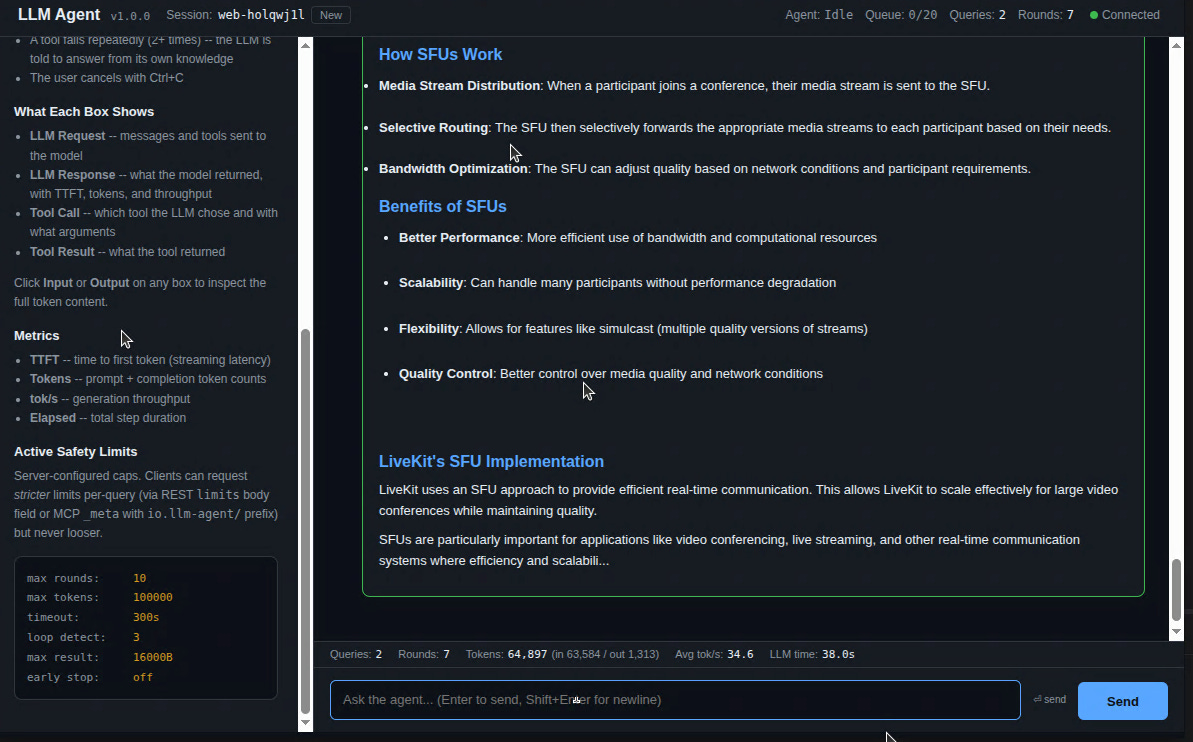
Just as a small teaser - this is the web frontend of our agent system. It provides info of input and output context etc. but more on that later in this blog series.
The agent is the orchestrator. It sits between the user, the LLM, and the MCP tool servers. It never lets the LLM talk to tools directly -- all routing goes through the agent. The LLM can be any OpenAI-compatible local server (Lemonade, LM Studio, Ollama, vLLM, llama.cpp), or a cloud API (Gemini, Anthropic, OpenAI, Groq, ...) -- the loop is identical because llm.go dispatches to the right adapter based on the endpoint URL (config.go::detectProvider).
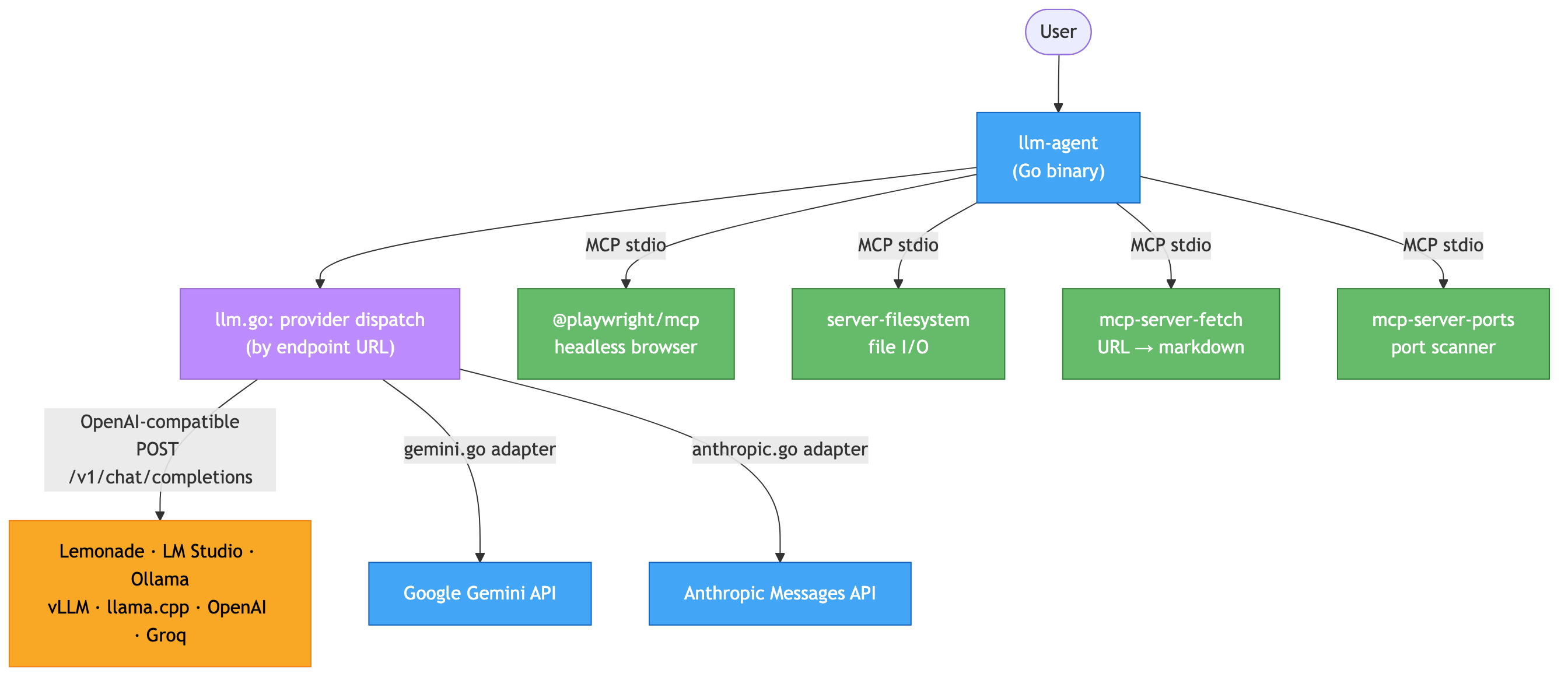
The provider adapters (gemini.go, anthropic.go) translate to and from the OpenAI shape the loop expects, so everything below this point applies regardless of which backend you point at. If you have another “special” provider you can clone an adapter and customize it accordingly.
One bit of terminology first: a round is one iteration of the loop -- one LLM call, zero or more tool executions the model requested in that call, then back to the LLM. Every “round 1 / round 2 / ...” you see in the logs, events, and OTEL spans refers to this unit. A typical query completes in 1-3 rounds; the hard cap is maxToolRounds (default 10).
Every user query enters a loop that continues until the LLM produces a final text answer:
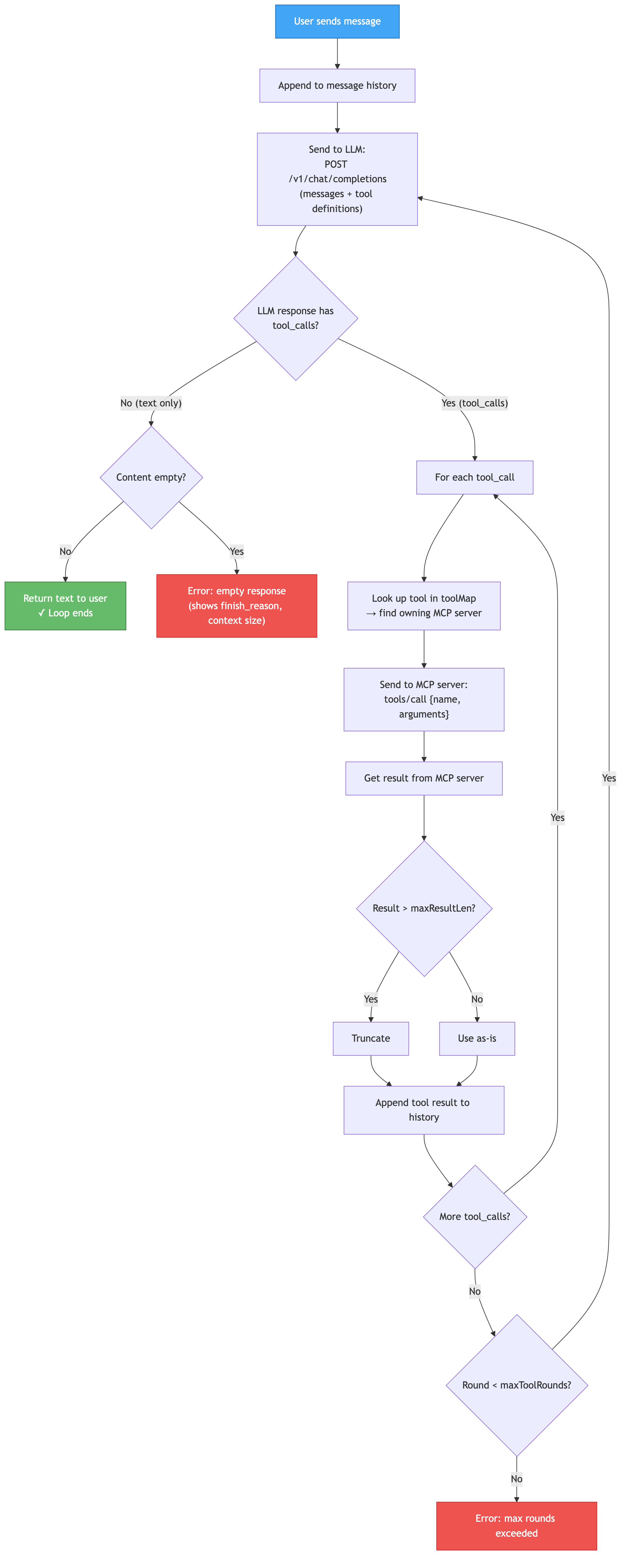
Between “the LLM emitted a tool call” and “the MCP server runs it,” two filters run in order. Argument validation (validate.go) checks the JSON the LLM produced against the tool’s declared inputSchema; malformed calls short-circuit with an error: result the LLM sees in the same round, so a bad call costs one round instead of a subprocess round-trip. Human-in-the-loop approval (approval.go) is the optional second filter: tools whose names match the agent’s requireApproval glob patterns block until an operator resolves them via POST /api/v1/approvals/{id}. A denied call returns “permission denied” as the tool result and the loop continues normally — denial is a routine outcome, not an error. Neither gate ends the loop, so neither appears in the termination table below.
Part 4 covers both files; Part 7 covers the approval queue from the operator’s perspective.
The loop pivots on a single check: hasToolCalls := len(msg.ToolCalls) > 0. When the LLM returns text with no tool calls, the loop exits. But layered around that core check are nine additional guardrails -- the agent has ten distinct termination paths:
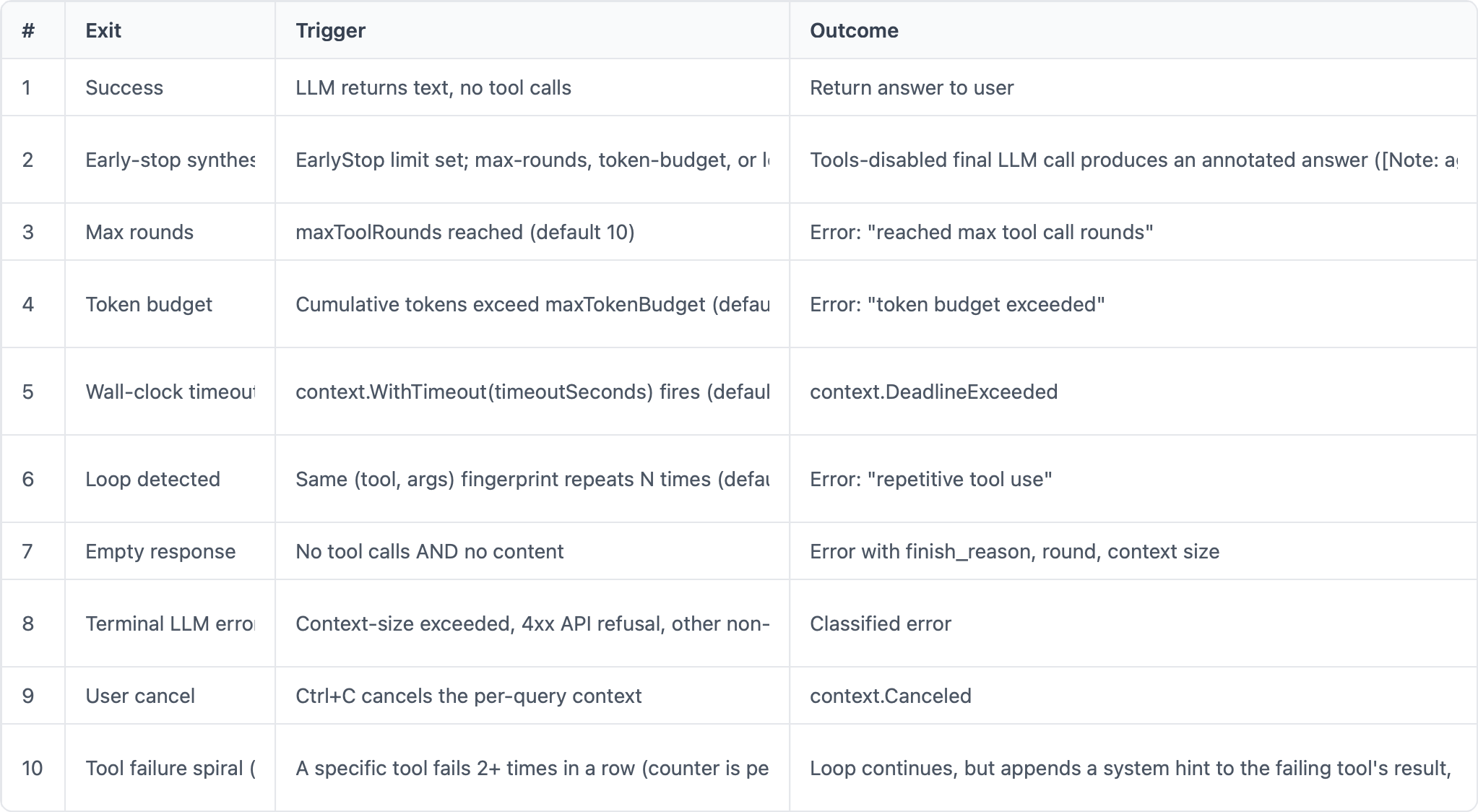
Each guardrail catches a different failure mode: #3 catches runaway reasoning, #4 catches expensive token burn on commercial APIs, #5 catches hung tools, #6 catches exact-duplicate loops the model can’t break out of, #10 catches tools that keep erroring without the model noticing.
The soft exit (#10) is subtle but important. The agent keeps a per-tool failure counter (session.failedTools[toolName]). When mcp.CallTool returns an error or the result looks like a failure (”No results found”, “Error:”, etc.), the counter for that toolincrements. A successful call resets it. Once a tool’s counter hits 2, the agent appends this hint to the next failed result it returns:
[SYSTEM: This tool has failed multiple times. Do NOT retry it.
Answer using your own knowledge instead.]
The LLM reads this on the next round and typically gives up on that tool, exiting via path #1 (success) -- often using a different tool. This prevents infinite tool-retry loops on a single broken tool while leaving the rest of the toolbox available.
Part 2 framed the split as “the LLM proposes, the agent disposes.” The same split applies to termination:
What the LLM decides (by predicting): call a tool, or emit a final text answer.
What the agent decides (by enforcing): whether the LLM even gets another round, whether a tool result is truncated, whether a repeat call is a loop worth killing, whether the whole query has exhausted its token/time budget.
The core termination check is trivially simple. But the hard question is: why does the LLM decide to stop calling tools?The model is just predicting the next output -- what makes it predict text instead of another tool call?
Several factors:
Tool descriptions matter enormously. A tool whose description ends with “The result is complete -- just report it to the user” signals that no follow-up is needed. Without this, the LLM often calls additional tools to “verify” or “expand” what it already knows.
Tool results terminate reasoning naturally. When
check_portreturns"Port 8000 is in use by lemonade-router, PID 467250", there’s nothing left to look up. The LLM’s next-token prediction favors text synthesizing the answer.Injected system hints override model instincts. The failure-spiral detection directly tells the model “stop retrying, answer from your own knowledge.” This is more reliable than hoping the model figures it out.
System prompt shapes behavior. Instructions like “Be concise” or “Always cite your source” influence when the model thinks it has enough information.
Training data patterns. Function-calling models (Llama-xLAM, GPT-4, Qwen-Coder) are trained on examples where the assistant eventually stops calling tools and produces a summary. The model learns this pattern statistically.
This is why narrow MCP servers with sharp tool descriptions produce shorter, better loops. With vague descriptions like “run a command,” the LLM keeps hedging and calling more tools. With specific descriptions like “check if a port is in use; result is complete,” the LLM calls once, gets the answer, and summarizes.
Not every model speaks the OpenAI tool-calling dialect. Some model families -- Qwen3 being the big one, but also certain Hermes and Granite fine-tunes -- were trained to emit tool calls as XML-ish markup inside the assistant’s text content rather than as a separate tool_calls field. A raw Qwen response to “is port 3000 in use?” looks like this:
I'll check that for you.
<function=check_port>
<parameter=port>
3000
</parameter>
</function>
The message.tool_calls field on the API response is empty. The structured-tool-call check (hasToolCalls := len(msg.ToolCalls) > 0) would say “no tool calls, looks like a final answer” -- and the loop would exit after one round every time, handing the user the raw <function=...> markup. Not useful.
The agent solves this with a promotion step: before the hasToolCalls check runs, if the configured style is text and the content contains a <function= opener, the content gets routed through parseTextToolCalls (in toolparse.go). That parser is short and deliberately boring -- two regexes and a type-inference helper:
go
var (
    reFunctionBlock = regexp.MustCompile(`(?s)<function=(\w+)>(.*?)</function>`)
    reParameter     = regexp.MustCompile(`(?s)<parameter=(\w+)>\s*(.*?)\s*</parameter>`)
)
For each <function=...>... block it finds, it pulls the tool name, extracts every <parameter=KEY>VALUE pair, infers a JSON type for each value ("3000" → 3000 as int64, "true" → true, "null" → nil, "0.5" → 0.5 as float64, otherwise string), and builds an openai.ToolCall with a synthetic ID (text_call_0, text_call_1, ...). The text before the first <function= becomes the cleaned content -- usually the model’s reasoning (”I’ll check that for you.”), which is worth keeping in history as context for future rounds.
Then the promoted calls are stuffed back into msg.ToolCalls and the loop continues as if they’d arrived structured in the first place:
go
msg := result.Message
// If toolCallStyle is "text" and content contains <function=...>,
// parse and promote to structured tool_calls.
if len(msg.ToolCalls) == 0 && a.config.ToolCallStyle == ToolCallText {
    if strings.Contains(msg.Content, "<function=") {
        cleanContent, textCalls := parseTextToolCalls(msg.Content)
        if len(textCalls) > 0 {
            msg.ToolCalls = textCalls     // loop sees these
            msg.Content = cleanContent    // reasoning kept, markup stripped
        }
    }
}
hasToolCalls := len(msg.ToolCalls) > 0  // now counts promoted calls too
A few details that matter once you start pointing the agent at more models:
Auto-detect by model name.
config.go::detectToolCallStylepicks the style based on substrings in the model id: names containingqwengetToolCallText; names containingllama,mistral,gpt-,xlam, etc. getToolCallNative; anything unrecognized defaults toToolCallNative. Override manually with thetoolCallStylefield inagent.jsonor the-tool-styleCLI flag when auto-detect guesses wrong (e.g., a custom fine-tune that breaks the naming convention).The
len(msg.ToolCalls) == 0guard. The text parser only runs if the model didn’t also emit structured calls. A model that returns both (rare, but possible in hybrid fine-tunes) gets its native calls treated as authoritative; the text parser stays out of the way.Multiple calls in one response. The
FindAllStringSubmatchcall matches every<function=...>...block in the content. If Qwen asks for three tools in one turn, you get threeToolCallentries, and they’re executed via the concurrent path (up tomaxParallelToolCalls = 4) in Part 4.Type inference matters. Without it,
{"port": "3000"}(string) fails JSON schema validation on tools that declareport: integer. The one-passParseInt → ParseFloat → bool/null → stringfallback is the cheapest way to stay schema-correct without making the model-author pick between “emit JSON” and “emit XML.”No streaming complication. The promotion runs on the assembled content after the stream finishes, not on partial chunks, so there’s no risk of matching a half-emitted
<function=opener. TTFT is unaffected; only the final-chunk check pays the regex cost.
The pattern generalizes: any future model that ships tool calls as some text format can plug into this exact seam by extending parseTextToolCalls -- nothing else in the loop changes. Native function-callers and text-format-callers end up in the same control flow by round 2.
When an external MCP client (CrewAI, AutoGen) calls agent_query via the /mcp/sse gateway, this entire loop runs inside a single tool call from the external agent’s perspective. The external client sees:
→ call agent_query("is port 8000 in use?")
← result: "Port 8000 is in use by lemonade-router, PID 467250"
Internally, our agent might have run 5 rounds, called check_port, synthesized the answer, and handled failures -- all invisible to the caller. This is what makes agent-to-agent orchestration work at the MCP protocol level. The full loop becomes a single tool invocation.
The agent loop lives in agent.go. Here’s the simplified core:
go
func (a *Agent) Query(ctx context.Context, input string) (string, error) {
    // Add user message to conversation history.
    a.history = append(a.history, Message{Role: "user", Content: input})
    for round := 1; round <= 10; round++ {
        // Send the full history + tool definitions to the LLM.
        result, err := a.llm.ChatCompletion(ctx, a.history, a.tools)
        if err != nil {
            return "", err
        }
        // Add the LLM's response to history.
        a.history = append(a.history, result.Message)
        // If no tool calls, the LLM is done -- return the text.
        if len(result.Message.ToolCalls) == 0 {
            return result.Message.Content, nil
        }
        // Execute each tool call and add results to history.
        for _, tc := range result.Message.ToolCalls {
            toolResult := a.mcp.CallTool(ctx, tc.Name, tc.Arguments)
            a.history = append(a.history, Message{
                Role:       "tool",
                Content:    toolResult,
                ToolCallID: tc.ID,
            })
        }
        // Loop back: send updated history to LLM for the next round.
    }
    return "", fmt.Errorf("max rounds exceeded")
}
The key insight: the conversation history accumulates. Each round, the LLM sees the full chain:
system prompt → user message → assistant response (with tool calls) → tool results → assistant response → ...
This is how the LLM “remembers” what it already tried.
Unbounded accumulation would eventually overflow the context window, so the agent trims older non-system turns when the total conversation exceeds maxHistoryChars (default 80,000 characters ≈ 20K tokens; 0 disables trimming). The system prompt and the most recent turns are always preserved. State that lives outside the LLM history -- the per-tool failure counter, the loop-fingerprint hashes, the cumulative token budget -- is kept per-query in a queryRun struct and thrown away when the query ends. New queries start with a fresh failure counter and fingerprint buffer.
NewLLMClient is the dispatcher. It looks at the configured provider and picks the right backend -- a go-openai client for OpenAI-compatible endpoints (Lemonade, LM Studio, Ollama, vLLM, llama.cpp, OpenAI itself, Groq, Together, Mistral, DeepSeek, ...), a GeminiClient for Google, or an AnthropicClient for Claude:
go
func NewLLMClient(endpointURL, model, apiKey string, provider LLMProvider, log *Logger, stream bool) *LLMClient {
    llm := &LLMClient{model: model, provider: provider, log: log, stream: stream, MaxRetries: 3}
    switch provider {
    case ProviderGemini:
        llm.gemini = NewGeminiClient(endpointURL, apiKey, model, log)
    case ProviderAnthropic:
        llm.anthropic = NewAnthropicClient(endpointURL, apiKey, model, log)
    default: // OpenAI-compatible
        cfg := openai.DefaultConfig(apiKey)  // apiKey is "not-set" for local backends
        cfg.BaseURL = endpointURL            // e.g. http://localhost:8000/api/v1
        llm.client = openai.NewClientWithConfig(cfg)
    }
    return llm
}
The provider is auto-detected from the endpoint URL by config.go::detectProvider: hosts ending in googleapis.com route to Gemini, anthropic.com to Anthropic, anything else to the OpenAI-compatible client. You can override with the provider field in agent.json if you ever need to.
ChatCompletion (the method the loop actually calls) just forwards to whichever sub-client is non-nil -- the agent loop above never touches a Gemini- or Anthropic-specific type. The adapters in gemini.go and anthropic.go translate to and from the OpenAI shape on the way in and out (covered in detail in Part 4).
MCP and OpenAI use different formats for tool definitions. The agent converts at startup:

go
func (m *MCPManager) OpenAITools() []openai.Tool {
    var tools []openai.Tool
    for _, server := range m.servers {
        for _, mcpTool := range server.tools {
            tools = append(tools, openai.Tool{
                Type: openai.ToolTypeFunction,
                Function: &openai.FunctionDefinition{
                    Name:        mcpTool.Name,
                    Description: mcpTool.Description,
                    Parameters:  mcpTool.InputSchema,  // JSON schema passthrough
                },
            })
        }
    }
    return tools
}
This is the part that connects MCP to the LLM. On every request, the agent sends two things to the model: the conversation history (messages) and the tool definitions (JSON schemas from MCP). The tool definitions are injected into the prompt -- the LLM literally reads a list of available tools with their names, descriptions, and parameter schemas.
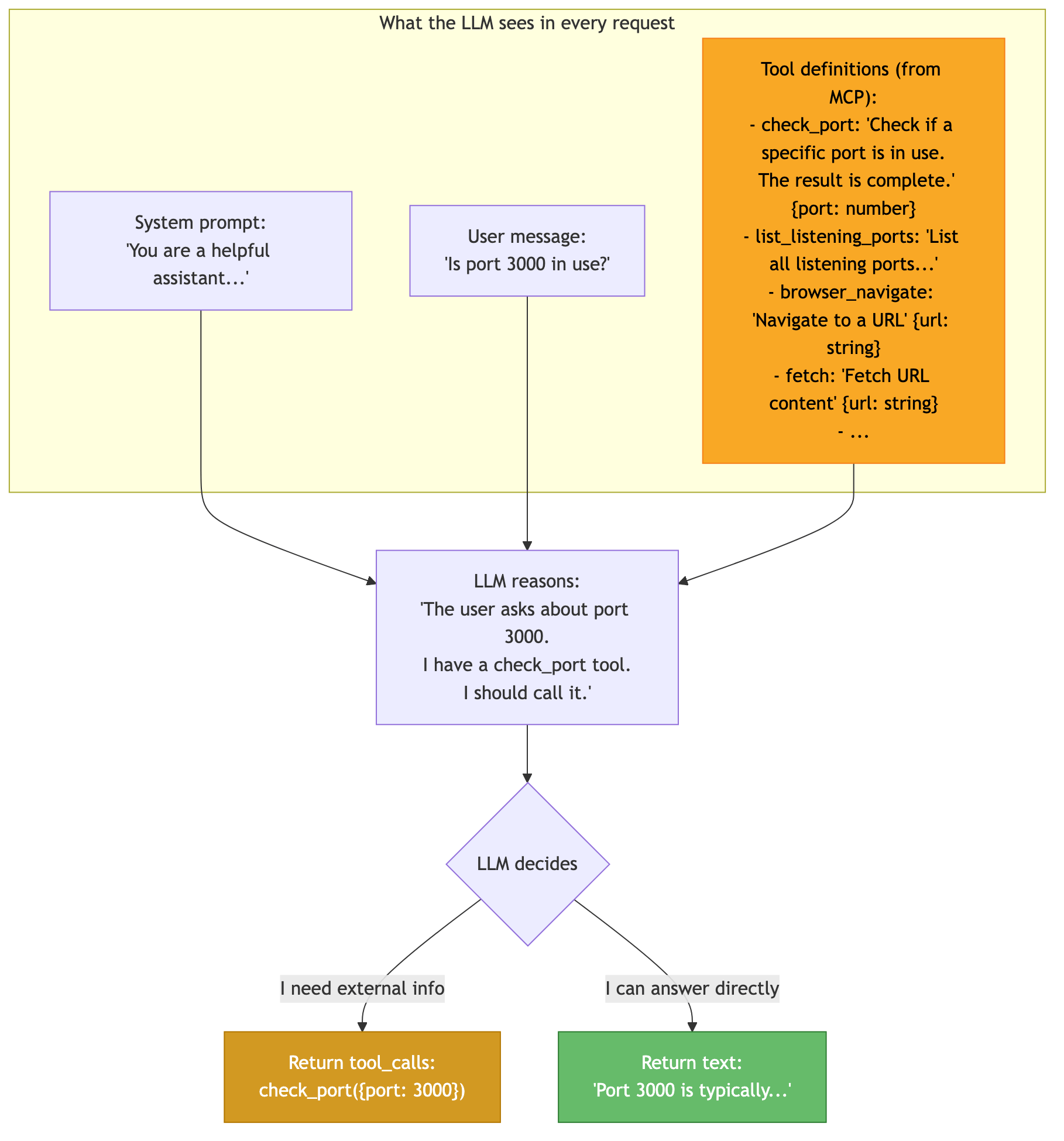
The model isn’t executing code or following rules. It’s predicting the most likely next response given the conversation and the available tools. When the tool descriptions are clear and specific (”Check if a specific port is in use, the result is complete”), the model recognizes that calling the tool will produce a better answer than guessing.
This is why tool descriptions matter so much:
Good: “Check if a specific port is in use and which process is using it. The result is a complete answer.” → LLM calls the tool, reports the result, done in 2 rounds.
Vague: “Run a system command.” → LLM isn’t sure what it does, might try it or might ignore it, wastes rounds.
And this is why narrow servers with few, well-described tools outperform broad servers with many generic tools. The LLM’s tool selection is only as good as the descriptions it reads. Fewer tools with sharper descriptions lead to better decisions on the first try.
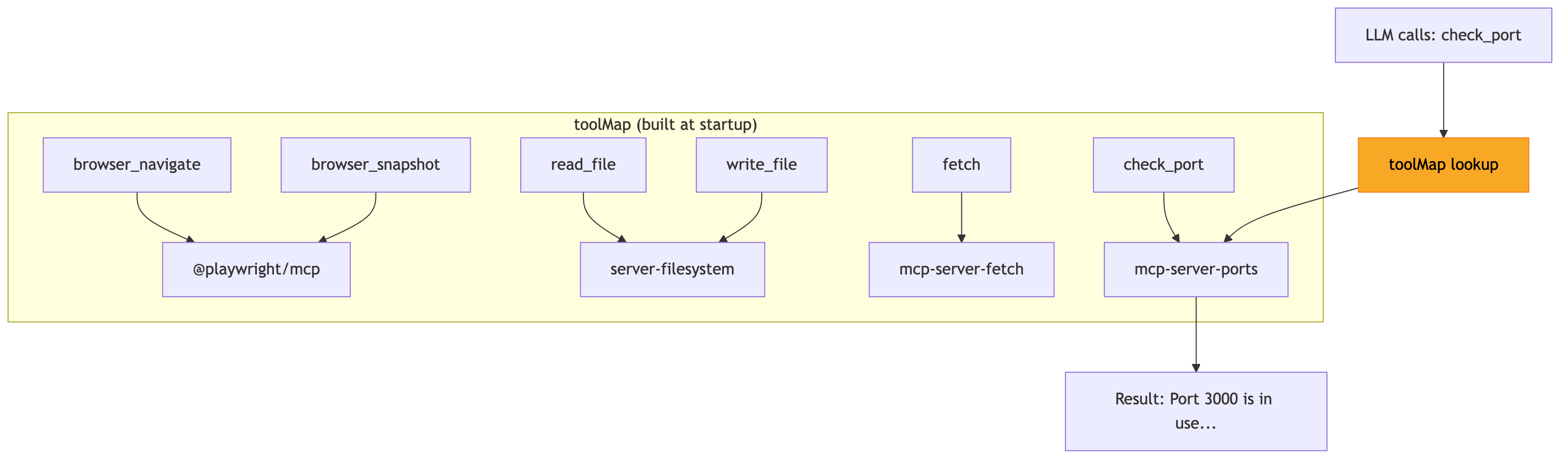
Once the LLM decides to call a tool, the agent needs to know which MCP server owns it. This is the toolMap -- built during startup:
Not all LLMs handle tool calling the same way. OpenAI-compatible models return structured tool_calls in the API response:
json
{
  "choices": [{
    "message": {
      "content": "",
      "tool_calls": [{"function": {"name": "check_port", "arguments": "{\"port\":3000}"}}]
    },
    "finish_reason": "tool_calls"
  }]
}
But local models like Qwen embed tool calls as text markup in the content:
json
{
  "choices": [{
    "message": {
      "content": "I'll check that for you.\n<function=check_port>\n<parameter=port>\n3000\n</parameter>\n</function>"
    },
    "finish_reason": "stop"
  }]
}
The agent detects the model family from the name and applies the right strategy:
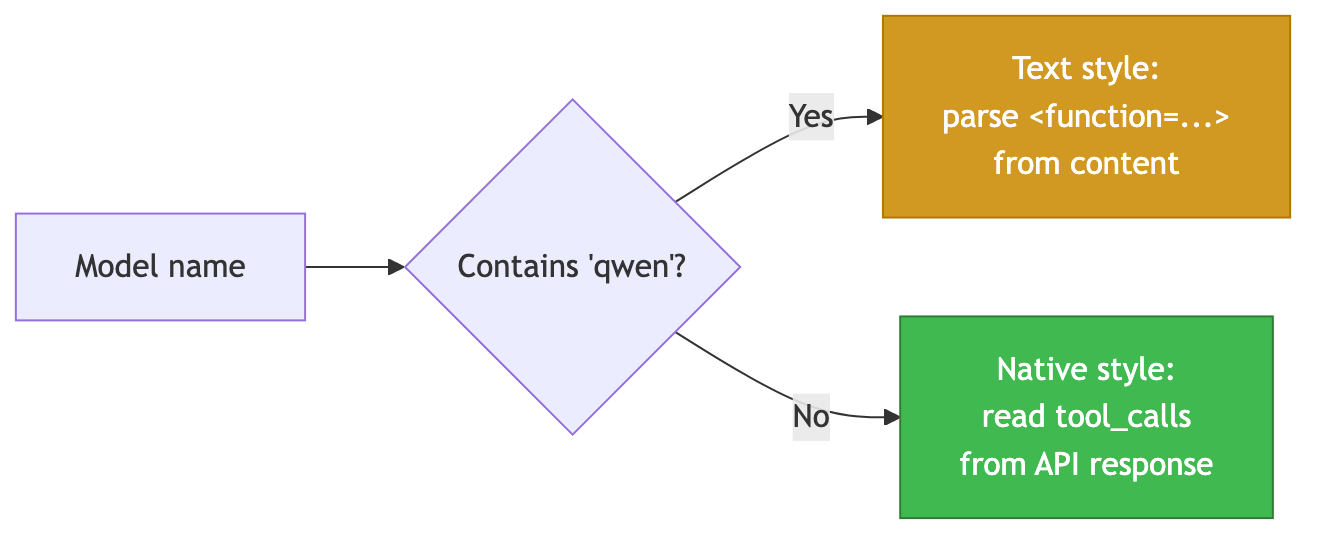
The text parser (toolparse.go) uses regex to extract tool calls from the content, infers proper JSON types (numbers stay as numbers, not strings), and promotes them to structured tool calls:
go
// Before: LLM content = "Let me check...\n<function=check_port>\n<parameter=port>\n3000\n</parameter>\n</function>"
// After:  toolCalls = [{name: "check_port", arguments: {"port": 3000}}]
//         content = "Let me check..."
Previous: Part 2: Understanding MCP Next: Part 4: Inside the Codebase -- a file-by-file walkthrough of every source file in the agent.
Well, if you want to dig deeper, need more insights as part of a workshop or want to elevate the Apache code covered in this series into a production ready grade, then lets get in touch via email: ai-consulting@smarttechlabs.de.
Copyright (C) 2026 By Smarttechlabs.de - All Rights Reserved
This article is part of a seven-part SmartTechLabs blog series on building a practical LLM agent system in Go. The goal is not to hide the complexity behind another black-box framework, but to make the moving parts understandable: agent loops, tool execution, MCP servers, local and remote LLM endpoints, OpenAI-compatible APIs, observability, and operational concerns. The example system supports local runtimes such as LM Studio, Ollama, Lemonade, vLLM, and llama.cpp, as well as cloud providers like Gemini and Anthropic. It is designed to run across AMD, NVIDIA, and Apple Silicon environments, from developer workstations to potentially lightweight edge deployments.
At SmartTechLabs, we help companies understand what LLMs and agent systems can realistically do, how they can be integrated into existing software and infrastructure, and where the operational, architectural, and governance boundaries are. Our consulting work covers GenAI workshops, technical enablement, architecture reviews, prototyping, integration with enterprise systems, and hands-on implementation support. This blog series is based on material from our GenAI workshops and is intended for teams that want to move beyond demos and start building reliable, observable, and maintainable AI-enabled systems.
No posts
Comments
Nothing yet. Say the first thing.
Sign in to join the conversation.