

Why networking matters in system design
How the internet actually works
DNS, TCP, HTTP in depth
Load balancers and CDNs explained
How to use this in interviews
Ask most engineers how a request gets from a user’s browser to a server and back, and they will describe it at the application layer.
The user clicks a button, a request goes to the API, the API queries the database, and a response comes back. This description is correct at one level and completely missing everything underneath it.
Between the user clicking and the API receiving the request, a remarkable number of things happen.
A domain name gets resolved to an IP address.
A connection gets established through a handshake that takes multiple round trips. Data gets broken into packets, routed across dozens of intermediate machines, reassembled in the right order, and handed to the application.
If anything in that chain fails or slows down, the request fails or slows down, and the engineer who does not understand the chain cannot diagnose why.
Networking is the layer that most software engineers skip in their system design preparation because it feels like infrastructure rather than architecture. This is a mistake for two reasons.
First, networking decisions, where to place servers geographically, whether to use a CDN, how to configure a load balancer, how to handle connection limits, are genuine architecture decisions that shape the performance and reliability of a system.
Second, interviewers probe networking concepts regularly, and a candidate who cannot explain why DNS matters, what TCP guarantees, or how a CDN reduces latency is revealing a gap in their foundational understanding.
This guide covers networking from the ground up, from how a request actually travels across the internet through the protocols that govern that travel to the components like load balancers and CDNs that engineers control and design around.
By the end, networking should feel like a legible layer rather than a black box, and the design decisions that depend on it should feel grounded rather than arbitrary.
The internet is a network of networks. Billions of devices connect to it, and any two of them can communicate by sending data through a chain of intermediate machines. Understanding the basic model of how this communication works is the foundation for everything that follows.
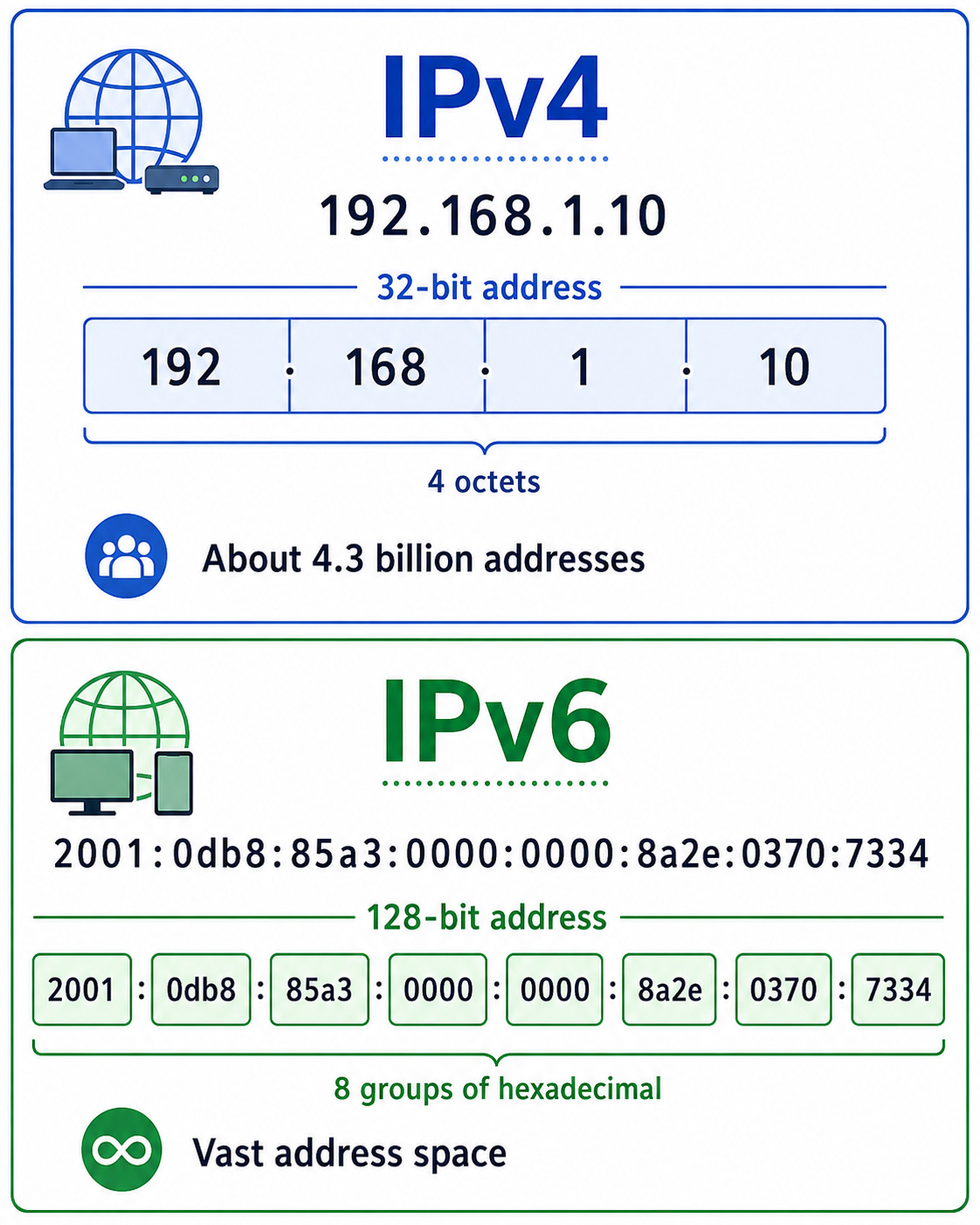
Every device connected to the internet has an IP address, a numerical identifier that tells the network where to deliver packets addressed to that device.
An IP address is like a postal address for a machine. Without one, the network has no way to route data to the right destination.
IPv4 addresses are 32-bit numbers written as four decimal numbers separated by dots, like 192.168.1.1. The 32-bit space allows roughly four billion unique addresses, which seemed enormous when IPv4 was designed in the 1980s and has long since proved insufficient.
IPv6 addresses are 128-bit numbers that provide a vastly larger address space, written as eight groups of four hexadecimal digits. The transition from IPv4 to IPv6 has been underway for years and is ongoing.
When a device sends data to another device, that data does not travel in a straight line. It passes through a series of routers, which are specialized machines whose job is to read the destination IP address of each incoming packet and forward it toward the destination.
Each router knows the topology of the network around it and can make a forwarding decision for each packet.
A packet sent from a browser in London to a server in New York might pass through fifteen or twenty routers before arriving.
This routing model is robust because it requires no central coordination. Each router makes independent decisions based on its local knowledge of the network.
If a link goes down, routers update their routing tables and start forwarding packets around the failure.
This decentralization is why the internet is resilient to partial failures.
Data is not sent across the internet as a continuous stream. It is broken into small chunks called packets, each one carrying a portion of the data along with a header containing the source and destination addresses and sequencing information.
The packets are routed independently and may take different paths to the same destination.
At the destination, the packets are reassembled in the correct order using the sequencing information in their headers.
If some packets are lost in transit, the protocol responsible for reliability requests retransmission of the missing ones.
Packet switching is more efficient than sending a continuous stream because it allows many different communications to share the same network links.
A link carrying packets from many different connections can interleave them, using available capacity far more efficiently than if each connection held the link exclusively for the duration of its transmission.
Two numbers describe the performance of a network connection.
Latency is the time it takes for a packet to travel from source to destination, usually measured as the round-trip time because most protocols require acknowledgments.
Bandwidth is how much data can be sent per unit of time.
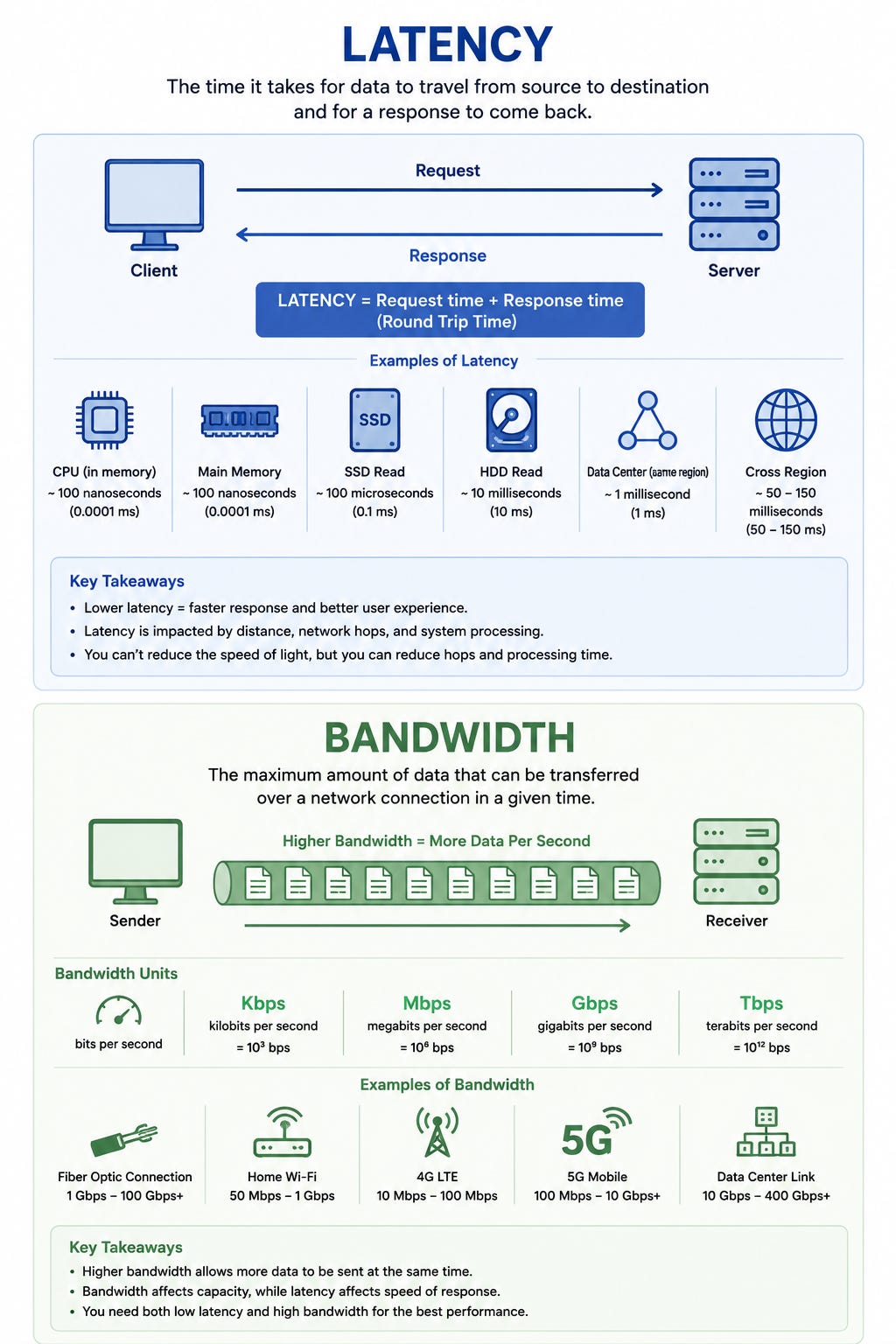
Latency is governed by physics.
Light travels at roughly three hundred thousand kilometers per second in a vacuum, and through fiber optic cable at roughly two thirds of that speed.
A packet traveling between London and New York covers roughly six thousand kilometers, which puts a physical floor of roughly forty milliseconds on the round-trip time.
Real latency is higher due to processing at each router and the path not being a straight line.
Understanding latency at the physics level is useful for system design because it makes geographic decisions concrete.
Serving a user in Tokyo from a server in New York adds roughly one hundred and seventy milliseconds of network round-trip time regardless of how fast the server is.
A CDN edge node in Tokyo reduces this to a few milliseconds.
This is not an optimization. It is a one-to-two order of magnitude difference in response time that directly determines whether the experience feels instant or sluggish.
A domain name like designgurus.io is how humans refer to services on the internet. An IP address like 104.21.14.190 is how machines refer to the same service. DNS, the Domain Name System, is the system that translates between the two.
When a user types a domain name into their browser, the following sequence happens before any request reaches the server.
The browser first checks its local DNS cache.
If it has recently resolved this domain and the cached result has not expired, it uses the cached IP address immediately and skips the rest of the lookup.
If the cache is empty or expired, the browser asks the operating system’s DNS resolver.
The resolver checks its own cache.
If that is also empty, it contacts a recursive resolver, usually provided by the internet service provider or a public DNS service like Google’s 8.8.8.8 or Cloudflare’s 1.1.1.1.
The recursive resolver works through a chain of authoritative DNS servers to find the answer. It starts with the root name servers, which know the authoritative servers for each top-level domain like .io or .com.
The root server refers the resolver to the authoritative server for .io.
The .io server refers it to the authoritative server for designgurus.io. That server returns the IP address for the domain.
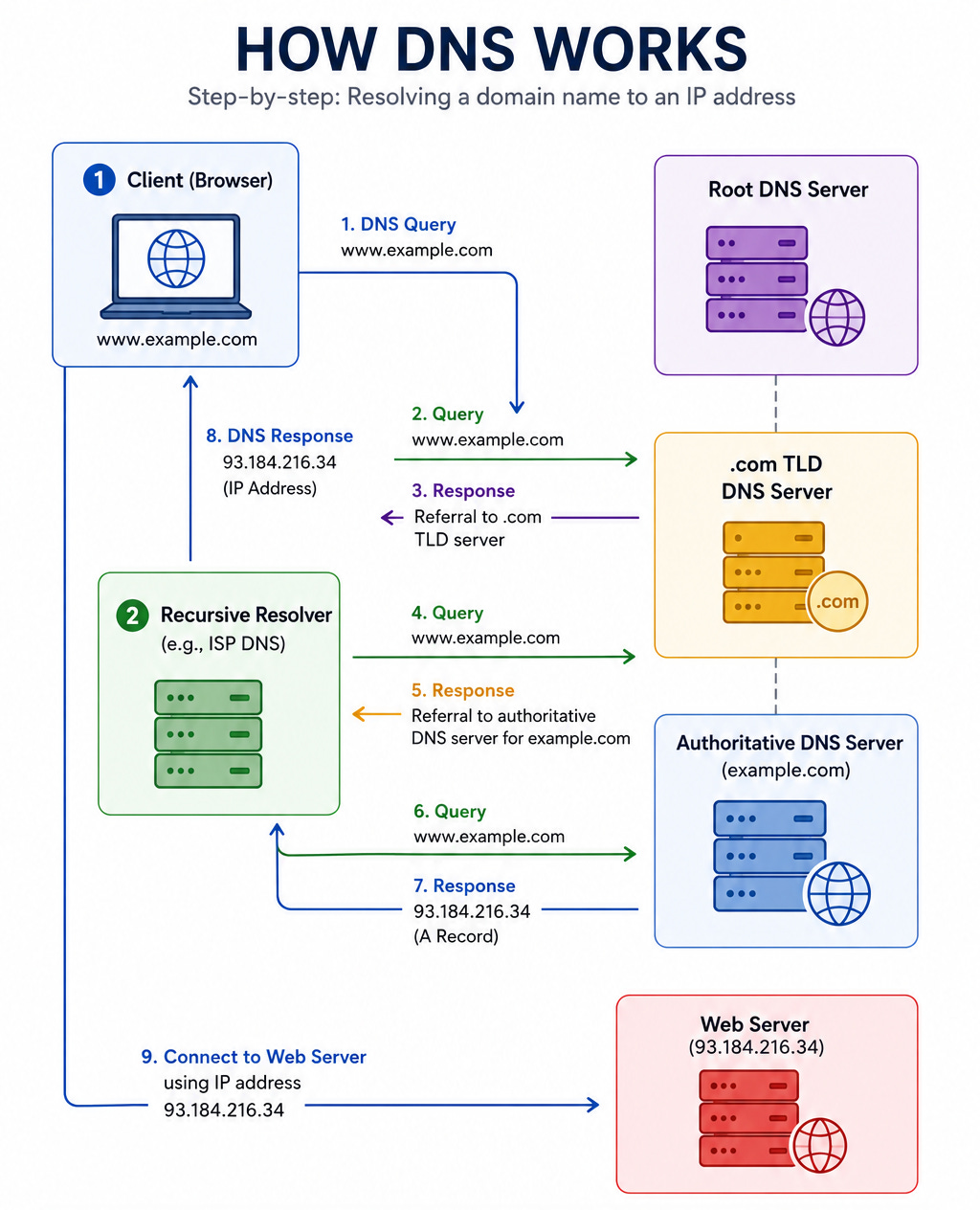
The recursive resolver caches this result for the duration specified by the TTL (time to live) field in the DNS record, returns the IP address to the browser, and the browser can now make the actual request.
DNS is more than a name lookup service.
It is a traffic routing mechanism that system designers use to distribute traffic geographically and implement failover.
DNS load balancing works by returning different IP addresses in response to the same DNS query, distributing clients across multiple servers. A simple round-robin DNS setup returns a different server’s IP address on each query, spreading traffic across a pool. More sophisticated setups return the IP of the server nearest to the client’s location, reducing latency.
Comments
Nothing yet. Say the first thing.
Sign in to join the conversation.