

Why the high-level diagram decides the interview
What to draw and in what order
The components that belong and why
How to narrate while you draw
What strong versus weak diagrams look like
This is the fifth post in the eight-week From Foundations to FAANG-Ready series. Previous weeks covered scalability and load balancing (Week 1), distributed systems fundamentals (Week 2), API design (Week 3), and data modeling and database design (Week 4).
Here is the full series:
Week 1: System Design Fundamentals: Scalability, Latency, and Load Balancing (published)
Week 2: Distributed Systems Fundamentals: Consistency, Replication, Sharding, and Queues (published)
Week 3: API Design for System Design Interviews: REST, GraphQL, gRPC, and How to Choose (published)
Week 4: Data Modeling and Database Design: SQL vs. NoSQL and How to Choose the Right One (published)
Week 5: How to Draw a High-Level System Architecture That Impresses Interviewers (you are here)
Week 6: Detailed System Design: How to Go Deep, Find Bottlenecks, and Discuss Trade-offs
Week 7: System Design Case Studies: Design a URL Shortener and Design a Twitter Feed
Week 8: System Design Case Studies: Design a Chat System and Design a Rate Limiter
Subscribe to get all eight weeks delivered to your inbox as they publish.
In a system design interview, the requirements have been gathered, the scale has been estimated, and the interviewer says something like okay, let us see the architecture.
The candidate picks up the marker.
The next two minutes are where most interviews are won or lost.
Not because two minutes is long enough to draw a complete system. It is not. But two minutes is long enough for the interviewer to form a clear impression of whether this candidate knows what they are doing.
A candidate who starts drawing immediately with recognizable components, clear labels, and directional arrows that mean something has already communicated competence before saying a word.
A candidate who pauses, draws a vague box labeled backend, and then says where do I start has communicated something else entirely.
The high-level architecture phase of a system design interview is not primarily a drawing exercise. It is a communication exercise where the drawing is the medium. What you draw, the order in which you draw it, and what you say while drawing together tell the interviewer how you think about systems.
Whether you start from the user’s perspective or the server’s perspective.
Whether you think about data flow or just component inventory.
Whether you add components because the problem requires them or because they sound sophisticated.
This week covers the complete process for drawing a high-level system architecture that impresses interviewers: what to draw first, how to build the diagram progressively, what to say while drawing, what belongs on the diagram and what does not, and what the difference looks like between a diagram that signals depth and one that signals surface knowledge.
The high-level diagram phase should not start immediately after requirements.
There is a brief preparation step that most candidates skip, and skipping it is what produces vague or incoherent diagrams.
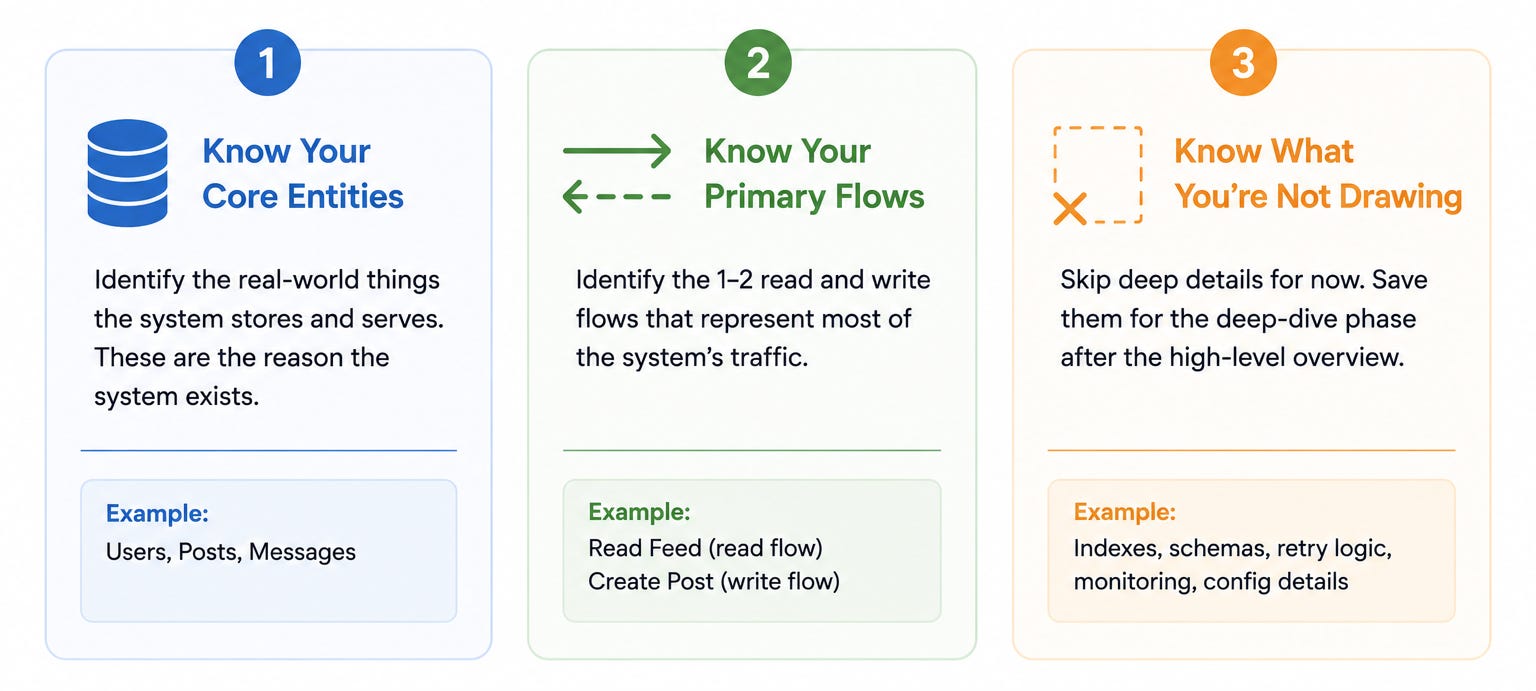
Before picking up the marker, spend thirty seconds identifying the core entities the system needs to store and serve.
Not the database tables.
The real-world things: users, messages, posts, orders, videos, sessions.
These entities are what the system’s components will exist to create, read, update, and delete.
Knowing the core entities in advance prevents the most common high-level diagram mistake, which is drawing infrastructure components without connecting them to the data they serve.
A load balancer that routes traffic to application servers that talk to a database is a correct abstraction.
A load balancer that routes traffic to application servers that talk to a database that stores users, messages, and notification events is a grounded architecture.
Before drawing, identify the one or two flows that represent most of the system’s traffic.
For a social media platform, the primary read flow is loading the feed and the primary write flow is posting content.
For a URL shortener, the primary read flow is redirecting a short URL and the primary write flow is creating a new short URL.
The high-level diagram should make these primary flows visible.
The most important paths through the system should be the most prominent paths on the diagram.
A diagram where the primary flows are hard to trace is a diagram that has been drawn without understanding what the system is for.
The high-level diagram is not the complete system. It is the starting point that the deep dive will build from. Before drawing, decide what belongs at this stage and what belongs in the deep dive.
The high-level diagram should show the main components and their connections. It should not show internal database schemas, specific caching eviction policies, detailed message queue configuration, or failure handling logic.
All of that belongs in the deep dive. Trying to put everything on the high-level diagram produces a cluttered, unreadable mess that signals the candidate does not know how to communicate at the right level of abstraction.
Draw the high-level architecture in five steps, in this order.
The order matters because it mirrors the way data actually flows through the system, which makes the diagram intuitive rather than arbitrary.
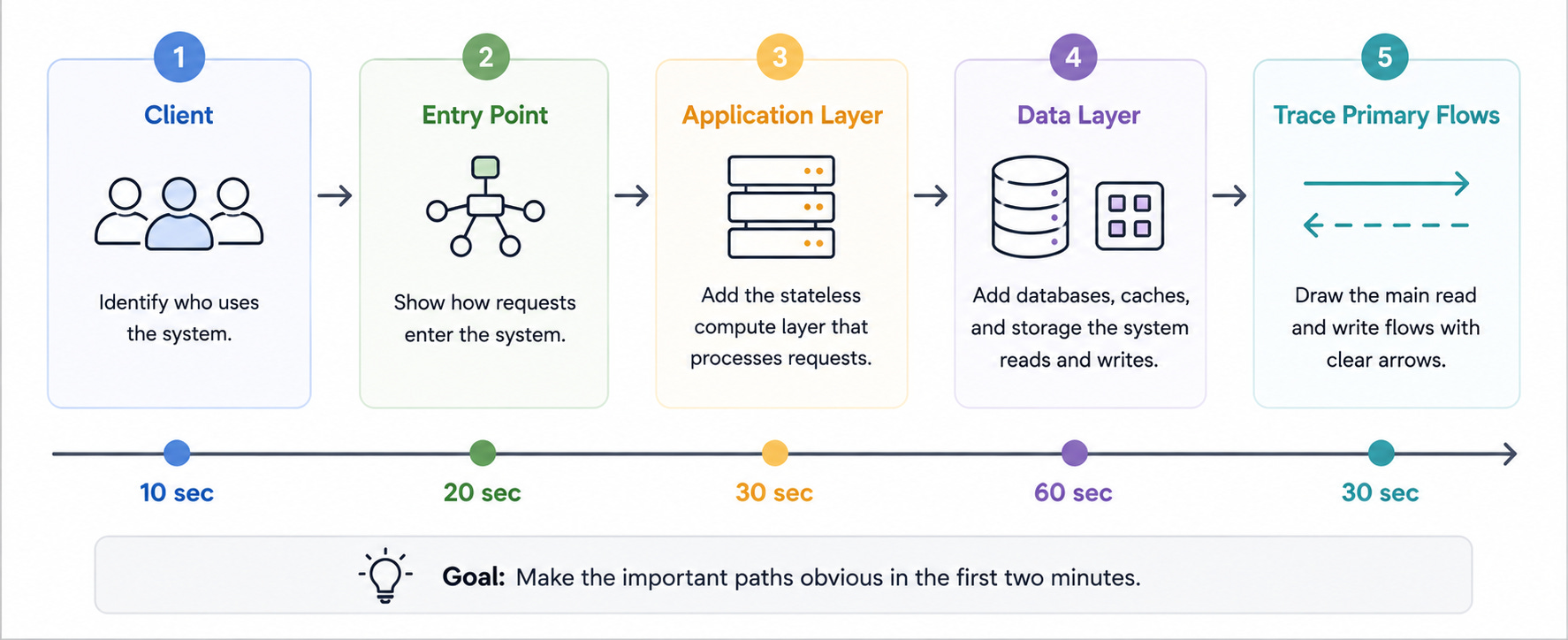
Start at the far left of the whiteboard and draw the client. Label it clearly: Web Client, Mobile Client, or both if the system serves multiple client types. Draw it as a simple rectangle or a device icon.
Starting with the client is not just convention. It is the right starting point because the client’s needs are what the rest of the system exists to serve. Every component you add after this should exist because it helps the system serve the client better.
As you draw it, say: “I am going to start with the client because the system’s job is to serve user requests and I want the architecture to reflect that data flow from left to right.”
This single sentence tells the interviewer that your diagram is intentional rather than arbitrary. It explains a choice that might otherwise seem unremarkable.
Draw the first server-side component the client talks to. For most systems this is either a load balancer (if the system serves web traffic) or an API gateway (if the system has multiple backend services). Draw it immediately to the right of the client with a labeled arrow connecting them.
Label the arrow with the protocol: HTTPS for browser clients, or the specific API style you chose in the requirements phase (REST, GraphQL, or gRPC).
Comments
Nothing yet. Say the first thing.
Sign in to join the conversation.