
Kubernetes 1.34 is here, and it brings features that can make your cluster safer, faster, and easier to manage. This release focuses on better resource handling, stronger security, and quality-of-life improvements for both developers and operators.
In this article, I’ll walk you through the most interesting changes.
Let’s get started!
Kubernetes 1.34 makes Dynamic Resource Allocation a stable feature. If you have to deal with GPUs, TPUs, or other special devices, this will ease your work. With DRA, Pods can request and claim devices in a structured way, very similar to how dynamic storage provisioning works.
Behind the scenes, DRA uses new APIs under resource.k8s.io like ResourceClaim, DeviceClass, ResourceClaimTemplate, and ResourceSlice. Pods can now include a resourceClaims section to declare what they need, and the scheduler will take care of the rest.
Here’s a small code snippet:
apiVersion: v1
kind: Pod
metadata:
  name: gpu-pod
spec:
  resourceClaims:
    - name: my-gpu
  containers:
    - name: app
      image: nvidia/cuda:12.0.1-base
      command: ["nvidia-smi"]
      resources:
        claims:
          - name: my-gpu
---
apiVersion: resource.k8s.io/v1
kind: ResourceClaim
metadata:
  name: my-gpu
spec:
  devices:
    requests:
      - name: gpu
        deviceClassName: nvidia-gpu
When you create a Pod that references this claim, Kubernetes will assign the GPU automatically.
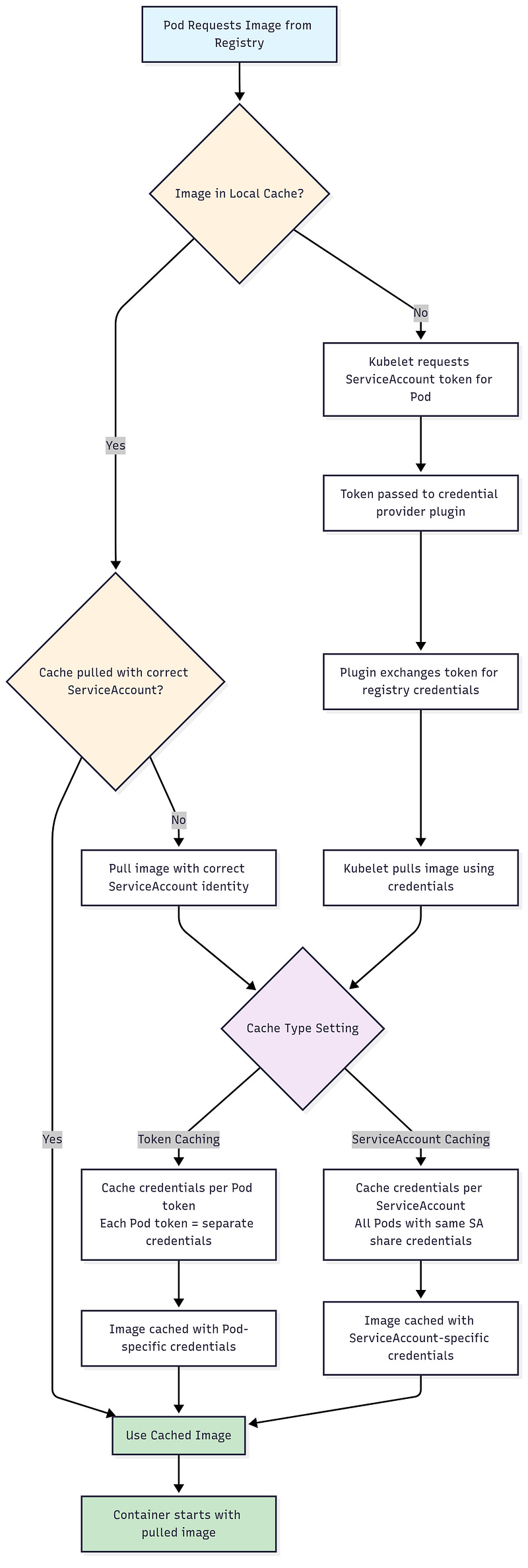
In the past, many clusters used long-lived image pull secrets. That was risky because anyone who got access to the secret could pull images forever. In 1.34, the kubelet can now use short-lived ServiceAccount tokens instead.
This means your nodes only get tokens valid for a short time, tied to the Pod. If someone steals one, it quickly becomes useless.
To try this, make sure to enable the feature gate KubeletServiceAccountTokenForCredentialProviderson each node’s kubelet. The kubelet needs a “credential provider plugin” — a program (exec plugin) that can take a ServiceAccount token and exchange it for registry credentials. Also, you have to set the tokenAttributes field in the CredentialProviderConfig file for the plugin.
The tokenAttributestells the kubelet:
What audience the token should have (
serviceAccountTokenAudience).What caching strategy to use (
cacheType) — either per-pod token (“Token”) or per service account (“ServiceAccount”), depending on how your credentials work.Whether a ServiceAccount is required (
requireServiceAccount: true) so that only pods with a service account are handled by this plugin.
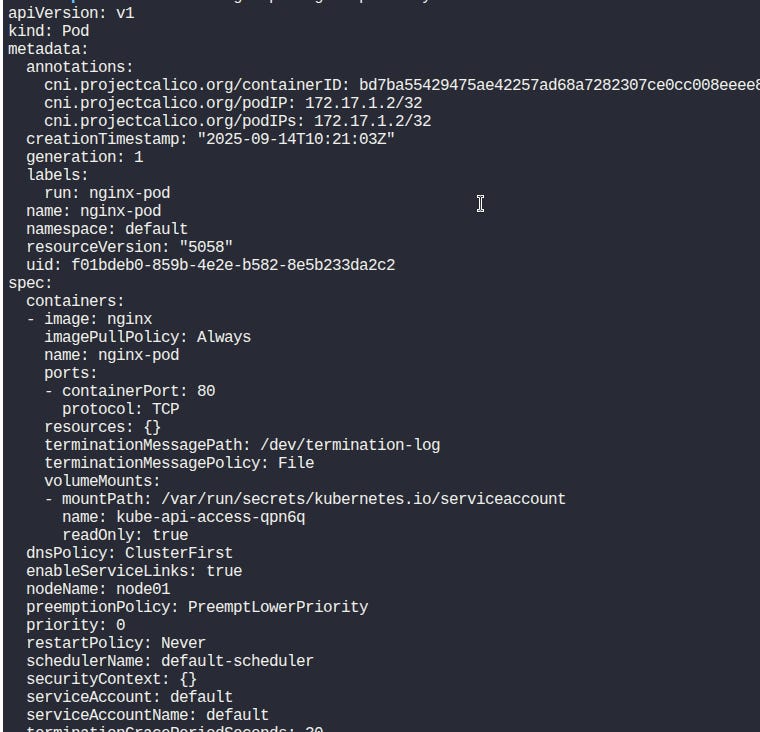
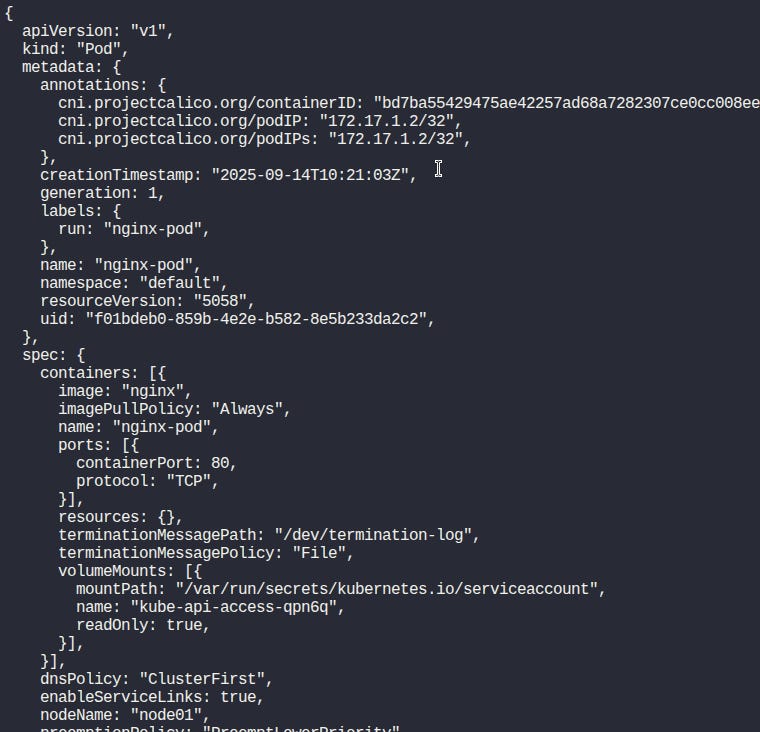
YAML has always been flexible, but that flexibility sometimes creates confusion. For example, strings and numbers can get parsed in surprising ways. Kubernetes 1.34 introduces KYAML, a stricter YAML flavor.
Export the env variable:
export KUBECTL_KYAML=trueYou can try it by running:
kubectl get pods -o kyamlBefore (using -o yaml):
After (using -o kyaml):
Jobs in Kubernetes manage batch workloads. Before 1.34, when a Pod failed, the Job would instantly create a replacement. That sounds good, but in resource-tight clusters, it often caused pressure because both the failed Pod and the new one ran at the same time.
With the new Pod Replacement Policy, you can wait until the old Pod fully terminates before the Job starts a new one. Your cluster breathes easier, and your Jobs behave more predictably.
Here’s how you can set it in a Job spec:
apiVersion: batch/v1
kind: Job
metadata:
  name: batch-example
spec:
  podReplacementPolicy: TerminatingOrFailed
  template:
    spec:
      containers:
        - name: worker
          image: busybox
          command: ["sh", "-c", "echo Running; sleep 5"]
      restartPolicy: Never
This makes Jobs more suitable for environments with tight CPU or GPU limits.
In earlier versions of Kubernetes, setting up authentication often meant adding a long list of API server flags. Each authenticator had its own configuration, and making changes usually required restarting the API server. That approach was hard to manage and not very flexible.
Kubernetes 1.34 introduces the AuthenticationConfiguration API, which centralizes authentication settings in a single resource. You can now define multiple authenticators in one file, and the API server can reload the config dynamically.
With this release, you can now also specify how JWT authenticators connect to external identity providers using egress selectors. This is controlled by the new issuer.egressSelectorType field.
If you leave this field unset, Kubernetes behaves as before and makes the connection without using an egress selector.
This functionality is behind the StructuredAuthenticationConfigurationEgressSelector feature gate, which is beta in v1.34 and enabled by default.
Kubernetes 1.34 introduces a new way to tighten access control using field and label selectors. Until now, when you gave someone permission to list or watch Pods, they could usually see everything in that namespace. With the new feature, authorizers like the built-in node authorizer or even a custom webhook can check not only what resource type a request is for, but also the selectors included in the request.
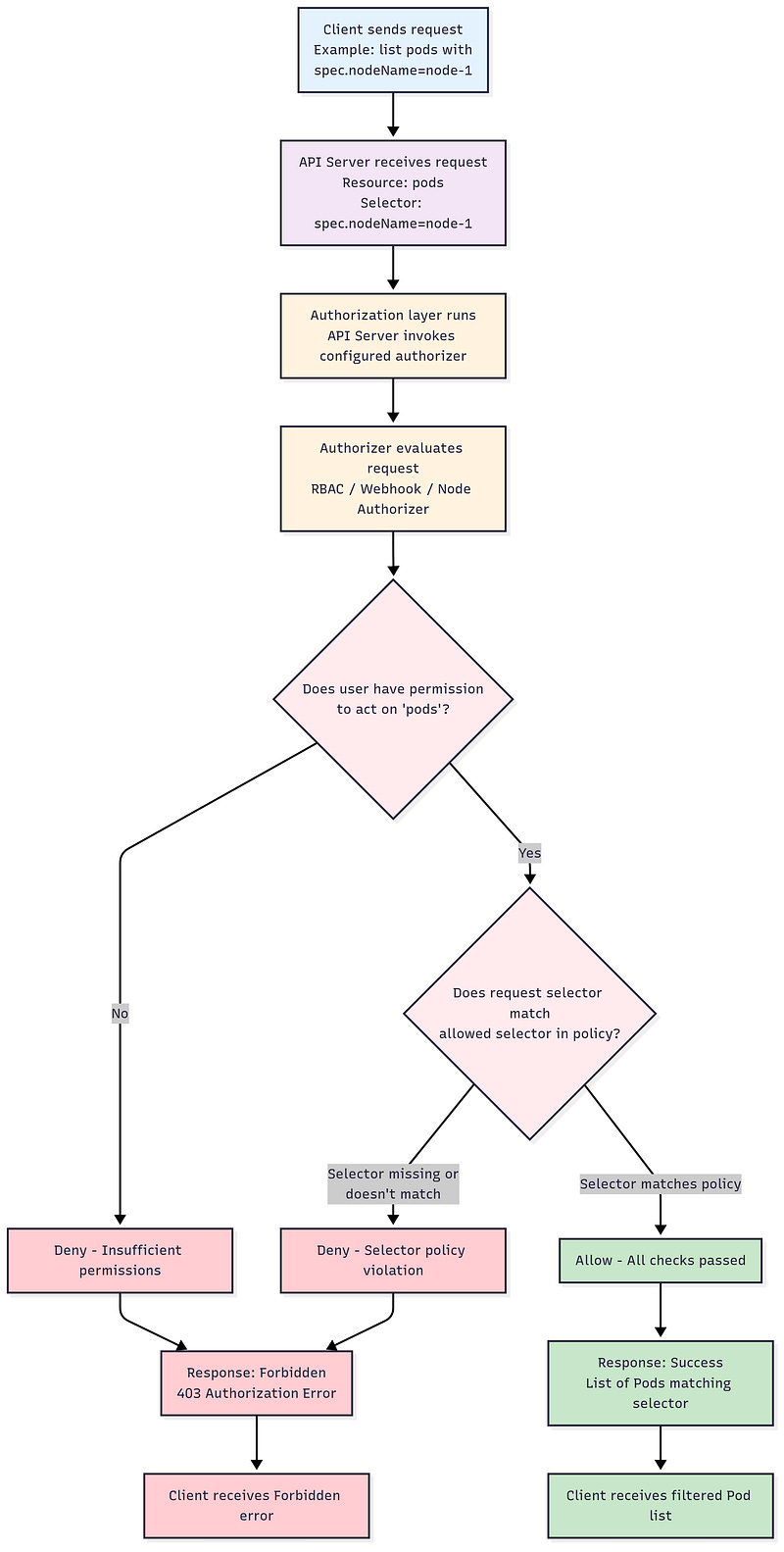
For example, you could allow a kubelet to list Pods, but only if it requests the Pods scheduled on its own node using a field selector on .spec.nodeName. If the kubelet tries to list all Pods without that selector, the request will be denied. The same approach works with label selectors, so you can tie access to specific workloads marked with certain labels.
This makes it possible to design true least-privilege policies. You no longer have to give a client access to every Pod or Deployment just because they need to query a few. Instead, you can scope access down to the exact subset they should see. This is especially powerful for multi-tenant clusters or cases where each node should only manage its own workloads.
Direct Server Return (DSR) is now stable in kube-proxy for Windows. Network traffic from a load-balanced service can now bypass the Load Balancer and go directly to the client. That reduces latency and lowers the load on your load balancers. You can enable this feature by adding the --enable-dsr=true flag to the Windows kube-proxy.
Also, graceful node shutdown on Windows is now enabled by default in beta.
Typing long kubectl commands can be troublesome. Kubernetes 1.34 introduces a .kuberc file where you can set your own defaults.
The default location is $HOME/.kube/kuberc.
It lets you define defaults and aliases.
For example, if you want to prompt for confirmation on resource deletion:
apiVersion: kubectl.config.k8s.io/v1beta1
kind: Preference
defaults:
- command: delete
  options:
    - name: interactive
      default: "true"
You can also create aliases to shorten common commands:
apiVersion: kubectl.config.k8s.io/v1beta1
kind: Preference
aliases:
- name: getn
  command: get
  options:
   - name: output
     default: yaml
When you run kubectl getn pods, it will print the result in YAML format.
Kubernetes 1.34 is a solid release that brings a log of new benefits. In this article, you learned about the main highlights of the release. Feel free to experiment with them at your leisure. To read about all new features, you can check the official Kubernetes 1.34 CHANGELOG.
If you’re just starting to learn Kubernetes, you might benefit from my ebook for beginners, Master Kubernetes from Scratch.
I hope that this post has been useful. Thanks for reading, and see you next time!
Thanks for reading Curious Devs Corner! This post is public so feel free to share it.
No posts
Comments
Nothing yet. Say the first thing.
Sign in to join the conversation.