
In Part 1 of this series I demonstrated the use of Python built-in and statistics module functions to calculate a selection of statistics. In Part 2 I wrote a CalcStats class to calculate various statistics from a List. Several of the statistics require the data to be iterated and the built-ins and statistics module functions do this each time they are called. The CalcStats class performs just one iteration so I put forward the hypothesis that it might be faster. In this article I will carry out a pair of timing tests to find out.
This article has a single Python file, statstimings.py, which you can find in the GitHub repository. This repository contains all of the files for this series.
This is statstimings.py.
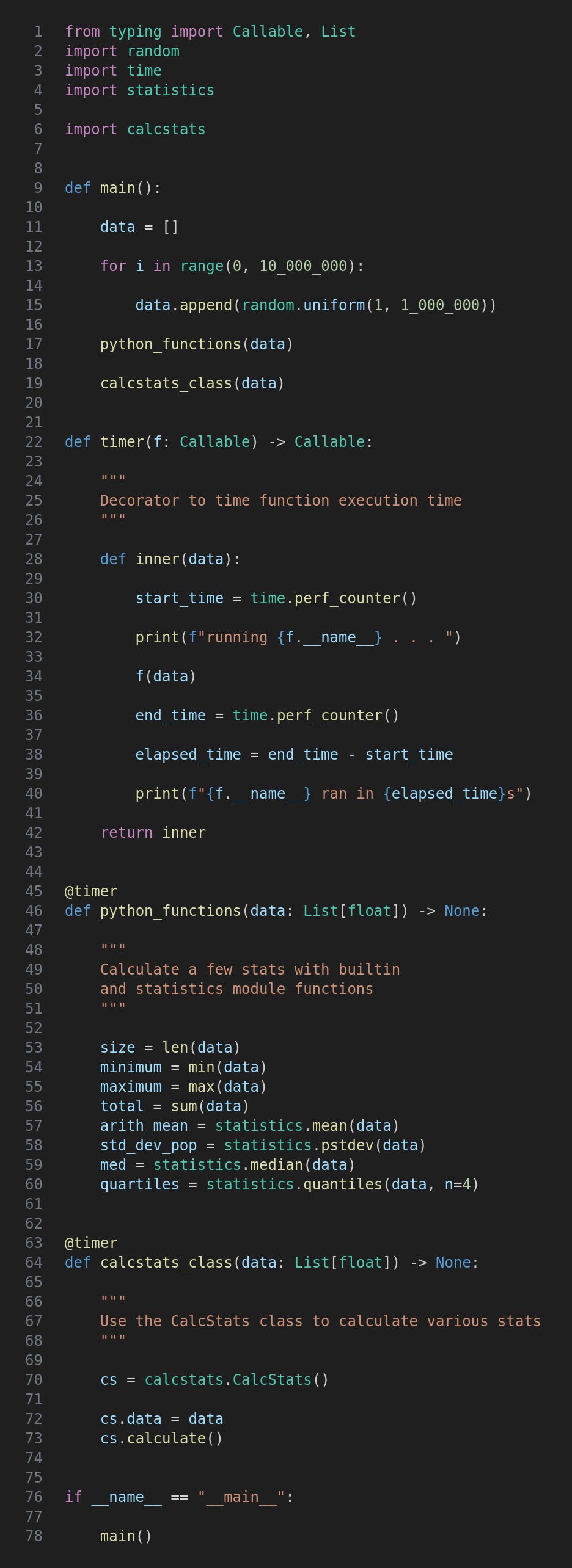
After a couple of items from typing we import random for creating test data, time for the perf_counter function and statistics for a few of its functions. The calcstats module from Part 2 is also imported.
This function creates a list of ten million random values and then passes them to both python_functions and calcstats_class.
This is a decorator function which, if you are not familiar with the concept, takes another function as an argument and then builds and returns a “decorated” function that adds to (or possibly replaces) that function.
In this case we carry out the following additional tasks in the inner function:
Pick up the start time using time.perf_counter(). This is accurate to nanoseconds, ie. billionths of a second.
Print a message saying the function is running. Note the use of __name__ to get the outer function’s name.
Call the outer function. Note the syntax for the data parameter,
Call time.perf_counter() again to get the end time.
Calculate and print the elapsed time.
Firstly note that this and the following function are prefixed with @timer. This means that instead of being run directly they will be passed to the timer function for it to do its thing.
The function itself is very straightforward and just uses a few of the functions from Part 1.
Again this is very simple and uses the CalcStats class from Part 2.
Run the program like this:
python3 statstimings.py
There will be a short delay while the random test data is created, then python_functions will start and sooner or later the run time will be printed. Then calcstats_class is run and again its time is printed.
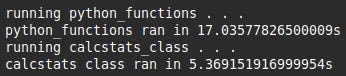
My hypothesis has been validated: it is about three times faster to run the CalcStats calculate method.
For updates and random ramblings please follow me on Bluesky.
No AI was used in creating the code, text or images in this article.
Comments
Nothing yet. Say the first thing.
Sign in to join the conversation.