
Everything about how I run my agency lives in one folder of plain files. I can hand it to any AI tool, and when I want to shift models, I can be completely agile.
That folder holds every meeting note, every strategy doc, every content plan, every half-formed idea I dumped in at 11pm, every client’s entire history, and all the rules my AI runs on. People call this a “second brain.” Mine runs my company.
Here’s exactly what it is, how it’s organized, and how to build your own, whatever tools you already use.

The why first, because it makes everything else make sense.
An AI tool is only as good as the context you give it. A fresh chat knows nothing about you, your business, your clients, or how you like things done. So most people spend the first ten minutes of every session re-explaining themselves, and they still get generic output, because they’re feeding it scraps from memory.
The fix is to stop keeping your context in your head and scattered across ten apps, and start keeping it in one organized place your AI can read. Do that once, and every tool you point at it starts already knowing everything.
That organized place is the second brain. Everything below is just how to build a good one.

Mine holds everything that touches the business:
Every client meeting note, transcribed and filed the second a call ends
Strategy docs, positioning, brand guidelines
Content plans, and the actual drafts
Brain dumps and rough ideas, exactly as messy as they arrive
Internal notes and decisions
The rules and the repeatable how-tos: how we write, what we never say, how each client likes things, the step-by-step for the tasks we run over and over
That last bucket is the one most people skip, and it’s the most important. I’ll come back to it.

This is the part I care about most, and the reason my setup looks the way it does.
My second brain is just files. Plain text and markdown, which is plain text with light formatting. Nothing is trapped inside one company’s app or one company’s format. That means I can point any tool at it. Today I mostly use Claude Code. If I want to open the exact same files in Codex, or in some tool that doesn’t exist yet, I can. Anything that can read files can read my company brain.
This matters more than it sounds like it does. In AI, the “best tool” changes every few weeks. If your whole system is locked inside one app, every switch is a painful migration, and you end up staying somewhere worse because leaving costs too much. When your system is just well-organized files, switching is nearly free. You keep the brain and swap the engine. That flexibility is the entire advantage, and it’s exactly why I’d never build this somewhere I couldn’t easily get my data back out of.

Structure is what separates a second brain from a junk drawer. Here’s mine.
Full disclosure: I ran my business this way before AI existed. My Google Drive has been hyper-organized for years. One HQ folder with everything for the business: internal operating docs, procedures, templates. A folder per client, and inside it, two more: a working folder for anything in progress we don’t want the client to see just yet, and a folder explicitly shared with the client, where their versions and final files live. Plus a parallel version only me and my executive team can access, with contracts, invoices, and correspondence. The whole thing is organized so a team member on their first day can find anything without asking. That was the standard before AI. AI just made the payoff enormously bigger.
One top-level folder per client. Everything about that relationship lives under it.
Folders that mirror your org chart. You have a marketing department, so I have a marketing folder, and inside it, the department: director of marketing, content marketer, social media manager, copywriter, graphic designer. Each role is its own file with its own instructions. A mirror tree of the actual company.
Predictable subfolders inside each one. Meeting notes in one. Intake and onboarding in another. Then strategy, content plans, copy, social, data. Same layout every time, so neither I nor the AI has to go hunting. For content clients, that means a brand voice folder with the guidelines and the do’s and don’ts, all their approved and posted content, and their analytics, so we can see what performed and iterate on it. The content itself is organized by quarter, then month, then week, then day, with instruction docs for which format posts on which day. It reads clean for a human and clean for an AI, which is the point.
A README at the top of every folder. This is the piece that makes the whole thing work, and the one most people are missing. A README is just a plain-text file that sits at the top of a folder and explains what’s inside and how to use it. (The name is a programming convention. It literally means “read me first.”) Mine do two jobs. They explain how we work with that specific client, their preferences, the things they never want, their internal vocabulary. And they point the AI to the right subfolder for whatever I’m asking. So when I say “draft this client’s newsletter,” the AI reads the README, picks up the rules, and knows exactly where to look. It’s an onboarding doc for the tool.
Shared rules and skills, written once. My writing rules, my banned words, the repeatable how-tos, all live in one shared spot so every client and every tool inherits the same standard. I write a rule one time. Everything downstream follows it. We keep an internal swipe doc for sales pages, for example, and every time we build one, the AI knows to go reference it, along with our resources and templates, before it writes a word.
It’s imperfect, and that’s fine, because the reference is always there to pull it back. Yesterday I was working on a sales page and the first draft was complete trash. So I asked: why aren’t you following the standard AIDA template I like to start from? (AIDA is the classic sales structure: attention, interest, desire, action.) It said “you’re right,” went back to my swipe doc, looked at years of sales pages I’ve written, and came back much closer to a final draft, because now it had the client’s voice and my sales style to draw on.
Once that exists, the asks get good. “Read the last six months of this client’s meeting notes and pull every story they’ve told about why they started the business.” “Check this new product idea against their existing plan and flag anything that conflicts.” “Draft next month’s content from their strategy doc and last month’s top performers.” None of that is possible when the context lives in your head. All of it is easy when it lives in a structured folder.

This is the question everyone asks, so here’s the full answer, tradeoffs included.
One non-negotiable first, no matter what you choose: your AI needs a way to read whatever you pick. That connection usually happens through something called MCP, short for Model Context Protocol. In plain English, it’s a standard plug that lets an AI tool reach into another app or file store and actually read what’s there (and sometimes write to it). A second brain your AI can’t open is just a filing cabinet. So before you commit to a home, confirm your AI can connect to it.
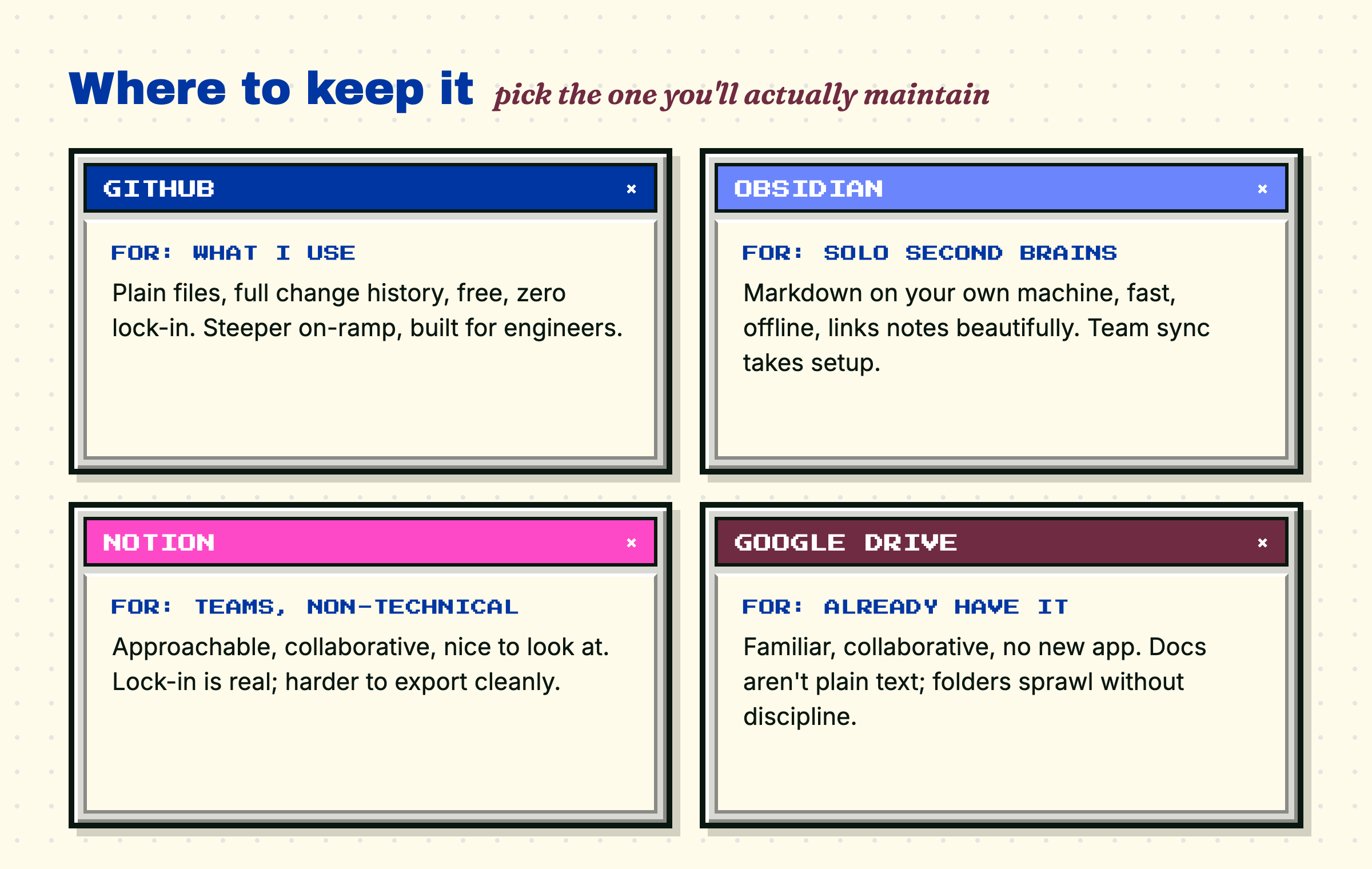
Now the options, and who each one is for:
GitHub is what I use. It’s built to store plain files, it keeps a full history of every change you’ve ever made, it’s free, and AI tools read from it cleanly. The catch: it’s the most technical option, built for engineers, so the on-ramp is steeper than the others. That tradeoff buys me total portability and zero lock-in, which I value more than a pretty interface. For most people, GitHub is confusing anod not worth the learning curve, which is a fine thing to decide.
Obsidian keeps plain markdown files right on your own computer. It’s fast, works offline, links your notes together beautifully, and is a favorite for personal second brains. The tradeoff: it leans solo, so syncing across a team or across multiple devices takes a little setup. If this is just for you, it’s a great place to start.
Notion is the most approachable and the most collaborative. It’s nice to look at, great for teams, and easy for non-technical people. The tradeoff is portability. Your content lives in Notion’s own format, so you’re more tied to it, and getting everything back out cleanly is harder. If your team already runs on Notion and you mostly care about working together, it’s a strong pick. Just go in knowing the lock-in is real.
Google Drive is the one almost everyone already has. Familiar, collaborative, no new app to adopt. The tradeoff: native Google Docs aren’t plain text, so AI tools read them a little less cleanly, and folders tend to sprawl without discipline. If your work already lives in Drive, start there and keep the structure tight.
The honest summary: I picked GitHub for the flexibility and the zero lock-in. You should pick the one whose strengths match how you actually work, and whose ceiling you won’t hit too soon. The worst choice is whichever one you won’t keep up to date, because a second brain only works if you actually feed it.

You don’t need my setup. You need the pattern. Six steps:
Pick the home from the four above. Optimize for “the one I’ll actually maintain,” not the most impressive.
Decide the top-level structure. For a business, one folder per client or project. For personal life, one folder per area.
Write a README at the top of each folder. What this is, how you think about it, where things go. Plain language.
Put your rules in one shared spot, so every tool inherits them. How you write, what you never want, your standards.
Connect your AI to it (through MCP, a built-in connector, or a native integration), and confirm it can actually read your files before you trust it with anything real.
Feed it, continuously. Meeting notes, brain dumps, decisions, ideas. The brain is only ever as good as what you put in it.

The structure scales down as cleanly as it scales up.
Solo creator: folders for your content, your brand voice, your offers, your audience research. Drop every voice memo and idea in. Now your AI drafts from your own body of work instead of a blank page, and it sounds like you, because it’s been reading you.
Small team: one folder per client or project, a README on each, shared rules so everyone, and every tool, works to the same standard. The system holds the context no single person can keep in their head, which is exactly what lets a small team do the work of a much bigger one.
And it scales without breaking. The test I hold any system to: can it handle one client as easily as it handles five? As easily as fifty? As easily as 500? This one can, because every client is set up independently but referentially. Each folder stands alone, and they all point back to the same shared rules.
Personal life: health, home, money, travel, family. The same second brain that runs a business runs a household. Same idea, smaller folders.

The model is the engine, and everyone has access to the same engines now. The thing that actually makes the difference is the brain you build around it: how your context is organized, and how easily your tools can reach it. That part is yours, and you can’t buy it off a shelf.
And it isn’t a technical-person thing. It’s a weekend of organizing, done once. The payoff shows up every week after.
If you build one this month, I want to hear how you set it up, and where you decided to put it. Hit reply.
Cheers,
Audrey
Comments
Nothing yet. Say the first thing.
Sign in to join the conversation.