
With AI becoming part of so many people’s daily workflows, its strengths are obvious. So are its limitations. For example:
A lawyer uploads a 40-page contract and asks Claude to review it. The analysis comes back and misses something critical on page 22. A post-sales leader sets up a Claude Project to evaluate SOWs against their firm’s standards. The output is decent but inconsistent.. sometimes it catches things, sometimes it doesn’t. A sales leader asks Claude to check whether a proposal meets the company’s deal requirements and gets a confident “yes” when the honest answer was “mostly, but section 4 is a problem.”
And the reaction is usually some version of: “See? AI isn’t ready for this.”
And I get it.. its an easy thing to say when you expect Claude to ‘just work’. But there are some gotchas you should be aware of. In fact, most of the time when Claude gets it wrong, it’s not because the model failed. It’s because of how the instructions, the documents, or the questions were set up.
These aren’t flaws in the technology. They’re gaps in the architecture around it. And every one of them is fixable.
Here are the six most common ones I see.
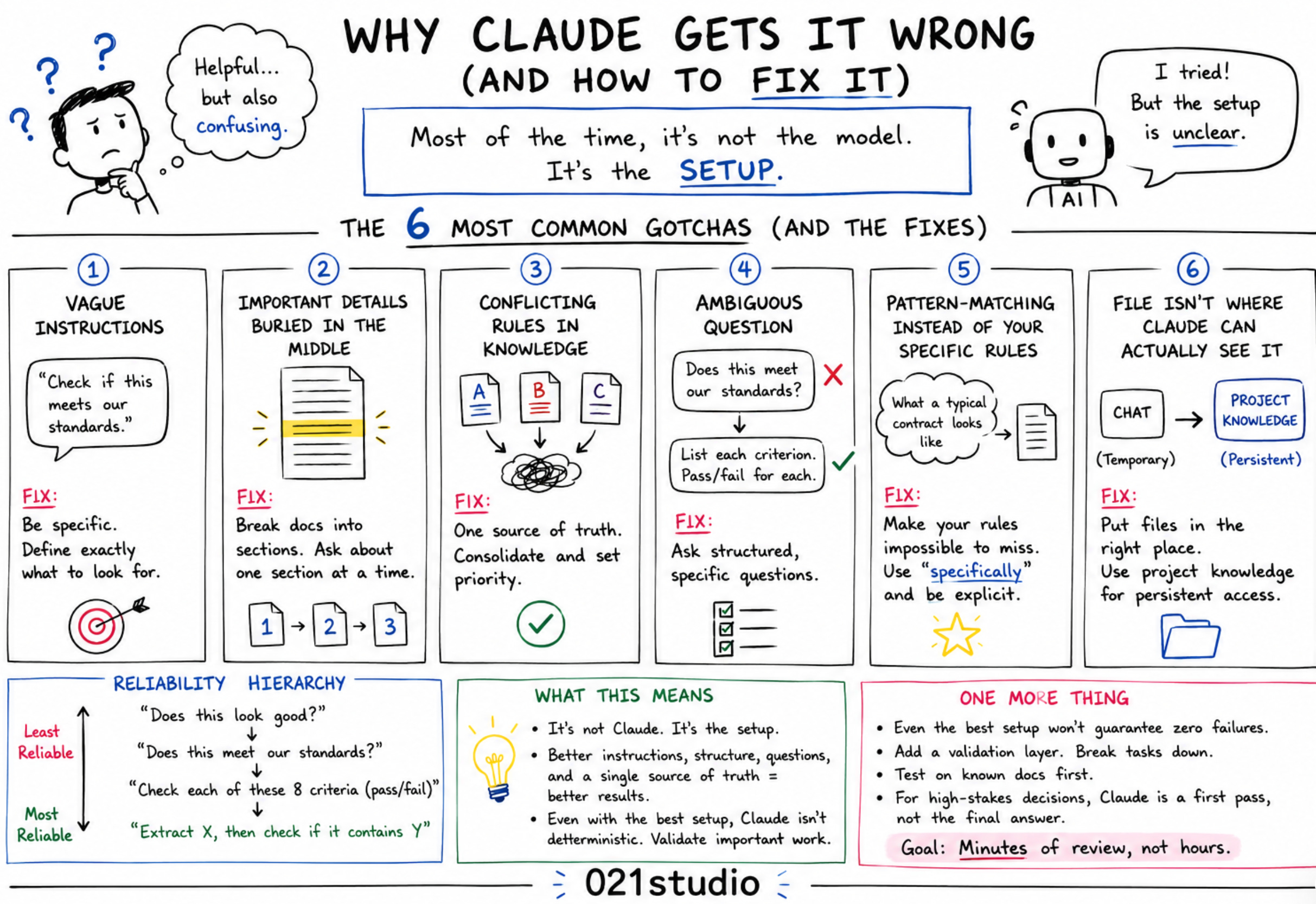
This is the most common reason Claude produces inconsistent output. And it’s almost always invisible to the person who wrote the instructions.
Your project instructions say something like “check if the SOW meets our standards” or “make sure the scope is clearly defined.” That feels specific. But “clearly defined” is subjective. Claude interprets what that means based on its training data and sometimes its interpretation doesn’t match yours.
The fix: Specificity. Instead of “scope should be clear,” write something like: “Scope must list specific deliverables with acceptance criteria for each one. Flag any deliverable described only as ‘consulting services’ or ‘advisory work’ without specific outputs.”
The more specific the rule, the more reliable the analysis. If a human following your instructions word-for-word could interpret them two different ways, Claude will too.
This one has a name in the research: the “lost in the middle” problem.
A 40-page contract has critical clauses buried on page 22. Claude attends more reliably to content at the beginning and end of long documents. The middle gets less attention. Not because Claude is lazy. Because of how attention mechanisms work in large language models.
The fix: Restructure how you feed the document. Instead of uploading the whole PDF and asking one question, break it into sections. “Analyze section 3, payment terms” gets better results than “analyze the whole contract.”
You’re not working around a flaw. You’re working with how the technology actually processes information. Just like you wouldn’t hand a new hire a 40-page document and say “tell me if anything is wrong” without pointing them to where to look.
If you have multiple documents in your project knowledge.. a standards doc from 2024, a revised checklist from last quarter, and a set of notes from a training session - and they say slightly different things about what a good SOW looks like, Claude will try to reconcile them.
Sometimes it picks the right one. Sometimes it doesn’t. And you won’t know which document it weighted until the output is wrong.
The fix: One authoritative rules document. Not five. Consolidate your standards into a single, clear reference. If there are exceptions or edge cases, document them in that same file with explicit priority order.
Think of it this way: if you handed five documents with slightly different rules to a new analyst and said “use these,” you’d get inconsistent work too. Claude has the same problem. One source of truth solves it.
“Does this meet our standards?” is a yes/no question that forces Claude to make a judgment call. And judgment calls are where AI is least reliable.
The problem is that the honest answer is often nuanced.. “mostly yes, but section 4 is ambiguous and section 7 is missing a key clause.” But a yes/no question pushes toward a binary answer, and Claude will pick one. Sometimes it picks wrong.
The fix: Ask structured questions instead of open ones. Compare the difference:
“Does this contract meet our standards?” → forces a judgment call, least reliable
“List every deliverable in this contract. For each one, tell me whether it has a specific acceptance criterion. Flag any that don’t.” → forces specific output, much more reliable
You’re not asking Claude to be smarter. You’re asking it a better question.
Claude has seen thousands of contracts, SOWs, proposals, and business documents in training. Sometimes it responds based on what a “typical good contract” looks like rather than your specific firm’s standards.
This is the hallucination-adjacent problem. Not making things up from nothing.. but applying general knowledge when you needed it to apply your specific rules. The output looks right. It reads like a competent analysis. But it’s answering a slightly different question than the one you asked.
The fix: Make your rules impossible to miss. Put them at the top of the project instructions in a clearly labeled section. Use explicit language like “Our firm specifically requires X” rather than “A good contract should have X.”
The word “specifically” does more work than you’d think. It signals to Claude that there’s a particular standard to follow, not a general best practice to reference.
Here’s a simple framework for thinking about how reliable Claude’s document analysis will be based on how you ask:
Least reliable: “Does this look good?” —> too much judgment, too little structure
Better: “Does this meet our standards?” —> still holistic, still a judgment call
Much better: “Check each of these 8 criteria and tell me pass/fail for each” —> structured, auditable, specific
Most reliable: “Extract the payment terms clause verbatim, then tell me if it contains X” —> decomposed into a retrieval task plus a specific check
The pattern: the more you decompose the question into specific, checkable items, the more reliable the analysis becomes.
This applies whether you’re reviewing contracts, evaluating customer health data, scoring accounts, or analyzing support tickets. The principle is the same. Don’t ask Claude to make a holistic judgment. Ask it to check specific things and report what it finds.
This one trips people (including myself) up constantly and causes real frustration because the symptom looks like Claude is ignoring you… rude right? but not really.
So here’s what happens..
Someone uploads a document or transcript, asks Claude to analyze it, and gets back a response that seems to miss the file entirely.. or worse, Claude says it can’t find what was referenced. It feels like the model failed. In almost every case, it didn’t.
The problem is that files and attachments behave differently depending on where and how they were added.
A file uploaded directly into a conversation only exists in that conversation’s context window. It’s not stored anywhere persistent. If you start a new conversation and reference that file, Claude has no access to it. It was never saved. It only existed for the life of that session.
Project knowledge is different. Files added to a project’s knowledge base persist across every conversation in that project. That’s where documents you want Claude to reference repeatedly should live — not dropped into individual chat threads.
Format matters too. A PDF processed through chat may be read as an image layer rather than extractable text, depending on how it was created. A scanned PDF with no text layer gives Claude nothing to work with, even if the upload appeared to succeed. Plain text and copy-pasted content reliably land in context. Scanned or image-heavy documents often don’t.
Context windows..
And context window length plays a role. A very large file might load into context but get truncated, meaning Claude genuinely cannot access content beyond a certain point — not because it’s ignoring it, but because it’s no longer within reach.
But there’s another scenario worth calling out specifically, because it’s one of the more frustrating ones: the file is attached to the conversation correctly, it shows up, and Claude still says it can’t find it or doesn’t engage with it.
This can happen for a few reasons. If the conversation has been running long.. multiple back-and-forth exchanges, lengthy system prompts, previous large documents.. the accumulated tokens can push the attachment toward or beyond the edge of the active context window. The file was there when it was uploaded. By the time you’re asking about it several messages later, there may not be enough context window remaining to hold both the conversation history and the full file content. Claude isn’t ignoring it. It genuinely can no longer see all of it.
It also happens when multiple files are attached at once. Claude may reliably access one and struggle with another, depending on how the content distributes across the available context.
The fix: Match the file to the right location. If you want Claude to reference a document across multiple sessions, add it to project knowledge. If you’re working with a single session, paste the content directly rather than uploading a file and hoping it lands cleanly. If you suspect a long conversation is the problem, start a fresh session with the file and a focused question.. less history competing for context space means more reliable access to the document. And if you’re using PDFs, confirm they’re text-based, not scanned images.
The file not being found is almost never a model failure. It’s a delivery problem.
None of these six problems are Claude’s fault. Every one of them is a setup problem, an architecture problem, or a question design problem.
That’s actually good news. Because it means the fixes are in your control.
The teams getting the best results from Claude aren’t the ones with better prompts. They’re the ones who invested in better instructions, better document structures, better questions, and a single source of truth for their standards.
That’s the work. And it’s the work most people skip because they assume the model should just figure it out.
One more thing worth saying honestly: even the best setup doesn’t guarantee zero failures. Claude is not deterministic. The same prompt on the same document can produce slightly different output on different runs. Specificity and structure dramatically improve reliability — but they don’t eliminate variance entirely. Anyone telling you otherwise is selling something.
So if you’ve worked through all six of these and you’re still not getting consistent results for a specific use case, that’s a real signal worth paying attention to. A few alternatives worth considering:
Build a validation layer. Run Claude’s output through a second pass with a specific prompt designed to catch errors. Ask it to review its own work against your criteria. It won’t catch everything, but it catches more than a single pass.
Break the task further. If analyzing a full contract is still producing inconsistent results, go smaller. One clause at a time. One question per run. The more decomposed the task, the more predictable the output.
Test on known documents first. Before you trust Claude on a live SOW or a real customer contract, test it on documents where you already know the right answer. Build a small set of test cases. Validate the setup before you rely on it.
Accept the human layer. For high-stakes decisions - legal review, final contract approval, anything where a wrong answer has real consequences - Claude is a first pass, not a final answer. The human review isn’t a workaround for an unreliable tool. It’s the right architecture for the stakes involved.
The goal isn’t to get Claude to a place where you never have to check its work. The goal is to get it to a place where checking its work takes minutes instead of hours, and where the errors it makes are predictable enough that you know what to look for.
If Claude isn’t getting it right for you, check these six things first. The answer is almost always in the architecture, not the model.
Hope this is helpful.
No posts
Comments
Nothing yet. Say the first thing.
Sign in to join the conversation.