
The SQL TRY_PARSE is one of the Conversions Functions. This function converts the String data to the requested data type and returns the result as an expression. For example, I suggest you use this TRY_PARSE function to convert the string data to either Date/time or Number type.
If the Try_Parse function cannot convert the string into the desired data type, or if we pass the string as non-convertible, this function will return NULL. The syntax of the SQL Server TRY_PARSE Function is
TRY_PARSE (String_Value AS Data_Type [USING Culture])

-- For example
SELECT TRY_PARSE (String_Column AS Data_Type USING 'en-US') AS [Column1]
FROM [Source]
- String_Value: Please specify the valid string you want to convert as the desired data type.
- Data_Type: Here, you have to specify the Data Type to which you want to convert the String_Value
- Culture: This is an optional parameter. And if you ignore the parameter, then the function will use the language of the current session.
SQL Server TRY_PARSE Example
The TRY_PARSE Function is mainly used to convert string values into dates and times, and numeric values. For example, the following query will parse the string to an integer and a decimal. It also parses the string to date and time. For more information about the remaining topics, refer to the SQL tutorial page.
DECLARE @str AS VARCHAR(50)
SET @str = '1234'

SELECT TRY_PARSE(@str AS INT) AS Result;

-- Direct Inputs
SELECT TRY_PARSE('4455' AS DECIMAL(10, 2)) AS Result;

SELECT TRY_PARSE('03/03/2017' AS DATETIME) AS Result;

SELECT TRY_PARSE('03/03/2017' AS DATETIME2) AS Result;

SELECT TRY_PARSE('Tutorial Gateway' AS DATETIME USING 'en-US') AS Result;
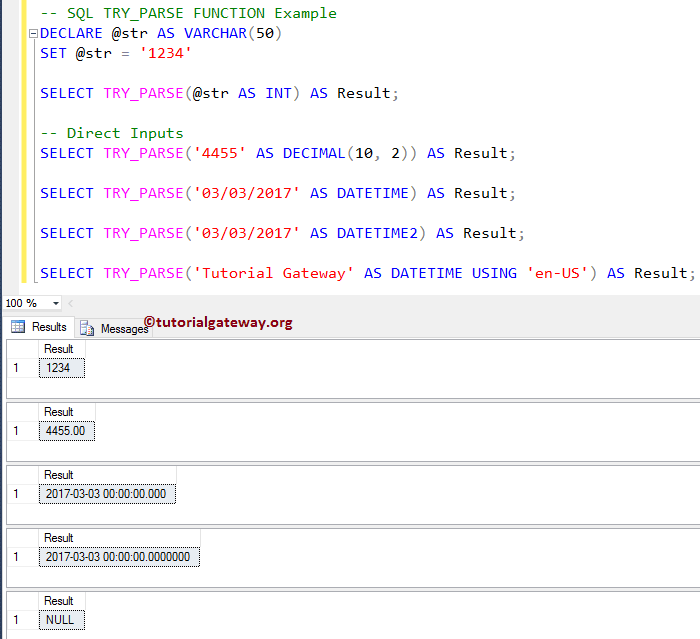
Below lines of the SQL Server code are used to declare a variable of VARCHAR Data Type. Next, we were assigned the string data ‘1234’.
DECLARE @str AS VARCHAR(50)
SET @str = '1234'
From the below statement, you can see that we are using the try parse function for converting the string to an integer. We also assigned new names to the result as ‘Result’ using the ALIAS Column.
SELECT TRY_PARSE(@str AS INT) AS Result;
In the next line, We used the SQL TRY_PARSE function directly on a string and converted it to a decimal value.
SELECT TRY_PARSE('4455' AS DECIMAL(10, 2)) AS Result;
Next, we convert the string to Date-Time and DateTime 2 data types. Please refer to SQL Data Types to understand the datatype limitations.
SELECT TRY_PARSE('03/03/2017' AS DATETIME) AS Result;

SELECT TRY_PARSE('03/03/2017' AS DATETIME2) AS Result;
Lastly, we tried to convert the ‘Tutorial Gateway’ string to date time. As you can see, it is not possible, so this SQL Server Try Parse function returns NULL as output.
TIP: Please refer to the SQL PARSE, SQL CAST, and SQL TRY_CAST functions from the list of available SQL conversion functions for type casting (data type conversion).
SELECT TRY_PARSE('Tutorial Gateway' AS DATETIME USING 'en-US') AS Result;
Use IIF with SQL TRY_PARSE
In this example, we show you how to use the IIF Statement to handle the NULLs returned by TRY_PARSE. It can be helpful when you are inserting records and you don’t know whether the column has a date and time or not. In this case, you can use this TRY_PARSE function to check; if not, we can replace it with the current date and time. Also, refer to the SQL CONVERT and SQL TRY_CONVERT articles.
SELECT IIF(
	    TRY_PARSE('Tutorial Gateway' AS DATETIME) IS NULL,
		       GETDATE(),
		       'False'
	   ) AS Result;
Here we used the SQL IIF statement and the SQL IS NULL statement to check whether the result expression is null or not.
Result
-------
2025-09-01 10:24:20.567