The SQL Server STRING_AGG String Function concatenates the string expressions and places a specified separator in between them. Remember, it will not place a separator at the end of the string. The basic syntax of the STRING_AGG function is as shown below.
SELECT STRING_AGG (String_Expression, Separator)
FROM [Source]
GROUP BY Columns
The list of arguments available in the STRING_AGG is
- String_Expression: Please specify a valid Expression
- Separator: Use VARCHAR or NVARCHAR type. This method will use this separator in-between string concatenation.
- Group By: This is an optional argument. Use this to perform Grouping. Refer to the GROUP BY in SQL Server article.
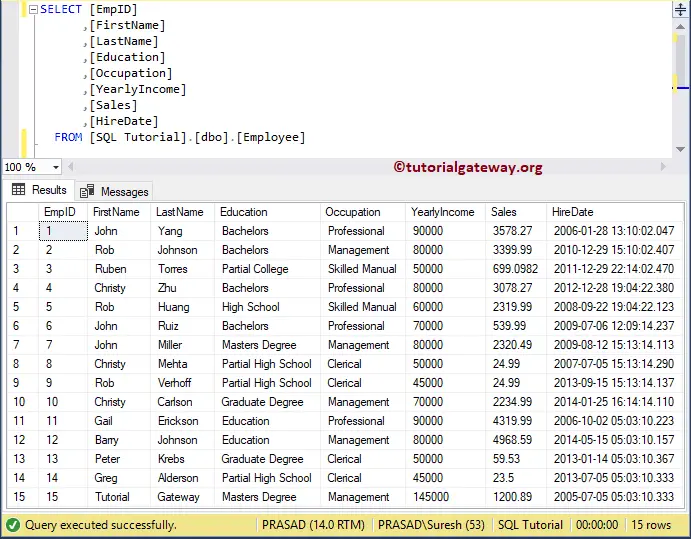
For this SQL Server demonstration, we are going to use the below-shown data.
SQL STRING_AGG Function Example
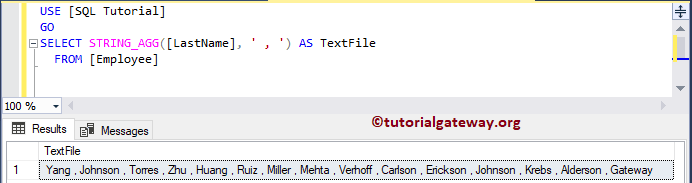
In this String functions example, we will concatenate the Last name column data using the STRING_AGG function. Please refer to the list of SQL String Functions from our SQL Server Programming.
SELECT STRING_AGG([LastName], ' , ') AS TextFile
  FROM [Employee]
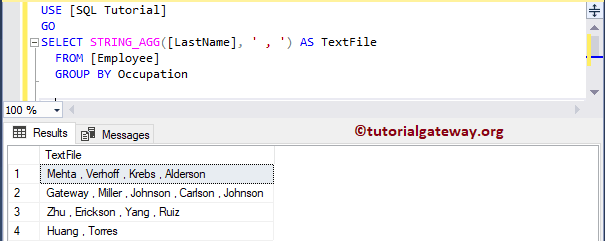
In this example, we are going to implement the Grouping along with the STRING_AGG function. Please refer to the SQL STRING_ESCAPE and SQL STRING_SPLIT functions.
SELECT STRING_AGG([LastName], ' , ') AS TextFile
  FROM [Employee]
  GROUP BY Occupation