SQL Server CURRENT_TIMESTAMP function is one of the Date and Time Functions, that is used to return the current timestamp (Date and Time) of the computer on which the Server instance is running. The basic syntax of the CURRENT_TIMESTAMP is as follows:
CURRENT_TIMESTAMP
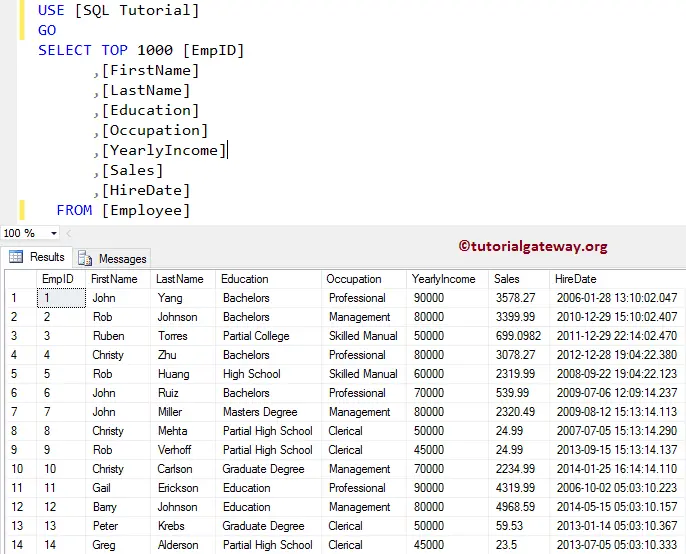
For this CURRENT_TIMESTAMP function example, We are going to use the below-shown data
SQL CURRENT_TIMESTAMP Example
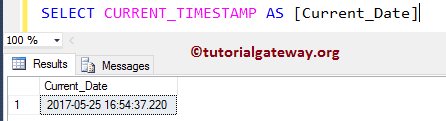
The CURRENT_TIMESTAMP function returns the DateTime data type, and the format is: ‘yyyy-mm-dd hh:mm:ss.nnn’ (you can see that, the fractional seconds precision = 3).
SELECT CURRENT_TIMESTAMP AS [Current_Date]
CURRENT_TIMESTAMP Example 2
In this example, we are going to show you the CURRENT_TIMESTAMP examples. Please refer to the list of SQL Date and time functions available on our SQL Tutorial page.
SELECT 'Today' AS 'TODAY', CURRENT_TIMESTAMP AS [Current_Date];

SELECT 'Milli Seconds' AS 'MILLI', DATEPART(millisecond, CURRENT_TIMESTAMP) AS [Milli_Seconds];
SELECT 'Micro Seconds' AS 'MICRO', DATEPART(microsecond, CURRENT_TIMESTAMP) AS [Micro_Seconds];
SELECT 'Nano Seconds' AS 'NANO', DATEPART(nanosecond, CURRENT_TIMESTAMP) AS [Nano_Seconds];

SELECT 'Day' AS 'DAY', DATENAME(WEEKDAY, CURRENT_TIMESTAMP) AS [Day_Name];

SELECT 'Tomorrow' AS 'DAY', DATEADD(day, 1, CURRENT_TIMESTAMP) AS [Next_Date];
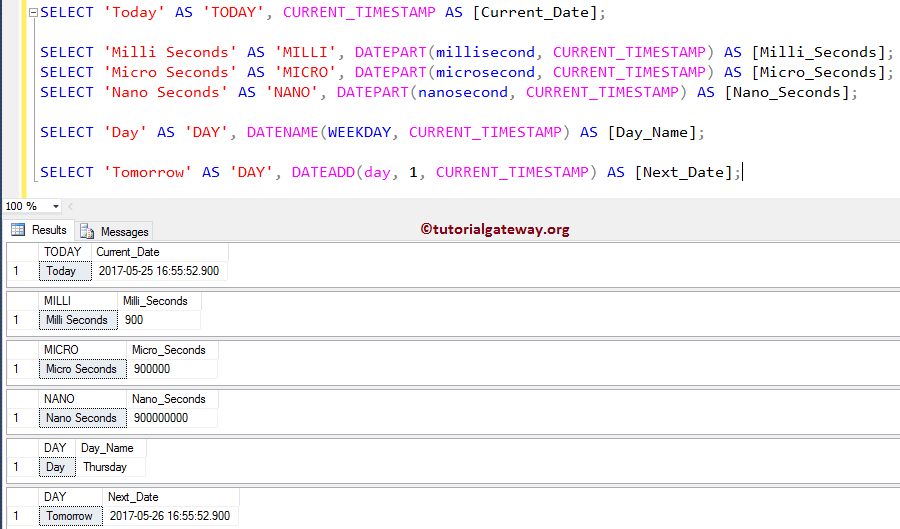
We used the SQL DATEPART function to display the Milliseconds, Microseconds, and Nanoseconds from SQL Server current timestamp (today’s date & time)
SELECT 'Milli Seconds' AS 'MILLI', DATEPART(millisecond, CURRENT_TIMESTAMP) AS [Milli_Seconds];
SELECT 'Micro Seconds' AS 'MICRO', DATEPART(microsecond, CURRENT_TIMESTAMP) AS [Micro_Seconds];
SELECT 'Nano Seconds' AS 'NANO', DATEPART(nanosecond, CURRENT_TIMESTAMP) AS [Nano_Seconds];
Next, We used the SQL DATENAME function to display the weekday name from the current timestamp (today’s date & time)
SELECT 'Day' AS 'DAY', DATENAME(WEEKDAY, CURRENT_TIMESTAMP) AS [Day_Name];
Lastly, We used the SQL DATEADD function to display the Tomorrow time stamp
SELECT 'Tomorrow' AS 'DAY', DATEADD(day, 1, CURRENT_TIMESTAMP) AS [Next_Date];
SQL Server CURRENT_TIMESTAMP Example 3
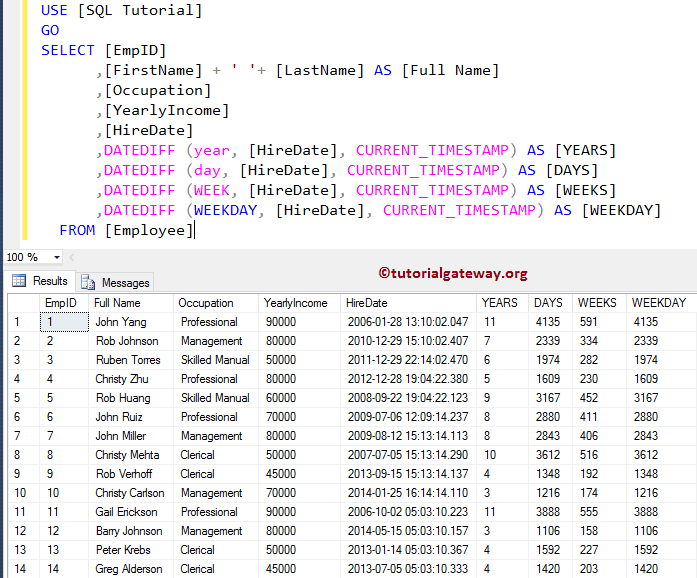
In this Date and Time Function example, we use the SQL DATEDIFF function. It finds the difference between the current time stamp and the Hire date) to check for Employee details. Such as Which year we hired him, how many weeks he associated with our company, etc.
SELECT [EmpID]
      ,[FirstName] + ' '+ [LastName] AS [Full Name]
      ,[Occupation]
      ,[YearlyIncome]
      ,[HireDate]
      ,DATEDIFF (year, [HireDate], CURRENT_TIMESTAMP) AS [YEARS]
      ,DATEDIFF (day, [HireDate], CURRENT_TIMESTAMP) AS [DAYS]
      ,DATEDIFF (WEEK, [HireDate], CURRENT_TIMESTAMP) AS [WEEKS]
      ,DATEDIFF (WEEKDAY, [HireDate], CURRENT_TIMESTAMP) AS [WEEKDAY]
  FROM [Employee]
Here, we are finding the difference between the Employee Hire date and the current today’s date & time (CURRENT_TIMESTAMP) using the DATEDIFF function. Please refer to the SQL SYSDATETIME and SQL GETDATE functions.