The SQL DATENAME function is used to extract or display specified date parts from the existing date. This DATENAME function always returns String data. For example, if you want to extract the month name or day name (Sunday, Monday, Tuesday, Wednesday, Thursday, Friday, Saturday) from an existing Date, use the Datename function.
SQL DATENAME Syntax
The basic syntax of the datename function is as shown below.
DATENAME (Datepart, Date)
Datepart: It is part of a given date that we are going to display as output. The following table will display the list of available datepart arguments in SQL Server. Please refer to the list of SQL Date functions available on our SQL Server Tutorial page.
| Datepart | Abbreviations | Description |
|---|---|---|
| year | yy,yyyy | This will display the Millisecond’s Value. |
| quarter | qq, q | Display the quarter value from the given date. |
| month | mm, m | Display the month name from the given date. |
| dayofyear | dy, y | The day of the year numbers from 1 to 365. |
| day | dd, d | The day of the year numbers from 1 to 365. |
| week | wk, ww | Display the Weekdays name from the given date (Sunday to Saturday). |
| weekday | dw, w | Minute Value present on the specified date. |
| hour | hh | It returns the Hour value. |
| minute | mi, n | Minute Value present on the specified date. |
| second | ss, s | This will display the Millisecond’s Value. |
| millisecond | ms | This will display the Milliseconds Value. |
| microsecond | mcs | This Datename will display the microsecond Value available. |
| nanosecond | ns | This argument in sql datename function will display the Nanoseconds Value. |
| TZOffset | tz | This will display the Time Zone Offset Value. |
| ISO_WEEK | isowk, isoww | This will display the Iso Week Number. |
Date: Please specify the valid date as the second argument in this DATENAME function. It can be a column, an expression, or any variable.
SQL Server DATENAME Example
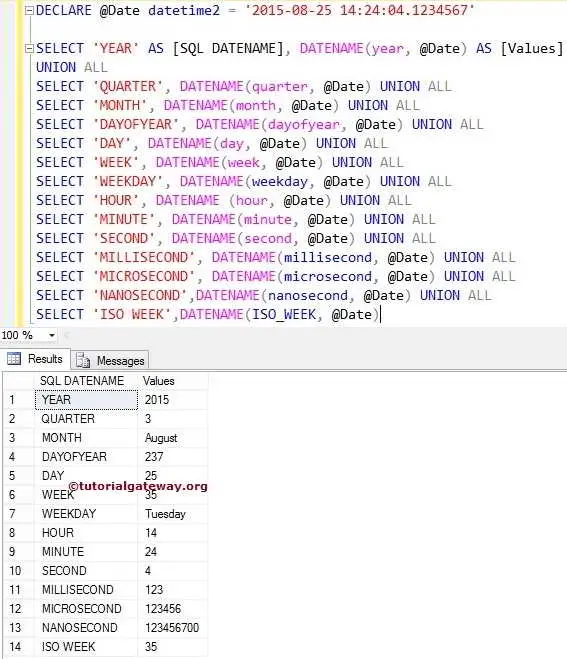
In this Date function example, we are going to declare a variable of datetime2 data type. Let us assign a valid date to that variable and perform all the available DATENAME operations.
First, we declared a variable and assigned the date and time to that variable. The first DATENAME statement displays the year number, and the subsequent statement prints the month.
DECLARE @Date datetime2 = '2015-08-25 14:24:04.1234567'
SELECT 'YEAR' AS [SQLDATENAME], DATENAME(year, @Date) AS [Values]
UNION ALL
SELECT 'QUARTER', DATENAME(quarter, @Date)
UNION ALL
SELECT 'MONTH', DATENAME(month, @Date)
UNION ALL
SELECT 'DAYOFYEAR', DATENAME(dayofyear, @Date)
UNION ALL
SELECT 'DAY', DATENAME(day, @Date)
UNION ALL
SELECT 'WEEK', DATENAME(week, @Date)
UNION ALL
SELECT 'WEEKDAY', DATENAME(weekday, @Date)
UNION ALL
SELECT 'HOUR', DATENAME (hour, @Date)
UNION ALL
SELECT 'MINUTE', DATENAME(minute, @Date)
UNION ALL
SELECT 'SECOND', DATENAME(second, @Date)
UNION ALL
SELECT 'MILLISECOND', DATENAME(millisecond, @Date)
UNION ALL
SELECT 'MICROSECOND', DATENAME(microsecond, @Date)
UNION ALL
SELECT 'NANOSECOND',DATENAME(nanosecond, @Date)
UNION ALL
SELECT 'ISO WEEK',DATENAME(ISO_WEEK, @Date)
DATENAME Function Example 2
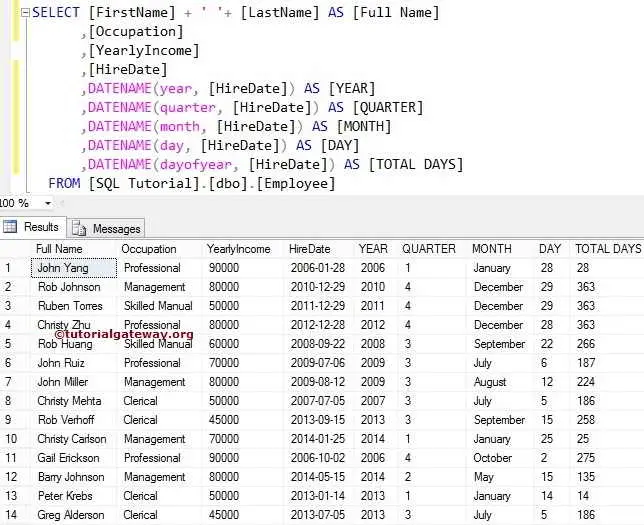
In this example, we use one of the custom tables to perform SQL Server DATENAME operations on the HireDate column.
The DATENAME function will print the Year value from the HireDate Column for the fifth line. The sixth line will display the Quarter value from the HireDate Column.
TIP: Please refer to the SQL DATEDIFF, SQL DATEPART, and SQL DATEADD functions.
SELECT [FirstName] + ' '+ [LastName] AS [Full Name]
      ,[Occupation]
      ,[YearlyIncome]
      ,[HireDate]
      ,DATENAME(year, [HireDate]) AS [YEAR]
      ,DATENAME(quarter, [HireDate]) AS [QUARTER]
      ,DATENAME(month, [HireDate]) AS [MONTH]
      ,DATENAME(day, [HireDate]) AS [DAY]
      ,DATENAME(dayofyear, [HireDate]) AS [TOTAL DAYS]
FROM [Employee]