
The Python add function is used to add an item to an existing set. In this section, we discuss how to use this function, and the syntax of the set add method is
setName.add(element)
This set add function accepts only one parameter value. However, you can add a tuple as an argument. Remember, You can’t insert existing or duplicate values.
Python set add Example
This function helps you to add a new item to an existing set. The below code inserts a banana into an existing Fruits and prints the same.
FruitSet = {'apple', 'Mango', 'orange', 'cherry','kiwi'}
print("\nOld Items = ", FruitSet)

FruitSet.add('banana')
print("New Items = ", FruitSet)
Old Items =  {'Mango', 'orange', 'cherry', 'kiwi', 'apple'}
New Items =  {'Mango', 'orange', 'cherry', 'kiwi', 'apple', 'banana'}
Let me show you another example of the Python set add function. So, you can get a complete idea. This example adds an integer value of 125 to existing integer elements.
IntSet = {10, 20, 30,40}
print("\nOld Items = ", IntSet)

IntSet.add(125)
print("New Items = ", IntSet)
Old Items =  {40, 10, 20, 30}
New Items =  {40, 10, 20, 125, 30}
TIP: Please refer to the Python sets article from the Python tutorial to understand every detail about sets.
In this example, we use this method to add an item to the existing one.
mySet = {1, 2, 4, 5}
print("Old Elements = ", mySet)

mySet.add(3)
print("New Elements = ", mySet)

FruitSet = {'apple', 'Mango', 'orange', 'cherry','kiwi'}
print("\nOld Elements = ", FruitSet)

FruitSet.add('banana')
print("New Elements = ", FruitSet)
Old Elements = {1, 2, 4, 5}
New Elements = {1, 2, 3, 4, 5}

Old Elements = {'kiwi', 'orange', 'Mango', 'cherry', 'apple'}
New Elements = {'kiwi', 'orange', 'banana', 'Mango', 'cherry', 'apple'}
How to add a tuple to the Python set?
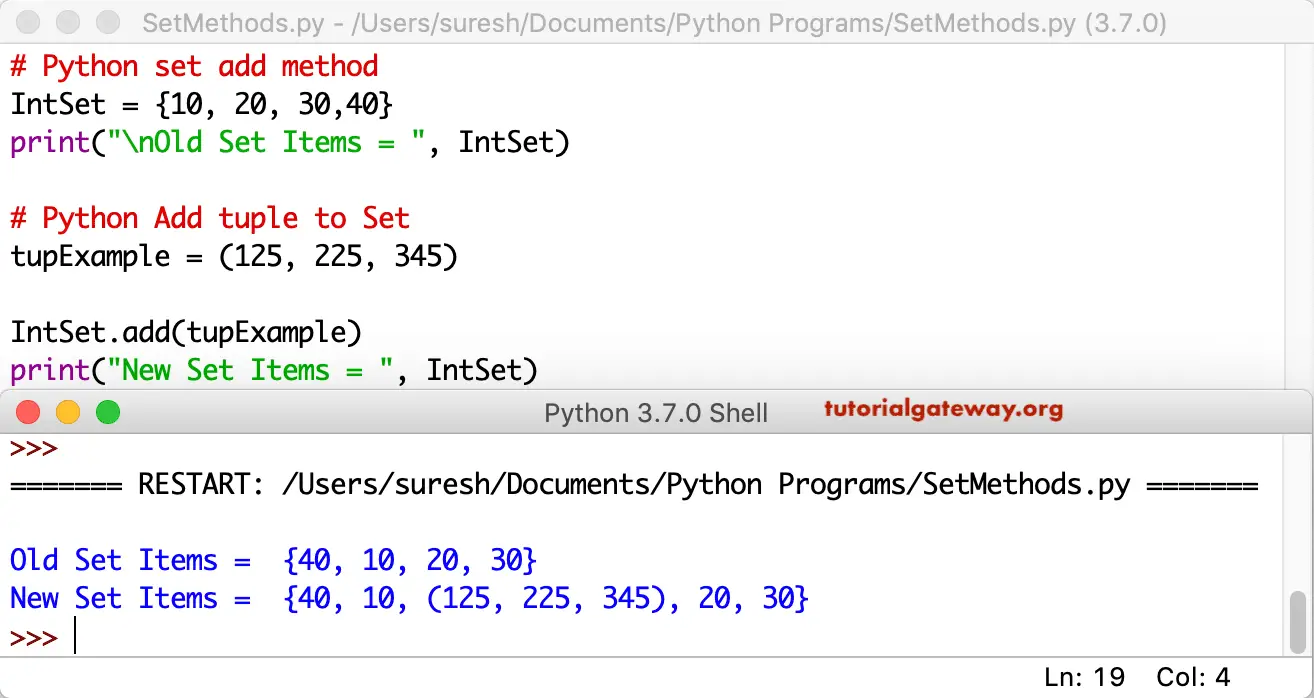
This example shows how to add a tuple to an existing set. Like any other item, you can add a tuple using this function.
IntSet = {10, 20, 30,40}
print("\nOld Set Items = ", IntSet)

tupExample = (125, 225, 345)

IntSet.add(tupExample)
print("New Set Items = ", IntSet)
TIP: Please refer to the Python set copy and Python set discard functions from the list of available Python set methods.
Duplicates Example
This example is the same as the above, which will add the tuple element to the set. However, we are adding the same tuple multiple times. As we mentioned, a tuple doesn’t accept duplicates, and this program only adds a tuple once. Also, refer to the Python set remove function.
IntSet = {10, 20, 30,40}
print("\nOld = ", IntSet)

tupExample = (125, 225, 345)

IntSet.add(tupExample)
print("New = ", IntSet)

IntSet.add(tupExample)
print("Repeated = ", IntSet)
Old =  {40, 10, 20, 30}
New =  {40, 10, (125, 225, 345), 20, 30}
Repeated =  {40, 10, (125, 225, 345), 20, 30}
How to add a list to a set in Python?
Unlike regular values or sets, we can not directly add a list to a set because lists are mutable. In this example, we are trying to add the list to an existing one using this method. Refer to the Python lists.
IntSet = {10, 25, 30, 40, 50}
print("\nOld Items = ", IntSet)

ListExample = ['apple', 'Orange', 'Grape', 'Mango']

IntSet.add(ListExample)
print("New Items = ", IntSet)
As you can see from the output, it is throwing an error because Lists are Mutable. There are other ways to insert items. We will explain later.
Old Items =  {50, 40, 25, 10, 30}
Traceback (most recent call last):
  File "/Users/suresh/Desktop/simple.py", line 7, in <module>
    IntSet.add(ListExample)
TypeError: unhashable type: 'list'
>>>
There are two options to add a list to an existing list: update() and convert a list to a tuple.
Using update()
In the example below, we declared a set and a list of integers. Next, we used the built-in update() method to add a list to the set.
s = {10, 20, 30,40}
l = [100, 200, 300, 400]
s.update(l)
print(s)
{100, 40, 200, 10, 300, 400, 20, 30}Using tuple
In the following example, we used the Python tuple() function to convert the given list to a tuple. Next, we used the update() to add those list items to a set.
s = {10, 20, 30,40}
l = [100, 200, 300, 400]
t = tuple(l)
print(t)
s.update(t)
print(s)
(100, 200, 300, 400)
{100, 40, 200, 10, 300, 400, 20, 30}
Using a for loop and the add() method
If our task is to use the built-in add() function, then we must use the for loop to iterate over the list of elements. Within the loop, use the add() function. It means on each iteration, the add() function adds one item (belonging to that iteration) to the existing set.
s = {10, 20, 30,40}
l = [100, 200, 300, 400]

for i in l:
    s.add(i)

print(s)
{100, 40, 200, 10, 300, 400, 20, 30}Python set add multiple elements
As we mentioned earlier, the set.add() function allows you to add one element to a set at once. If you try to pass multiple elements, the add() method raises TypeError.
s = {10, 20, 30,40}
s.add(50, 60)
print(s)
TypeError: set.add() takes exactly one argument (2 given)There are multiple options available in this programming language to add multiple elements to an existing set at once.
Using set.update() method
In the following example, we use the update() method and pass any iterable (in this case, a list of two items) as the argument.
s = {10, 20, 30,40}
s.update([50, 60])
print(s)
{40, 10, 50, 20, 60, 30}Using union() method
The set union method creates a completely new set by combining the original set items and the new items that you want to add. Explore the Python set union function.
s = {10, 20, 30,40}
t = s.union([50, 60])
print(s)
print(t)
{40, 10, 20, 30}
{40, 10, 50, 20, 60, 30}
Using the merge assignment operator (|=)
If we use the merge assignment or union operator, we must use the common iterable. You can’t merge a set with a list. If both are sets, we can use this approach.
s = {10, 20, 30,40}
s |= {50, 60}
print(s)
{50, 20, 40, 10, 60, 30}How to add two sets in Python?
Similar to the above, we can’t use the add() method to add two sets. Instead, use the above-mentioned approaches. It includes utilizing the union() function, the merge operator (|), or the merge assignment operator (|=).
The following example demonstrates the update() method technique to add two sets.
s = {10, 20, 30,40}
s.update({50, 60, 70, 80})
print(s)
{70, 40, 10, 80, 50, 20, 60, 30}Python set add elements conditionally with an if statement
In real-time, it’s not about adding a random value. There are situations where we have to add an element to a set when a certain condition is met. In such a situation, we use the Python if statement to check the condition. If it is true, the set.add() function adds that element to an existing.
In the example below, we declared an empty set. Next, we use the combination of an if statement and the add() function to add only even numbers to an empty set.
s = set()

for n in range(1, 11):
    if n % 2 == 0:
        s.add(n)

print(s)
{2, 4, 6, 8, 10}