
SQL Agent Job Automated Change Capture Process
Build a process that captures your SQL Agent job history and changes across time.
2026-07-24
1,542 reads
Build a process that captures your SQL Agent job history and changes across time.
2026-07-24
1,542 reads

If you haven’t migrated your workloads to a managed database platform yet, you’re probably still relying on SQL Server Agent for various maintenance and other scheduled tasks. Most of the time, these processes just work. But when it’s time to troubleshoot, it can be cumbersome to get to the root of some problems.
2024-04-17

This script will create the necessary login and linked servers on a given availability replica. Please ensure that the script is executed on all the replicas.
2022-02-22 (first published: 2022-01-25)
7,925 reads
SQL Server Agent has a built-in alerting process for when jobs fail, but the information it provides isn’t very useful. You’re only told which job, what time, who ran it, and which step failed. If you want to see why it failed, you have to review the job history manually. On a busy system with […]
2020-10-29
7,910 reads
2020-10-22
9,462 reads
2019-11-14
774 reads
Lists the job names and package names for jobs that execute SSIS packages (for packages stored in msdb).
2017-09-13 (first published: 2017-09-05)
2,063 reads
Finding the nightly job failures is just one of a DBA's morning rituals. It is fairly easy to scan all the email with a number of creative search criteria, but what if you would like a more automated approach? Read on to learn how to find and report all job failures using a script.
2017-01-12
4,563 reads
Your SQL Agent Jobs may be silently failing when using Linked Servers.
2016-05-02
2,778 reads
2016-04-28
1,480 reads
By Steve Jones
I recently started playing with the MCP Server for SQL Server, which is a...
If you spend your days tuning queries, managing pipelines, or keeping a production database...
I’ve been rebuilding my three-site SQL Server demo lab, and I ran into something...
Has anyone written a wrapper function (or similar) around STRING_AGG() to allow the retrieval...
Putting this here as we're currently on SQL Server 2019 installed on Windows Server...
Comments posted to this topic are about the item Never is Not the Policy
I have added a few indexes to one of my tables in SQL Server 2025:
ALTER TABLE dbo.CustomerContact
ADD CONSTRAINT PK_CustomerContact
    PRIMARY KEY (CustomerID);

-- Create index on CustomerEmail
CREATE INDEX IX_CustomerContact_CustomerEmail
ON dbo.CustomerContact (CustomerEmail);
CREATE INDEX IX_CustomerContact_CustomerPhone
ON dbo.CustomerContact (phone);
I then do this to disable one index:
alter index IX_CustomerContact_CustomerPhone on dbo.CustomerContact disableI see this when I check the index status:
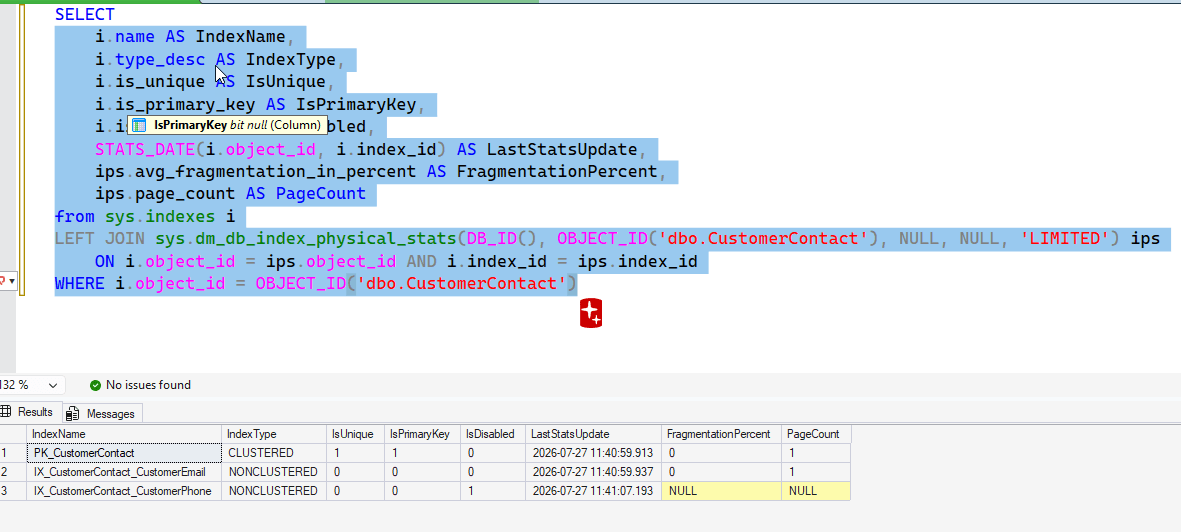 I decide to rebuild all indexes with this command:
ALTER INDEX ALL ON dbo.CustomerContact rebuildAfter I do this, what will I see for the index status? See possible answers