
Hello, Antonis here!
We're hitting pause on the Data Role series for the next 1–2 weeks as I dive deep into producing the upcoming DataConscious podcast episodes and let me tell you, it's been an intense but exciting process! 🎙️
But don't worry, the content won’t stop! During this break, I'll be sharing two value packed posts focused on SQL optimization and pro level SQL techniques. Whether you're looking to write more efficient queries or level up your SQL game, these insights will help you code like a pro. Stay tuned! Powerful SQL tips are coming your way! 🚀
SQL query optimization is critical for advanced users who work with large, complex databases. Even small improvements in query performance can translate to significant gains in productivity and cost savings.
In some cases, poorly optimized queries can even bring a system to its knees.But it’s also a matter of code readability and collaboration. When building SQL pipelines with your teammates you need to be consistent on the way you work. You cannot have half of the scripts coded in style A and the rest in style B.
Finally, by following these tips you will make your code reviewer life MUCH easier.
At its core, query optimization involves finding the most efficient way to retrieve data from a database. This often requires a deep understanding of the database structure, as well as the underlying hardware and software environment. Optimizing queries involves a variety of techniques.In this post, we will explore some of these advanced techniques in greater detail, providing examples and best practices for optimizing SQL queries.
The truth is that for many years, I used to code in uppercase SQL. This finally changed, when I had to adapt myself in a professional setting that codes lowercase. I got used to it immediately and I never looked back.
Despite the fact that uppercase is more commonly used for SQL keywords, as it can make the code easier to read and differentiate between keywords and identifiers, unfortunately, it is not ergonomic. Lowercase style is less “noisy” and more natural. You do not have to focus on pressing CAPS LOCK but in the SQL side of things. Finally, readability is getting the same when you are getting used to lowercase.
Instead of this
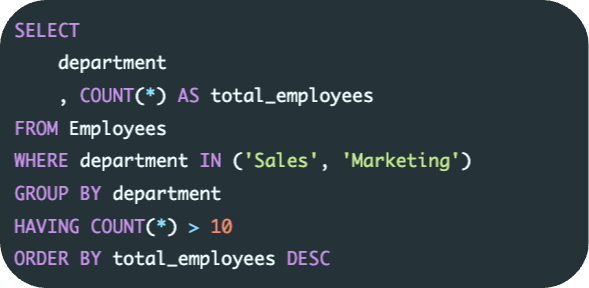
Do this
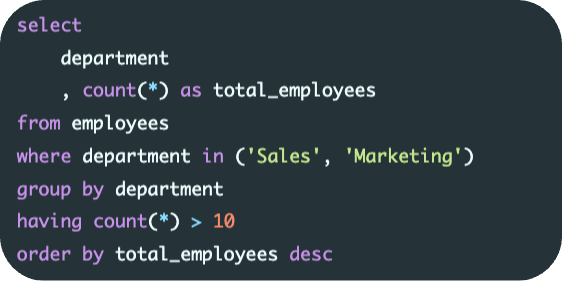
Consistency is key when it comes to choosing between uppercase and lowercase keywords. If you’re working on a team or with a codebase that uses lowercase keywords, it’s important to maintain that style for the sake of consistency and clarity.
Ultimately, the choice between uppercase and lowercase SQL keywords comes down to personal preference and the style guidelines of your team or organization.
In SQL, leading commas and trailing commas refer to the placement of commas in a list of items within a SQL statement. Let’s break down these terms:
Leading commas refer to commas that appear at the beginning of each element in a list
Trailing commas refer to commas that appear at the end of each element in a list
Of course, there is no single standard for how to write SQL code. Some people use uppercase keywords, while some lowercase. Some use trailing commas and others leading commas.
Trailing commas style is easier to read for most people. One advantage of using leading commas is that the last item doesn’t differ from the others, but on the other hand the first item differs.
To my experience, leading commas style is easier for debugging as for errors that will occur due to missing commas, it will be faster to check the lines from start instead of their end and fix the appropriate line.
The most crucial thing here is to adapt ourselves in the organisation that we belong and stick to the team’s coding style. It’s more useful to have pieces of code with a consistent look, rather applying your personal preferences.
Instead of this
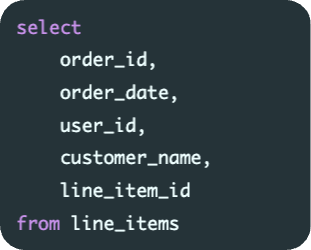
Do this
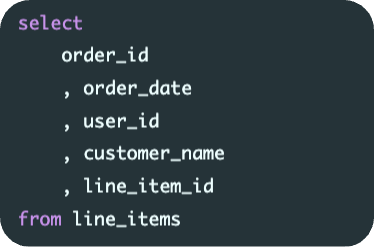
aha moment: Imagine that a comma is missing. Which style suits you better for debugging?
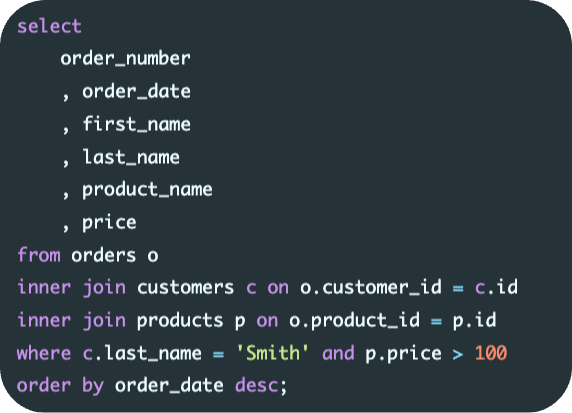
In a database with multiple tables, it is possible that two or more tables have columns with the same name. If we don’t specify the table name when selecting columns, the database may not know which column we are referring to, leading to errors or incorrect results.
Instead of this
Do this
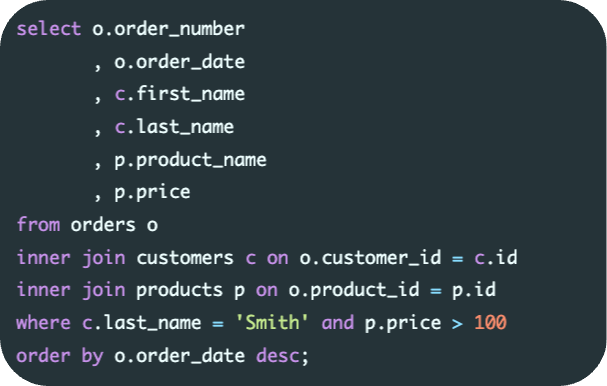
It makes the query more readable and easier to understand. When we refer to columns without specifying the table name, it can be difficult to determine which table the column comes from, particularly if the query involves multiple tables.
by including the table name in the select statement we avoid conflicts when joining tables. It is possible for two or more tables to have columns with the same name.
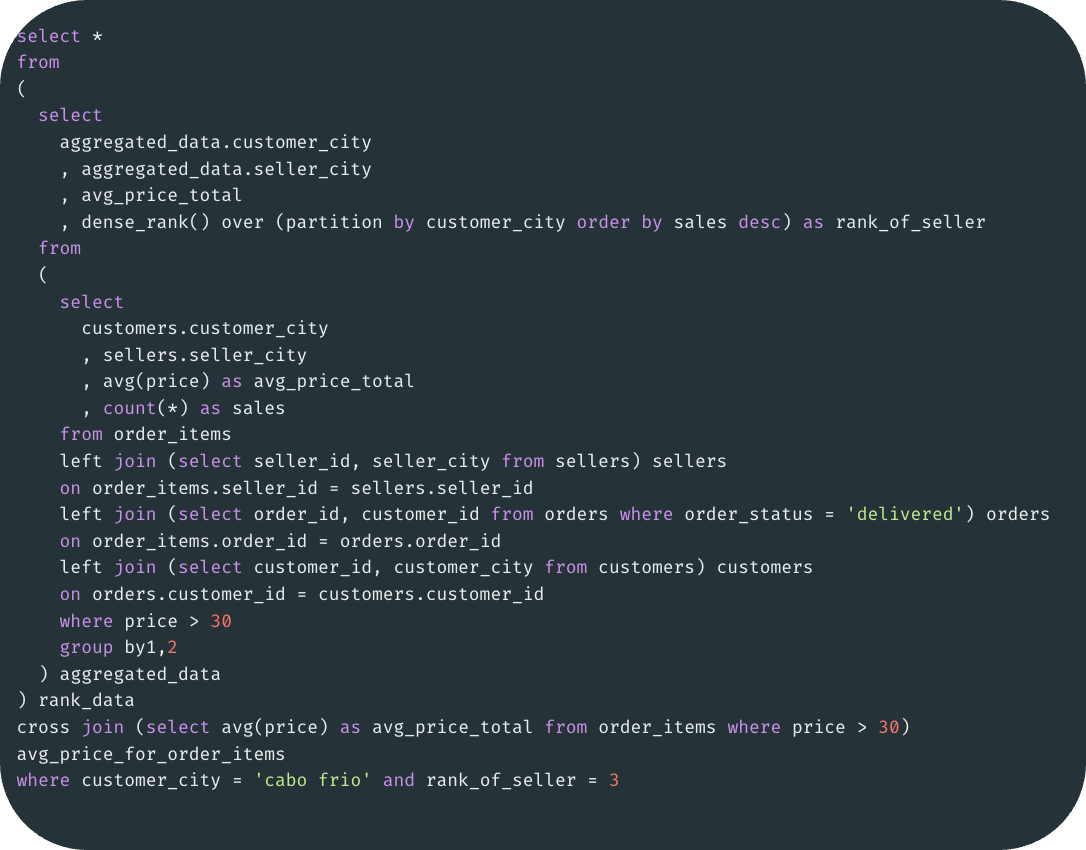
CTEs can make the query more readable and easier to understand. Nested queries can become very complex and difficult to read, especially if there are several levels of nesting. It can also improve query performance. When we use a nested query, the database management system has to execute the inner query before it can execute the outer query. This can result in slower query performance, especially if the inner query involves a large amount of data or a complex calculation.
They can be reused in multiple queries. When we use a nested query, we can only use the result set of the inner query once. If we need to use the same result set in multiple queries, we have to execute the inner query multiple times, which can result in slower query performance.
Breaking down complex queries into smaller, results in more manageable and readable parts. This can greatly improve the clarity and maintainability of SQL code.
Code Reusability Results can be referenced multiple times within a single query.
Easier Debugging and Testing It becomes simpler to isolate and debug specific parts of a query.
Code Documentation Properly named CTEss can serve as self-documenting code, providing descriptive names for temporary result sets and making the intention of the query clearer.
Instead of this
Do this
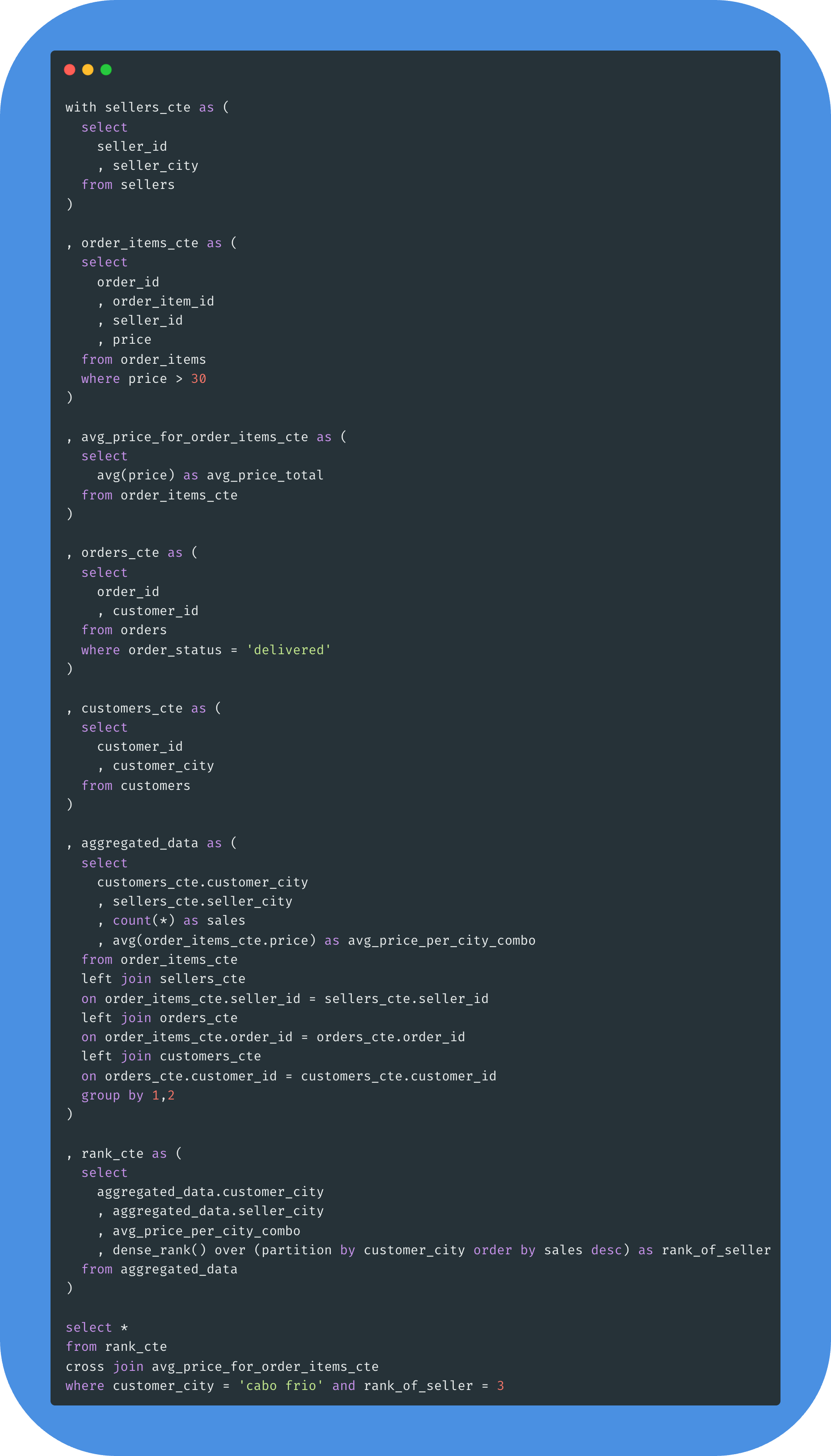
These queries achieve the same result but they are more clear and easier to read and understand. They are also faster, especially if there are many orders and/or customers, because it is not executing subqueries for each row in the main query. It breaks the query down into smaller, more manageable parts, and simplifies the logic, making it easier to read and optimize.
Stay tuned!
Great analysis starts with great awareness. Be mindful, be DataConscious.
❤️ Liked this article? Make sure to push the button
💬 Community needs your voice, do you have something to add? Feel free to
🔁 Know someone that would find this helpful? Feel free to share
Thanks for reading DataConscious – A mindful approach to analytics! Subscribe for free to receive new posts and support this effort
No posts
Comments
Nothing yet. Say the first thing.
Sign in to join the conversation.