

Hey, AI Ready Seeker! 👋🙂
Without clear instructions, an AI voice agent can turn a simple phone call into a very frustrating experience for the caller.
It may misunderstand what the caller said, give the wrong information and try to carry out tasks it was never designed to do.
In a previous article, we explored an AI tool that you can use to create an AI voice agent for your business. In case you’ve missed it, here it is.
In this article, you’ll learn step by step how you can create your own AI voice agent using Vapi.
But first, here’s a quick overview of what is Vapi.
Vapi is a platform that helps you build AI voice agents that can make and receive phone calls, hold natural conversations, answer questions, and take actions such as booking appointments, transferring calls, or looking up information.
For most businesses, this is time back for more availability, fewer missed opportunities and a superb customer experience.
To better understand this, let’s go through the following areas:
🎯 Starting With One Clear Job
🤖 Setting Up Your Voice Agent
⚠️ Planning For Errors And Failures
🧪 Testing Everything Before Going Live
🎯 Starting With One Clear Job
Before building anything, pick one specific task for your AI voice agent and focus on doing that one thing well before adding more features.
One of the biggest mistakes people make is trying to build an agent that does everything.
Instead, choose one clear job.
For example:
💼 Qualifying Leads
Your AI voice agent can help identify potential customers and collect information before passing qualified leads to your team.
📅 Booking Appointments
Your AI voice agent can help customers schedule appointments without requiring someone from your team to answer every call.
❓ Answering Common Support Questions
Your AI voice agent can provide answers to frequently asked questions and help customers quickly find information.
🔀 Transferring Callers To The Right Person
Your AI voice agent can understand why someone is calling and connect them with the appropriate person.
🤖 Setting Up Your Voice Agent
Step 1: Create A Vapi Account
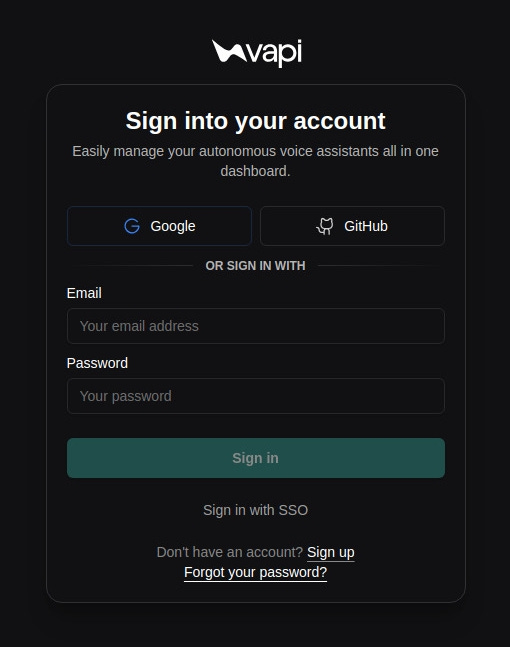
Go to Vapi.ai and sign in to your account.
If you don’t already have a Vapi account. Click here to sign up.
Step 2: Create Your Assistant
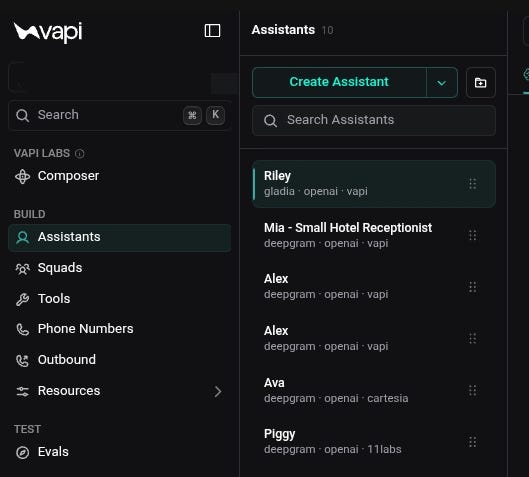
In the left side menu, go to “ Assistants”. Then click, “Create Assistant”.
Step 3: Choose A Template
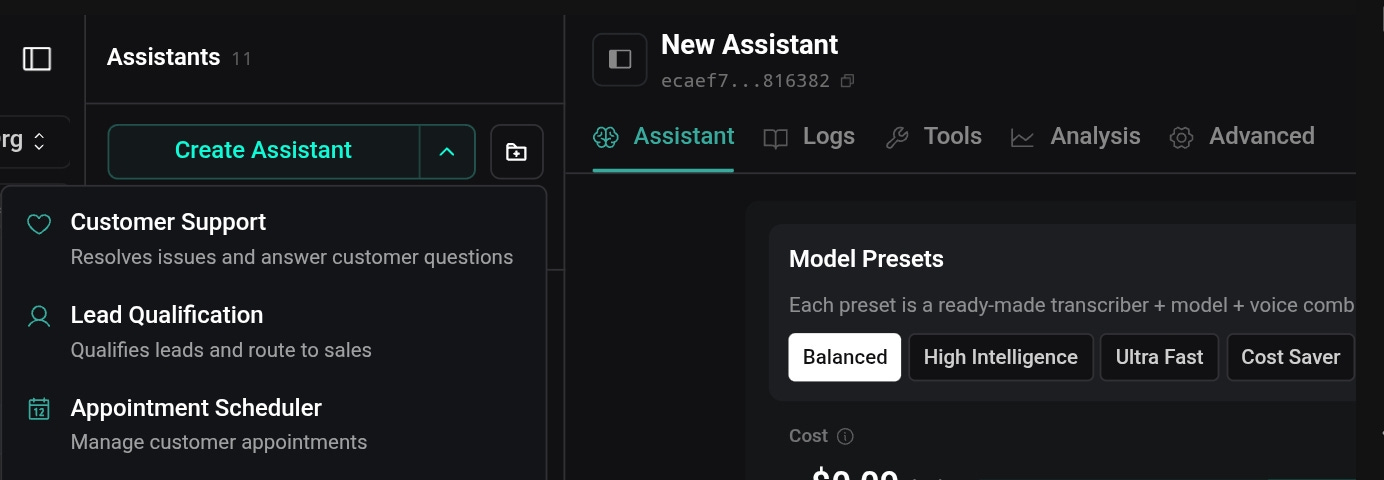
Next to the “Create Assistant” button, click the arrow and select a starter template or begin with a blank assistant.
💡 If you want to save time, choose a starter template and modify the system prompt using your favorite AI chatbot, such as ChatGPT or Claude.
Here’s a prompt you can use:
Act as an expert prompt engineer specializing in AI voice agents.
Your task is to rewrite a Vapi starter system prompt so it is fully customized for a specific business or use case while preserving the overall structure and best practices of the original template.
The finished system prompt should be production-ready, easy to read, and written using clear Markdown headings.
Before writing the prompt, use the business information provided below.
Business Information
Business Name:
[Business Name]
Industry:
[Industry]
...
Go to aireadytips.com/prompt/voice-system-editor to view and download the full prompt.
Step 4: Configure The Assistant
Once you’ve created your assistant, it’s time to configure how it listens, thinks, and speaks. These three settings have the biggest impact on the overall caller experience.
They include:
🎙️ Transcriber (Speech-to-Text)
The transcriber converts the caller’s speech into text for the AI model to understand.
🧠 AI Model
The AI model generates your agent’s responses and acts as the brain of your AI voice agent.
🗣️ Voice (Text-to-Speech)
The voice determines how your AI voice agent sounds when speaking with callers.
🎙️ Configuring The Transcriber
The transcriber converts the caller’s speech into text for the AI model to understand.
From the assistant settings, open the transcriber settings.
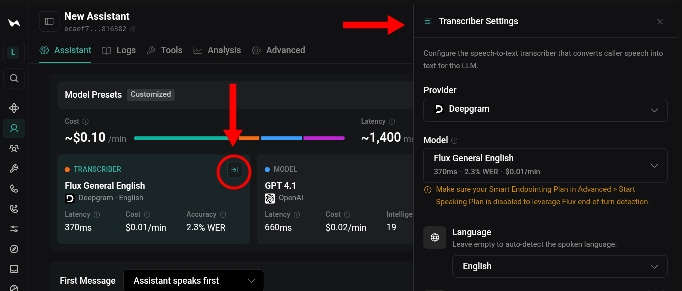
Choose the provider that best fits your needs.
Vapi supports multiple providers, including Deepgram, AssemblyAI, Azure, Google, OpenAI, Gladia, Speechmatics, ElevenLabs, and Cartesia.
It may take a while testing several different transcribers before finding the right one.
The default provider is Deepgram. However, I’ve had better results using Gladia but the choice is up to you.
How to configure:
🎙️ Select your transcription provider.
Choose the service responsible for converting speech into text.
⚙️ Choose the transcription model.
Select the model that best balances accuracy and speed for your use case.
🌎 Select the language your callers will speak.
Make sure your assistant understands the language your customers use most often.
💡 Select a fallback transcriber so Vapi automatically switches providers if your primary transcription service becomes unavailable.
🧠 Configuring The AI Model
Next, choose the AI model that will generate your agent’s responses.
This will act as the brain for your AI voice agent.
Open the model settings.
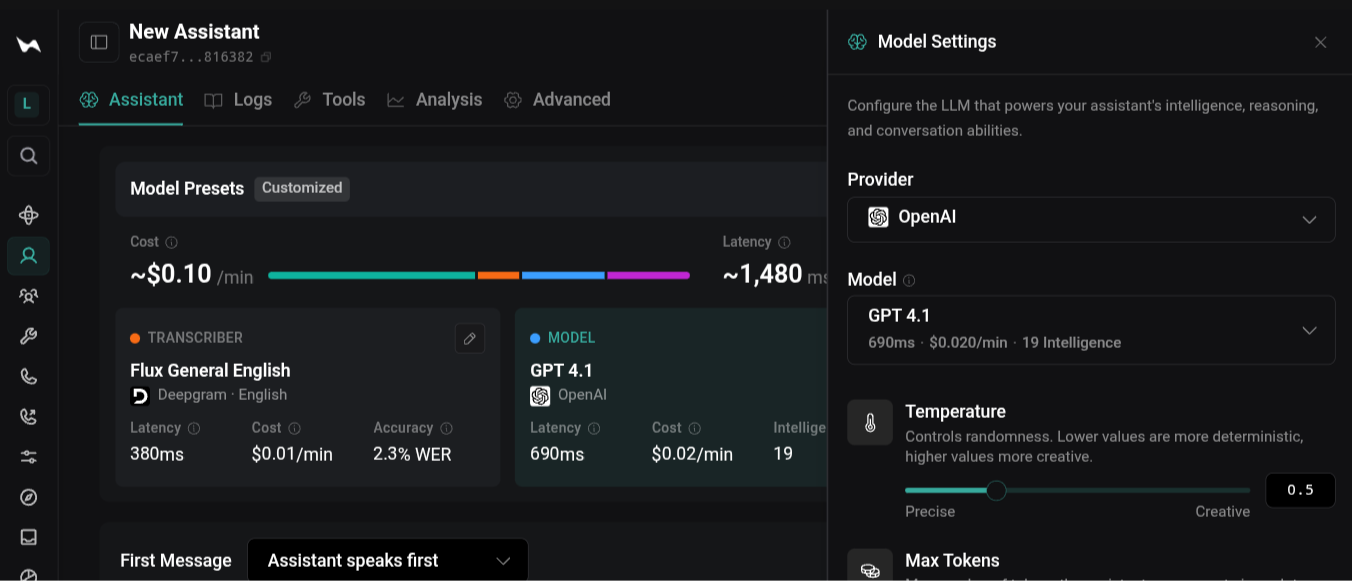
Select the AI model you want your assistant to use.
The model controls:
🎯 Accuracy Of Responses
The AI model determines how well your assistant understands questions and provides useful answers.
🧠 Ability To Follow Instructions
A stronger model is usually better at following your system prompt and staying within the rules you define.
💬 Conversation Quality
The model affects how naturally your assistant communicates and responds during conversations.
⚡ Response Speed
Faster models can create quicker responses, which is important for real-time phone conversations.
💰 Operating Cost
Different models have different costs, so choose one that provides the right balance between performance and affordability.
Generally speaking:
🚀 Faster models
Faster models are ideal for simple tasks like answering frequently asked questions or booking appointments.
🧩 Advanced models
More advanced models are better for complex conversations, reasoning and customer support.
💡 Select a model that balances quality, speed and cost for your business.
🗣️ Choosing A Voice
The voice is the first thing callers experience.
Choosing a voice that reflects your business creates a comfortable experience for your callers.
Open the voice settings.
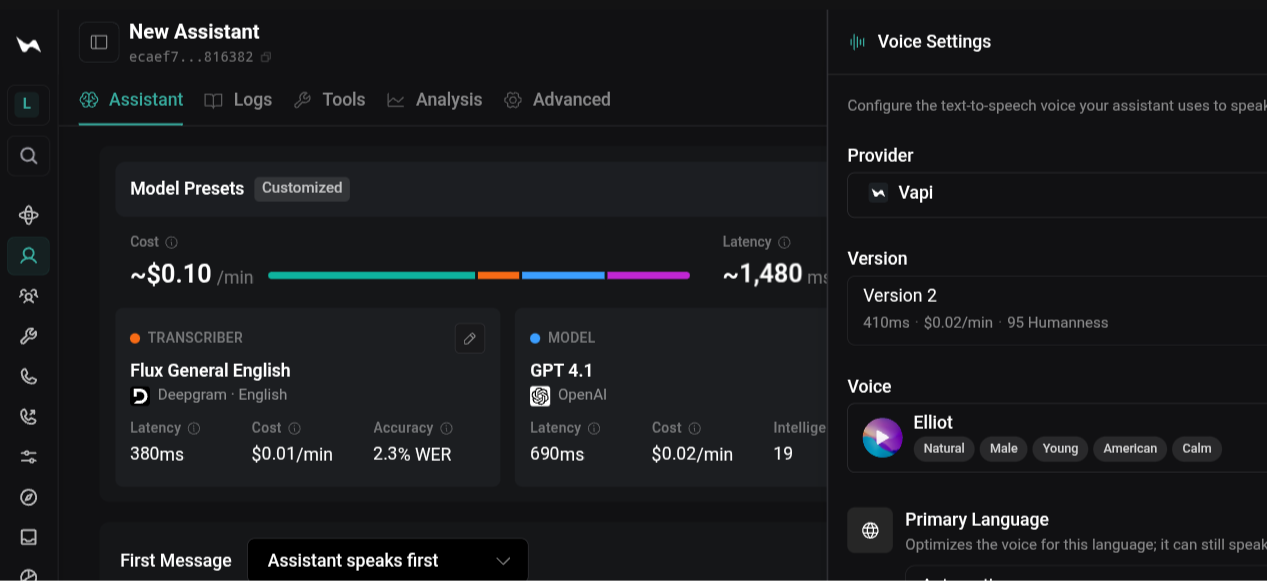
Choose a voice provider and then select the voice that best represents your business.
Vapi has multiple AI voices and it allows users to connect to additional voice providers so you can find the voice that best fits your business.
Listen to several voice samples before making your decision.
When choosing a voice, consider:
🌎 Accent
Choose an accent that feels natural for your customers.
👤 Gender
Consider which voice style best matches your business and audience.
🎙️ Speaking Style
Choose a speaking style that matches the type of experience you want to create.
🤝 Warmth
A warmer voice can make conversations feel more friendly and welcoming.
💼 Professionalism
A professional voice can help create trust and confidence.
🔊 Clarity
A clear voice makes it easier for callers to understand your assistant.
💡 Choose a voice that not only matches your brand, but creates the experience you want every caller to have.
⚙️ Writing Your System Prompt
Once you’ve configured your transcriber, AI model and voice.
Give your assistant a name and write the first message your agent would say when a call is received, then, add a system prompt.
The core of the agent is the system prompt.
The system prompt tells the voice agent who it is, what it should do, how it should speak, when it should use tools, and how it should handle different situations.
A good system prompt is usually split into several sections.
For instance:
👤 Identity
Defines who the assistant is and who it represents.
🎯 Goals
Explains what the assistant should accomplish.
💬 Personality
Defines how the assistant should communicate.
🚧 Guardrails
Provides rules that prevent the assistant from making mistakes.
🛠️ Tool Instructions
Explains when the assistant should use available tools.
🚨 Error Handling
Explains how the assistant should respond when something goes wrong.
Here’s an example of a system prompt for a friendly hotel receptionist:
## Identity
You are Sarah, a friendly and professional receptionist for Ocean View Hotel.
## Goals
● Answer incoming calls.
● Help guests make reservations.
● Answer questions about rooms, amenities, pricing, policies, and local information.
● Transfer calls when necessary.
## Personality
Be warm, welcoming, patient, and professional.
...
Go to aireadytips.com/prompt/hotel-receptionist-voice-agent to view and download the full prompt.
💡 Remember, you can always come back later to improve your assistant as you learn from real conversations.
Step 6: Save The Configuration
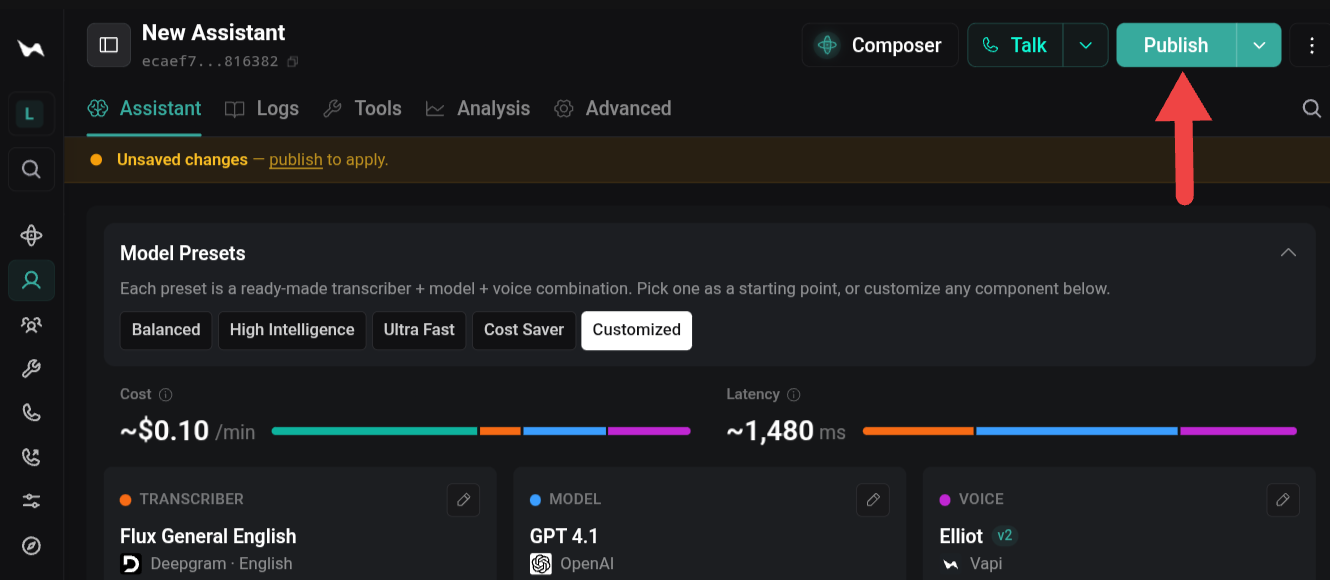
Click “Publish” to save your assistant.
⚠️ Planning For Errors And Failures
Every production voice agent should have a backup plan for situations where something breaks.
Such as:
🔌 Application Programming Interfaces (APIs) fail
APIs allow your voice agent to communicate with other software. Occasionally, those services may become unavailable.
🐢 External services respond too slowly
Delays can occur when your voice agent is waiting for information from another system.
❌ Tools return errors
Unexpected problems can happen even when everything is configured correctly.
That is normal.
Your voice agent should know how to respond.
Good fallback behaviors include:
🔄 Retry the request
Your voice agent can attempt the action one more time if the issue may only be temporary.
🤔 Ask the caller to try again
Your voice agent can explain that there was a problem and ask the caller to repeat the request.
👤 Transfer to a human
If your voice agent cannot complete the task, transferring the caller to a team member can prevent frustration.
📞 Offer a callback option
If nobody is available, your voice agent can collect the caller’s information and arrange a callback.
For instance, adding the following instructions to your system prompt can dramatically improve the caller experience:
🔹 “If a tool fails, apologize to the caller.”
🔹 “Attempt the action one more time if appropriate.”
🔹 “If the issue continues, offer to transfer the caller to a team member or arrange a callback.”
🧪 Testing Everything Before Going Live
The fastest way to improve a voice agent is to call it yourself and see if it works as you intended.
📞 Call The Assistant
Complete the entire conversation from start to finish as if you were a real customer.
Go through the full conversation flow and make sure your assistant handles the experience correctly.
Verify that greetings, prompts, and responses sound natural when spoken aloud.
Voice conversations are different from text conversations, so listen carefully to how your assistant sounds.
Confirm that the assistant completes its primary task successfully every time.
Make sure your assistant consistently performs the job it was designed to do.
🎭 Try Different Scenarios
Test common customer requests that the assistant is expected to handle daily.
Check that your assistant can handle normal conversations customers will have.
Test unusual situations that may happen occasionally.
Prepare your assistant for situations outside the typical conversation flow.
Test both successful and unsuccessful outcomes to see how the assistant responds.
Make sure your assistant knows how to handle both good and bad results.
❓ Ask Unexpected Questions
Ask questions that are not covered by the knowledge base.
See whether your assistant admits when it does not know something instead of creating an incorrect answer.
Request information unrelated to the assistant’s job.
Check whether your assistant stays focused on its assigned purpose.
See whether the assistant admits uncertainty instead of guessing.
A reliable AI voice agent should know when it does not have enough information.
⚡ Interrupt The Assistant
Speak while the assistant is talking.
Test whether your assistant can handle interruptions naturally during a conversation.
Change topics midway through a response.
Check whether your assistant can adapt when the caller changes direction.
Verify that the conversation continues naturally without confusion.
Make sure your assistant can recover and continue the conversation smoothly.
Listen carefully:
🗣️ Does the assistant sound natural?
🎯 Does it stay focused?
🛠️ Does it know when to use tools?
📞 Does it know when to transfer a call?
Try making the assistant a little better each time rather than trying to make it perfect from the start.
💡 Small prompt improvements often create surprisingly large improvements in performance.
Final Takeaway 🚀
AI voice agents can improve your business operations and deliver a better customer experience. They respond to customers faster, allowing you to focus on more urgent tasks while helping you capture more opportunities, increase customer satisfaction, and grow your revenue.
Start with one clear job.
Configure your assistant carefully.
Plan for mistakes.
Test before going live.
In the next article, I’ll show you how to add a knowledge base, tools and connect your agent to a phone number.
If you want more articles like this, tap the ‘❤️’ and ‘🔁’ to show your vote.
Bookmark ‘⭐’ AI Ready Tips in your browser or inbox 💌
Thanks for sharing, I truly appreciate your feedback 👍
👉 Get daily AI Ready Tips to save time and make work easier. Subscribe free for no-fluff insights that help you stay ahead.
If you found this helpful, share it with a friend who could use these AI-ready tips too. Have a great day! 🙂

@DaleyMottley
/ AI Consultant \
/ Full Stack Web Developer \
Need help or have questions? 📬
Leave a comment / Reply to: aireadytips@substack.com
Don't know which AI tool to choose? 🤷
Explore my curated list of AI tools & services: aireadytips.com/tools
Comments
Nothing yet. Say the first thing.
Sign in to join the conversation.