

Let me say something that most people don’t realize: Most of you are using Claude Fable 5 in a completely wrong way.
You open it and maybe ask it to write an email, summarize a document, generate some code, or explain a topic. What next? You get an answer, copy it, and move on.
Yes, that’s useful.
But that’s also the reason you never experience what makes Claude Fable 5 so different from other AI models.
Unlike other AI LLMs that simply respond to prompts, Claude Fable 5 is designed to work through much bigger and more complex tasks that may take hours, or even weeks, for a human.
I’ve been experimenting with Claude Fable 5 since its release, and after testing it across content creation, coding, research, and business workflows, I can confidently say it’s one of the biggest upgrades Anthropic has made.
And in this post, I’ll explain what Claude Fable 5 actually is, how to prompt it properly, and multiple practical use cases that gives you an idea about what you can build.
With that said, let’s get started.
You know, we all use AI models to answer our questions, but Claude Fable 5 is designed to complete your work.
That might sound like the same thing, but there’s a huge difference.
Suppose you ask a traditional AI model to research a topic. It’ll search for information, summarize it, and give you the result.
Now suppose you ask Claude Fable 5 to do the same task.
Instead of giving you an answer right away, it first understands what you’re trying to achieve, makes a plan, works through the task step by step, checks if the result actually solves your problem, and improves it before giving you the final answer.
In other words, it behaves more like someone who’s actually trying to help you finish a project.
That’s why Anthropic recommends giving Claude Fable 5 a clear goal.
Here’s a simple prompt to give you an idea:
I’m writing a beginner-friendly blog post about AI agents. Research the latest developments, explain them in simple English, compare the most important tools, highlight practical use cases, and organize everything into an article outline with examples.
You see, you’re assigning a task, and that’s exactly where Claude Fable 5 performs at its best.
Claude Fable 5 is Anthropic’s latest AI model, built to handle complex, long-running tasks with much better reasoning, planning, and reliability than previous generations.
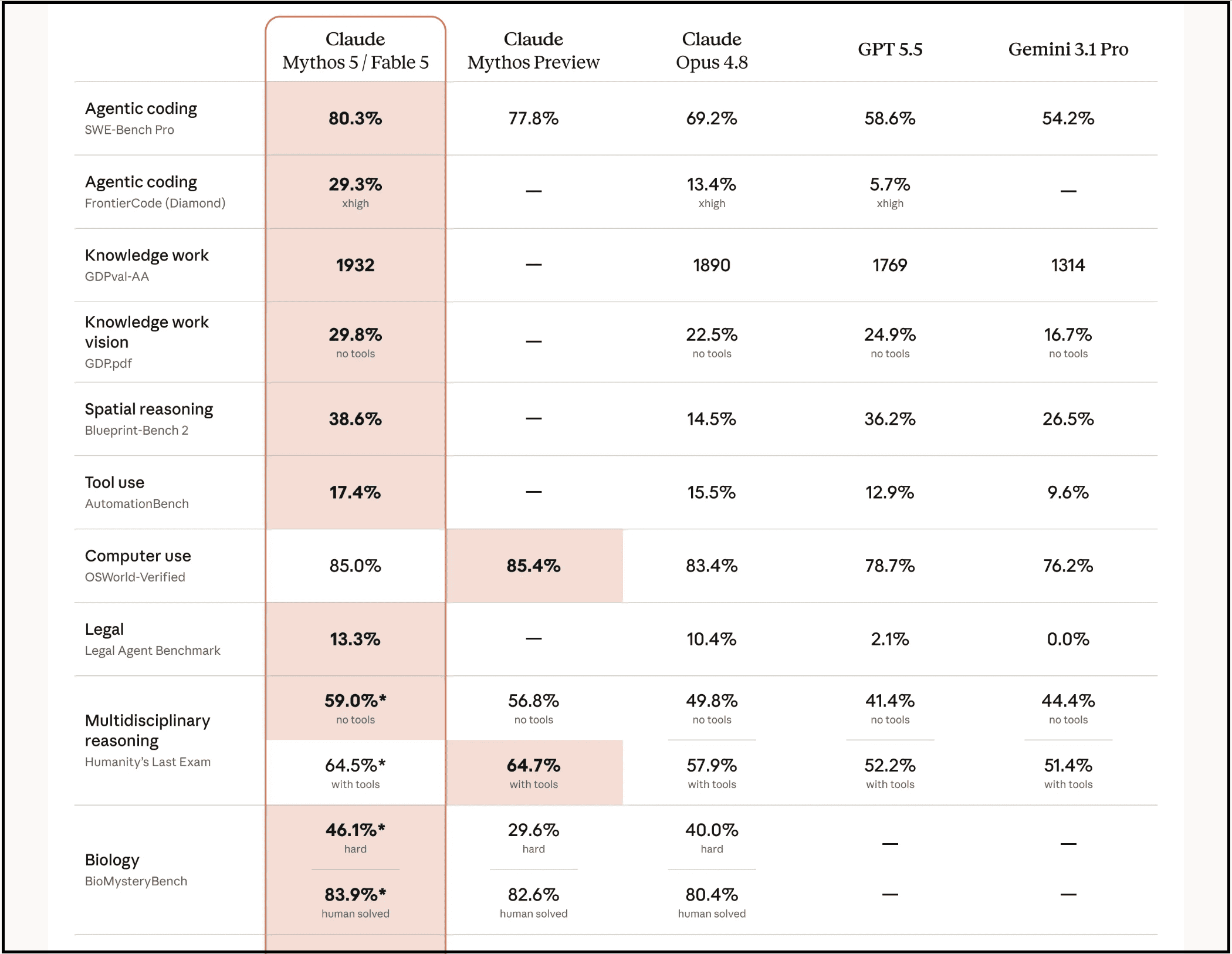
Unlike traditional chatbots that mainly focus on generating text, Claude Fable 5 is designed to understand context, think through problems, and work on projects that involve multiple complex steps.
For example, you can ask it to analyze hundreds of pages of documentation, compare different approaches, write production-ready code, improve a business strategy, create detailed research reports, or even help plan an entire product launch.
Because it maintains context much better, you don’t have to keep repeating yourself every few prompts. And it remembers what you’re trying to achieve and continues working toward that goal.
The best part? You don’t need to learn any complicated commands or workflows. If you can clearly explain what you want, provide enough context, and define what a successful outcome looks like, Claude Fable 5 does an excellent job of figuring out the rest.
That’s why I believe it’s less about writing “perfect prompts” and more about learning how to communicate your intent effectively.
Now, before we jump into the practical use cases, let’s look at a few prompting techniques that made the biggest difference in my own results.
After experimenting with Claude Fable 5 for a while and reading the prompting guide, here are six simple rules that consistently give me better results.
Tell it what you’re actually trying to achieve.
For example, you can say:
Help me write a beginner-friendly newsletter that teaches readers how to use AI for research. Keep the language simple, include practical examples, and end each section with one actionable takeaway.
The clearer your destination, the better Claude plans the journey.
Imagine hiring an employee on your team and saying, “Write an article.”
The employee won’t have a clear idea of what you want, so you’ll most likely get a generic output.
In the same way, explain to Claude Fable 5 who the audience is, why you’re writing it, what tone you want, and what success looks like.
One trick I’ve been using is asking Claude to first create a plan before generating the final output.
For example:
Before writing the answer, create a step-by-step plan, identify any missing information, and then generate the final response.
This usually produces much more organized and thoughtful results.
One of my favorite prompts is:
Before you finish, review your answer, identify weak points, fix factual inconsistencies, and improve clarity wherever possible.
It’s like getting an automatic second draft without asking twice.
If you don’t specify limits, Claude has to guess and may even do things you don’t want.
So mention things like the maximum word count, reading level, target audience, formatting, and examples to include or avoid.
Most people open a new chat every time they’re unhappy with a response.
I rarely do that. Instead, I continue the conversation and say things like:
Simplify this for beginners.
Add more practical examples.
Rewrite this section in a conversational tone.
Challenge your previous assumptions and improve the answer.
Since Claude already understands the context, each iteration usually gets better than the last.
Now that you know how to prompt Claude Fable 5 properly, let’s look at the mind-blowing use cases.
Comments
Nothing yet. Say the first thing.
Sign in to join the conversation.