
✌️ Hey, I’m Caitlin. I help product, design, and insights folks do better customer research with AI—without the hype.
Dive deeper: AI Analysis Course (March - final spots filling) | Claude Code for Customer Insights (April) | Free Lightning Lessons
Thanks for reading AI Customer Research! Subscribe for free to receive new posts and support my work.
Is your model the problem, or your workflow?
This edition is one I hope will inspire you to think about how to make sure your insights workflows really work—to know that you’ve chosen the best model for the task, and that your process isn’t getting in your way.
Despite that LLMs are non-deterministic (and variable outputs are a given), there is a way to know whether your AI workflows are likely to give you consistent outputs—or whether you’ve just been getting lucky with a couple of runs.
I’ve been connecting multiple LLMs through Claude Code and pressure-testing my research workflows across models. It changed how I build, evaluate, and trust everything I ship to stakeholders.
But almost no one I know is working like this, and that’s a problem. If we’re running workflows that are more likely than we expect to trigger highly variable outputs across runs, we can’t rely on the insights from today’s LLM session as much as we believe we can. I want to help you fix that.
Then, the news is getting harder for all of us to keep up with. I’ve picked a handful of stories you need to know about.
In this edition:
🧰 Workflow upgrade: How to know if your AI workflow (and model) actually works for the task—five multi-model use cases.
🙇♀️ I was featured! Two top Product Management sources in one month.
📰 AI news: The battle over ads continues, an AI legend raises money for physical spaces AI (and I promise it’s relevant), and much more
Let’s do this —
WORKFLOW UPGRADES
🧰 Using multiple LLMs through Claude Code - 5 use cases
When was the last time you systematically tested your AI discovery workflows? I mean, really tested different versions, across different models, and figured out which combination gives you the best results?
The common scenario: we run a prompt, the output looks reasonable, we keep using it. Maybe we tweak a few words, run it again, get something similar. Good enough.
The real question is whether your workflow produces consistent, reliable results—or whether it just happened to work alright that one time.
A few months ago, I started connecting multiple LLMs through Claude Code—and it changed how I build and trust my discovery workflows.
If you’re new to this, Claude Code lets you plug in APIs to connect other LLMs—ChatGPT, Gemini, and more. Instead of being locked into using only Claude models, you can run the same workflow across multiple platforms’ models in one place. Same data in, same workflow instructions, different models processing it. No switching between tools, no copying and pasting between chat windows.
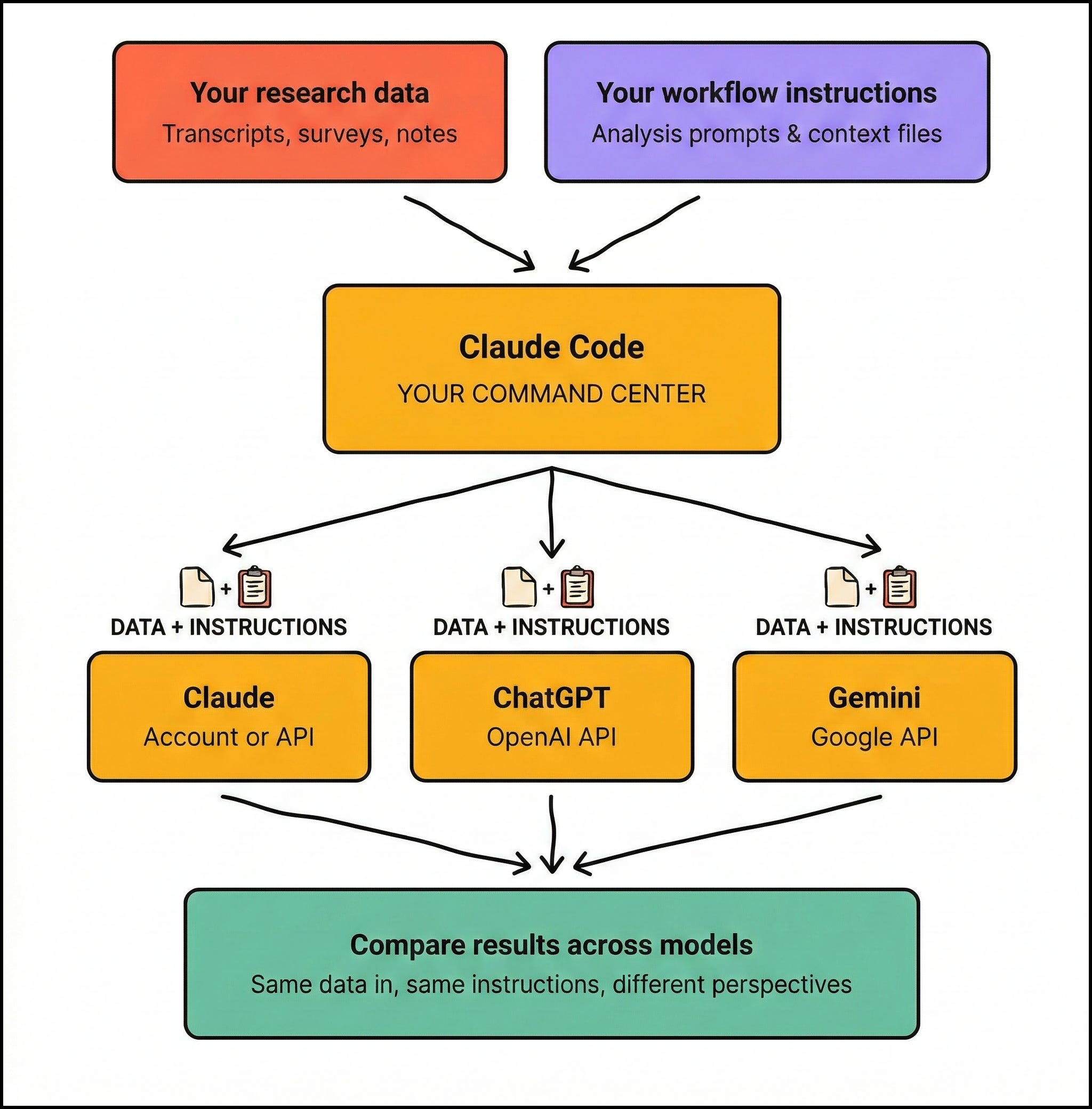
Here are use cases the multi-model setup unlocks:
1. Cross-model evals
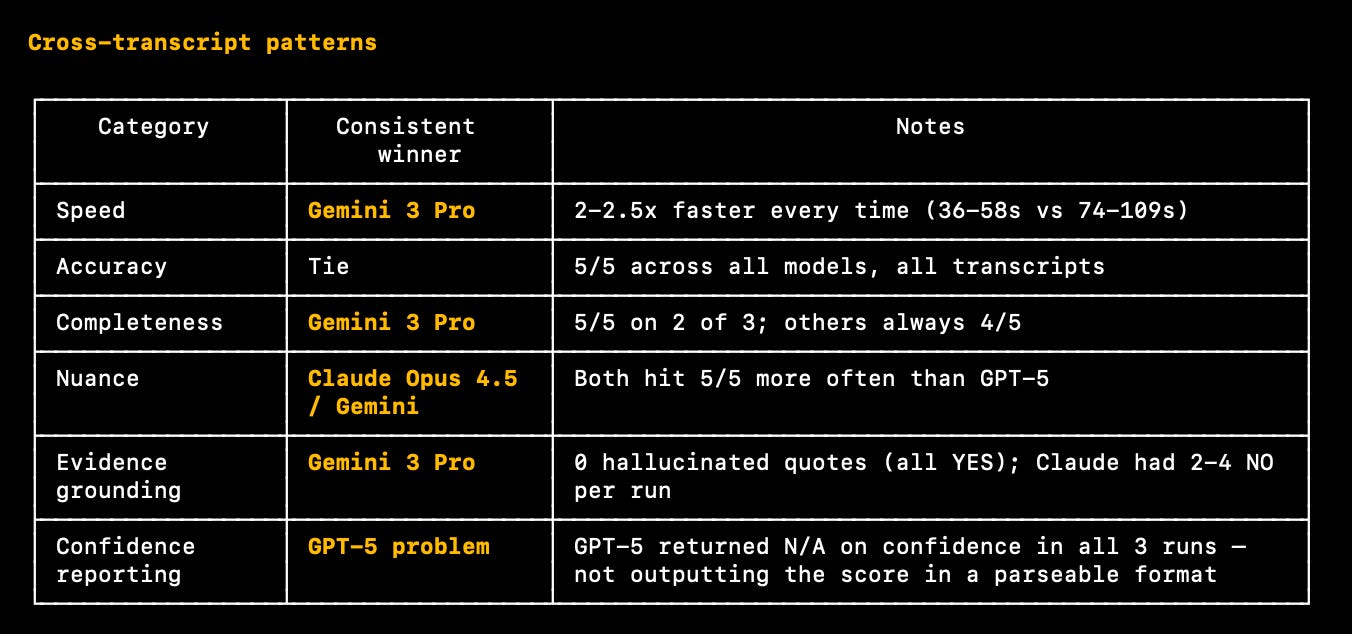
The most important to me lately. I run the same workflow—same data, same requirements, same instructions—across Claude, ChatGPT, and Gemini. If the outputs clearly converge, the workflow is solid. I want to see that my workflow forces non-deterministic models to behave in predictable ways. Most people blame the model when they get inconsistent results. But if your results diverge too much across runs, the workflow could be the problem.
If we see one model perform particularly well at a task (and we trust our workflow), it’s a signal that model could be the better fit for the task.
2. LLM-as-judge
After one model does the heavy lifting on a task, I can hand that output to a second model to evaluate the first one’s work. Where was the task done too hastily? What other solutions are there that the first model skipped over?
It’s like a skeptical colleague who’s also reviewed all 20 of your customer calls. The critiques aren’t always perfect—your judgment still needs to be in the mix—but they surface blind spots that self-review misses.
3. Ensemble analysis
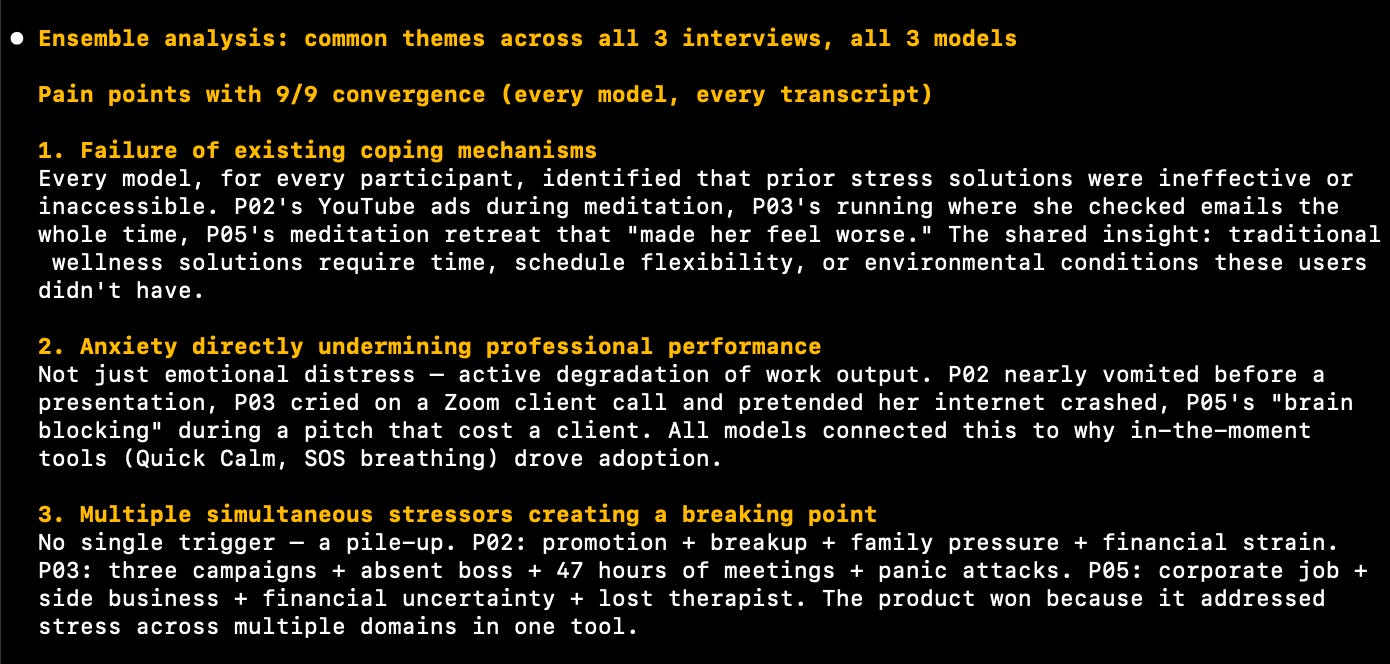
You run the same process across multiple models, then looks at what’s common across all outputs - and calls that truth. Example: themes that all three models independently surface are your highest-confidence findings. Themes that only one model catches go on the “investigate further” list.
Same logic as triangulation in research. You wouldn’t trust one interviewer’s interpretation as multiple people who agree on what’s true. A multi-model ensemble applies that rigor to AI-assisted discovery process. The convergence pattern becomes the finding—not any single model’s output.
4. Model routing
Not every step in a research workflow needs the same model. Some are better at planning fast, light experiments. Some are stronger at structured coding tasks. Some produce the best arguments for a product decision for specific stakeholders.
When you run evals across models, you start mapping which model handles which task best—then route accordingly. The expensive model handles complicated triangulation. The fast model handles pitching solutions to your CEO. You stop asking one model to be good at everything and start building a system where each step uses the best tool for the job.
5. Red-teaming recommendations
When I want to be truly certain of a product recommendation I’m handing over, I give the recommendation set plus the raw data to a different model and ask it to build the strongest possible case against the recommendation. What would have to be true for this to be the wrong call? What did the data say that contradicts this direction?
It’s a structured pre-mortem powered by a model with no loyalty to the original conclusion. When the counter-case is weak, the recommendation is solid. When it’s strong, I go back to the data before anyone makes a big, bad decision.
—
Multi-model access turns Claude Code from a single-model tool into research infrastructure.
〰️
FEATURES
🙇♀️ I was featured by Lenny and Aakash
Two very cool guest spots went live for me this month. I’d love to share them with you—including guidance I hope helps more people feel a little more caught up.
: “How to do AI analysis you can actually trust”
I wrote a guest post with the Lenny’s Newsletter team on the failure modes that break AI-assisted analysis—and the fixes for each one. It covers how to catch AI quote hallucinations, why models default to generic themes, which LLM fabricates the most, and the verification pass that stress-tests everything before it hits a stakeholder deck.
Important: this isn’t a guide to using the web ui, it’s a series of ingredients to use wherever you interact with LLMs running analysis for you - whether that’s chatgpt.com, Claude Code or setting up system prompts for n8n agents.
👉 Read my guest post on Lenny’s
—
: “How to do AI-powered discovery (step by step with live demo)”
Aakash had me on to walk through an AI-powered customer discovery workflow —live, on screen, with test data sets. No slides. No theory. Just an actual workflow running in (almost) real time. From a prompt sequence in the web chat, to the Claude Code semi-automated version (twice as fast).
👉 See the workflow with prompts
〰️
NEWS
📰 Perplexity walks away from ads—and the AI trust debate gets louder
Perplexity was one of the first AI companies to run ads alongside chatbot answers. Now they’re pulling back. They seem to have realized that once ads appear in results, users start questioning whether the responses are honest or commercially influenced.
The timing is notable: OpenAI recently started testing ads in ChatGPT. Anthropic ran Super Bowl ads mocking the practice and committed to staying ad-free. The AI industry is splitting into two camps on monetization, and the dividing line is trust.
Why this matters: If you’re using AI tools for customer research or decision support, the commercial model behind the tool shapes the output. An AI search engine optimizing for ad revenue has different incentives than one optimizing for accuracy. Pay attention to which tools have a commercial layer between you and the answer—especially when you’re making product decisions based on what they return.
📰 World Labs raises $1B to build AI that understands physical space
World Labs—founded by Fei-Fei Li, the Stanford computer scientist whose ImageNet dataset helped launch the modern deep learning era—just closed a $1B round including a $200M investment from Autodesk.
Their product, Marble, is a “world model”: you give it text, photos, or video and it generates navigable, editable 3D environments. Not flat renders. Actual 3D spaces you can walk through, modify with natural language prompts (”add a window here,” “change the lighting to evening”), and export to game engines, VR headsets, or design tools.
But I don’t think gaming and architecture are the only applications here.
Where this could head for product and design teams:
Physical product prototyping. Describe a product, space, or environment in text and get a walkable 3D version to iterate on before building anything. Concept testing for hardware, retail layouts, packaging—without touching 3D modeling software or waiting for production of the real thing.
Contextual research. Reconstruct the physical spaces your users live/work in from photos or video. Help your full team understand the spaces people operate in—how they move through environments, what’s around them, what physical constraints shape their behavior.
Why this matters:
For product and design teams working on physical products, spaces, or experiences—retail, healthcare, hardware, hospitality—this is the start of being able to prototype and test spatial concepts as fast as you can describe them, and model how humans will exist within the space or context designed. No 3D modeling skills, no weeks of production time. That changes how quickly teams can go from research insight to testable concept.
📰 Anthropic dropped six major releases in 11 days
Absurd month. More shipped in a few weeks than most companies manage in a year.
Sonnet 4.6 delivers ≈Opus performance at ~60% of the cost and the same 1M-token context window. For most insights workflows, you won’t feel the difference.
Claude Code Security scans vulnerabilities like a security researcher —tracing data flows, catching business logic flaws, re-examining its own findings to filter false positives.
Scheduled tasks + plugins turned Cowork into a digital employee. Describe a recurring task, set a cadence, it runs without you. Many enterprise connectors shipped — Google Drive, Gmail, DocuSign, and more.
Remote Control lets you start a Claude Code session in your terminal and continue from your phone.
Auto-Memory gives Claude Code persistent memory across sessions — build commands, debugging patterns, preferences — loaded automatically every session. This is changing my world right now.
Agent Teams: many Claude Code agents that can share context, and coordinate on complex tasks while running in parallel without constant human intervention. That last part makes me nervous, but I’m getting results (even without me in the loop) that felt far-fetched even 3 months ago.
📰 Gemini 3.1 Pro is upping the multi-modal game
Gemini’s 3.1 Pro arrived, boasting “more than double the reasoning performance of 3 Pro”. Where I’ve noticed some of the biggest improvements from 3 to 3.1: UI. They highlight svg animation file improvements, but there are big jumps in layout, component structure, visual hierarchy, ability to follow highly specific instructions for all kinds of image generation across my tests. This changes what you can realistically prototype with a prompt, or how much fussing you’ll need in Figma later (possibly none?).
📰 FDM-1 learns to use computers by watching people
Standard Intelligence’s FDM-1 learns computer tasks from video, then replicates what it sees. Built on an inverse dynamics model trained on 40,000 hours of labeled screen recordings, which then auto-labeled 11 million hours of internet video — the data FDM-1 was actually trained on.
It already handles multi-step CAD operations, website navigation, and — most interesting — discovers UX bugs through exploration. In testing, it found a duplicate wire transfer vulnerability by navigating deep into an app’s state tree unprompted.
Why we should care: A model that watches screen recordings, learns from what’s happening and copies it, and pinpoints what’s breaking — in accurate detail — is not far from one that watches usability tests and flags where users struggle, then rebuilds the broken UX. FDM-1 is built for task execution, not behavioral analysis — but comprehending video at the interaction level is exactly the foundation video-based UX analysis needs. Keep this on your radar.
〰️
If you’ve made it this far, I’d love your input about the future format of this newsletter 🙋♀️
—
Have a great weekend ✌️
-Caitlin
Thanks for reading AI Customer Research! Subscribe for free to receive new posts and support my work.
Comments
Nothing yet. Say the first thing.
Sign in to join the conversation.