
This is a 5-article series on Context Engineering:
️➡️ Memory and Token Management
AI Grounding Strategies and Advanced RAG
LLM Evaluation and Ensemble Methods
These series are completely organic and contain a lot of examples from my experiences. I want to refer to all those engineers who are starting their AI journey.
Token and memory management are critical aspects of context engineering. But before we dive into them, it’s important to understand how an LLM actually generates a response.
Let’s walk through a simple example.
Input:
Explain how airplanes fly
LLM Output:
Airplanes fly because of lift created by the wings moving through air.
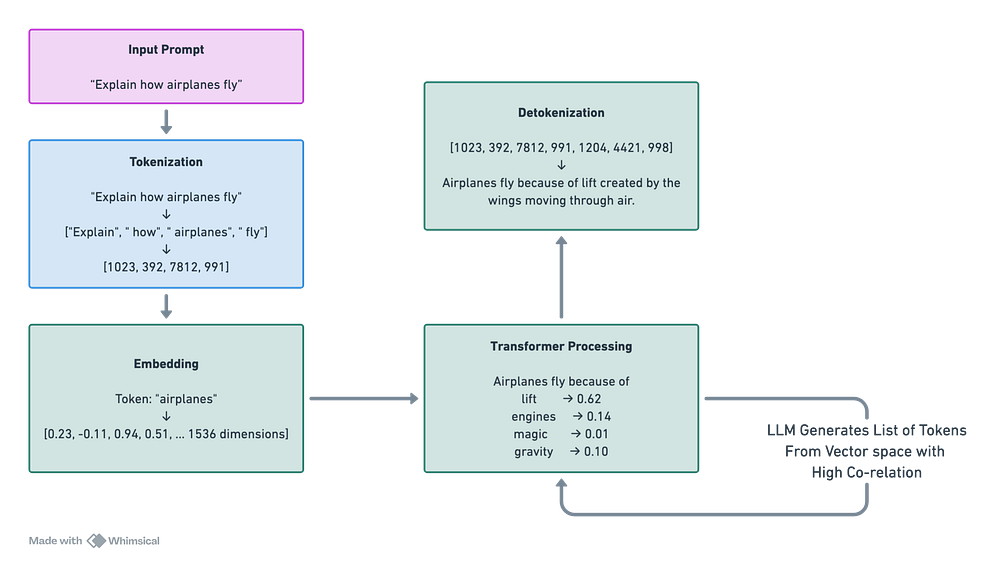
Here is a detailed diagram that demonstrates what happens when you make an API call.
The input prompt is first converted into tokens — essentially a sequence of integers.
These integers are then transformed into vectors, known as embeddings.
The embeddings are passed into the LLM, where the model performs inference.
As the model processes them, it produces a probabilistic distribution over the next possible tokens.
The most likely token is selected, converted back into text, and appended to the response.
This process repeats step by step, allowing the model to generate a continuous sequence of text.
Now let’s dive deeper into each step and see what’s actually happening under the hood.
Language models do not read text the way humans do. Before a model can process a sentence, the text is first tokenized, and each token is mapped to a discrete numeric ID.
One straightforward way to do this is to assign a unique ID to each character or word.
Character-level tokenization, however, produces very long sequences. Even a short sentence turns into a large array of tokens, which makes computation inefficient and expensive.
Word-level tokenization has the opposite problem. The vocabulary grows extremely large because every unique word needs its own ID. Managing such a massive vocabulary quickly becomes a bottleneck.
To balance these trade-offs, modern language models use subword tokenization. Instead of relying strictly on characters or full words, this method splits rare or unfamiliar words into smaller, meaningful pieces while keeping common words as single tokens. This approach keeps the vocabulary manageable while preventing sequences from becoming unnecessarily long.
If you want to see how many tokens your prompt consumes, you can use the code snippet below:
import tiktoken
# Background highlight colors
HIGHLIGHTS = [
    “\033[41m”,  # red background
    “\033[42m”,  # green background
    “\033[43m”,  # yellow background
    “\033[44m”,  # blue background
    “\033[45m”,  # magenta background
    “\033[46m”,  # cyan background
]
RESET = “\033[0m”
def highlight_tokens(text: str, model: str = “gpt-4o”):
    try:
        encoding = tiktoken.encoding_for_model(model)
    except KeyError:
        encoding = tiktoken.get_encoding(”cl100k_base”)
    tokens = encoding.encode(text)
    print(f”Total tokens: {len(tokens)}\n”)
    for i, token in enumerate(tokens):
        piece = encoding.decode([token])
        highlight = HIGHLIGHTS[i % len(HIGHLIGHTS)]
        print(f”{highlight}{piece}{RESET}”, end=”“)
    print(”\n”)
prompt = “Hello, explain me about tokenization”
highlight_tokens(prompt)
The output looks like:
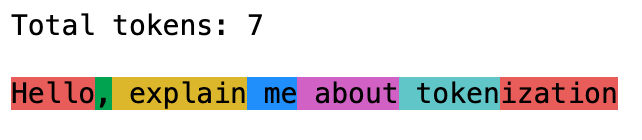
It’s evident now that one word can correspond to multiple tokens if required.
But what happens if the prompt contains spelling mistakes?
Consider the sentence: “Hello, explain me about toeknizatoin.”
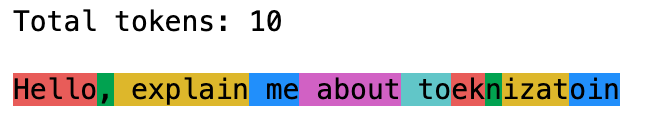
Since “toeknizatoin” is not a known word, the tokenizer cannot match it to familiar subwords. Instead, it splits the word into multiple smaller fragments. This increases the total number of tokens compared to the correctly spelled word “tokenization.”
Even small spelling mistakes can therefore increase token usage. To keep prompts efficient, ensure they are spelled correctly and clearly written.
Computers cannot process words directly — text must first be converted into numbers. But if that’s the case, why aren’t tokens alone sufficient?
Each token is mapped to an integer ID, but integers by themselves carry no semantic meaning. The numbers 42 and 913 don’t inherently tell the model anything about the relationship between the words they represent.
This is where embeddings come in.
An embedding is a dense vector representation of a token or piece of text that captures its semantic meaning. For example:
vector_dog → [0.91, -0.22, 0.55, 0.10]
vector_cat → [0.88, -0.25, 0.59, 0.09]
vector_car → [-0.44, 0.77, -0.12, 0.63]
In high-dimensional space, semantically similar words tend to appear closer together.
vector_dog • vector_cat → high similarity (dot product)
vector_dog • vector_car → low similarity (dot product)
This allows the model to understand relationships between words — something that simple token IDs cannot capture.
LLMs are stateless. When an application communicates with an LLM, the model retains no memory of past conversations. To generate a coherent response, every API call must include the relevant context in the prompt.
This requirement introduces a significant engineering constraint driven by the Transformer architecture.
Transformers rely on a self-attention mechanism to determine how each token relates to every other token in the sequence. Because of this, every token must attend to every other token.
As a result, adding more tokens increases the computational complexity quadratically — O(n²).
For example, consider the following sentence (assuming one word equals one token):
Input = [AI, will, change, world]
Attention Matrix Looks like:
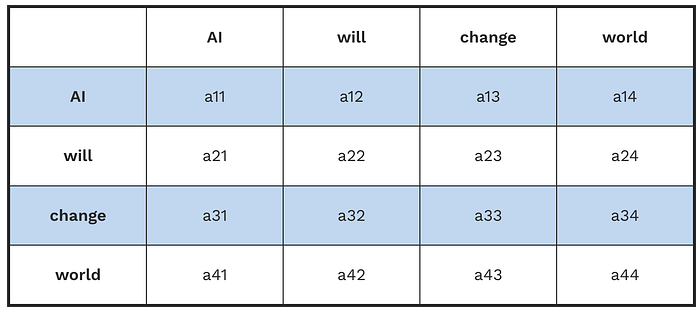
Each cell represents how much one token attends to another token.
This means the model computes 4 × 4 = 16 attention relationships for just four tokens. As the number of tokens grows, the number of computations grows rapidly, which is why token and memory management become critical in LLM applications.
Since we have computation constraints, “Context Window” comes into the picture to avoid system degradation.
Context window is the maximum number of tokens that LLM can hold in the working memory. Hence, this acts as a hard boundary for input and generated tokens.
Context limits of common LLMs:
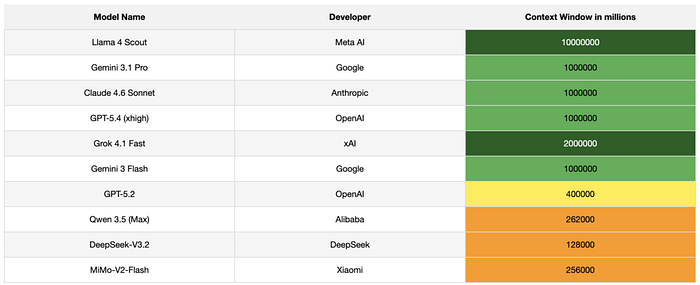
Now, what does a 128K token limit actually mean?
Suppose your input prompt — including the role, task, constraints, and output structure — already consumes 120K tokens. In that case, the LLM has only 8K tokens remaining to generate the response before it reaches the context limit and memory is exhausted.
Most modern LLMs now support much larger context windows. However, relying on extremely large prompts is often an architectural anti-pattern. Large prompts tend to suffer from a phenomenon known as context rot.
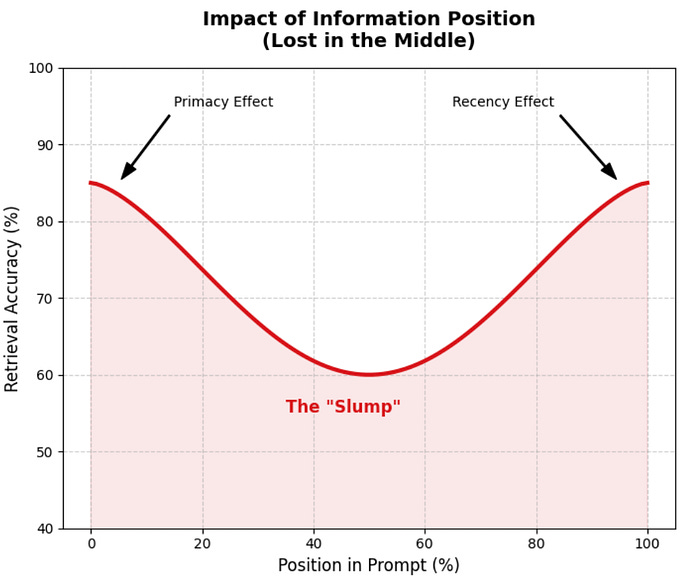
The attention mechanism in transformers typically shows high precision at the very beginning of the prompt (the primacy effect, where system instructions usually live) and at the very end of the prompt (the recency effect, where the latest user query appears).
As a result, information placed in the middle of a long prompt gradually loses influence during generation. This degradation of attention to mid-prompt information is what we refer to as Context Rot.
Since LLMs are inherently stateless, what we call “memory” is not built into the model itself — it’s a system-level abstraction created and managed by the surrounding software architecture.
Short-Term Memory (Conversation History):
This is session-scoped memory that captures the ongoing interaction. Typically, it is maintained as an ordered array of messages representing the back-and-forth between the user and the system.
Long-Term Memory (Semantic & Factual Store):
This layer enables persistence beyond a single session. It stores structured or unstructured information such as user preferences, facts, and organizational knowledge, allowing the system to retain context over time without endlessly expanding the prompt.
Working Memory:
Working memory consists of the immediate tokens being processed during a single inference. It is constrained by the model’s context window and functions similarly to RAM — holding only what is necessary for generating the current response.
This is where the LLM process chain of thoughts.
Together, these layers of memory operate in coordination to produce context-aware, personalized responses for the user.
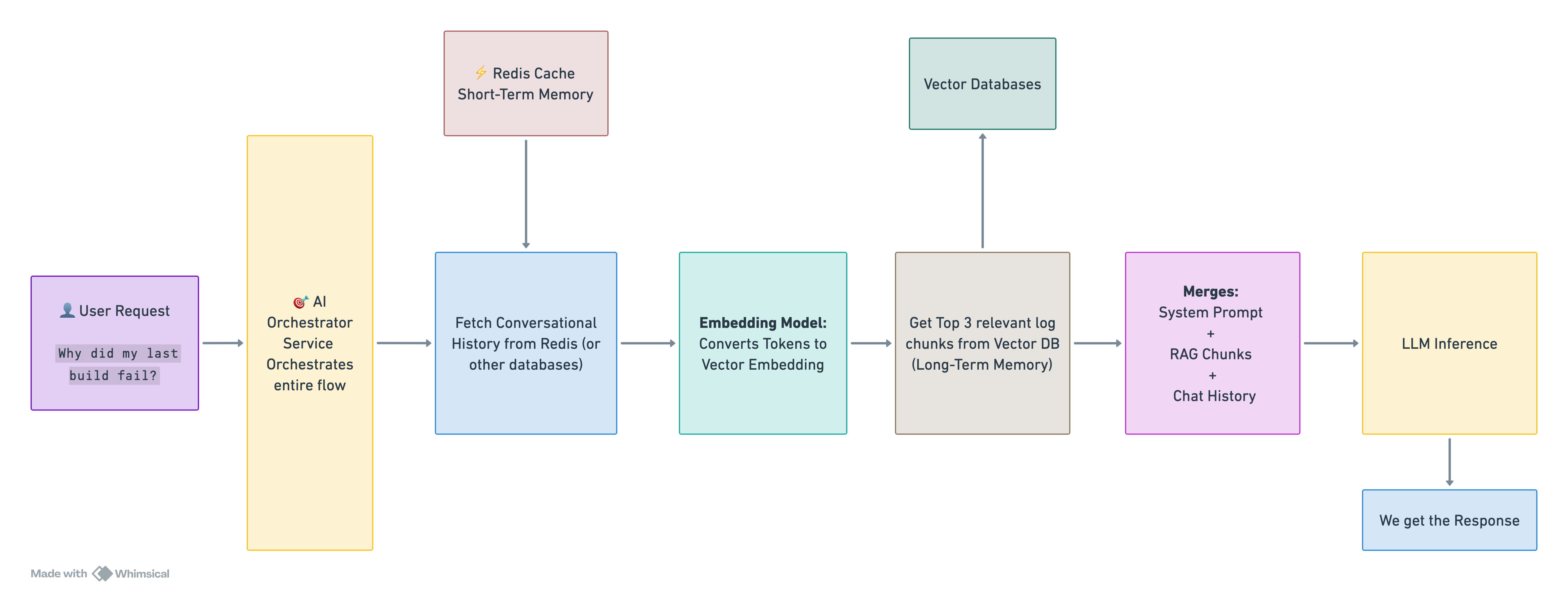
For AI Engineers, understanding memory in LLM systems is critical because the model itself does not retain any state between requests. This means that everything we call “memory” must be explicitly designed and managed at the system level.
Now, since we know about tokens and memory with regard to LLMs. Let’s talk about strategies to manage them.
To keep prompts within the model’s context window, you need a few guardrails at the code level. The exact approach depends on the use case, but there are a couple of patterns that show up again and again.
Before sending any payload to an LLM, you should programmatically count the tokens to forecast costs and prevent context window overflow. Sample Code:
import tiktoken
class TokenManager:
    “”“Manages token counting and truncation using deterministic BPE encoding.”“”
    def __init__(self, model_name: str = “gpt-4o”):
        # Load the exact BPE encoding used by the target model
        self.encoding = tiktoken.encoding_for_model(model_name)
    def count_tokens(self, text: str) -> int:
        “”“Returns the exact number of tokens in a string.”“”
        return len(self.encoding.encode(text))
    def truncate_to_budget(self, text: str, max_tokens: int) -> str:
        “”“Truncates a string to fit within a specific token limit.”“”
        tokens = self.encoding.encode(text)
        if len(tokens) <= max_tokens:
            return text
        # Slice the token array and decode back to a string
        truncated_tokens = tokens[:max_tokens]
        return self.encoding.decode(truncated_tokens)
# Usage Example
manager = TokenManager()
budgeted_context = manager.truncate_to_budget(”A massive document payload...”, max_tokens=2000)
This is the simplest way to manage short-term conversational memory. You keep a fixed number of recent messages, and as new ones come in, the oldest ones are dropped from the prompt.
When to use:
Works well for short, task-driven interactions where older context stops being useful pretty quickly.
Downside:
Anything important mentioned early on — like a user’s name or a key constraint — gets lost once it falls out of the window. This is often referred to as “hard amnesia.”
To deal with that loss of context, you can introduce a summary layer. Instead of keeping the full conversation, you compress older messages into a concise summary.
The prompt then typically looks like:
System Prompt + Summary + Last N messages (verbatim)
When to use:
Useful for longer conversations — think support bots, assistants, or any system where maintaining continuity matters but you can’t afford to send the entire history every time.
Below is an example of how you might combine both approaches in practice.
class MemoryBufferManager:
    “”“Maintains conversation history, enforcing token limits via sliding window and summarization.”“”
    def __init__(self, max_history_tokens: int = 4000):
        self.messages =
        self.summary = “”
        self.max_history_tokens = max_history_tokens
    def add_message(self, role: str, content: str):
        “”“Appends a new message and ensures the budget is maintained.”“”
        self.messages.append({”role”: role, “content”: content})
        self._enforce_budget()
    def _enforce_budget(self):
        “”“Continually evicts oldest messages until under budget.”“”
        while self._calculate_total_tokens() > self.max_history_tokens and len(self.messages) > 1:
            evicted_msg = self.messages.pop(0)
            self._update_summary_async(evicted_msg)
    def _update_summary_async(self, evicted_message: dict):
        “”“
        In a production environment, this triggers an asynchronous LLM call
        to merge the evicted_message into self.summary, preventing pipeline blocking.
        “”“
        # Pseudo-logic: self.summary = async_llm_call(f”Summarize: {self.summary} + {evicted_message}”)
        pass
    def get_prompt_context(self) -> list:
        “”“Assembles the final context payload for the LLM.”“”
        context =
        if self.summary:
            context.append({”role”: “system”, “content”: f”Prior Conversation Summary: {self.summary}”})
        context.extend(self.messages)
        return context
When you bring long-term memory into prompts using RAG, large documents can’t be sent as-is. They need to be broken down into smaller chunks first.
A common way to do this is recursive character chunking.
Instead of splitting text randomly, this method follows a hierarchy of separators — like paragraphs, then lines, then words. It typically uses something like ["\n\n", "\n", " ", ""] to break the text step by step.
The idea is simple: keep related content together for as long as possible, so each chunk still makes sense on its own.
from typing import List
class RecursiveTextSplitter:
    “”“Splits text hierarchically to preserve semantic boundaries.”“”
    def __init__(self, chunk_size: int):
        self.chunk_size = chunk_size
        # Hierarchy of semantic separators: Paragraph -> Sentence -> Word -> Character
        self.separators = [”\n\n”, “\n”, “. “, “ “, “”]
    def split_text(self, text: str) -> List[str]:
        return self._split_recursive(text, self.separators)
    def _split_recursive(self, text: str, separators: List[str]) -> List[str]:
        # Failsafe for characters if no separators remain
        if not separators:
            return [text[:self.chunk_size]] # Hard slice
        separator = separators
        next_separators = separators[1:]
        # Split by current highest-order separator
        splits = text.split(separator)
        final_chunks =
        current_chunk = “”
        for split in splits:
            # Reconstruct the text piece with its separator
            piece = split if not current_chunk else separator + split
            # If combining the piece keeps us under budget, aggregate it
            if self.token_manager.count_tokens(current_chunk + piece) <= self.chunk_size:
                current_chunk += piece
            else:
                if current_chunk:
                    final_chunks.append(current_chunk)
                # If the individual split itself is too large, recurse deeper
                if self.token_manager.count_tokens(split) > self.chunk_size:
                    final_chunks.extend(self._split_recursive(split, next_separators))
                    current_chunk = “”
                else:
                    current_chunk = split
        if current_chunk:
            final_chunks.append(current_chunk)
        return final_chunks
Building LLM applications isn’t just about prompts — it’s about disciplined system design. Tokens, memory, and context are your real constraints, and how you manage them defines success.
I’d be curious to know what techniques you’re using in production and what challenges you’ve encountered along the way.
Comments
Nothing yet. Say the first thing.
Sign in to join the conversation.