
This is a 5-article series on Context Engineering:
➡️ Prompt Engineering
AI Grounding Strategies and Advanced RAG
LLM Evaluation and Ensemble Methods
These series are completely organic and contain a lot of examples from my experiences. I want to refer to all those engineers who are starting their AI journey.

In this article, I have gathered 7 techniques for prompt engineering.
Chain of Thought Prompting
Role-based Prompting
Few-Shot Prompting
Constraint Prompting + Negative Prompting
Output Formatting Prompting
Critic + Generator Pattern
HTML-based Prompting
CoT is a technique where LLM uses the intermediate steps to generate a comprehensive context. Instead of mapping a prompt directly to an output Prompt -> Answer, CoT inserts a reasoning pathway Prompt -> Reasoning Steps -> Answer
LLMs are nothing but next token predictors. When you ask them to answer directly, they tend to do all the computation in a single call.
Whereas in CoT, you provide them with more computational space. Also, for the step they are working on, all other steps act as a context.
The AI reads its own reasoning, which heavily biases its next predictions toward the correct logical path.
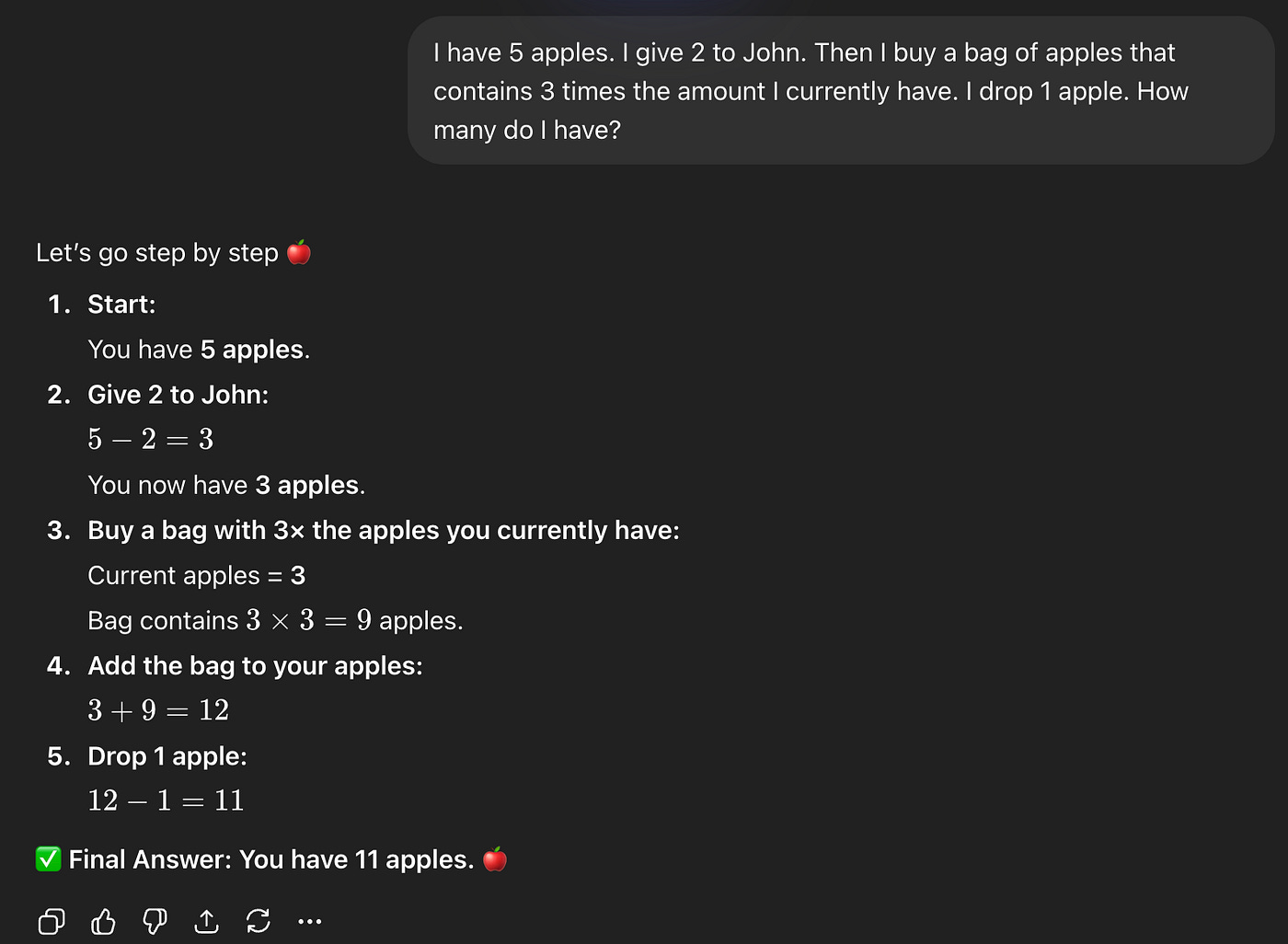
CoT using ChatGPT Free Tier Model
While most of the models do support step thinking for simple tasks, for your use case, you can define a comprehensive Chain of Thoughts.
Massive Accuracy Boost: On complex logic, math, and reasoning benchmarks, CoT has been shown to increase AI accuracy by 20% to over 50%.
Explainability: You are no longer dealing with a “black box.” You can read the AI’s “mind” and see exactly how it arrived at its conclusion.
Debuggability: If the AI gets the answer wrong, you can look at the chain of thought, find the exact step where the logic failed, and correct your prompt or provide a better example.
While you can use CoT for complex tasks like Analysis, Debugging, PR Review, and Strategic Planning, you can avoid this for simple tasks, such as summarizations.
This method is where you define a persona or a role for your LLM above the prompt.
To do Role-based prompting, you need to define S.O.A.P:
To move from “Basic” to “Advanced,” you need to go beyond just naming a job. Use the framework:
Specificity: Add constraints or “vibe” (e.g., “Use data-driven arguments and avoid fluff”).
Objective: State the goal clearly.
Persona: Define the title (e.g., “You are a Senior Data Scientist”).
Audience: Tell the AI who it is talking to (e.g., “Speaking to a board of directors”).
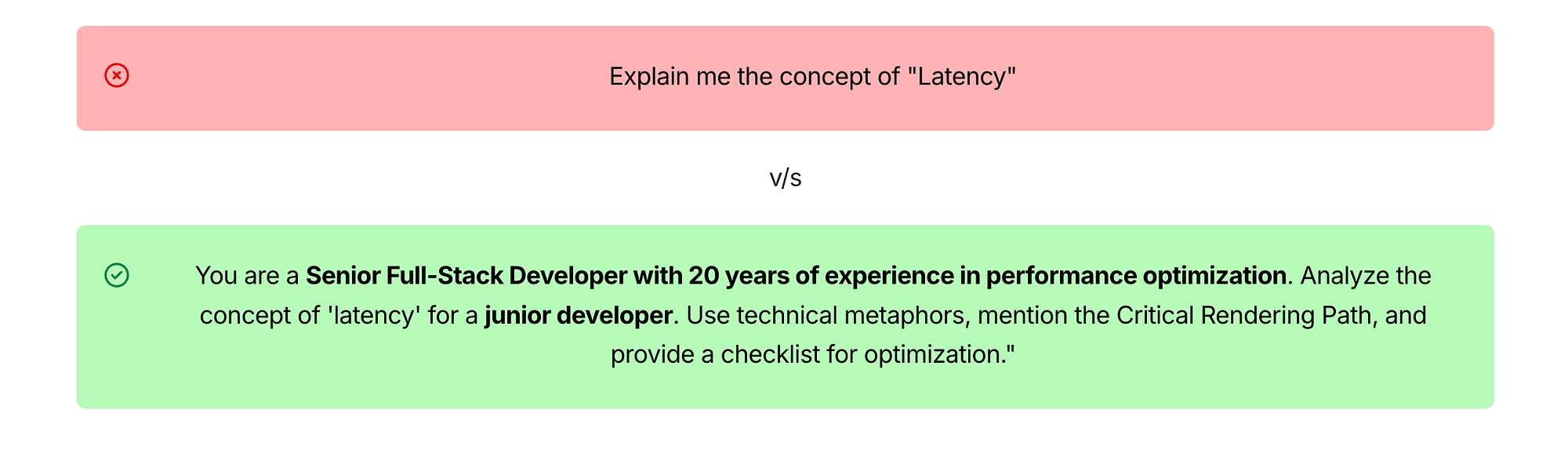
Role-Based Prompting
When we specify the role, we narrow the probabilistic distribution of word selection. It sets the proper context, filtering, tone calibration, and depth of reasoning.
Here are some small examples that you can use:

Methods for Role-Based Prompting.
It is a method where we give some examples in the prompt itself. These examples, known as “shots,” act as a template for the AI to follow.
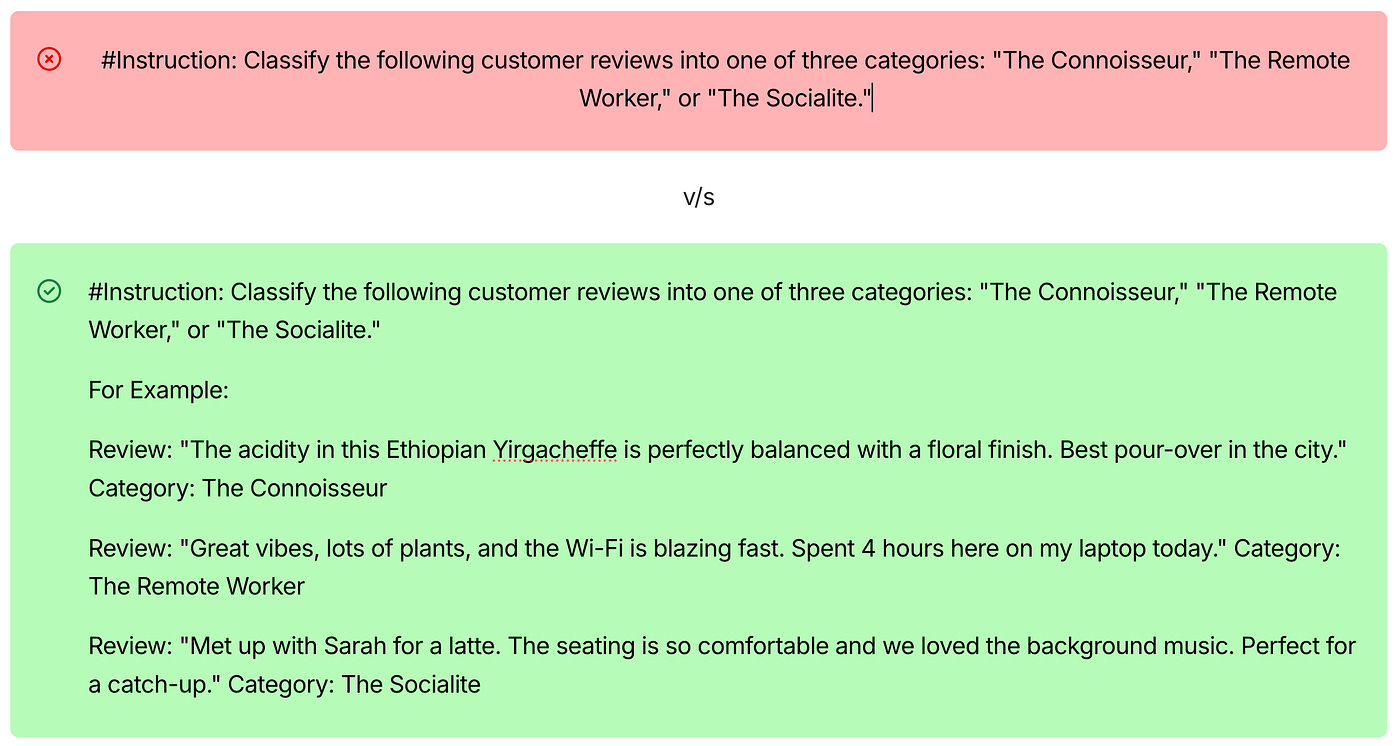
Few-Shot Prompting Example
When you are using the Few-Shot Method, you help LLMs to:
Recognize Patterns: Few-Shot prompting can help more accurately than a 500-word prompt. It helps AI to mimic rather than just calculate.
Consistent Output: Since we have given a template, the output is also streamlined.
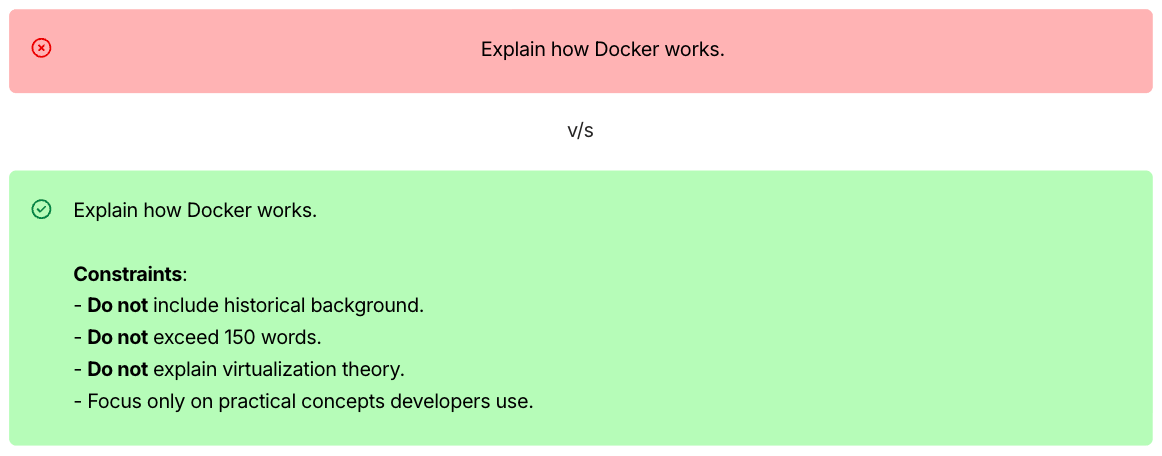
Here, we define clear boundaries, rules, or limitations for LLMs.
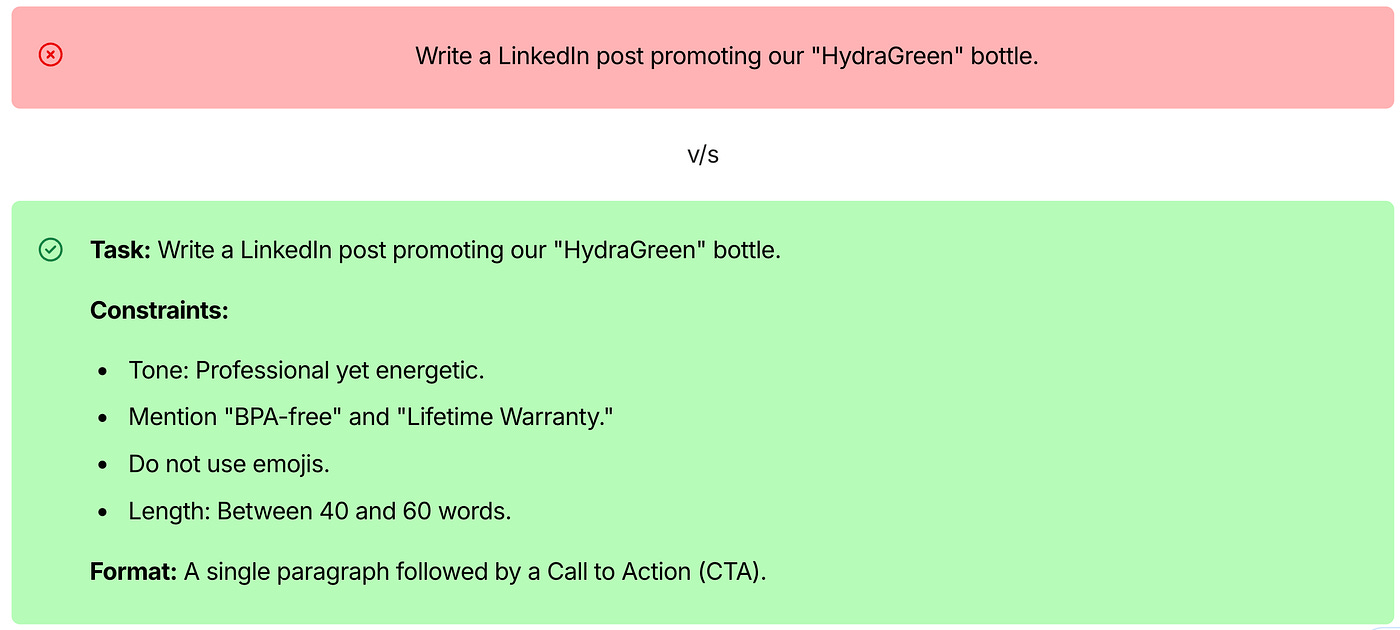
Constraint Prompting
Precision: It eliminates “AI fluff” and hallucinations.
Efficiency: You save time on editing because the first draft is already formatted for your needs.
In constraint prompting, you can also define what things you don’t want. That’s called Negative Prompting.
Negative Prompting is used for:
Anatomy & Quality Control: To avoid the “uncanny valley” (extra fingers, fused limbs, distorted faces).
Aesthetic Direction: To remove styles you dislike, such as “cartoonish” or “high contrast.”
Negative Prompting
In this method, you clearly define the output structure. Instead of a model determining the structure, you provide a mold for output.

Output Formatting Prompting
Automation Readiness: If you are building an app, the output structure matters when it comes to reliability and scalability.
Consistency: You get a consistent output.
In this pattern, we use two distinct roles or agents that work together to achieve a goal in a single prompt.
Generator: Which creates…
Critic: Which evaluates…
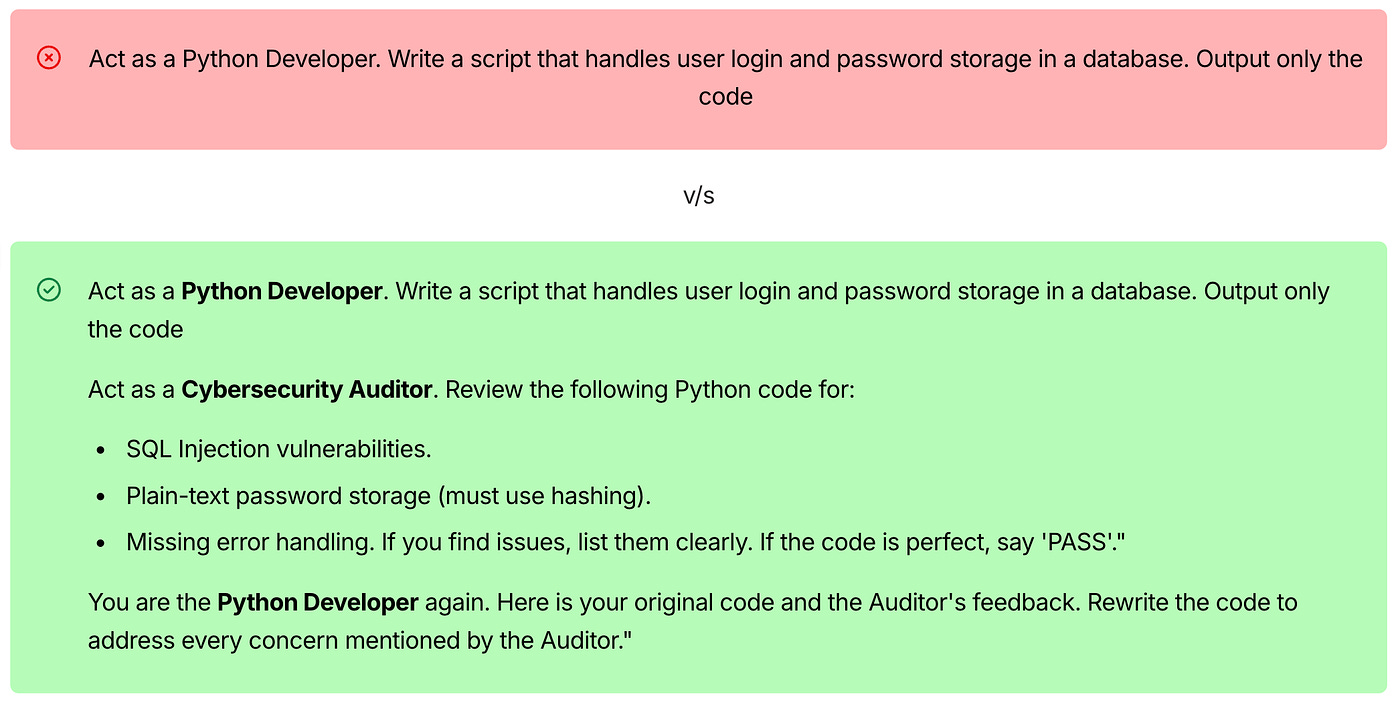
Critic + Generator Pattern
Reduced Hallucinations: The Critic can catch factual errors that the Generator made.
Higher Reasoning: By forcing the AI to “think twice,” you simulate another layer of reasoning which single-pass prompt often lacks.
Using HTML tags in prompts can improve how LLMs understand structure and context.
While models don’t actually “render HTML,” they are trained on a huge amount of HTML from the web, so they naturally understand these patterns. Here are the main benefits.
LLM understands which text belongs to which Instruction, which reduces instruction mixing.
Improves prompt readability
Helps in giving nested instructions as it understands HTML code.
When you’re designing a prompt for you production grade application, it’s very obvious to use a combination of the above techniques.
And this helps you to not only get correct output for the first time but also the 1000th time.
Here is a sample prompt template on how an engineer can apply all these techniques together:
That’s the end of the article. Hope you have found valuable insights. The goal is no longer just to give the model the right answer — it is to build a system that knows exactly which part of its “world” to look at to find that answer itself.
Do share what different techniques you are using for writing optimal prompts.
Stay tuned for Part 2, where we move from static prompts to dynamic, self-evolving context architectures.
Comments
Nothing yet. Say the first thing.
Sign in to join the conversation.