
The last element of the organizational change management activities (besides communication and org design) is the training and enablement area. You want your users to be up-to-date with what they need to learn for their role in the architecture program.
The good news is that most organizations already have a training program in place, and I highly recommend simply following their guidance and processes. Setting up a global learning program in multiple languages and for different products/learning areas is no small effort (guess how I know this ;-).
The following two articles describe what you should do in case you do not have a learning group. You can also use it to give additional input and ideas in case you already have something established and you think it could need some fresh ideas.
In this article I will describe the overall setup and the first phases, and next week will close it out with the remaining phases.
Setting up a program from scratch is typically structured in three phases:
Design of the program
Development and training delivery
Management of the training program
In addition to this, I highly recommend looking for a Learning Management System (LMS) that you will use for managing online and in-person content. These tools allow you to manage the content of your classes and allow sending out surveys after delivery, doing reporting, etc. — a lifesaver in some situations. However, the implementation of an LMS is out of scope for this article.
Figure 1 below shows the three phases in an overview:
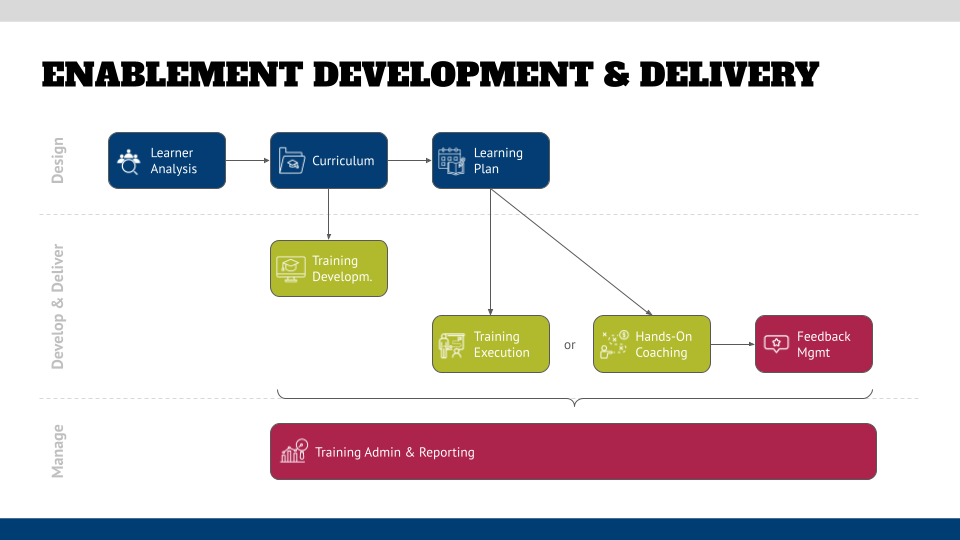
Fig. 1: Three phases of enablement development and delivery
The first phase is the design phase of the program. In this phase, you have to look at the learners that you will cater to with your program. These are the roles you have identified in your process governance, the groups that you identified in the organizational governance phase, and the various stakeholders that you determined in the strategy phase.
Once you have identified the roles, you start with the learner analysis. For each role, determine what they need to learn (the easiest way is to run a report on the governance processes that you have already modeled — this will give you the steps that users will do in which process and which tools they will use for that) and what their previous knowledge of the subjects is. For example, have your users already worked with similar tools to your architecture tool, or are they complete newbies?
In addition to that, you need to determine their change readiness and where they are on the change curve that we’ve discussed earlier. This could mean that you will have to create additional content for them to “bring them into” the program and address their potential objections in the form of supplementary material and micro-learning (“Why do we do this?”), which are typically not found in a curriculum.
A good training consists of more than tool training (“Which button do I have to press?”). You need additional conceptual content (“What is BPMN?”) and governance material (“What am I supposed to do in my role as x?”). You also might have to add additional communication content, as discussed above, to support the adoption of the program.
This will give you the raw list of things that you need to teach, and you should also include resources that you find elsewhere, such as training offerings from your tool vendor, or organizations that you are part of, such as TOGAF. There is no need to reinvent the wheel, and you take away the effort of having to maintain that content every time when the software updates or a new concept is added to a framework that you follow.
The next step is to map training content to the different roles that we’ve seen in the previous chapter. Typically, you see different levels of expertise needed that can be mapped to levels like “Foundation”, “Basic”, and “Expert”:
Users need the main content in detail (tool usage, governance, concepts)
Enablers might need different content depending on their role as admins, developers, or data scientists. These roles are also “heavy users” and might need the same level of deep detail, just in different areas (such as the administration of the tool or the APIs). However, there are also less involved roles in this group, such as reviewers and SMEs — these might need a “less heavy” content in the form of overviews or stripped-down content that just covers what they need to know. An example of this could be automated governance processes — they don’t need to know how those will be set up in the tool, but only need to know what they have to do as a participant in these processes. Either way, all of these rules require governance and concept content as well.
Contributors are less involved, and some roles in this category have viewer status or do limited data input. In any case, their needs are more around overviews and their role in the governance processes. From a conceptual perspective, they might need maybe a bit of knowledge (a reviewer or SME should be able to read a BPMN diagram for example) or might not need anything (like IT people who operate an on-premise installation).
The last group of consumers, which could be internal (e.g., process participants) or external (e.g., auditors) typically requires just high-level, overview-type content, such as “Where do I find content that I am interested in following the structure of the tool?” Typically, you don’t have any special content for these roles besides overviews and basic “Where do I have to click” information, and I have seen organizations that build dynamic in-tool walkthroughs for this group of users.
This shall provide you enough information to lay out the content in a structured way. One visualization that I like is mapping it out as a subway map, where every logical piece of content is represented as a stop. You can also see where related content is connected.
In the example below, you can see that process modeling (activity in the tool) not only requires knowledge about the notation (concept/BPMN) but is also connected to other activities like simulation, exchanging diagrams with process mining or the automation component.
You can now also define which subway lines are for less involved roles (the overview line) or what the foundational content is, and you can point your users to just the content that they need.
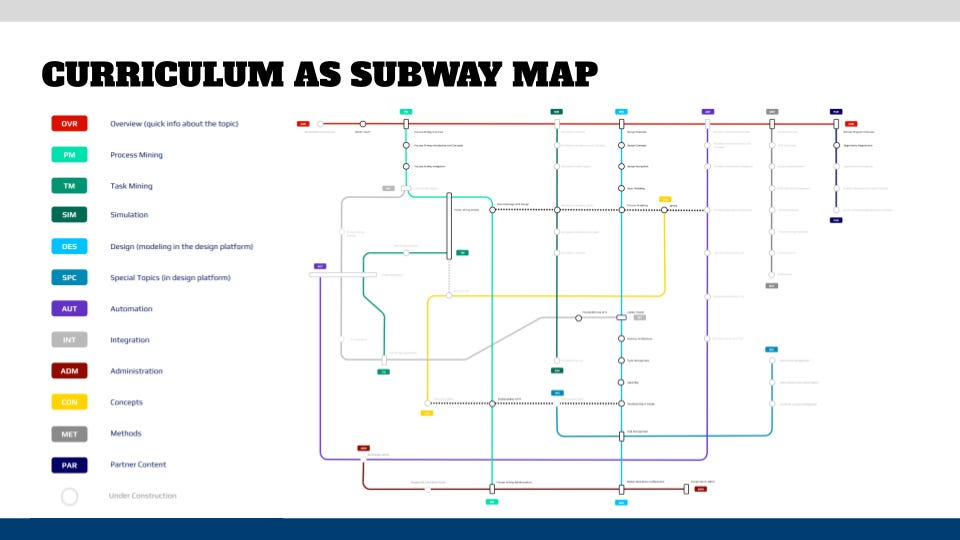
Fig. 2: Curriculum visualization as a subway map
One thing you definitely should do is to define learning plans per role — the sequence of subway stops and where a learner might have to switch lines. The successful completion of a learning path can also be the prerequisite for a certification. If you use an LMS, then you can use their functionality to structure things and also upload required material that someone needs to have read before they start a course.
Then you define the format of the courses: will you provide instructor-based classes, self-paced e-learning courses, micro-learning, brown bag sessions/events, or any other form? This will determine what effort and which tools you might need besides a presentation program. When designing your courses, keep in mind the different learning styles that different people have — the most common ones are visual, auditory, read/write, and kinesthetic (doing/moving/touching).
Finally, you have to consider if you require learning labs for your software stack (in almost all cases, the answer will be “yes”). Then you need to determine how those can be provisioned — does the tool vendor have those? Do you want self-service, or do you need to provision them manually? How long do they need to be made available (the cost can creep up pretty quickly)? And so on. My recommendation is to automate as much as possible and hopefully, you have chosen a tool that allows multi-tenancy so that you have only one installation, but you can provide multiple instances for the learners on that one installation. Or can you provide local installations with a temporary key?
BUT: For all of these thoughts on creating a curriculum (and also the learning plan and delivery below), keep in mind that you need flexibility. Be prepared to change if you realize that things don’t work out and your learners don’t reach their goals.
The learning plan has two aspects — an external-facing part that has the learners in focus and an internal-facing part that looks at the update and ongoing maintenance of your content.
For the external-facing part, you need to look at your roll-out plan and when you want to provide which capability/service to whom. This will result in “learning packages” that you will provide over and over whenever a new group is onboarded to the program once you have things set up. For the initial roll-out, I recommend having a “soft launch” of some well-meaning volunteers that understand that things might not go well in the beginning but also can give you relevant feedback.
Once you have launched your program, you should think about how you will keep the content current. Initially, this is not a problem because it is a very fast-moving area with an “all hands on deck” attitude, but you would rather not keep that pressure on forever and rather install a process that establishes predictability when new or updated content can be expected. As a rule of thumb, I would review the content and potential feedback at least twice a year, depending on the availability of resources that can work on the courses.
Whatever you decide, communicate clearly and openly what the plan is — a wiki that holds the training offering descriptions and a calendar that shows the internal and external perspective should do the trick for you in the beginning. Once you mature, this can be done by the LMS or your work management tool.
In part two of this mini-series, we will take a closer look at the remaining phases: develop and deliver, manage, and additional learner support. Stay tuned
No posts
Comments
Nothing yet. Say the first thing.
Sign in to join the conversation.