
Okay, this is going to be a fun one! And THANK YOU to the lovely Karen Michaels 🦋 for basically commanding me to write this post 😁
This week, we’ve got a new video tutorial, but bear in mind I am just discovering this tool RIGHT NOW as I write this…so if I fumble around a bit, I’m taking one for the team!
This is a brand-new feature designed to help you offer exclusive benefits to paying subscribers, including promotional codes, digital downloads, and access to live videos on Substack.
You might be wondering how this differs from regular paid subscriber benefits.
I think the biggest difference is how we can display them on a dedicated PERKS page that could potentially look like this, depending on what your perks are:
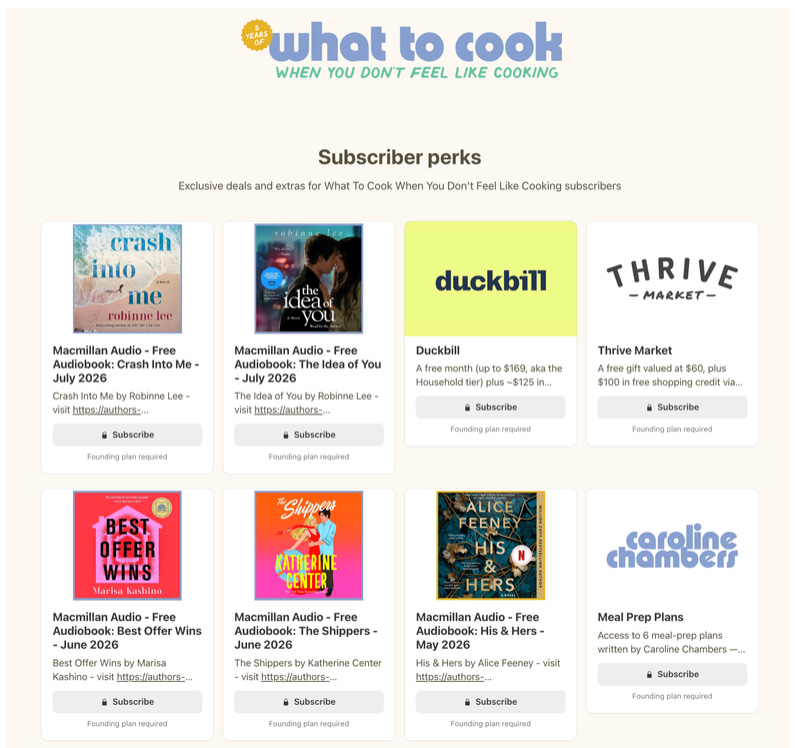
Here’s a link to her actual perks page so you can see it in real life vs a screenshot.
Discount or promo code: a code you’ve created for an external site
Digital download: a file up to 700 MB that subscribers can download (PDF, ebook)
Community invite: a link to a private space, such as Discord
Link: a link to an online resource, such as a Zoom session
Substack Live video: a link to a future live video for paying subscribers
Something to note is that perks pages are only visible on desktop versions, NOT in the app. This seems to be the usual case for any new feature rollout.
One more thing…you MUST have payments enabled in your Substack dashboard to see the Perks feature in your settings.

Below is a video walkthrough of how to create a perk and what it all looks like behind the scenes. And remember, this is my first time! I can’t promise my (fake) perk will look good but I’ll get you there regardless! 😁
This post is part of the Unstack Substack Video Vault—a growing library of simple, practical tutorials you can come back to anytime you need to set up, fix, or fine-tune your Substack. Most Video Vault content is one of many fabulous paid subscriber benefits.
Comments
Nothing yet. Say the first thing.
Sign in to join the conversation.