
If we have learned one thing over the time, then it is this: Nothing on the internet ever is really free. However, if something on the internet is free, then you are most likely not paying with money but with your data. This is why a new market for email providers has developed that focus on privacy-first. Two of these email providers, that keep your inbox ad free and private, are Tuta Mail and StartMail.
Key differences - A quick overview
The key differences between Tuta Mail and StartMail include:
• Tuta uses a freemium model while StartMail offers only paid services (+ a 7 days free trial period)
• Tuta offers an all-in-one suite of secure email, contacts, calendar and drive services while StartMail focuses solely on an email solution
• Tuta uses postquantum cryptography and end-to-end encryption while StartMail is rooted in OpenPGP encryption
• Tuta offers 15 or 30 extra email aliases (depending on the plan) while StartMail’s plans offer an unlimited number of email aliases
• Tuta offers its own email client for use while StartMail supports IMAP/ SMTP so you can use third-party email clients
Turn ON Privacy in one click.
Secure alternatives to Big Tech
Mainstream email providers and Big Tech companies like Google or Outlook base their business model by scanning and tracking your data. But recently a new trend can be observed: the “deGoogle” trend. The aim is to “de-google” your life and break free from other Big Tech companies. Luckily, there are alternatives available to Google or Microsoft. Two of these email alternatives are Tuta and StartMail. Let’s have a look at how these two compare!
But basics first: StartMail is based in the Netherlands, with its servers located there as well, and offers a secure email service. The company was founded in 2013 and the email service was officially released in 2014.
Tuta (formerly Tutanota), based in Germany, offers a secure all-in-one communication suite including email, calendar and drive services. The compay was founded in 2011 and launched its email service in 2014 with its calendar following in 2019. Both Tuta and StartMail are GDPR-compliant.
Note: All information regarding StartMail are taken from its website.
Comparison
Now let’s take a deep dive and compare the two email services in terms of pricing, encryption, usability, and much more!
Pricing
Since both providers do not make money by abusing your privacy, both offer paid plans. While Tuta offers a freemium model, StartMail only offers paid plans but you can have a free trial of seven days.
Generally, StartMail offers two paid plans: “Personal” and “Business”. On its website StartMail advertises that all paid plans include no ads, no tracking, unlimited aliases and the possibility to send encrypted emails to anyone. The “Personal” plan is meant for individuals and families and costs 4.99€ per month (or 59.88€ if billed annually) with 20 GB of storage. The “Business” plan, according to the website, is targeted at teams, entrepreneurs and freelancers, and costs 6.99€ per month (or 83.88€ if billed annually) and has storage capacities of 30 GB.
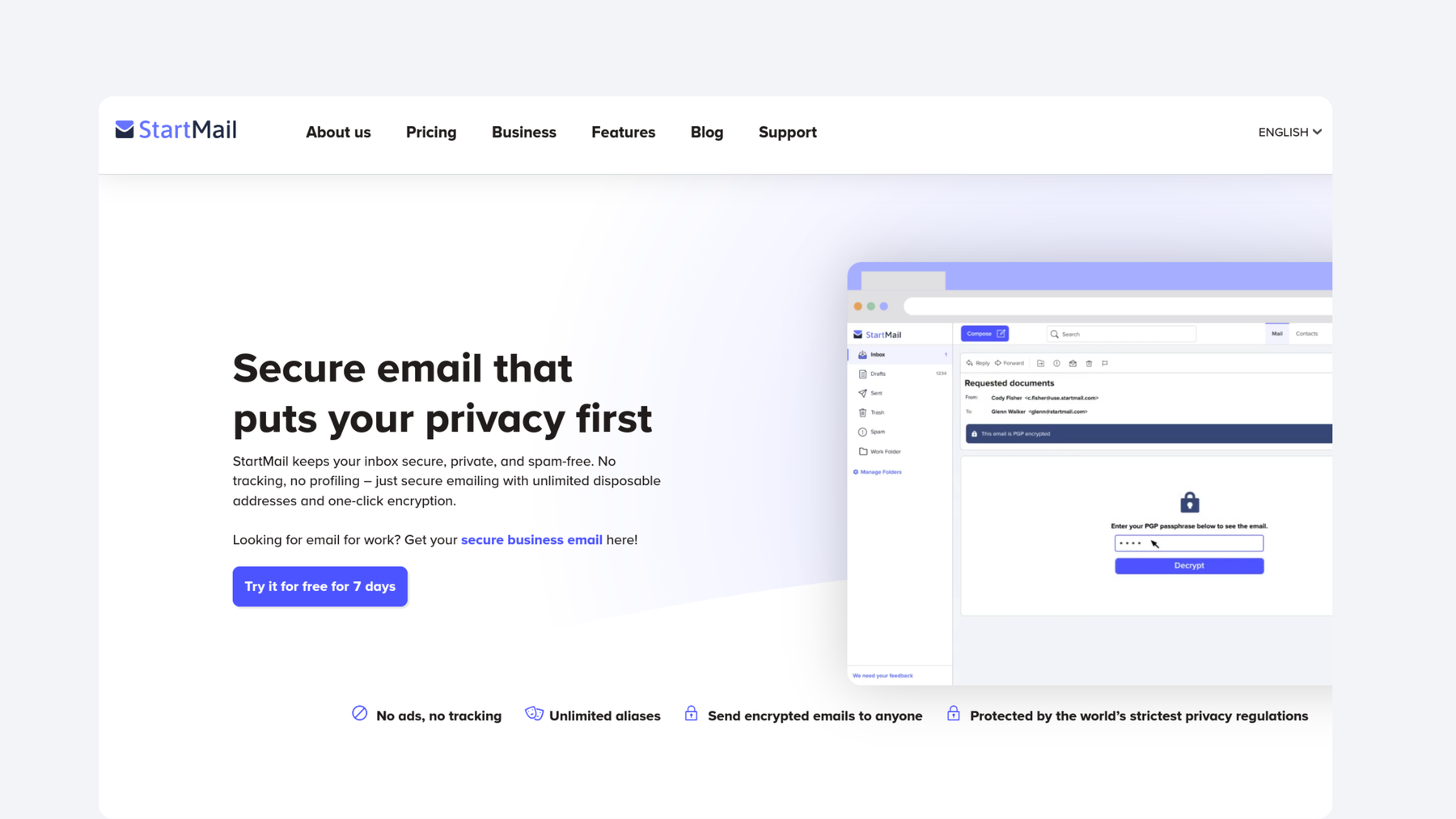
StartMail pricing overview. Screenshot: StartMail website.
Tuta offers a freemium model, which includes a basic version for free and paid plans, for personal as well as for business use. For paid personal plans Tuta offers the “Revolutionary” (3.60€ per month or 3€ per month if paid yearly) with 20 GB of storage and the “Legend” plan (9.60€ per month or 8€ per month if paid yearly) with 500 GB of storage.
For business use, Tuta offers three paid plans. The “Essential” plan is ideal for freelancers and costs 7.20€ per user per month (or 6€ per user/ month if paid yearly) with 50 GB storage while the “Advanced” plan, ideal for teams, costs 9.60€ per user per month (or 8€ per user/ month if paid yearly) and has storage capacities of 500 GB. Lastly, the “Unlimited” plan is especially suitable for businesses and costs 14.40€ per user per month (or 12€ per user/ month if paid yearly) with 1000 GB storage.
You can find a more detailed overview of Tuta’s pricing plans on its website.
Note: All of Tuta’s prices for businesses exclude taxes.
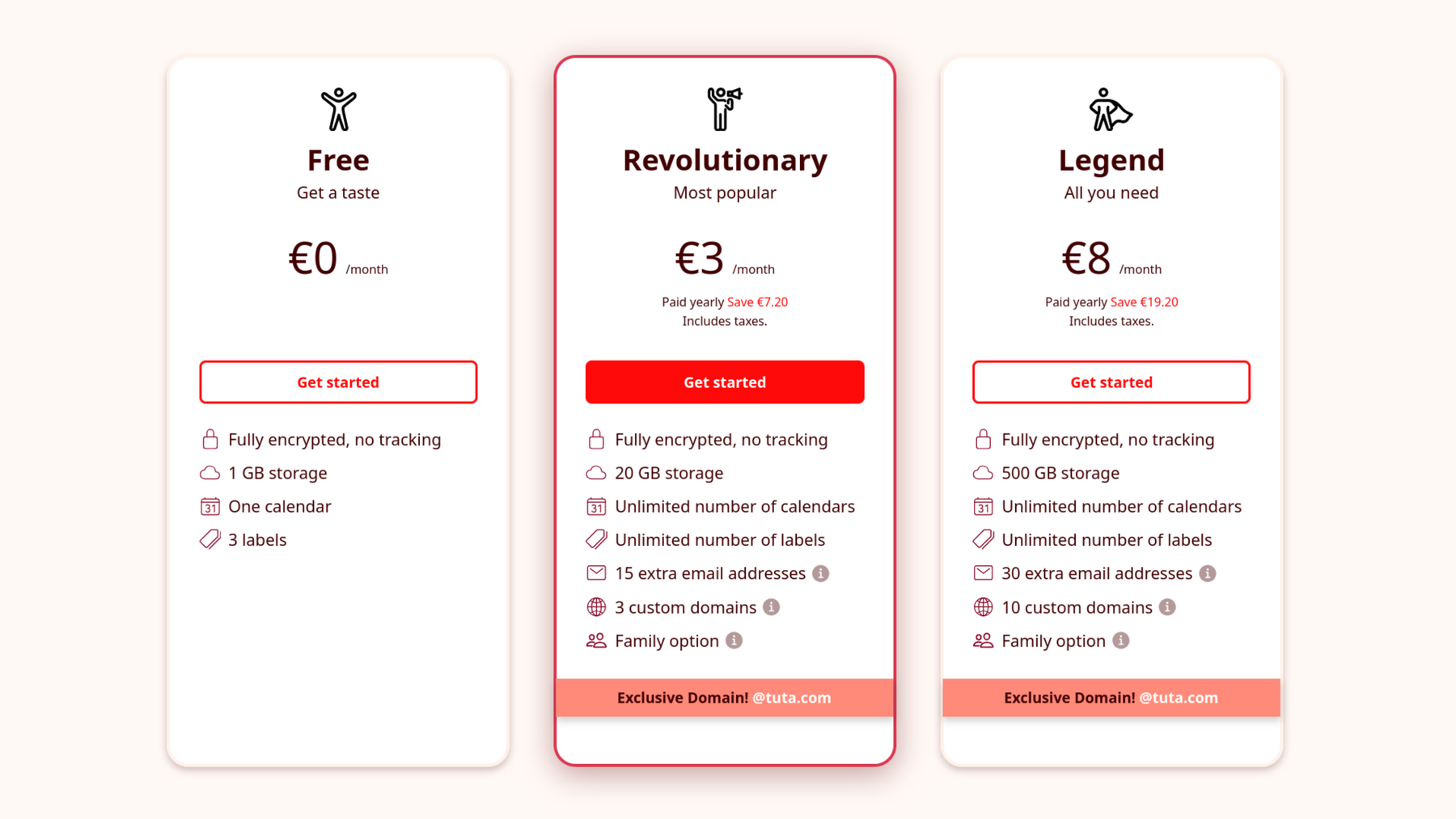
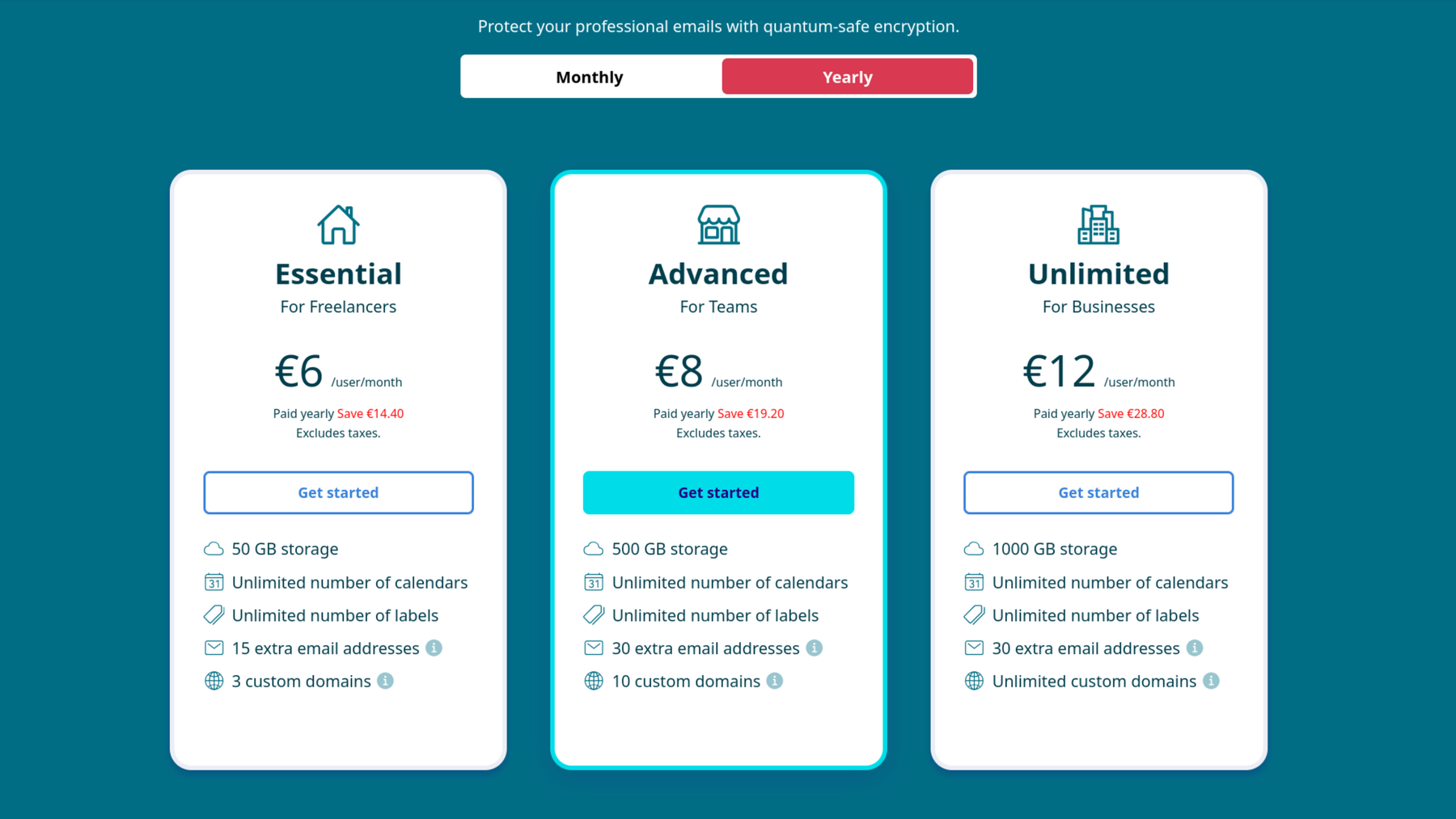
Tuta pricing overview for personal and business use. Screenshot: Tuta website.
Encryption
StartMail’s encryption is rooted in using OpenPGP which has become a standard for email security. In more technical terms, PGP uses public-key encryption as well as symmetric encryption and is primarily used for sending and receiving encrypted emails or for verifying the ID of an encrypted message sender. On top of that, StartMail enables you to send password-protected encrypted emails to someone even if they do not use PGP.
Tuta is the first email provider worldwide that offers post-quantum cryptography for email. This means that with Tuta the entire email mailbox – including subject lines - is end-to-end encrypted by default, meaning that not even Tuta itself can decrypt and read the emails. In addition to this, post-quantum cryptography means that Tuta uses algorithms that are resistant to future attacks from quantum computers which can protect you from so-called “Harvest now, decrpyt later” attacks. With Tuta, you can also send password-protected, encrypted emails to someone, even if they do not use end-to-end encryption.
Turn ON Privacy in one click.
Open-source
According to StartMail’s Whitepaper about Privacy and Security Insights, the email provider uses a mix of open-source and closed-source software. However, the core of StartMail’s service is closed source.
With Tuta, all Tuta clients are open source and the entire client code is published on GitHub for all Tuta apps and web clients. This means that anyone can audit the code and therefore verify that Tuta uses maximum protection to secure your privacy and data.
Related: Tuta was even the first open source email app available on F-Droid.
Email Alias
Email aliases are additional email addresses that you can use for a special purpose while protecting your primary email address. Moreover, email aliases can help you to reduce the spam in your email inbox and help you to keep your inbox organized.
Both plans by StartMail, “personal” and “business”, include an unlimited number of email aliases. In Tuta’s paid plans, the “Revolutionary” plan offers 15 extra email addresses while the “Legend” plan offers 30 extra email addresses. Regarding Tuta’s business plans, the “Essential” plan offers 15 extra email addresses while both, “Advanced” and “Essential” plans offer 30 extra email addresses. When using your own domain, you get unlimited aliases in all paid Tuta plans.
Email Migration
Email export, and especially import, allows you to easily move email providers, for both personal and business use. In other words, email import makes leaving Big Tech even easier!
For email migration in StartMail you can use its ShuttleCloud migration service. The service allows you to migrate emails/ contacts from another provider to StartMail. As of now, StartMail supports up to 20 GB of storage space for personal accounts and 30GB for business accounts.
Last year, Tuta released email import which allowed businesses and individuals to import emails into your encrypted mailbox. In July 2026, Tuta announced its one-click migration is in closed beta which allows you to migrate and sync any old external mailboxes into Tuta Mail. The advantage about one-click migration is that it will import your old mailbox and will maintain the emails folder structure. Moreover, one-click migration will sync one way from the external mailbox into Tuta Mail. This means that if you, for example, receive an email in Gmail, it will automatically sync into your Tuta Mailbox.
Custom domain
Custom domains allow you to get an email domain with your own name, for example for business purposes. If you own a business you could, for example, use custom domains like sales@yourcompany.com or support@yourcompany.com. You can find more information about custom domains here.
Both StartMail and Tuta offer you to get a custom email domain. StartMail’s personal plan allows you to get one custom domain while its personal plan allows you to get an unlimited number of custom domains.
With Tuta’s personal paid plans you can get either three custom domains, in the “Revolutionary” plan, or ten custom domains, with the “Legend” plan. Regarding Tuta’s business plans, in the “Essential” plan you can get three custom domains, in the “Advanced” plan you can get ten custom domains or you can get an unlimited number of custom domains in the “Unlimited” plan.
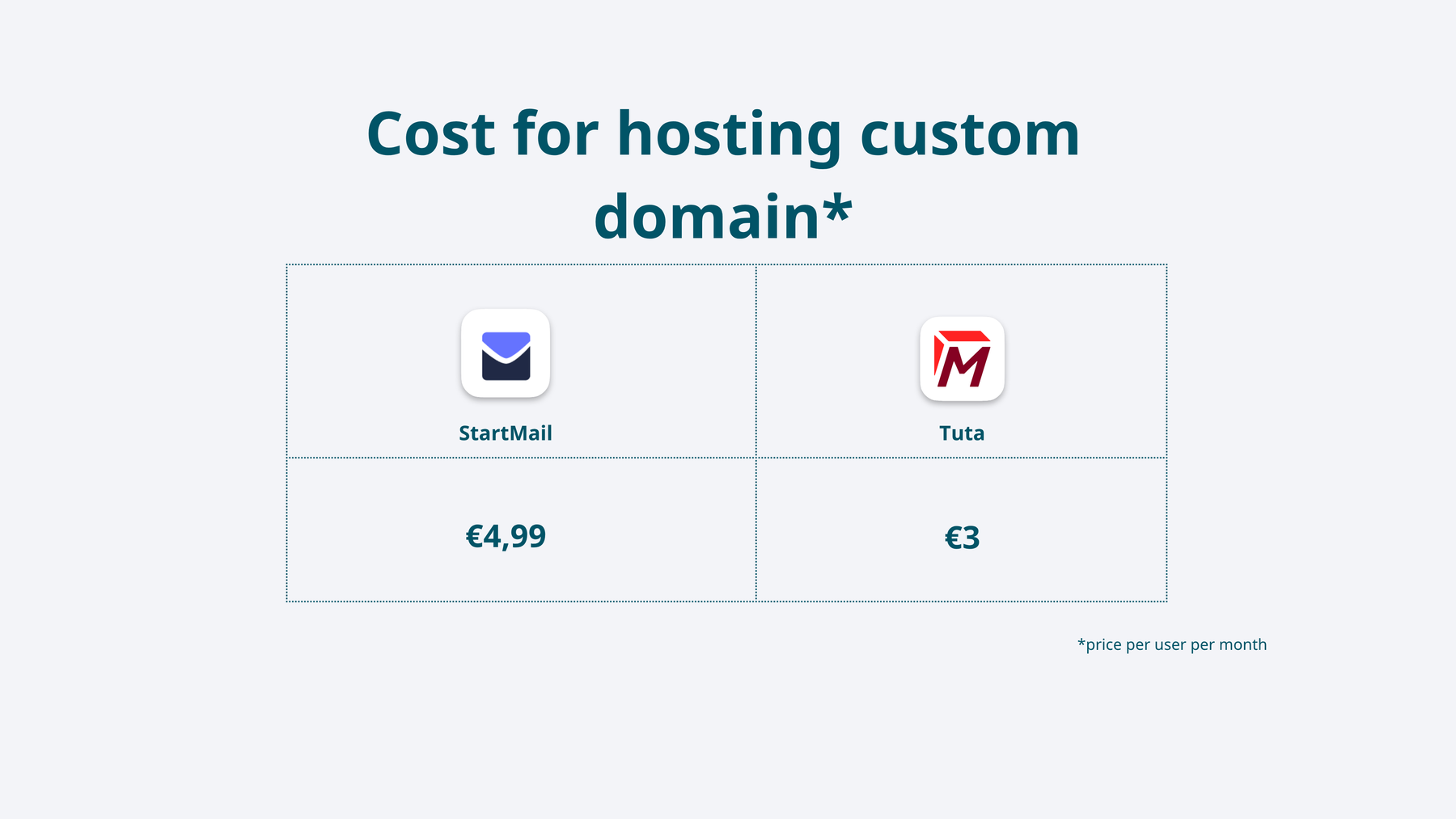
Comparison of hosting custom domains.
Usability
StartMail supports IMAP/SMTP so you can use third-party email clients with StartMail, from Apple Mail to Thunderbird to even Outlook.
Tuta is available via web and has its own mobile and desktop apps that are available for Microsoft, macOS, Linux as well as for iOS and Android. In contrast to StartMail, Tuta does not support IMAP since it is fully encrypted. Not just the emails but also the calendar and entire address book. To support external clients, Tuta would need to support IMAP. But this would mean that Tuta would have to send the data unencrypted to a third-party client which defies Tuta’s security promise of quantum-safe end-to-end encryption.
There is more to compare
Sustainability: Both email providers, StartMail and Tuta are committed to a sustainable approach. To be more precise, both company’s servers are powered by 100% renewable energy.
Support: Sometimes things are not working as they are supposed to be… Hence, having a support which you can contact in order to help you sort things out can be crucial sometimes. StartMail and Tuta Mail offer all paying customers direct support. Free Tuta users can ask the Reddit community for help for, or, if there are technical issues, contact the team in Hanover directly.
Conclusion
Privacy is a human right and, fortunately, there are companies that take this right serious. Whether you are sending photos, medical bills or business contracts via email, you deserve a private email provider that does not read along.
Hence, whether you are using StartMail or Tuta – both offer an alternative to Gmail or Outlook and give you your right to privacy back. Tuta Mail, however, has the better usability all around as it offers its own clients for smartphones and desktops which gives you a harmonic user experience no matter what device you use. On top of that, Tuta offers more affordable pricing plans, has unlimited aliases for custom domains, and has more features. In addition to email, you can use the encrypted Tuta Calendar, you can store all your contacts in Tuta and sync these encrypted contacts to your phone, and soon you will also be able to use Tuta Drive for storing and securing large documents, images, and other files.

Comments
Nothing yet. Say the first thing.
Sign in to join the conversation.