
Gmail is no longer the only major player when it comes to free email for private and business use and people are increasingly looking for Gmail alternatives. Check out this detailed comparison of Gmail vs Proton Mail, and how both compare to the quantum-safe encrypted email provider Tuta Mail.
Gmail was first released in 2004, and since then it has grown to become the most popular email platform with billions of personal and business users around the world. While Gmail is easy to use, is quick to create a free email address with, and offers a wide range of useful features, there are numerous safer email alternatives available. Proton Mail and Tuta Mail are just two of the best private email providers, but in this comparison we will focus on Proton vs Gmail in terms of security, privacy, and features; and also compare the two against Tuta Mail here and there.
The question you need to ask yourself is: Do you want to sign up for a popular, mainstream email service or choose a private solution to create a free email address with? This comparison of Gmail and Proton Mail will help you decide because when choosing the best email provider, one size doesn’t fit all.
Maybe you want to move away from the tech giant Google and its ad-based surveillance and are looking for a Gmail replacement, or maybe you’re interested in opening an email account for private matters – we have all your questions covered in this ultimate comparison of Gmail and ProtonMail, including which is cheaper to host your custom domain with!
In this guide, we take a look at ProtonMail vs Gmail, the pros and cons of each of these popular mail providers as well as the key differences.
Related: If you want to have a look at other email comparisons, check our Tuta vs. StartMail comparison out!
ProtonMail vs Gmail: Main differences
ProtonMail and Gmail are both popular email providers, but they differ significantly in features and security.
Proton Mail places a strong emphasis on privacy, offering end-to-end encryption, ensuring that even the provider cannot access the content. Users can create accounts anonymously (though if you try to register via the Tor browser, you need to provide a phone number or donate to Proton), and the service operates under Swiss jurisdiction, which is known for its good privacy - but this concept os “Swiss privacy” is over-hyped as the data protection laws in Switzerland are none better compared to the legal situation in the European Union.
Gmail, on the other hand, is based in Silicon Valley, United States, which is part of the Five Eyes which is known for its NSA and FBI surveillance. This means that your data stored on Google’s US servers is easily accessible to US law enforcement - even without court warrants. Gmail is ad-supported, and known for making huge profits with targeted ads. While Gmail employs security measures like TLS, two-factor authentication and offers convenience with its integrated ecosystem, Gmail lacks default end-to-end encryption, raising concerns about data protection.
Let’s take a deep dive into ProtonMail vs Gmail security to decide, once and for all, which is the better email provider.
Turn ON Privacy in one click.
Is Proton Mail safer than Gmail
First things first: Proton Mail boasts some of the best security, but can it stack up against the tech giant Google? When it comes to security, both email providers have things on offer. Here are the main pros and cons regarding the security of Gmail and Proton Mail.
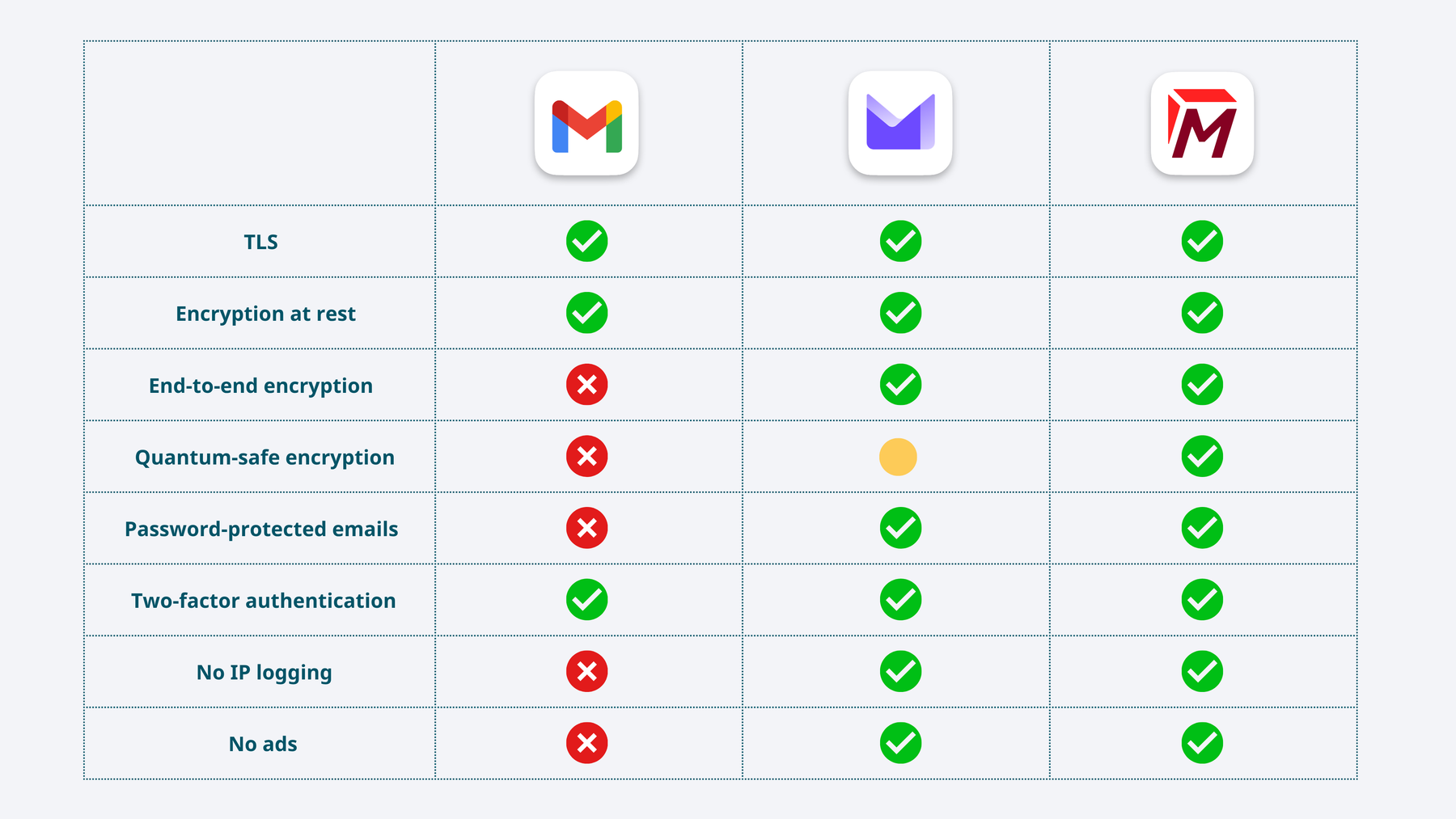
Comparison of security features of Gmail, Proton Mail and Tuta Mail: TLS, encryption at rest, end-to-end encryption ( zero access), quantum-safe encryption, two-factor authentication, password-protected emails, IP logging, ads.
So the question that many ask is: Is Proton safer than Gmail? As the above table shows, yes Proton is more safe than Gmail. In fact, the main reason people switch from Gmail to Proton is for better security and mailbox safety. While Proton is safer than Gmail, the most secure option of the two is Tuta Mail due to its quantum-safe encryption that can protect emails also from the threat of “Harvest Now, Decrypt Later” attacks. Encrypted providers like Proton Mail and Tuta Mail far outrun Gmail because Gmail does not have end-to-end encryption. The difference between end-to-end encryption compared to normal TLS encryption and encrypting data at rest - which Gmail also does - is that with end-to-end encryption, only the senders and recipients of an email have access to the encryption keys, making the messages including their attachments unreadable to anybody else, even to the email provider. With this, Tuta Mail goes a step further than Proton by also encrypting metadata such as subject lines end-to-end. This makes ProtonMail definitely the safer option compared to Gmail, but Tuta Mail is even more secure.
Learn more about the differences between Tuta Mail and ProtonMail in this detailed comparison!
Proton Mail Review
Proton Mail, the much lesser-known email provider compared to Gmail, was created in 2014 by scientists and engineers at CERN in Switzerland with a strong focus on privacy and security. Over the years, it has increased its ecosystem and offers a wide range of tools like ProtonVPN, Proton Calendar, Proton Drive and Proton Wallet, among others. Like Tuta Mail, Proton Mail has become a popular email provider for individuals and organizations who prioritize privacy and security.
A key selling point for Proton Mail is its security features; it uses end-to-end encryption, which means only the intended email recipient is able to decrypt and view the messages. In addition to end-to-end encryption, unlike most email providers, Proton does not collect heaps of personal data, you can sign up anonymously (but Proton will ask for your phone number if you sign up via the Tor Browser) and in general there’s no IP address logging.
Looking for an anonymous email provider that never asks for your phone number? We have got you covered!.
Turn ON Privacy in one click.
Now that we’ve covered the benefits of ProtonMail, it’s only fair to mention that there are some downsides and disadvantages. In the next section, we take a deeper look at the pros and cons of ProtonMail.
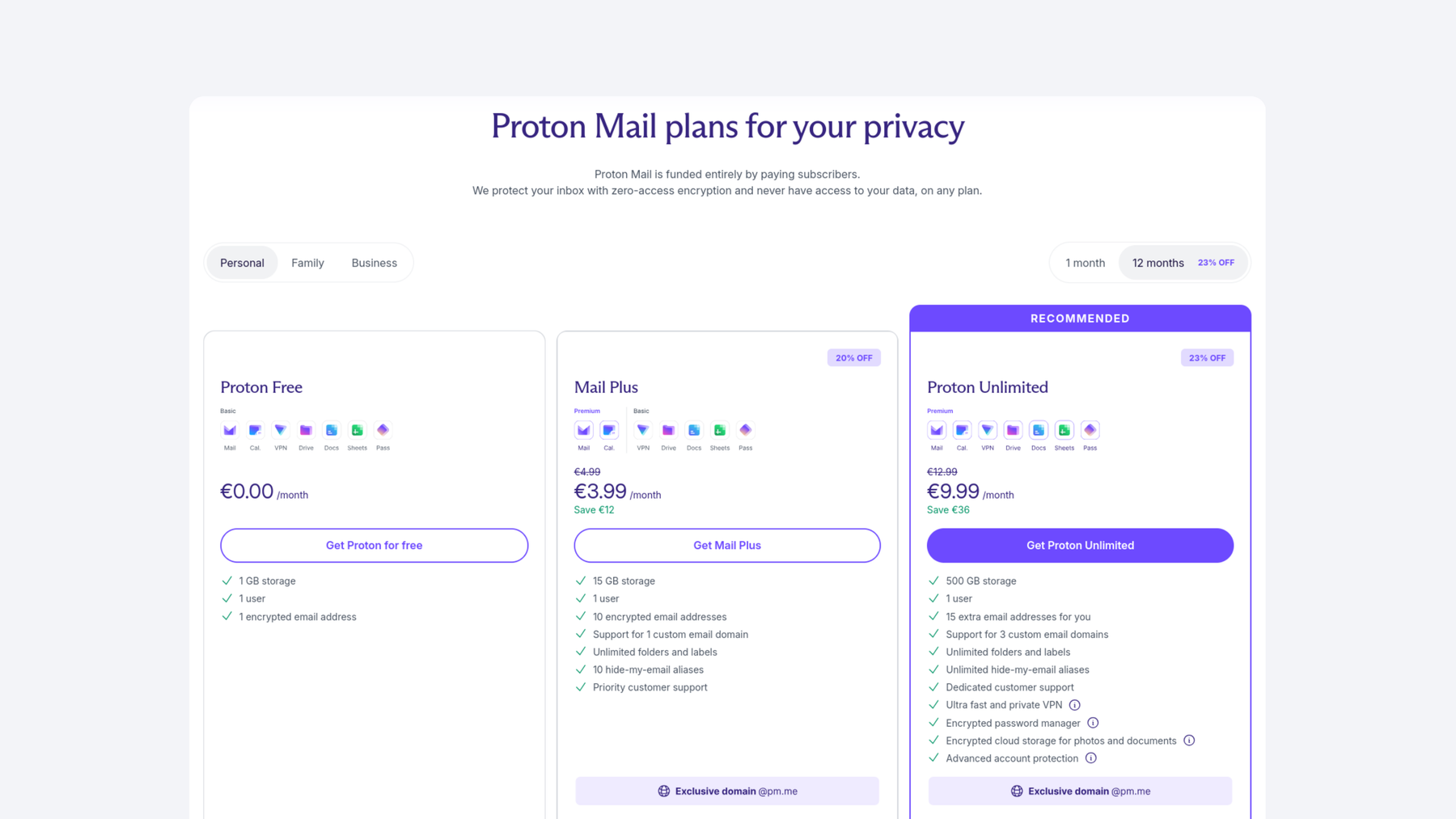 Proton Mail offers a free email plan as well as a Proton Unlimited paid plan. Screenshot: Proton.
Proton Mail Advantages
-
End-to-end encryption: Proton Mail has a zero-access encryption system which means that only the intended recipient can view and decrypt the email contents. Even Proton itself isn’t able to view the contents of the emails. In 2014, they started building Proton Mail using PGP encryption based on AES and RSA to secure emails, and in 2019, they brought out elliptic curve cryptography (ECC) allowing for faster speeds and better security.
-
Anonymous sign-up: When you sign up for Proton’s free email accounts, you don’t need to give them any personal information which means you can remain anonymous. However, if you try to register via the Tor browser for a free email account, it might be difficult as Proton Mail will not let you create an email address absolutely anonymously without at least forcing you to donate to the service or enter a phone number. A completely anonymous registration is therefore not possible with Proton.
-
No IP address logging: In general, Proton Mail doesn’t log IP addresses when accessing their services. However, when also using Proton VPN, keep in mind that this is the same company as Proton Mail, meaning if law enforcement requests the IP address of the user, it will be easier for them to get hold of it. This poses the risk of “putting all eggs in one basket”, so to say.
-
Free account access: Proton Mail is allowing users around the world to protect their right to privacy for free which is a major push in the right direction.
Proton Mail downsides
-
Use of AI: In 2024, Proton Mail introduced the AI tool Proton Scribe which is available for some paid plans. Proton describes this as a, “privacy-first writing assistant”. As with all features that now implement artificial intelligence, the privacy community was unpleasantly surprised when Proton released this feature. After all, AI uses (and possibly abuses) users’ data for training purposes which raises a lot of questions in regard to data ownership and privacy rights. Thus, introducing an AI email writer defies the purpose of a private, secure email service such as Proton Mail - this is also the reason why we at Tuta do not plan to introduce cloud-based AI assistants in email.
-
Daily message limit: Users on the free email plan are limited to sending 150 emails daily. For individual use, this number should be sufficient, but if you are an email power user, the free Proton offer will not work for you. Enterprise and individual users have the option to get a paid Proton Mail subscription which allows you to send unlimited emails per day.
-
Limited storage: With the free Proton Mail account, users get 1 GB of storage space. Users also have the option to get a Mail Plus account which offers 15 GB total storage for 3.99 €/mt or a Proton Unlimited account which offers 500 GB total storage space for 9.99€/mth. This pricing struggles to compete with email providers like Google’s Gmail and even with Tuta Mail’s offering who offer much larger packages in the free version and less expensive plans for increased storage space.
-
Limited integrations: Proton Mail can integrate with some third-party services but compared to Gmail this is much more limited. Proton Mail supports IMAP so that you can use popular email clients like Outlook or Thunderbird with it. However, to use this feature, you first need to have a paid plan and second need to install the Proton bridge (for decrypting your emails before they are sent to Outlook or Thunderbird), which is a bit clunky, particularly on Linux users reported lots of issues. In addition, if you use the ProtonMail bridge, you should know that your encryption is no longer end-to-end: The bridge needs to decrypt your data and then send it to the desktop client that you use (Thunderbird, Outlook, Apple Mail) where the data is available in plain text and not encrypted. This raises severe security issues, particularly if you use Outlook as Outlook is not known for its best security standards. Plus, you will not be able to see whether emails in Proton Mail are end-to-end encrypted as the third-party email clients are not able to show whether an email was sent encrypted or not. This is why the other popular encrypted email provider, Tuta Mail, has decided not to build a bridge for third-party desktop clients but has instead focused on developing its own native email desktop clients for Windows, Apple and Linux - and these work like a charm and are completely free.
Turn ON Privacy in one click.
Gmail Review
Gmail, owned by the big tech giant Alphabet, has been around for years and is the free email provider of choice to billions of people around the world. It first came on the market in 2004, and at the time the 1 GB storage space Google offered with Gmail as well as conversation threads was super modern and advanced compared to other popular providers like Yahoo or Hotmail (now Outlook).
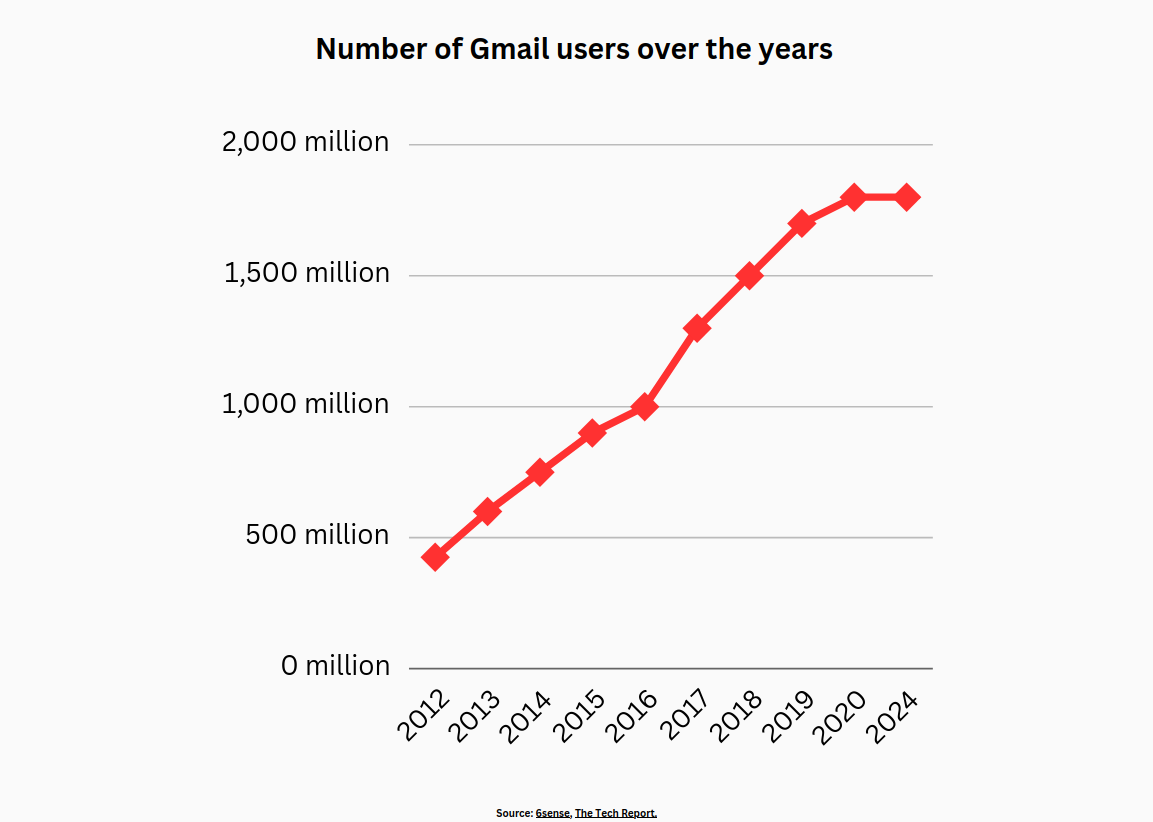 The number of Gmail users from 2012 to 2024. Google’s Gmail was created in 2004, and is currently the world’s most used and
popular email service provider around the world. However, its growth has recently come to an end - a first sign that
people today want more than, “just an email provider that works” but rather privacy.
The number of Gmail users from 2012 to 2024. Google’s Gmail was created in 2004, and is currently the world’s most used and
popular email service provider around the world. However, its growth has recently come to an end - a first sign that
people today want more than, “just an email provider that works” but rather privacy.
You can get a free Gmail account for personal use which offers generous storage space, good organizational features and a powerful search function. Particularly if Proton Mail’s free version is too limited for you, this legacy email provider makes a good Proton Mail alternative. For professional email use, you can pay for a Google Workspace subscription, where you not only have your Gmail account but also access to all Google Workspace tools, too. For many people the free Gmail account works well, but if you need access to Google Workspace and all its tools then you’d need to pay a subscription fee.
Google has a wide range of other applications like Google Drive, Google Calendar and Google Hangouts which all integrate and work effortlessly with Gmail. Google offers so many features and apps, it’s no surprise it’s a super useful and popular provider for enterprises and individuals.
While Gmail has a great user-interface and nice features and services, what’s often overlooked is its lack of privacy. Because Gmail’s email service is supposedly free, it means you’re paying with your privacy – Google can mine tons of your data, and use it for ad-targeting. This is how you pay for Google to be free.
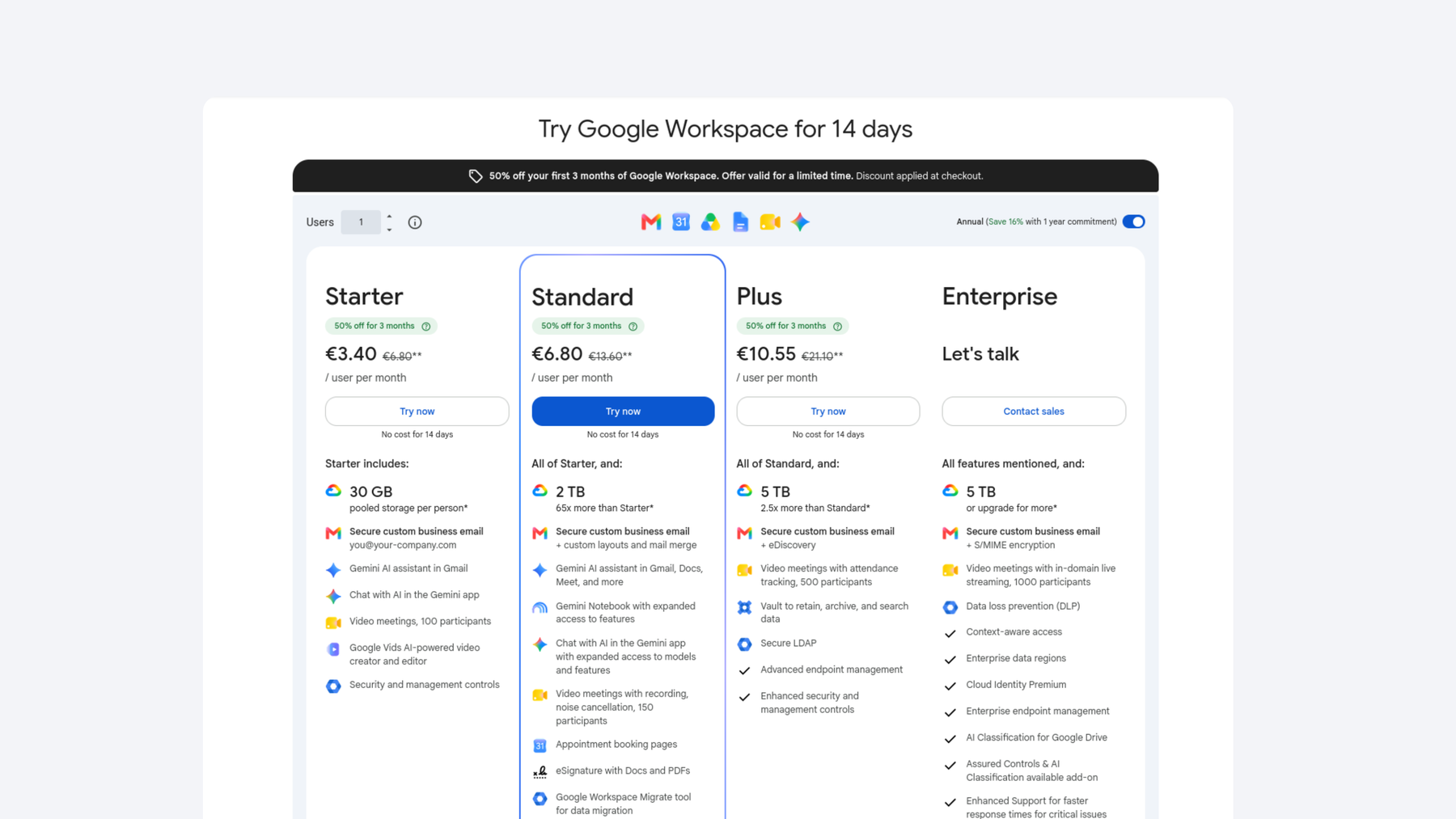 Gmail offers a free email service, but if you’d like to use it professionally, along with the Google Workspace tools, then you will need to pay a subscription fee. Screenshot: Google.
Below we’ve reviewed this email provider in detail and put together pros and cons about Gmail.
Gmail Advantages
-
Ample storage space: Gmail gives its free and paid users plenty of storage space, including 15 GB of free storage, allowing you to store a good amount of emails and attachments. For many, the storage offered for a free account is more than enough.
-
Google service integration: Google has a wide range of other services like Google Calendar, Google Docs, and Google Drive which all integrate seamlessly allowing users to access various productivity tools, schedule events, or collaborate on documents at ease from the email interface.
-
Great user interface: Gmail is super user-friendly, and it has an intuitive interface making it easy for users to navigate and manage their accounts. Gmail is constantly updating and creating new features to enhance the user experience. The interface design is organized, clean, and easy to navigate.
-
Spam protection: Gmail is known for its good Spam protection. The Silicon Valley email provider was also the first to introduce a “Newsletter” tab so that newsletters are no longer received in the main inbox but in the Newsletter folder instead.
Gmail Disadvantages
-
Use of AI: Google is actively integrating its Gemini AI into all of its products including your Gmail mailbox. In fact, Google recently faced a scandal where its AI tool Gemini claimed that it was accessing private Gmail emails to produce its answers.
-
Lack of user privacy: In 2017, Google finally decided to stop scanning your emails for ad targeting but that doesn’t mean they stopped scanning your mailbox entirely. Gmail scans your mailbox – yes, you read right. Gmail tracks everything you buy, but here you can find out how to delete this information. In addition, if you use the free version, Google has started to place annoying ads directly in your mailbox. For ad targeting purposes Google has a profile about you, generated from all your activities on the Google services you use. So when you see adverts that seem far too similar to what you’ve been talking about in your mailbox or on other Google services, it’s because Google goes to extreme measures to track you with digital fingerprinting and target you with relevant ads to increase revenue. Many people are actively choosing to leave Google’s service entirely by Degoogling and switching to better privacy-focused alternatives.
-
Expensive paid subscriptions: Gmail does have a free plan which is usually adequate for personal use, but if you want to make the most of Gmail you can get a basic Starter plan which starts at 6.80€ per month. The Google price plans are a bit more expensive compared to their competitors and if you’re an enterprise, the price increases quickly.
-
Gmail pushes ads to you inbox: Gmail posts ads to your Promotions and Socials tab, and also directly into your inbox. Learn here how you can block ads in Gmail.
Regardless of these Gmail downsides, some people are curious whether you can use Proton Mail within your Gmail account, possibly to get both: best security with lots of features. But this is not possible as both are completely different email providers.
For many people, Gmail’s lack of privacy is a big annoyance, and it should be! If in of for a more private alternative, check here to see how Tuta Mail compares to Gmail and why it’s the best choice for private and secure emails!
Turn ON Privacy in one click.
Proton vs Google features: Is Proton Mail a good Gmail alternative?
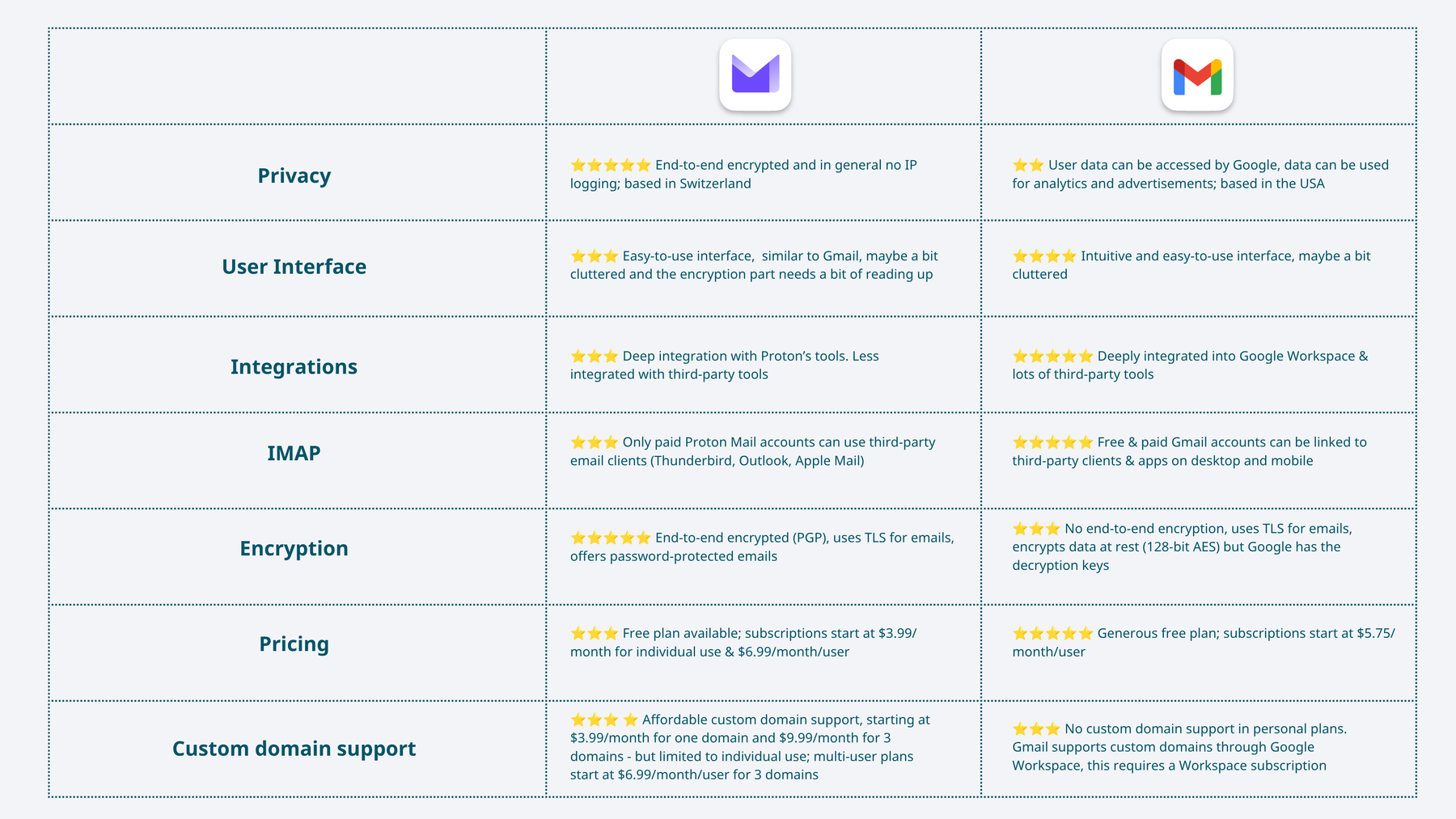 Comparison table: Proton Mail vs Gmail at a glance: privacy, user interface, integrations, IMAP support, encryption,
pricing, custom domain support.
Comparison table: Proton Mail vs Gmail at a glance: privacy, user interface, integrations, IMAP support, encryption,
pricing, custom domain support.
Now that we have briefly reviewed the pros and cons of Proton Mail vs Gmail, it is becoming clearer that ProtonMail is excellent for user privacy whereas Gmail is excellent for its user-interface, its large storage, and its integration with the Google suite. Both email providers are a solid choice depending on your needs, so at the end of the day, it’s up to you to decide what fits best for you. In this next section, we highlight the key differences between both providers Gmail and Proton Mail, but you can also check the summary in the table above.
Privacy
Remember, Gmail is a product of tech giant Google whose business model is based around using data for targeted advertising to push revenue. When you sign up for a free Gmail account, you are required to put in a lot of personal details, whereas ProtonMail requires only a username and password. So although Gmail’s features are great, using their products comes with a loss of privacy. This compares to ProtonMail who like Tuta Mail prioritizes privacy. In addition, Google is based in the US, a country known for its surveillance and being part of the Five Eyes.
User Interface and Integration
Google has a wide range of products in its ecosystem, and it works effortlessly with these useful products, particularly for professional email use. Gmail has many useful features and an easy-to-use interface that is customizable for your needs. Proton Mail also has a user-friendly interface, but it has fewer features and isn’t as customizable as Gmail. Additionally, it doesn’t have as many integration options.
IMAP support
Both, Gmail and Proton Mail come with IMAP support so that you can link your mailbox to third-party clients like Thunderbird, Outlook, and Apple Mail. However, Proton Mail limits access to this feature to paying users. If you want to use your emails for free in Thunderbird or K9 on Android, for example then Gmail is the better option.
Encryption
Gmail uses Transport Layer Security (TLS) to encrypt data when it’s sent between the user device and Google’s servers. Using TLS is standard practice for emails, and it works by creating a tunnel where the emails are sent through protected with a layer of encryption. However, within this tunnel, the emails are still sent in plain text, so not encrypted, and are at risk of being scooped up by malicious actors or three letter agencies like the NSA. Gmail also encrypts emails on Google servers but has access to the encryption keys. Proton Mail uses TLS as well to send normal emails. However, in Proton Mail you also have the option to end-to-end encrypt emails to other Proton Mail users or with PGP, and you can send password-protected emails to Gmail users and others, which are then also end-to-end encrypted.
Turn ON Privacy in one click.
Pricing
Gmail and Proton Mail both offer a free plan, but Gmail’s free version is much more generous with 15 GB of storage and lots of features included for free. Proton Mail, on the other hand, limits a lot of features like the number of sent emails per day, labels, IMAP support, and more so that the free version is not really usable if you are a power user. Prices for individual use start at €3.99/month at Proton Mail and at €6.99/month/user if you want to use this private email provider with multiple users. Gmail professional subscriptions start at €6.80/month/user.
Custom domain support
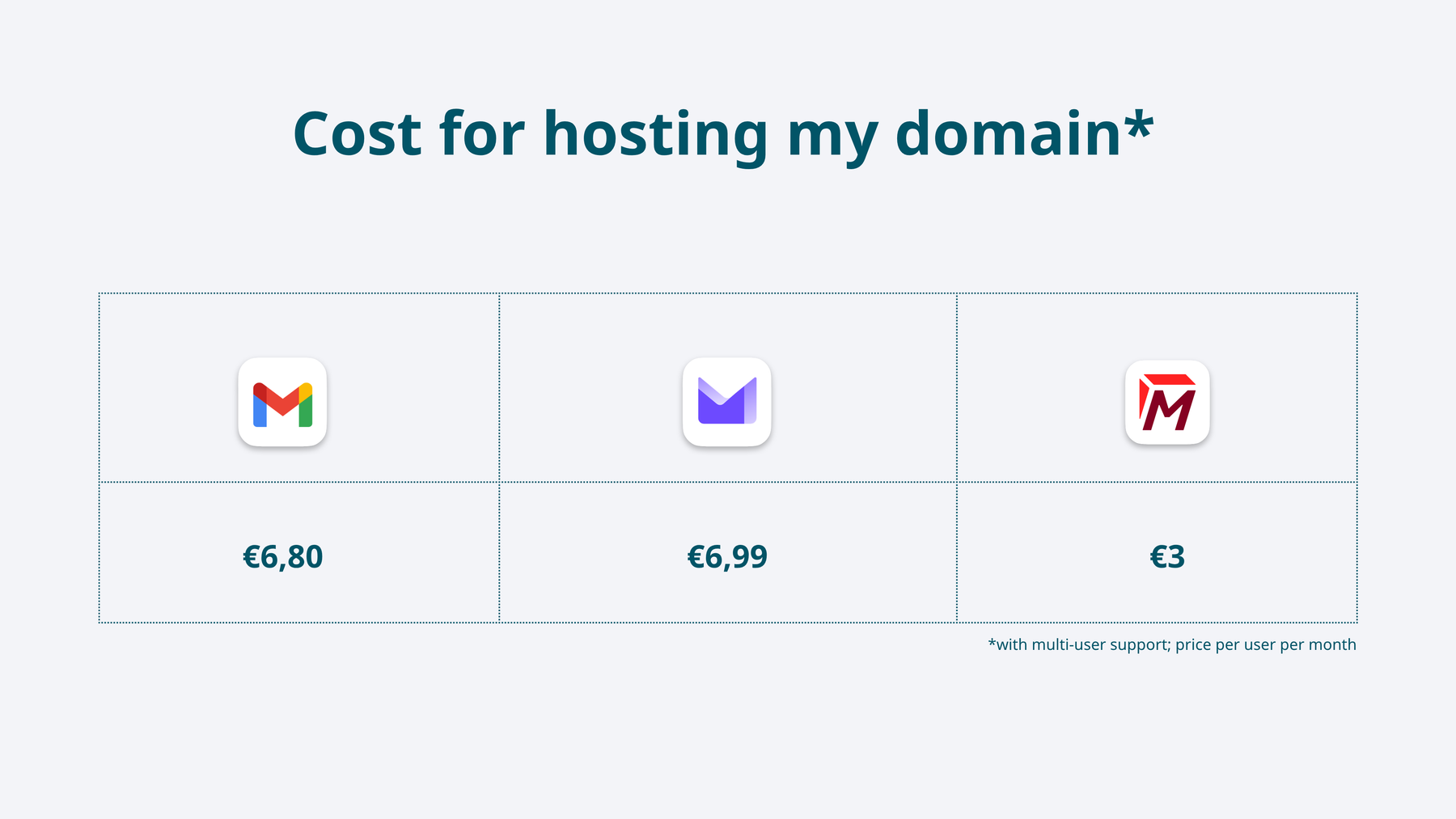 Cost for using my custom email domain in Gmail, Proton Mail and Tuta Mail with multi-user support.
Turn ON Privacy in one click.
The Proton Mail vs Gmail cost is not so easy to compare and whether Gmail or Proton Mail is cheaper for you depends on the number of users that you would like to have. This is due to the fact that Proton’s pricing structure is quite complex and can’t be easily compared to Gmail’s prices. But we’ll break it down for you:
To add one custom domain in Proton Mail for individual use the Mail Plus is only €3.99/month so definitely cheaper than Gmail with its price of €6.80/month/user for the Starter plan. However, Gmail’s version already comes with multi-user support. So if you want to host your domain with Proton Mail and use it with your family, for instance, you need to pick a different plan:
- Mail Essentials at €6.99/month/user with support for 3 custom domains
- Proton Family at €23.99/month for up to six users with support for 3 custom domains
So in the end, it depends on how large or small your family is: If you are three people who want to share your domain, Gmail is the cheaper option. If you are only one person or six people in your family, the cost at Proton Mail is lower for hosting your own domain with them.
This should answer your question about how much Proton charges for hosting a domain and whether Gmail is more expensive.
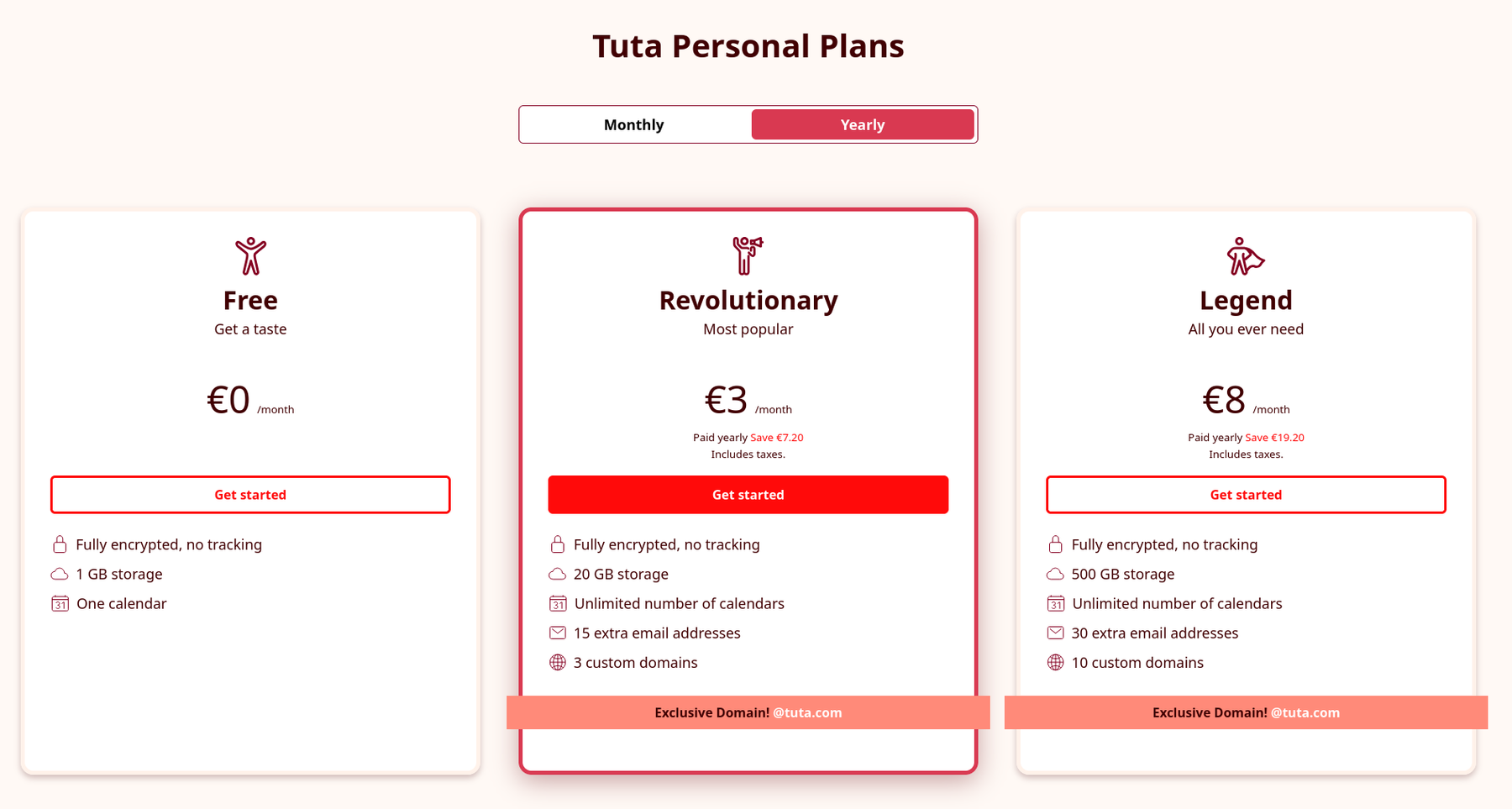
However - and we have to say this here - if you want a fully encrypted, privacy-first email provider to host your custom email domain, it does not have to be as costly or as complex as Proton Mail. The prices of Tuta Mail are very affordable and pretty straightforward: You can host your domain at Tuta Mail starting at €3/month/user, including unlimited alias addresses. This price is unbeatable and the best option available, compared to both, Gmail and Proton Mail.
Get the best of both worlds and sign up for Tuta Mail now!
TL;DR: Which is best for you - Proton or Gmail?
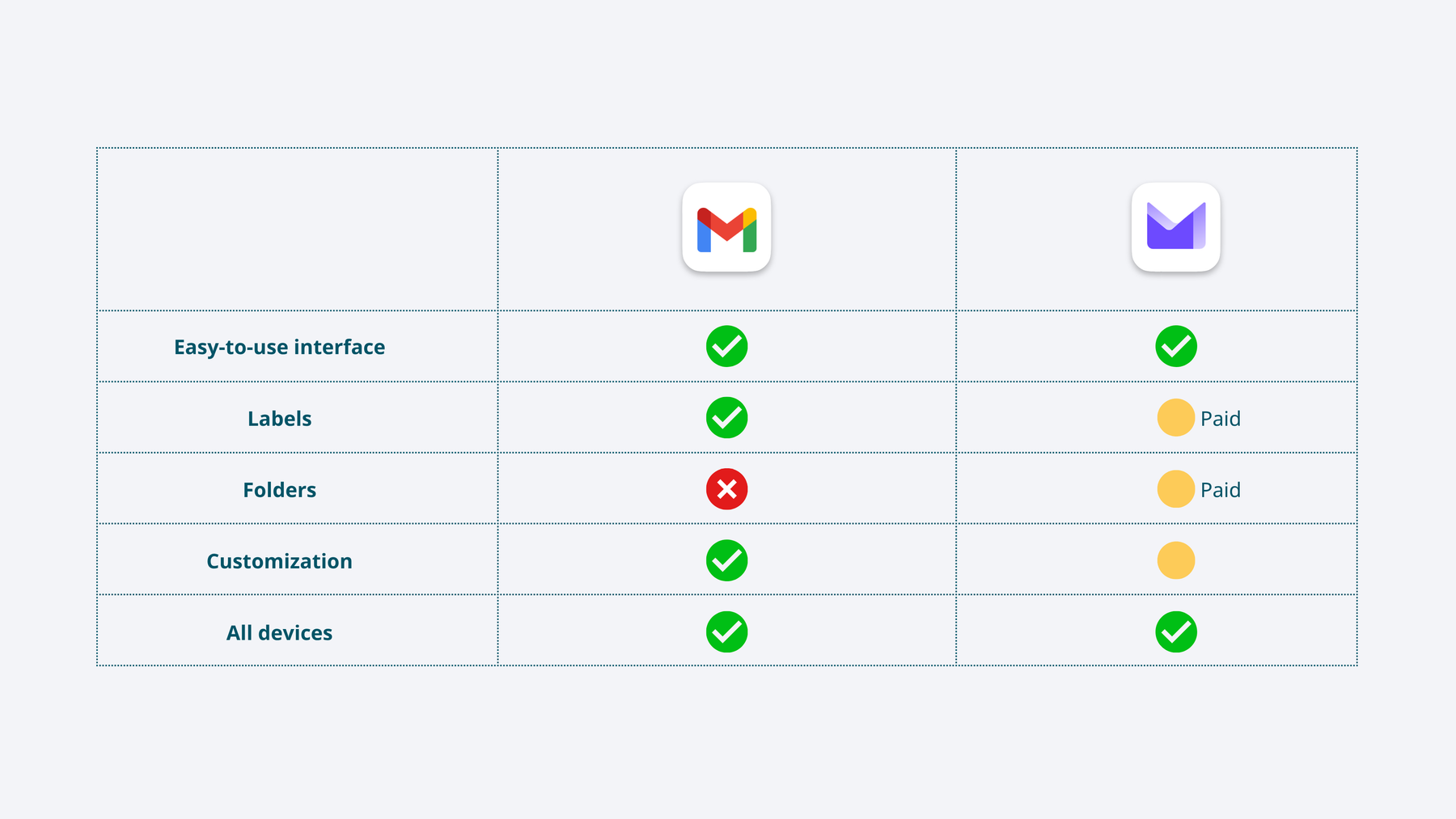 Quick overview of Gmail and ProtonMail features: interface, labels, folders, customization, devices.
As this ProtonMail vs Gmail comparison shows, each email service has its pros and cons and not one is better than the other in general. In the end, which is best depends on your needs and personal preference.
Both Gmail and Proton Mail have an easy-to-use interface and can be used on all devices, including apps for Android, iPhones, and iPads. The free Gmail version includes lots of features like labels and customizations, users can even create their own custom theme. In Proton Mail lots of features like labels and folders (Gmail does not have folders at all) are hidden behind a paywall, and themes are more limited than in Gmail.
So in the end, your choice is down to one simple question: Do you want better privacy or as many features as possible?
If privacy is your number one concern, then Proton Mail is hands down better.
If you’re looking for an email provider that has lots of features, is user-friendly, and has great integrations with other services, then Gmail is your go to!
Turn ON Privacy in one click.
And, if you’re not ready to choose your favorite email alternative to your current provider, we’ve created a review of the ten best private email services.
Is Proton Mail worth it?
Now that we have covered in-depth Proton vs Gmail, and you know that Proton is the better option for privacy and security. You might still be asking yourself but is Proton Mail worth it to make the switch? Proton is a good choice if you’re looking for an end-to-end encrypted email provider, but it is not worth it if you compare it to Tuta Mail, the most secure quantum-proof email provider. Below, we discover what makes Tuta Mail the best email provider compared to Gmail and Proton Mail.
The best replacement for both – Tuta Mail!
We do not only claim that Tuta is better, we can also back this up with facts. Tuta Mail is a better alternative to Gmail because it’s secure, private and we at Tuta respect you and your right to privacy. At Tuta, you are not just one more of billions of users, but you matter to us not just as a user, but as a person and as a member of our community.
While being better than Gmail is easy, with Proton Mail we have to be more granular as to where the differences are and why Tuta is better because we are both privacy-focused email providers who encrypt all your data end-to-end.
At Tuta, we want to enable everyone to take back their privacy - whether they can pay for email or not. That’s why the following features in Tuta Mail stand out compared to Proton Mail:
-
Tuta offers free desktop clients for Linux, Windows, and Apple while Proton’s desktop clients are only available if you pay.
-
Tuta comes with zero Google integrations; we’ve built our own CAPTCHA and even our own push notification service on Android, whereas Proton’s Android app uses Google Push.
-
Tuta Mail was the first email provider to offer quantum-safe encrypted emails which means we already protect your data from the threat of “Harvest Now, Decrypt Later”. All Tuta accounts are secured with TutaCrypt, our post-quantum protocol. Proton is in the process of slowly rolling out quantum secure encryption to its accounts.
-
When you send password-protected emails with Tuta Mail, all emails are stored in one, single mailbox so that the external recipient can access the entire message thread all at once while in Proton, they can only view the latest message when decrypting it with the shared password.
-
At Tuta we are committed to sustainability; all our servers are powered with 100% renewable energy.
-
Tuta does not plan to introduce cloud-based AI assistants in email. Tuta will not implement any kind of AI assistant in your encrypted mailbox. This compares to Proton who was met with a lot of backlash when it introduced its AI tool for mail, Proton Scribe.

Comments
Nothing yet. Say the first thing.
Sign in to join the conversation.