
If you’ve worked in Unity for any considerable length of time, you’ll know that although Unity is great for multi-platform development, there are some aspects of the Editor which feel like they fall short of the promise of ‘write once, run anywhere’.
One such area is the Package Manager. The addition of the Package Manager in Unity 2018 introduced a much cleaner way to handle additional, optional, or 3rd party assets and code within your project. Centralising these types of dependencies via a single tool made a lot of sense, and support for features like custom package registries and direct Git repository checkouts meant that studios could finally ditch their custom dependency management scripts and lean on a first-party tool instead.
The Package Manager is now the de facto ‘correct’ way to add additional dependencies to your project, and it does the job it’s designed to do well. Though the Asset Store remains, for now, the official marketplace for Unity assets, the default route to importing any purchased assets now runs through the Package Manager, even if those assets remain, for the foreseeable future, ‘old-style’ .unitypackage assets.
Unfortunately, the Package Manager enforces a strict ‘one-size-fits-all’ approach to your dependency management, which may not be suitable for every project.
To help with this, I’ve recently released a new asset that introduces much-needed flexibility to Unity’s package management: Package Profiles. Package Profiles allows you to link package manifests directly to Build Profiles, allowing you greater control over the dependencies of individual platforms and SKUs. Simple integration into automated build pipelines means you can confidently differentiate dependencies for each target platform or SKU.
Read on to find out why your project might benefit from Package Profiles.
If you’re a paying subscriber to Not a Robot, and you’d like to use this asset in your projects, then please message me for a free copy.
Though the Package Manager works perfectly well for most projects, it has one fundamental constraint which, in certain circumstances, can lead to extreme frustration.
Every Unity project since Unity 2018 now contains a single JSON file which records any dependencies that the Package Manager should track. If a dependency is missing, but present in the manifest.json file, then it will be downloaded and imported. If a dependency is present in the project but not in the manifest file, then it will be removed from the project.
This single file applies project-wide. If your project targets Windows and macOS, then you will be using the same versions of the same packages on both platforms. If you decide to add Android and iOS support, then they too will share the same packages, whether or not those packages contain relevant or compatible code. Package maintainers can use Assembly Definitions alongside Define Constraints and Version Defines to control whether the assemblies in a package are active on specific platforms, or to control which features are available based on the current Unity version or version of some other dependency. However, the project itself has no control over the configuration of packages and their assemblies; packages are ‘read-only’ unless imported directly into the project and maintained as part of your own codebase.
This ‘one-size-fits-all’ approach to dependency management is, it’s worth repeating, probably ok for most small-to-medium-sized Unity projects. Where you may begin to struggle, however, is when your variables begin to impose requirements and constraints that demand flexibility in your project’s configuration and build pipeline:
Target platform(s)
Development environment
Distribution channels
Runtime environment
3rd-party dependencies
Each of these factors may require subtle, and sometimes even significant, changes to your project’s codebase, and each may impose constraints, restrictions, or compliance requirements that begin to expose the shortcomings of the ‘one-size-fits-all’ approach.
The latest version of a package may introduce a bug on a single platform. A missing #define in a 3rd-party package may cause havoc for developers who don’t have a particular console platform’s Unity module installed. If you’re using custom / 3rd-party package registries, the surface area of potential problems grows, and if you don’t maintain your dependencies directly, you’re forced to submit bug reports and change requests in the hope that somebody else fixes whatever issue has cropped up.
This problem can become particularly acute if your project is a monolith, from which multiple different apps may ultimately be produced.
Most developers who run across these problems eventually succumb to the pressures of time and money: it’s too expensive to maintain everything yourself, and it’s too time-consuming to wait for somebody else to fix the problem. The easiest solution is to differentiate: if a bug exists in Version 4 of a dependency, but only on Platform B, then you bite the bullet and clone manifest.json for Platform B, remove or downgrade the dependency version, and then hot-swap the dependency manifest as required.
Usually, this solution takes the form of a handful of shell scripts that do whatever needs to be done. This works; you can differentiate your package manifests however you like, and as long as you don’t do something silly, you’ll probably be fine. It becomes a little more cumbersome to upgrade packages universally, but you have at least gained the flexibility you needed. It is, however, busywork that introduces new potential points of failure and confusion!
After working on many projects that eventually reached the point of diminishing returns for the ‘one-size-fits-all’ approach, I decided to build something that sits inside Unity itself and removes the need for external scripting and manual editing of manifest files.
Package Profiles integrates into Unity and grants you the ability to create and switch between any number of package manifests.
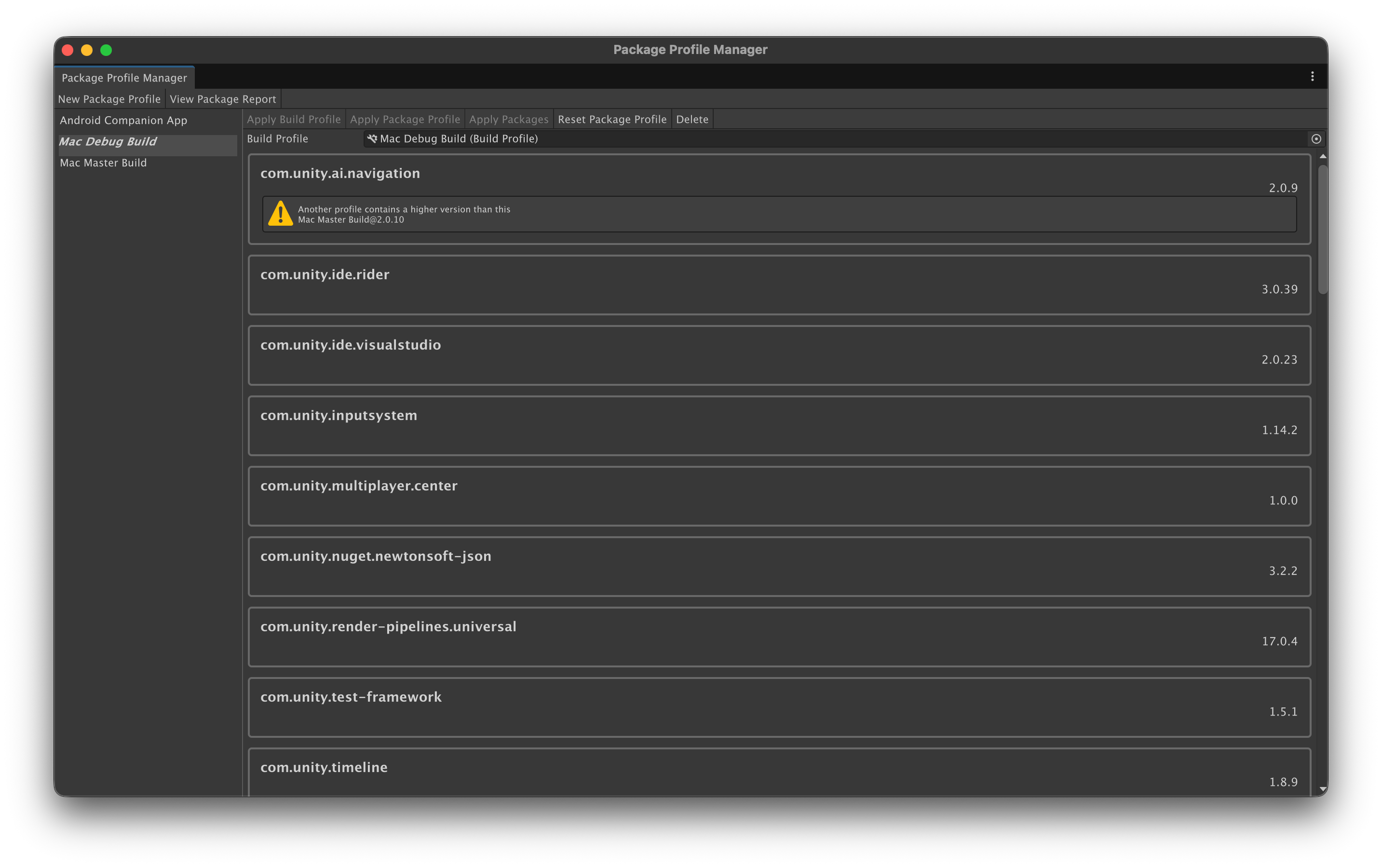
When you switch to a different Package Profile, your project’s manifest.json and packages-lock.json files will be overwritten with the contents of the selected profile.
Package management itself still occurs via the Package Manager, and any changes made whilst a Package Profile is active will be persisted within that profile.
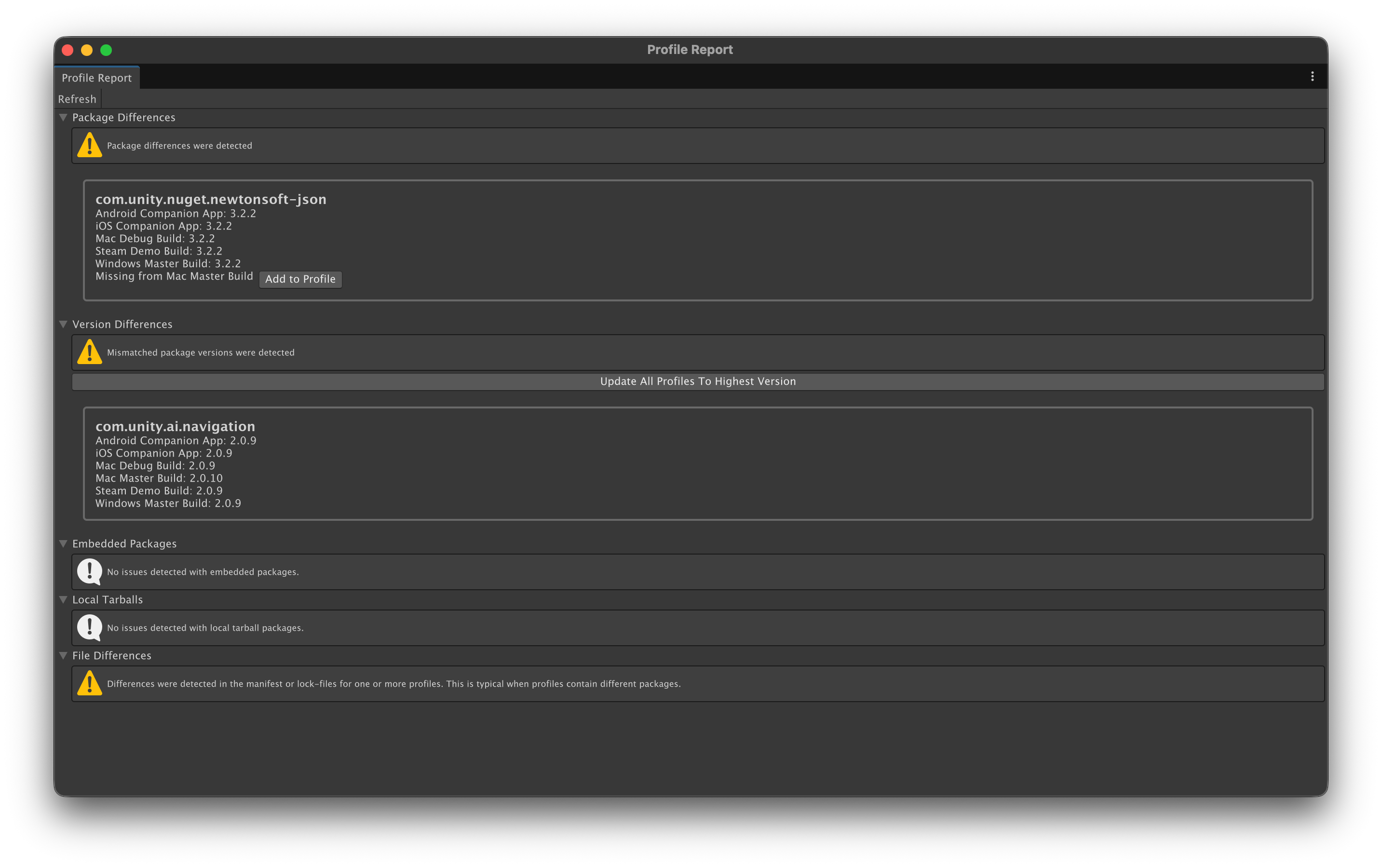
Package Profiles includes a Profile Report view that analyses your current set of profiles and identifies any potential problems, such as version mismatches or missing packages. Wherever possible, a simple one-click option exists to normalise packages and versions across all your profiles.
Package Profiles may also be linked directly to Build Profiles. When such a link exists, then the relevant Package Profile is automatically enabled whenever the Build Profile is activated. This is extremely beneficial in a CI context, and integration with your existing build pipeline can be achieved with minimal changes required.
Package Profiles allows developers to differentiate project dependencies on their own terms, rather than being constrained by Unity’s default one-size-fits-all approach. Though it would be ideal if a single package manifest were appropriate for all platforms and SKUs targeted by your project, experience dictates that this isn’t always feasible, especially when you’re relying on 3rd-party dependencies or platform-specific bugs exist in one or more packages.
If you’re a paying Not a Robot subscriber, then please feel free to contact me for a free copy of Package Profiles. Otherwise, please take advantage of the 30% discount currently applied on the Asset Store!
As this is the first release of Package Profiles, please report any issues via the bug report menu at Tools/Package Profiles/Report Bug - I will endeavour to get any issues resolved as quickly as possible!
In the meantime, please check out the documentation to see how you might integrate Package Profiles into your current projects!
If you’ve enjoyed this post and would like to see more of my Unity related content, take a look at the following, and consider becoming a free or paid subscriber!
Bootstrapping your Unity game with Addressables
·
August 23, 2024

In this post, we’ll explore a straightforward way to assert control over your Unity game, keep your scenes clean, and lay the foundations of a flexible, extendable bootstrapper that leans on Unity’s Addressables system.
Simple Unity Playmode Configuration
·
May 16, 2025
Building a game in any engine will inevitably result in a degree of complexity that requires management. If you’re working as part of a team, this complexity can quickly multiply, and as time goes on and features are added, you’ll invariably find that interests begin to compete.
Splitting Keyboard Input in Unity
·
September 12, 2024
In an era where online games dominate the multiplayer market, the simple joy of huddling around the family PC with your siblings and friends, and playing a local multiplayer game on a single, shared keyboard seems like a distant memory, but at Not A Robot
Comments
Nothing yet. Say the first thing.
Sign in to join the conversation.