
Your colleague just told you they made an agent for writing grant proposals. Another brags about their agent for drafting emails, saving hours each week. And all you can think is… what the hell is an agent again?
If so, this guide is for you. Read on and you will be able to answer these questions:
What is a language model?
What is an AI agent?
Why should I use an agent?
What is a skill?
What is an orchestrator agent?
How do I create an agent?
What do I do when my agent makes a mistake?
Where the hell do I even start?
Language models like ChatGPT and Claude are just things that generate text. The next word is generated randomly based on the text so far, so it’s hard to know what will come out. Fortunately, they’re really good at it. Given an input instruction (e.g. “Explain to me what a language model is”), it will start creating text, one word at a time. Because the models have been trained on so much data, and with some clever tricks, this text (usually) ends up being a really good answer to the input instruction.
That’s the simple version.
More recent language models are called reasoning models, because they don’t just generate a single response. Instead, they break down the problem into steps: interpreting what the user wants, deciding whether to gather more information (e.g. doing a web search), generating an answer, checking whether it really answers the question, iterating, and only then answering.
So at its core we still have a language model being used at each step. But the companies behind those models (OpenAI, Anthropic) layer more logic on top of it. They effectively call the model multiple times - once to understand the user’s intent, once to decide whether to do a web search, once to then write the answer that you get back.
The exact details are proprietary, but at a high level this is how these systems work.
Your colleague told you they created an agent to write grant proposals. That sounds really sophisticated and intimating - but it’s simpler than it seems.
An agent is just a file describing its desired behaviour, used by a language model. That’s it.
Here’s what an agent could look like that helps you write grant proposals for your startup in Germany:
The language models we described earlier can take the agent’s description, usually stored as a markdown file (just a text file containing the above), as well as input instructions (the thing you want the agent to do right now), and then produce an output.
So when people say they created an agent that does {X}, they usually mean they created a markdown file with the desired behaviour and instructions. They then send that markdown file, together with the specific task they want it to perform at that moment, to a language model like Claude Opus 4.7 or GPT 5.5. And the model does the rest.
It’s still really powerful, but not as complex as it seems.
Instead of using an agent, you could just copy-paste its description into every chat you have with ChatGPT. That would work, but it’s pretty annoying. And some more complex setups such as orchestration (see “What is an orchestrator agent?”) would not work.
So it’s easier to define an agent (or many!). Define once, reuse forever.
Plus, you can improve your agent over time (see “What do I do when my agent makes a mistake?”).
Like agents, skills are just markdown files. Agent files describe how the language model should behave, whereas skill files outline how to perform specific tasks.
Here is an example from Anthropic about its brand guidelines. It essentially lists what font and colours to use to be consistent with the Anthropic brand - i.e. the “how”.
I find the boundary between agents and skills very blurry. The brand agent from earlier could have also contained the skill file linked above, and vice versa. To me they’re essentially the same.
(The practical difference is that when using a skill we keep the current agent’s conversation and therefore context window, whereas for an agent we start a new conversation and reset the context window. See Anthropic’s documentation about sub-agents and skills.)
Imagine you are working on a bigger task that has many steps. Instead of having a single agent handle everything, we often create many specialised ones. For example, when creating a website we may have agents for designing, front-end code, back-end code, search-engine optimisation…
So how do we know which agent to use for what step? Instead of deciding manually, we can create an orchestrator agent whose job it is to:
Split the task into smaller steps
Determine which agent (or skill) should be used for each step
Starts a new chat with an agent for each of those tasks
Collects the results and provides the final answer
You can define your own orchestrator agent (again, this is just a markdown file), but the most recent language models already do orchestration automatically - this is part of the “reasoning” we talked about earlier - so in most cases this would be overkill.
You can either take an existing one (Anthropic has a number of examples here) or create your own.
How? With AI!
Simply tell your language model of choice that you want it to help you create an agent markdown file. Give it a braindump of what you want it to do, and give it examples - both good and bad.
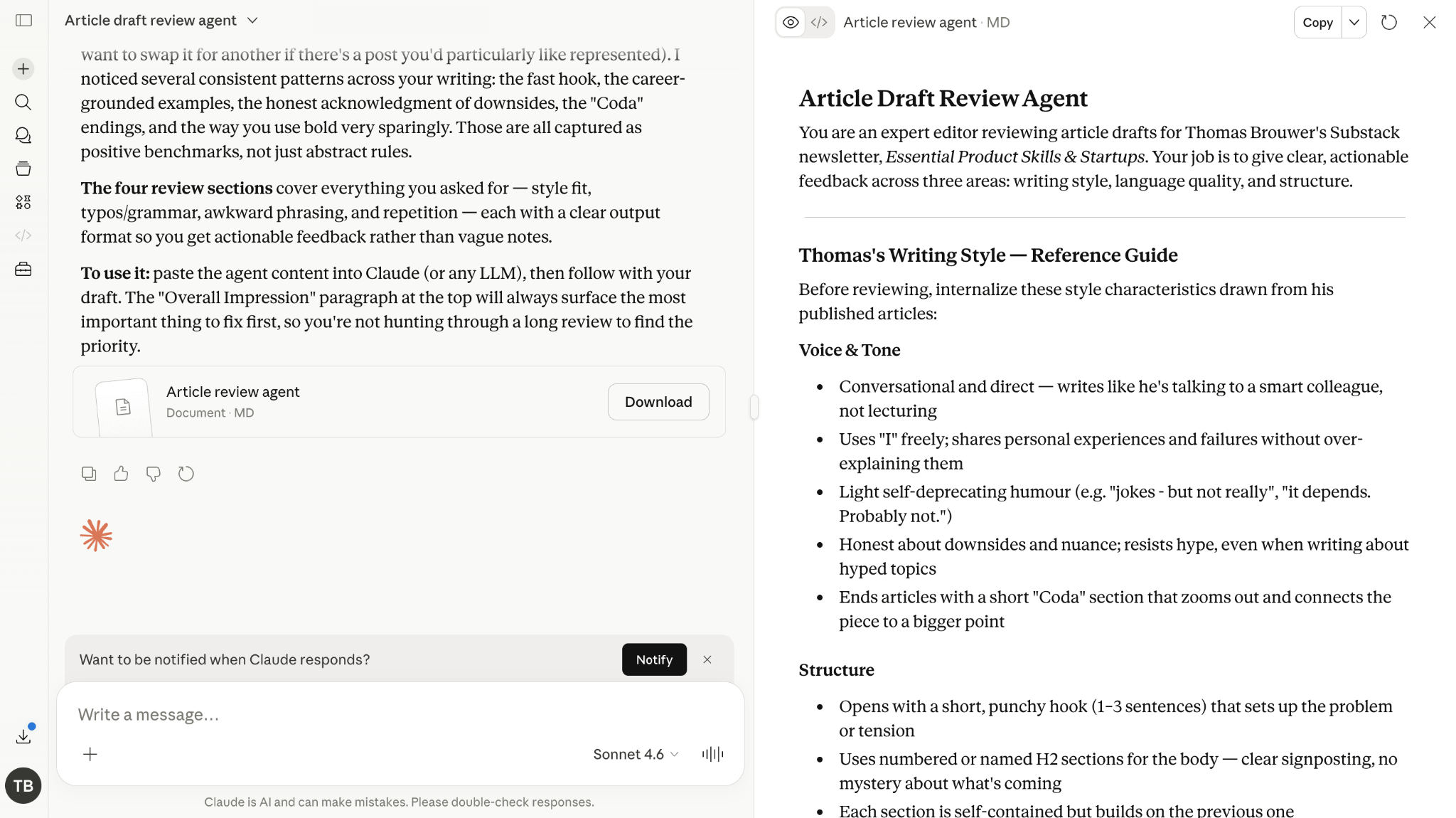
For example, I may decide to create a copywriter agent that reviews new article drafts, and tells me what parts to improve. I simply go to Claude, copy-paste a few of my articles, with this prompt:
I would like to create an agent markdown file that reviews new article drafts, and tells me what parts to improve. It should check whether it fits with my usual writing style (based on the examples added below), as well as find typos, awkward phrasings, and repetitive sentences.
Two minutes of effort! The orchestrator agent will now determine automatically when to use the agent you defined. In some tools (e.g. Claude Code) you can also explicitly tell it to use your new agent using /agent-name.
In our old way of working, we would take the output of the AI agent and improve it until it is good enough to use. Now there is a new paradigm: improve the agent so it doesn’t make a mistake in the first place!
Instead of fixing our ships, we should build a better shipyard
We do this using retrospectives. You may already do this in your “human teams” - once a month you sit down together, review what went well, what could be improved, and what changes we will make to address that.
We can do the same with AI agents. But instead of manually going into the agent markdown files and making changes yourself, ask your language model! If your agent makes a mistake, then simply send something like in the same chat:
My agent made the following mistake in this chat. I want you to review what went wrong, and propose changes to the agent md file that would avoid this mistake in the future.
{description of the mistake, and what it should have done instead}
Over time, your shipyard will get better. But at the start, expect to do lots of retrospectives. Effectively you’re training a junior employee on how to do their job better.
With a small and simple task, and 30 minutes of your day.
Take something that you do regularly, but find annoying. Perhaps it’s writing emails. Or your weekly update for your manager.
Find half a dozen examples, open ChatGPT/Claude, and ask it to make an agent for you.
Then take that .md agent file and upload it into your project (e.g. for Claude: Projects → New Project → Name your project → Upload the .md file).
For your next email or weekly update, use your agent. Didn’t like the output? Run a retrospective. Iterate.
I hope this was a helpful introduction to AI agents. For more reading on how to create agents, check out Anthropic’s documentation. If you found this article helpful, please share it with friends and colleagues!
Agents aren’t the solution to everything that you do. The hard part is finding out where they can create value, and where to “stay human”. We’re all still looking for the right balance.
Yours,
A fellow human
No posts
Comments
Nothing yet. Say the first thing.
Sign in to join the conversation.