
Hey friends 👋
Welcome back to the Signal Pro.
On July 21, a new button appeared in the + menu of the Claude desktop app. It’s called “Record a skill”. When you click it, Claude records your screen, clicks, typing and voice whilst you work through a task, narrating as you go. When you stop, it turns the recording into a repeatable skill you can run again at your command.
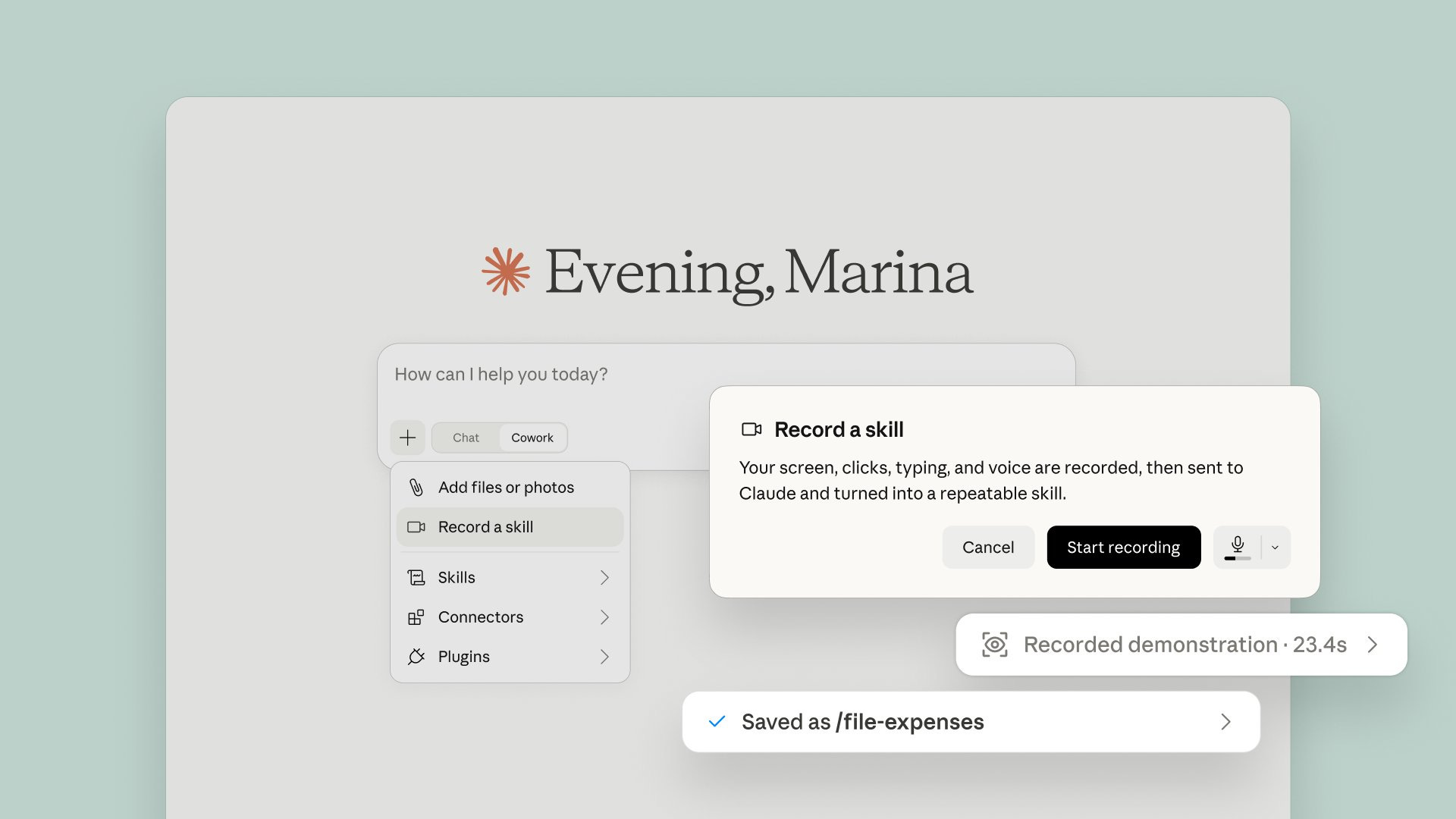
Since “prompting” went mainstream upon the launch of ChatGPT in November 2022, getting a good output from these models has always meant being good at describing what you want.
Over the summer, both OpenAI and Anthropic dropped the same alternative within five weeks of one another. OpenAI’s “Record & Replay” in Codex arrived on June 18.

OpenAI Developers@OpenAIDevs
Show Codex a workflow once. Reuse it as a skill. Record & Replay lets you show Codex a recurring task, like filing an expense report or submitting a time-off request. Codex turns that demo into an inspectable, editable skill. You control when recording starts and stops.
6:50 PM · Jun 18, 2026 · 4.61M Views
527 Replies · 1.23K Reposts · 13.3K Likes
Anthropic followed a little over a month later on July 21.

Claude@claudeai
New in Claude Cowork: teach Claude a skill. Record your screen while you do a task, talk through it as you go, and Claude turns it into a skill it can run again. Find it under Record a skill in the + menu of the Claude desktop app. Available on Pro, Max, and Team plans.

3:54 PM · Jul 21, 2026 · 11M Views
1.29K Replies · 3.33K Reposts · 45.4K Likes
Given how quickly this convergence took place, I think it tells us a lot about where the interface is heading. Today I’m going to show you how it works and why “prompting” as we know it today is going to change dramatically over the next 5 years.
The “record a skill” function is now available on Pro, Max and Team plans. Open the Claude desktop app and switch the input toggle from Chat to Cowork. This is important to note, as Record a skill only appears in the + menu once Cowork is on.
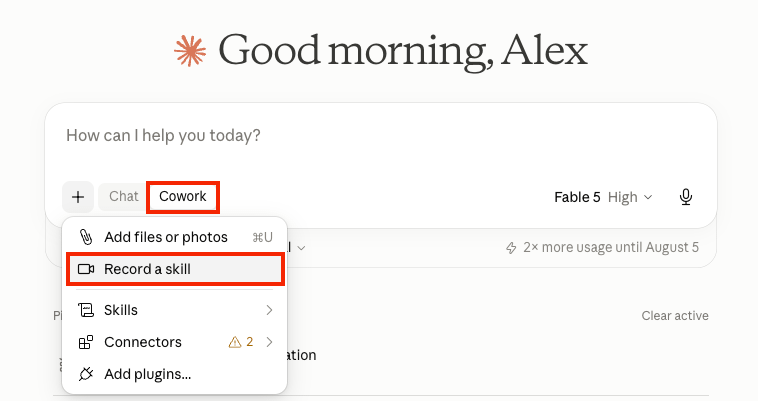
After you click on the “+” button, choose “Record a skill”, pick your microphone from the dropdown and press Start recording.
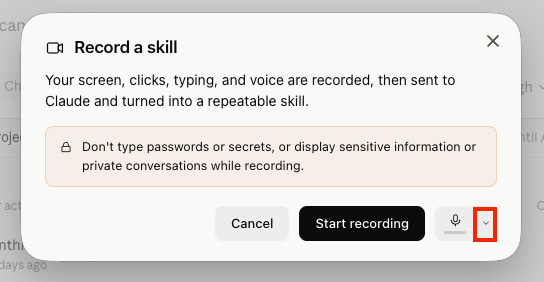
Do the task once exactly the way you always would, making sure to talk as you go. When you stop, Claude processes the demonstration and saves the result as a slash command you can run from any chat. If you can’t see the button, check the Cowork toggle before anything else, since in Chat mode it actually doesn’t appear.
After that, update the desktop app, confirm you’re on a Pro, Max or Team plan and give the gradual rollout a few days, as there’s no published regional restriction on Claude’s side.
What I like about this feature is that it comes from a team that includes Kiana Ehsani, a researcher who joined Anthropic when it acquired her company Vercept.

Kiana Ehsani@ehsanik
This might be a hot take, but I'm a big believer that current form of asking users to write down prompts is not the way human-AI interaction should look like. • People should not have to write prompts! • People should not have to think about what they can / can not delegate

Claude @claudeai
New in Claude Cowork: teach Claude a skill. Record your screen while you do a task, talk through it as you go, and Claude turns it into a skill it can run again. Find it under Record a skill in the + menu of the Claude desktop app. Available on Pro, Max, and Team plans.
6:47 PM · Jul 21, 2026 · 81K Views
26 Replies · 13 Reposts · 358 Likes
Something she wrote for the announcement of this new feature resonated with me a lot: “People should not have to write prompts!” Her view is that typing instructions into a box was never what human-AI interaction should look like in the first place. She also argued that working out what you can and can’t delegate is a burden the model should carry for you. I agree—AI at its core should be a partner for thought. We’ve started with incredibly primitive interfaces (being chat) and are now ascending to voice and beyond.
Think about the last time you wrote a careful prompt for a task you do often. You sat down and described, from memory, exactly how it goes. The description might look reasonably complete, but it still misses the things you don’t really notice yourself unless you’re actually doing the task at hand. This is why skills—the repeatable workflows you create with Claude—so far have been useful for basic input-output-driven tasks, but miss the mark on anything more complex.
Now let’s contrast this to when a new hire starts at a company. You have them sit beside you for a morning rather than emailing them back and forth (or you might do both, but the real value comes from that physical touch point). Working knowledge lives in the doing. Show, don’t tell is how people have taught work for hundreds of years, and until last week, a written text instruction was the only thing you could give Claude. Now, with screen recording, it can watch you work instead.
A recording brings with it information a textual prompt physically can’t hold. This involves the order you work in, the pauses, corrections, and your voice explaining the reasoning at each fork in the road, where more context is required. For the labs building computer-use agents, demonstrations of real people doing real work are the most valuable training material there is—and these recorders turn their everyday users into a willing supply of it.
In October 2023, Atlassian paid ~$975 million for Loom, a product that records your screen so viewers can watch how something gets done. Both OpenAI and Anthropic have now delivered the next step, which takes the form of studying the recording and then performing the task itself.
Each recording really does make these agents better—Claude Cowork or ChatGPT Work—and it also leaves you with a library of your working methods that runs on your command. We only have to think back to Excel with its macro recorder, available since the early nineties, to see the uplift.
Anthropic’s launch got the attention (about 11 million views on the announcement to OpenAI’s 4.6 million), but OpenAI released the idea first, with Record & Replay arriving in the ChatGPT desktop app and Codex on June 18, 33 days ahead.
If you follow both companies, you’ll see the copying itself is nothing new; it has just usually flowed in the other direction. Anthropic released MCP in November 2024, and OpenAI adopted it the following March. Anthropic shipped computer use in October 2024, three months before Operator, and prompt caching that August, two months before OpenAI’s version. Claude had Projects six months before ChatGPT and Artifacts before Canvas, and this January’s Cowork was answered by ChatGPT Work only three weeks ago. The Recorder is the latest horse in this hotly contested race.
On availability, OpenAI’s documentation restricts Record & Replay to macOS and excludes the EEA, the UK and Switzerland at launch. Anthropic, on the other hand, has published no regional restriction, just a gradual rollout, and I can confirm the button reached my + menu in Claude Cowork in the UK this week. If you’re in the UK or the EEA and reading this soon after this was published, Claude’s is the only recorder of the two currently available to you.
I think it’s also important to highlight the difference in what gets recorded too. Claude records your screen, clicks, typing and voice. OpenAI’s documentation describes their recorder observing your actions and window content, and it advises typing your goal in before you start and adding the preferences it missed when you refine the skill afterwards; nothing in it involves listening to you.
Clicks show what you do, but your commentary carries the context for why you did it. Anthropic’s version listens, which I find to be infinitely more useful when it comes to understanding nuance.
The rest of this issue covers where I think the interface ends up and how to dissect the tasks that fit this kind of setup. I’ll also be diving into the strongest case against handing any AI lab your working methods, made this month by Alex Karp, and where I think that tension stands. Record one task with the method and you’ll have a skill doing actual work by the end of the day.
Comments
Nothing yet. Say the first thing.
Sign in to join the conversation.