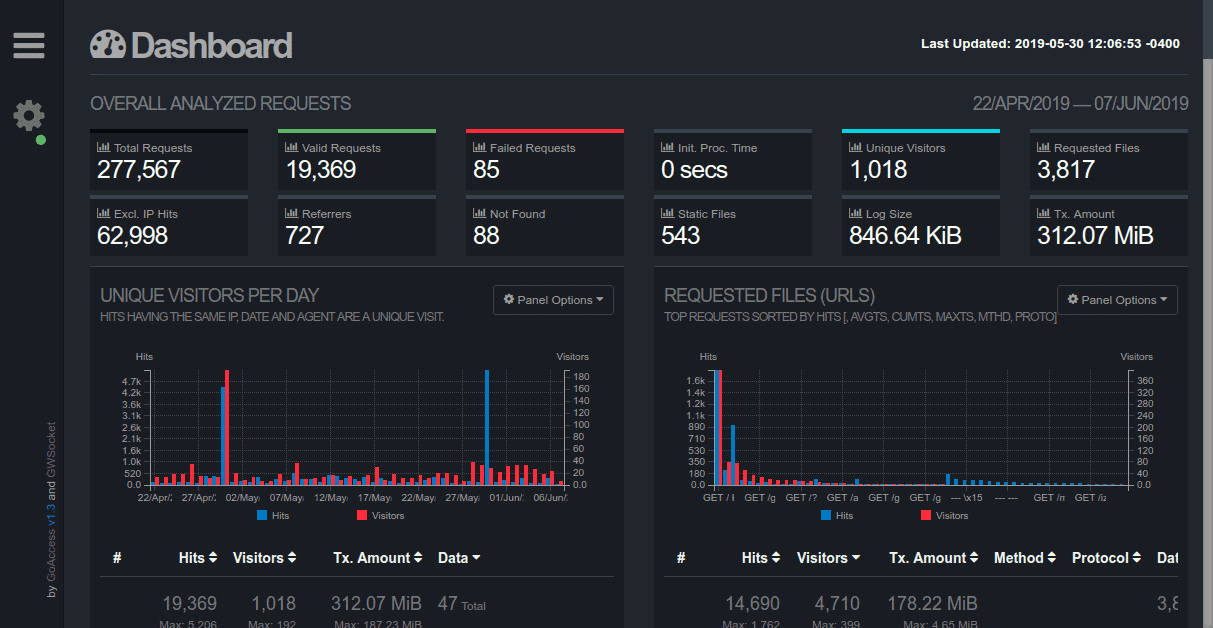
GoAccess is an open source server–side web log analyzer. Server side means that it will process web server logs and compile the results into a real–time graphical view. It works with many web log formats. Nearly all log formats such as Apache, CloudFront, and Nginx according to GoAccess’ website.
By default goaccess will provide a
complete
A
complete graphical overview can allow you to spot patterns or quirks in your
stack.
picture of the traffic to your server. This includes
crawlers, bots, and various HTTP requests. We can make some changes to
goaccess’ configuration to make it behave a bit more like a
traditional
Check out
Matomo
and
Fathom.
web analytic
server.
View this server’s
goaccess analytics page.
“I believe tracking visitors at the client level deflates the actual number of visitors. On the other hand, server–side tracking gives you a more accurate number at the cost of not knowing for sure if the client is a human behind a browser.” GoAccess Author Explains Tracking using Client vs. Server
GoAccess allows command line flags and shell piping, but we’ll do most of the
work from a central goaccess.conf
file.
The
default configuration file can be viewed
at the goaccess code repository.
Let’s start off by enabling
real–time HTML for live updates through the socket connection.
cfg
# Enable real-time HTML output.
real-time-html true

# Set output HTML path.
output /srv/http/goaccess/index.html
The backend web server is nginx so enable the combined log format and set the
access log path.
cfg
# Set log format.
log-format COMBINED

# Specify the path to the input log file.
log-file /var/log/nginx/access.log
Exclude localhost so that goaccess ignores counting internal requests as
unique visitors. We can exclude multiple public IPv4 and IPv6 addresses here
as well.
cfg
# Exclude an IPv4 or IPv6 address from being counted.
exclude-ip 127.0.0.1
exclude-ip xx.xx.xx.xx
Ignore counting crawlers. This should make the unique visitors count more accurate.
cfg
# Ignore crawlers from being counted.
ignore-crawlers true
You can further refine the output by adding more crawlers to ignore. This can be
done by setting a browsers-file
path.
An
example
is provided in the repository. This file must be tab
delimited.
cfg
# Include an additional delimited list of browsers/crawlers/feeds etc.
browsers-file /opt/goaccess/config/browsers.list
Let’s enable IP address anonymization. In future versions of goaccess you’ll
be able set the
level of IP address anonymization
with the command line flag --anonymize-level and the configuration option anonymize-level.
cfg
# IP address anonymization
anonymize-ip true

# Pedantic IP address anonymization
anonymize-level 3
By default goaccess does not add client errors to the unique visitors count.
cfg
# Do not add 4xx client errors to the unique visitors count.
4xx-to-unique-count false
We can also remove specific HTTP response codes from the visitor’s count too.
cfg
# Ignore parsing and displaying one or multiple status code(s)
ignore-status 429
Referrer spam inflates and skews
the log data.
Ignore
There is a
hard limit
of 64 ignored entries. To accommodate larger lists adjust settings.h
accordingly.
visitors from a list of
domains
We can use a systemd or cron
timer to refresh the list periodically.
by using
ignore-referer. My personal preference is to use
Matomo’s list.
cfg
# Ignore referrer from being counted.
ignore-referer www.example.com
Sort the most important panels by visitor count, data, and bandwidth in descending order.
cfg
# Sort panels on initial load by visitors, data, and bandwidth.
sort-panel BROWSERS,BY_VISITORS,DESC
sort-panel CACHE_STATUS,BY_VISITORS,DESC
sort-panel GEO_LOCATION,BY_VISITORS,DESC
sort-panel HOSTS,BY_VISITORS,DESC
sort-panel KEYPHRASES,BY_VISITORS,DESC
sort-panel MIME_TYPE,BY_VISITORS,DESC
sort-panel NOT_FOUND,BY_BW,DESC
sort-panel OS,BY_VISITORS,DESC
sort-panel REFERRERS,BY_VISITORS,DESC
sort-panel REFERRING_SITES,BY_VISITORS,DESC
sort-panel REMOTE_USER,BY_VISITORS,DESC
sort-panel REQUESTS,BY_VISITORS,DESC
sort-panel REQUESTS_STATIC,BY_BW,DESC
sort-panel STATUS_CODES,BY_VISITORS,DESC
sort-panel TLS_TYPE,BY_VISITORS,DESC
sort-panel VIRTUAL_HOSTS,BY_VISITORS,DESC
sort-panel VISITORS,BY_DATA,DESC
sort-panel VISIT_TIMES,BY_DATA,DESC
Change the theme and table specifications on the page by using a string of
json
preferences.
The theme is set to dark
blue, with 20 results per graph. The visitors and visit time graphs are set to
use bar charts instead of line charts.
cfg
# Set default HTML preferences.
html-prefs {"theme":"darkBlue","perPage":20,"visitors":{"plot":{"chartType":"bar"}},"visit_time":{"plot":{"chartType":"bar"}}}
Make sure that all static files — including files with a query string are categorized under the static files table.
cfg
# Include static files that contain a query string in the static files
all-static-files true
Show statistics based on country by loading in a
GeoIP database. You can
install a database
from your Linux distribution of choice.
cfg
# Set GeoIP database path.
geoip-database /usr/share/GeoIP/GeoLiteCity.dat
Everything runs in memory.
Enable
Check the
configure options to compile with Tokyo Cabinet
Support. For example —
./configure --enable-utf8 --enable-geoip=legacy --enable-tcb=btree --disable-zlib --disable-bzip
Tokyo Cabinet and store the results as a
database on the file system.
cfg
### GoAccess version <= 1.3

# Persist parsed data into disk.
keep-db-files true
# Load previously stored data from disk.
load-from-disk true
# Path where the on-disk database files are stored.
db-path /tmp/
Newer versions use a different syntax and will not require setting up specific configure options.
cfg
### GoAccess version >= 1.4

# Persist parsed data into disk.
persist true
# Load previously stored data from disk.
restore true
# Path where the on-disk database files are stored.
db-path /tmp
Now stream the logs into goaccess using our souped–up config. GoAccess will
process the rotated logs of nginx in addition to the current access log
stipulated in goaccess.conf.
shell
zcat --force /var/log/nginx/access.log-* | goaccess --config-file=/opt/goaccess/config/goaccess.conf -
Comments
Nothing yet. Say the first thing.
Sign in to join the conversation.