
 3
The Package »
3
The Package »
Introduction

The AVerMedia DualCam (PW313D) is aimed at teachers, tutors, and anyone who regularly needs to show physical objects or documents during video calls, but it's affordable and simple enough to be considered by home users as well. It's a 2-in-1 webcam, equipped with two independent cameras that can stream two different perspectives simultaneously. The first camera is a fairly ordinary 2 MP unit that records Full HD video at 30 FPS and is meant to be pointed at your face, just like any other webcam. The second camera uses a 5 MP sensor with a maximum resolution of 2592×1944, again at 30 FPS, and can be rotated to look in the opposite direction or even all the way down towards your desk, effectively turning it into a document camera.
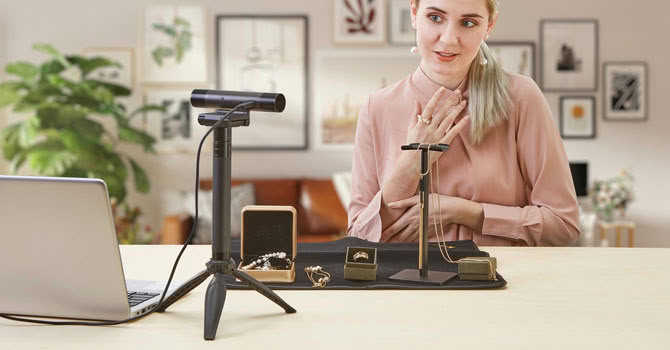
Both cameras have autofocus and their own physical privacy shutters. The idea is simple and, at least on paper, quite clever: instead of juggling screen sharing, phone cameras, or a separate document camera, you get a single device that shows both you and whatever is on your table. Teachers can show handwritten work, artists can demonstrate their technique, and reviewers like myself can point a camera at a product without rearranging half of the desk.
The DualCam carries a MSRP of $149.99, although its street price regularly dips below that. That's noticeably more than you'd pay for a basic 1080p30 webcam, but dedicated document cameras alone often cost as much or more, so the value proposition largely depends on whether you actually need that second perspective. Throughout this review, I'll try to answer whether the execution lives up to the concept.
Specifications
- Left camera: 2 MP CMOS sensor, 1920×1080 @ 30 FPS, 71° diagonal field of view (63° horizontal, 38° vertical), autofocus
- Right camera: 5 MP CMOS sensor, 2592×1944 @ 30 FPS, 76° diagonal field of view (67° horizontal, 52° vertical), autofocus
- Left camera rotation: 90° upward, 15° downward
- Right camera rotation: 195° backward, 75° forward
- Microphone: Dual mono omnidirectional (up to 3 m/9.8 ft pickup distance), AI noise reduction
- Connection: USB 2.0 (USB-A to USB-C cable, 2 m/6.56 ft)
- Privacy cover: Yes (both cameras)
- Compatibility: Microsoft Windows 7/10 or later, Apple macOS 10.15/11 or later (including Apple Silicon), iPadOS 17 or later
- Supported apps: Zoom, Microsoft Teams, Google Meet, Skype, OBS, and other standard UVC-compatible software
- Mounting: Universal monitor/laptop clip, 1/4" tripod thread (tripod included)
New Forum Posts
Popular Reviews
- NVIDIA DLSS 4.5 Ray Reconstruction Review - Transformer Improved
- AMD Ryzen 7 5800X3D 10th Anniversary Review
- MOAIPLAY ORA PRO G1 1000 Review
- ASUS NUC 16 Pro Review
- AutoFull M6 Ultra 2.0 Review - Official IEM 2026 Chair: How Does It Perform?
- Upcoming Hardware Launches 2026 (Updated Jul 2026)
- Intel Core Ultra 7 270K Plus Review - Intel's Fastest Gaming CPU
- CPS PCCooler YS1200 Review
- ADATA SC735 2 TB Portable SSD Review - Rugged and Convenient
- Halo: Campaign Evolved Performance Benchmark Review - 35 GPUs Tested
TPU on YouTube
Controversial News Posts
- Microsoft Promises Better Windows 11 Memory Efficiency (235)
- NVIDIA RTX 50 Series Median Prices Jump Up to 41% in August, with MSRP Now a Distant Dream (193)
- NVIDIA RTX 50-Series GPUs Could See Another 20-30% Price Hike in 2026 (183)
- AMD Gains Ground as Intel x86 Market Share Goes Back to 1995 Levels (119)
- AMD Confirms Radeon RX 9050 4 GB Has Smaller Infinity Cache, Lower Memory Bandwidth (118)
- Intel "Nova Lake-S" 28-Core SKU With bLLC to Draw Nearly 300 W at PL2 (108)
- CachyOS and AlmaLinux Beat out Windows 11 in Workstation Benchmarks (86)
- Windows 11's Built-In Weather App Wastes More Than 1 GB of RAM (81)
Comments
Nothing yet. Say the first thing.
Sign in to join the conversation.