
I help experts, journalists and consultants become recognized and citable sources by teaching them how to create high-value information resources that people rely on to navigate today’s information overabundance.
Text within this block will maintain its original spacing when published
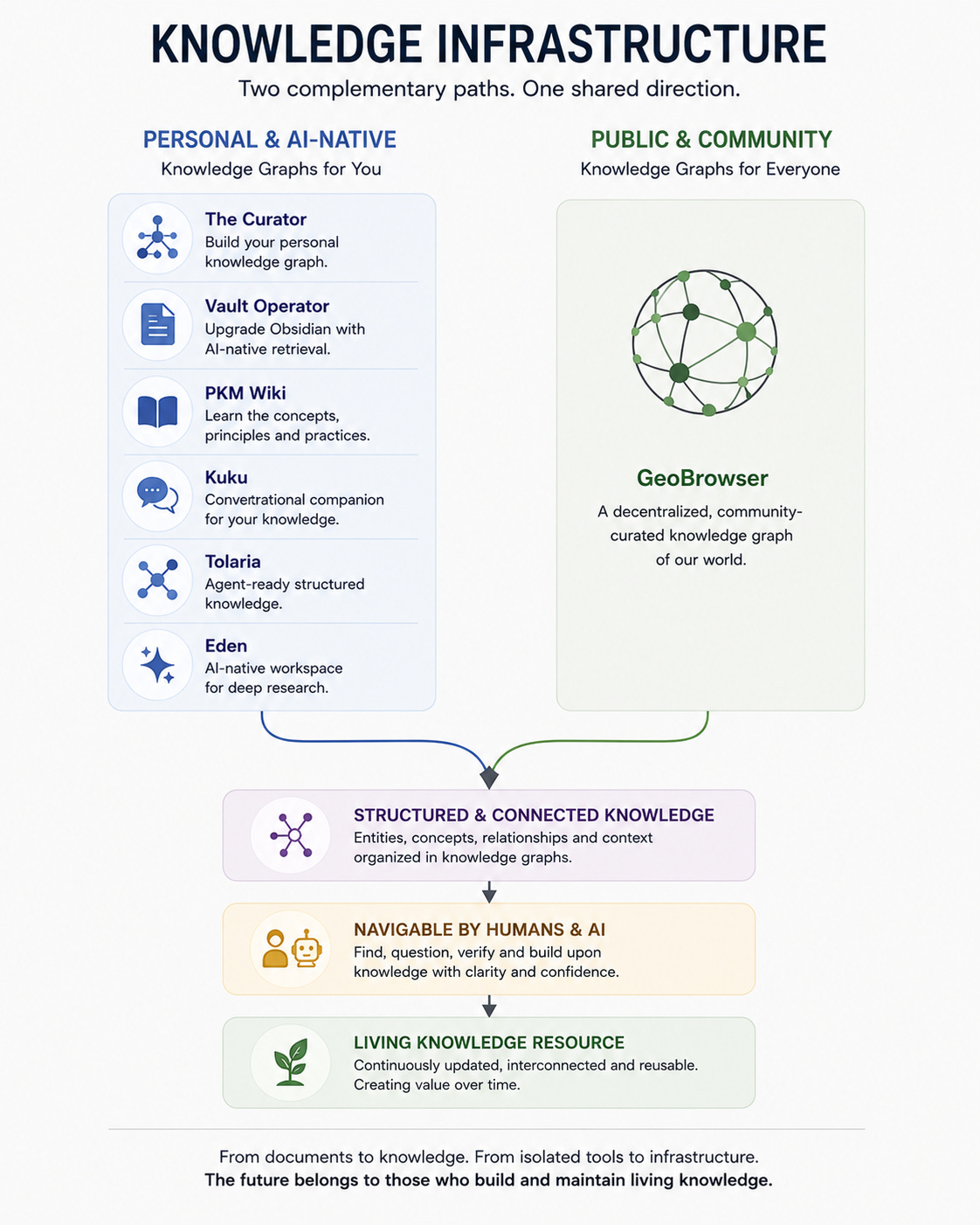
Focus / New Trend: For twenty years we’ve managed documents. The new tools I present in this issue are trying to manage knowledge instead. It looks like we’re moving from storing notes and organizing documents to compiling personal and public knowledge into forms that both humans and AI agents can navigate, question and build upon (knowledge infrastructure).
Text within this block will maintain its original spacing when published
Why to pay attention: Emergence of a new architectural pattern for personal (and public) knowledge management relevant for strategic authority and trust building: Knowledge Infrastructure is now a “thing”, and it is the one thing that experts should start focusing on.
Text within this block will maintain its original spacing when published
Text within this block will maintain its original spacing when published
Six months ago I would have considered the tools I showcase in this issue as completely different tools.
One builds a public knowledge graph. Another organizes your personal archive. Another upgrades your Obsidian vaults. Another is an AI research environment for writing.
But looking at them today, I think they start to reveal a pattern that is not evident to most experts writing online.
These tools show where research, writing and knowledge management are heading: knowledge that is structured, connected and explorable by both humans and AI.
Whether these tools and platforms manage public knowledge or personal knowledge, they’re all simultaneously moving away from individual isolated articles and documents and toward structured knowledge that can be navigated, questioned, maintained and expanded over time by both humans and AI.
Text within this block will maintain its original spacing when published
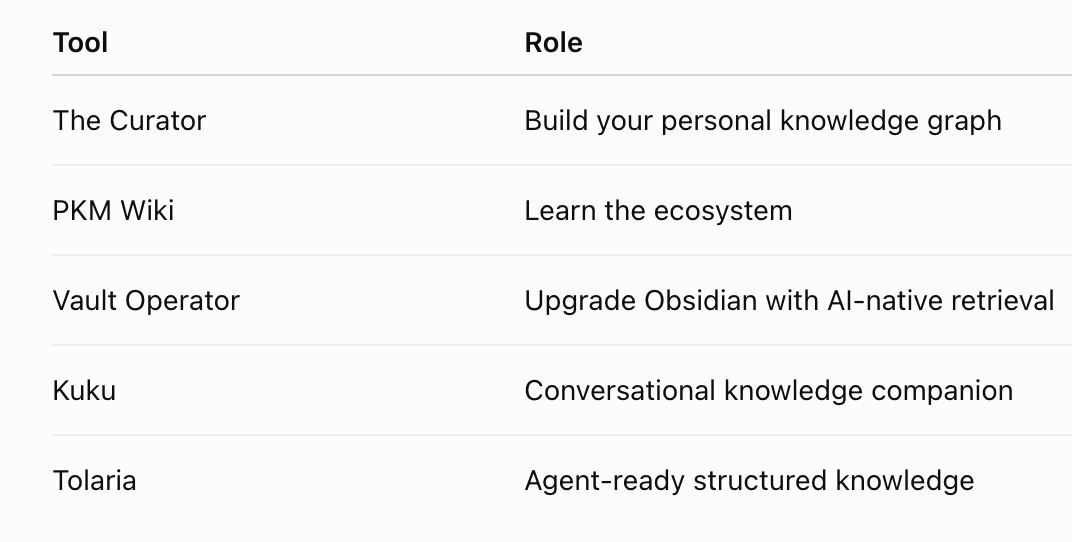
A small but fast-growing ecosystem spinning around the LLM-Wiki concept. This ecosystem represents the personal side of the broader transition described above.
Text within this block will maintain its original spacing when published
A local PKM that lets you interact with your own body of knowledge rather than with the public web.
I first wrote about The Curator app in this article:
I started using The Curator by Dr. Tali Režun (100% free - open-source) in late April. In it I have captured all of the TRUSTable issued published so far (80+ issues).
The Curator converted all those articles into a structured knowledge base easy to query, update, maintain and interrogate with any AI. This personal knowledge base is now made up of 1,272 pages containing 432 entities, 737 concepts, 103 summaries interconnected by 17,302 links between them.
What has surprised me most in using The Curator is has how useful it can be in seeing patterns, gap and connections inside what you have already written that can be great for identifying new insights and future topics. It is like having a personal, local, private NotebookLM with all of your content organized and ready to be interrogated in a thousand different useful ways.
I am only at the beginning in discovering its potential but I think that as I learn to use it better, it will become more and more useful for the work I do.
Why you should pay attention to it: Normally, when I save, bookmark, put aside interesting articles, PDFs and notes, I’m aware that I may never get to read some of that stuff. On the other hand when using The Curator, every article I ingest becomes part of a growing knowledge base that can be explored, questioned and connected to everything else I have published before. That’s different.
Over time, it starts feeling less like an archive of all of your articles (or whatever else you have saved) and more like a research companion that actually knows what you think, how you reason, what are your key principles and values or on which ideas you stand differently from everyone else.
For people who curate professionally, I think this is a really useful tool. Instead of asking any AI that knows about everything, you can interrogate an AI that knows you specifically, your ideas, your references, your sources and beliefs.
That’s quite a difference.
As our personal archives continue to grow, I expect tools like The Curator to become increasingly valuable, because they make instantly available and useful years of writing, thinking and exploring.
My advice: For anyone who is serious about building a long-term knowledge base instead of an ever-growing pile of forgotten articles, this is one of the most interesting tools I’ve used so far this year.
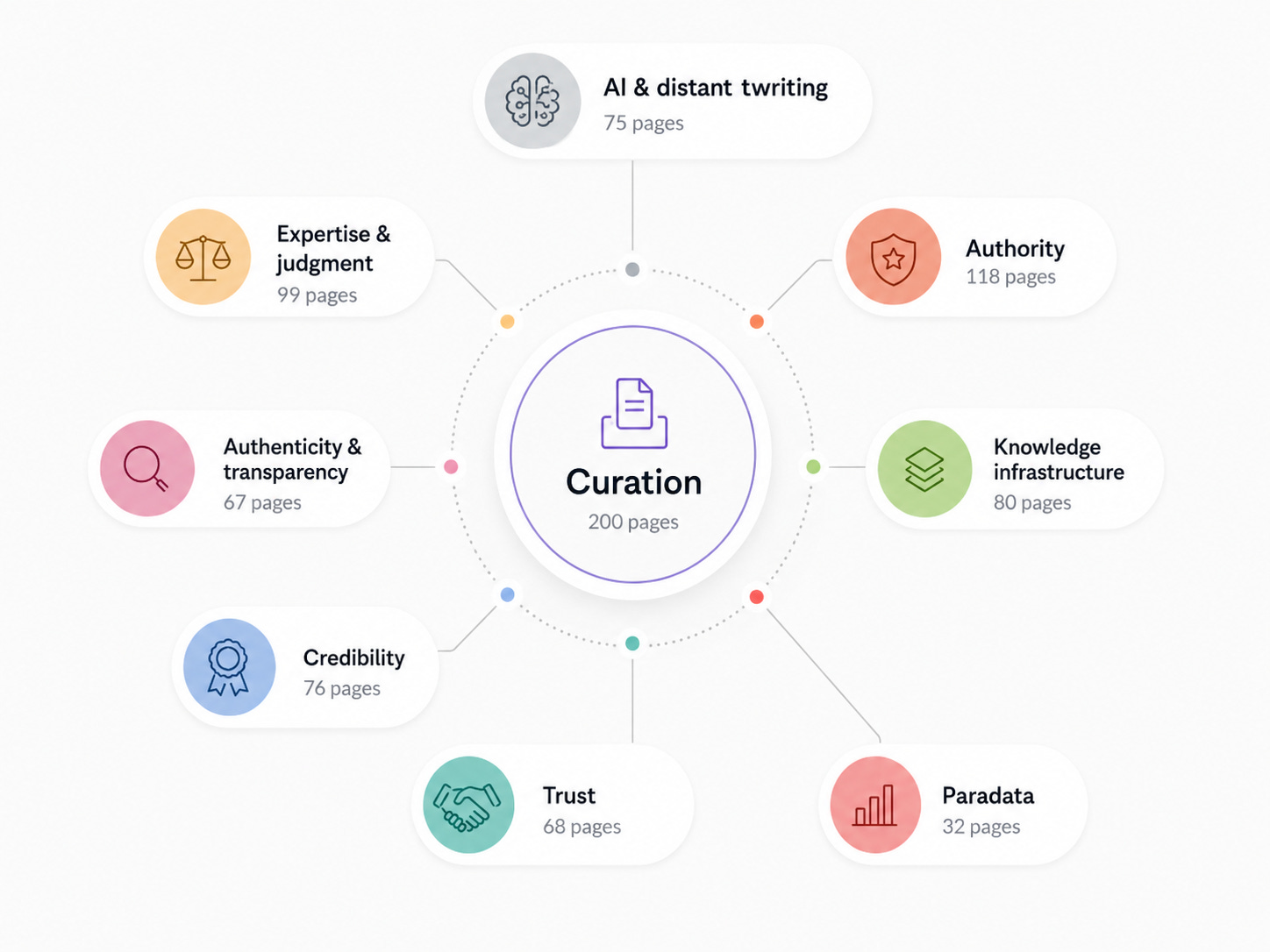
The Curator’s key value is in making years of accumulated judgment reusable. Here’s a simple visualization of the key concepts naturally emerging by having converted all my TRUSTable articles into a LLM-wiki personal knowledge base.
Text within this block will maintain its original spacing when published
Where to go to keep yourself updated on the LLM-wiki ecosystem. A community-maintained field guide to the LLM-Wiki movement.
Here’s a public, AI-generated but human-curated wiki built from Sébastien Dubois’ personal Obsidian vault. Rather than documenting software, it documents the emerging concepts, principles and vocabulary behind AI-ready personal knowledge systems: knowledge decay, context engineering, LLM-wikis, epistemic hygiene, AI-ready vaults and much more.
For anyone interested in building a long-term knowledge base, it’s an excellent field guide that helps you understand not just the tools, but the mental models behind this rapidly emerging discipline.
It’s also an excellent example of knowledge infrastructure.
Text within this block will maintain its original spacing when published
I already have 5,000 notes inside Obsidian. Now what?
Vault Operator is open-source software that transforms an existing Obsidian vault into an AI-ready knowledge base without forcing you to migrate to a new platform. Rather than treating notes as isolated Markdown files, it exposes the vault in a structured format so that AI agents can navigate relationships, retrieve context and work more intelligently with your accumulated knowledge.
The biggest benefit again here is preserving years of work while making it immediately more useful inside your AI-assisted workflows.
Text within this block will maintain its original spacing when published
What if your personal knowledge base became something you could naturally converse with all day?
Kuku makes your personal knowledge base feel less like a collection of notes and more like an ongoing conversation. Instead of searching folders or manually connecting ideas, you interact naturally with your accumulated knowledge while the system continuously builds context from previous conversations and collected material.
For researchers, consultants and writers, it offers a glimpse of what everyday collaboration with a persistent AI research companion may soon look like.
Text within this block will maintain its original spacing when published
Makes structured knowledge navigable for AI agents, which connects directly to everything I’ve been writing about regarding citation authority and trust infrastructure. This is a free, open-source, local-first desktop app that manages Markdown knowledge bases while making them naturally understandable to both humans and AI agents. Every note remains a plain Markdown file under Git version control, but the system adds semantic relationships, structured metadata and AI-friendly conventions that turn an ordinary note collection into a navigable knowledge graph.
Its strength is in identifying relationships between concepts and making large collections of information easier to maintain over time.
It is particularly interesting for experts building long-term knowledge assets that need to become increasingly useful as new material is added, instead of gradually decaying into digital archives. Also of value for authors who want complete ownership of their knowledge while preparing it for AI-assisted research and writing.
Text within this block will maintain its original spacing when published
Taken together, these LLM-wiki based projects suggest that knowledge management is entering a new phase.
The goal is no longer to collect more notes or build a bigger second brain. It is to compile your accumulated knowledge into living, structured resources that both you, your AI tools, and possibly your future customers, can interrogate, refine and expand over time.
Text within this block will maintain its original spacing when published
For experts and advisors who struggle to come up with ideas and who want their research and content workflow in one place.
If the above group of LLM-wiki based tools focuses on preserving and structuring accumulated knowledge, Eden explores what happens once that knowledge becomes your everyday research workspace you use for writing content that needs to be published online.
Created by DAN KOE, out of the evolution of his Kortex second-brain, this is one of the first attempts at building an AI-native writing environment, a general-purpose AI research and topic-validation canvas for independent authors and writers that meets a rapidly growing demand.
Its key features include:
Capture from anywhere with the web app, mobile app, and browser extension,
Discover top-performing posts across every major platform
Access boards and swipe files to organize everything you save
I haven’t been able to test and try enough of Eden to report my personal impressions (free trial only 7-days, way too short to get my hands dirty with it), but I’d say I am positively intrigued by its interface architecture, which seems highly suited to support the research-curator-writer workflow: to collect stuff, ideas and notes from different sources, organize and arrange these and notes and gradually develop an article around these elements without visually disconnecting these elements.
Why you should pay attention to it: Eden is interesting because it helps experts to identify already validated ideas to cover while transforming their collections of notes, ideas, quotes and articles into actual essays and articles with valuable insights.
Definitely worth looking into for those who love to research and write.
Text within this block will maintain its original spacing when published
Turning your social saves into quality insights.
Digital Culturist is an interesting app created by Carissa Estreller author of the homonymous Substack publication, launching in beta officially in the next 24 hours.
What the tool does is capture most any kind of social content (Instagram, Tiktok, Youtube, X, etc.), lets you upload your own, and then it slowly maps with AI your key ideas, connections and gaps through which you may discover new interesting insights. Every save is transcribed, analyzed, and summarized.
Why you should pay attention to it: Besides being a potential Eden competitor with no apparent initial costs, DigitalCulturist is - as much as Eden - a living proof that experts as much as indie entrepreneurs can now start to build their own custom knowledge management tools for their audience / space.
To see how Digital Culturist works check this video (if you have little time watch only first 2 minutes and the last 3):
Text within this block will maintain its original spacing when published
A serious attempt at building a public knowledge graph curated by experts.
GeoBrowser represents the public counterpart to everything we’ve seen so far. While today most every “AI research workspace” around (like Eden in this issue, the LLM-wiki ecosystem, Sublime) optimizes for personal, private intelligence, Geobrowser has been designed to serve public knowledge.
Can expert communities build and maintain a shared knowledge graph instead of leaving knowledge organization entirely to Google, Wikipedia and LLMs?
This is what Geobrowser is trying to achieve by bringing Wikipedia, Wikidata, Reddit and GitHub approaches to structured knowledge into a single system, where communities curate, debate, verify and connect facts in a shared knowledge graph.
Geobrowser uses blockchain and IPFS technologies, and every selection, piece of information or claim must not only be linked and supported by other sources, but must be vetted and voted by other Geo curators. Additionally, Geo makes it possible for any topic to be curated by multiple experts, returning to the user the ability to decide which version / interpretation they prefer to rely on.
Geo has also a dedicated Curator Program, where contributors are rewarded with token-like virtual intangibles for organizing sources, structuring arguments, identifying gaps and improving knowledge quality rather than simply producing content.
Why you should pay attention to it: If Geo succeeds, you as an expert, advisor or consultant will eventually care less about publishing isolated articles and more about becoming a recognized maintainer of one or more trusted knowledge spaces like the ones Geo is starting to build right now.
That’s quite a big change: from creating content to curating information resources that are used over time. GeoBrowser is one of the very few projects I’ve seen that is explicitly designed around this premise.
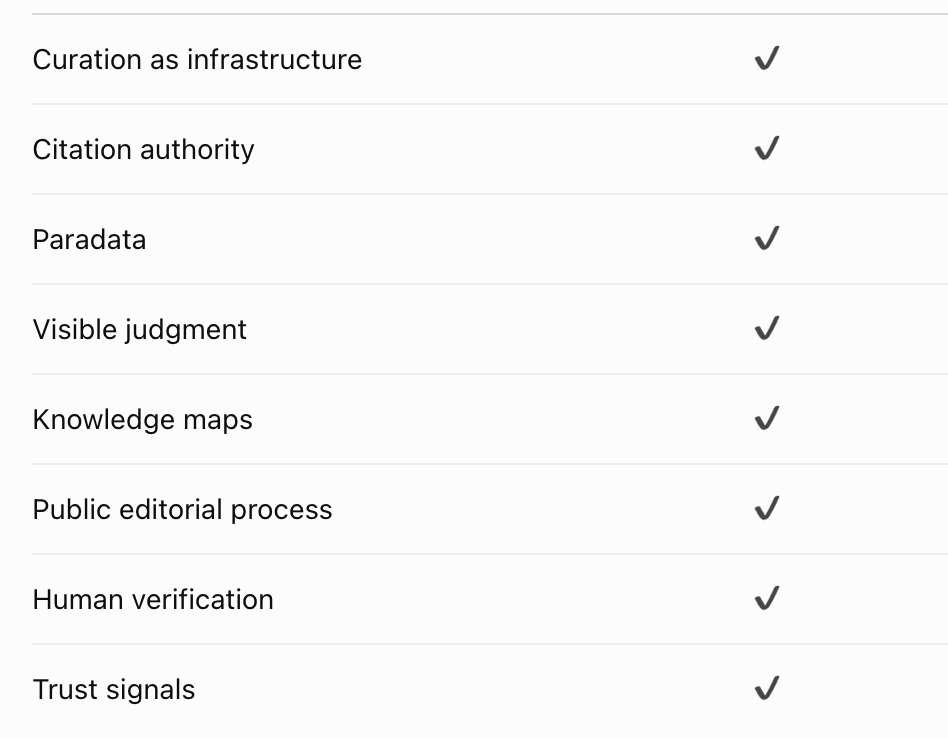
Geobrowser is also extremely relevant to experts and curators as it intersects and checks out on all of the top themes I have been treating here recently inside TRUSTable.
My advice: Don’t rush to sign-up, the infrastructure is not quite ready for prime-time and for non-technical users the learning curve right now could feel a little steep. Understanding databases, ontologies, properties, entities and all of this knowledge management stuff, it is definitely the kind of mental background you want to have / develop to get into this kind of knowledge ecosystem.
Definitely worth knowing about. I will be reporting more as I learn and discover by using it. *The distributed human team at Geo is very open, friendly, welcoming, supportive and generous in the attention and time they provide to new users and interested contributors.
Text within this block will maintain its original spacing when published
What all these projects collectively suggest is that we’re beginning to build two complementary kinds of knowledge infrastructure:
One is personal and AI-native
The other is public and community-maintained
Together they point toward a future where experts won’t simply publish documents.
They'll become maintainers of living knowledge resources that continue creating value long after they have been initially created.
From articles to knowledge infrastructure.
Text within this block will maintain its original spacing when published
Text within this block will maintain its original spacing when published
Intent / Why: I wrote this edition of The Curator Toolstack to update my readers on the most relevant and interesting new tools I have recently discovered and that help subject matter experts collect, organize and extract valuable insights from existing information.
Text within this block will maintain its original spacing when published
Process: I constantly monitor the field for new tools and apps that may be useful to my readership and every few months I review and publish my views on the new ones that appear to be most relevant. I rely on many different sources, mostly newsletters and startup announcing sites, but - at least for this issue - Yutori Scouts has been the true main source of new tools discovery.
As I spot or find new interesting tools, I save them inside Capacities second brain with a specific tag, so that I can easily retrieve them later. When the time comes to do a quarterly review of the most interesting ones, I go and check all of those apps I have saved - a few of which I may have started using and exploring - and I vet and review each one manually.
The key selection criteria I use include:
relevance for what my readers are seeking: increasing visibility, authority, credibility and ultimately trust to become visible and referenced by others.
access - can I try it, explore it, put it through some test, or do I need to register and pay to get to feel it?
use - is it designed for individual or for enterprise use?
uniqueness - has something special about it, that would make me want to recommend it to my readers?
I do not go after having as many tools as possible, but to have a small but very interesting / useful selection.
Text within this block will maintain its original spacing when published
What I left out
The tools I did not include in this issue (and the reasons I kept them out):
StumbleAgain
A re-enactment of the long-gone unique serendipitous experience of StumbleUpon. Interesting, valid proof of concept, but not immediately useful to what my readers need. It’s a nice-to-see project validating the creation of public tools and apps that indirectly promote your business while showcasing your skills.
On this topic see “Satellite Apps Are the New lead Magnets” by Elena Verna.OpenMAIC
Turn any topic or document into an immersive classroom. Slides, quizzes, interactive simulations, plus AI teachers and classmates who speak, draw on a whiteboard, and discuss with you. Very interesting open-source concept and app originating from a Chinese university. Not quite ready for prime time. Chinese language appears in outputs. Good for learning about a new topic in a new engaging fashion.Sigtel
Daily briefs on your selected topics. Still unreliable. My account has not yet produced any info report.Web Curator
Web app by Alex Karim Howard to track specific topics. Had tested it a couple of months ago, but it wasn’t performing as expected. A promising new version has just been released, but I have not had time yet to vet it.ZEEF - covered in issue #77 has been refining its UI and basic features but the project has slown down as it is looking for fresh partners and investors. Not ready for prime-time.
.
I wrote 95% of what you have been reading, completely by hand. AI has only been used to check for grammatical errors and misspellings and to help me express me better some summary passages.
Text within this block will maintain its original spacing when published
Time:
Finding, collecting, testing: 2.5 hours weekly (ongoing)
Research and first draft: 2.5 hrs.
Editing, refine, clean-up: 2 hrs.
Links and references: 1.5 hrs.
Formatting: 1 hr.
Paradata: 1.5 hrs.
Cover design: 0.5 hr.
Grammar and general text verification and corrections: 1.5 hrs.
Title and subtitle refinement: 0.5 hrs.
Total apx time: 13.5 hrs.
Text within this block will maintain its original spacing when published
Tools:
Yutori Scouts - keep yourself updated on specific topics with multiple agents constantly searching for relevant stuff tailored to your specific needs and perspective.
Claude Fable 5 + ChatGPT 5.5
Text within this block will maintain its original spacing when published

Cover image: Logos of the app and tools showcased in this issue - Concept & Design by Robin Good, executed by ChatGPT Image 2.
Text within this block will maintain its original spacing when published
Text within this block will maintain its original spacing when published
Private consulting for experts and consultants who want to start building useful living knowledge resources in their field of expertise.
One-to-One Audit & Strategic Advice
Text within this block will maintain its original spacing when published
Follow a path with a heart.
The time is now.

From Koh Samui (TH)
Robin Good
Comments
Nothing yet. Say the first thing.
Sign in to join the conversation.