
NOTE: Please do collect visual comic available at the end of the page ;)
A server rack is a standardized metal cabinet that houses servers, network switches, and other datacenter equipment. Think of it as a bookshelf for computers — except instead of books, each “shelf” holds a server or network device.
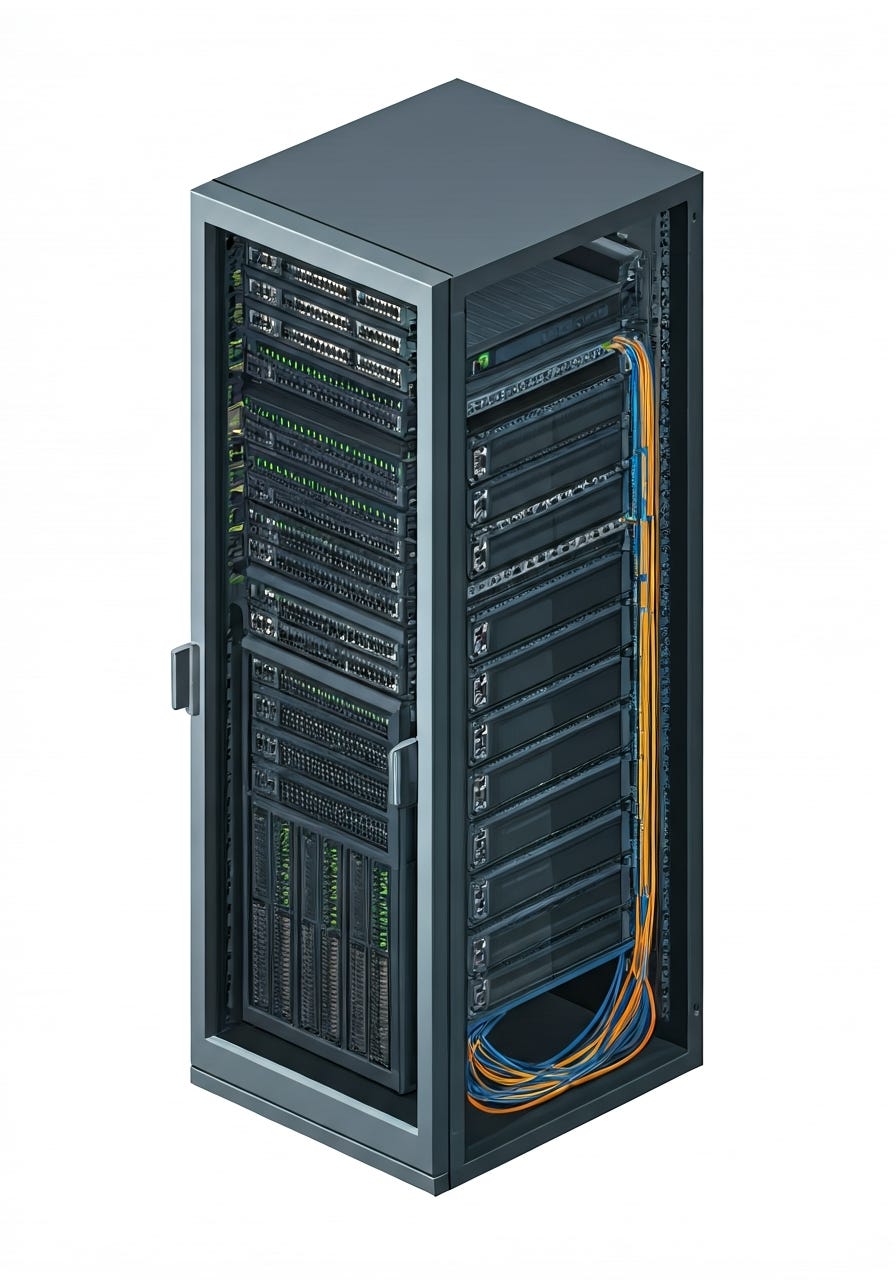
The industry standard is the 42U rack (also called a full-height rack):
U stands for “rack unit” — 1U = 1.75 inches (44.45mm) of vertical space
A 42U rack provides 42 slots, each 1.75 inches tall
Most servers are 2U (two slots tall), so a 42U rack holds roughly 20-21 servers plus switches and cable management
Standard width: 19 inches (482.6mm) — this is universal across all manufacturers
Standard depth: 36-48 inches depending on the server type
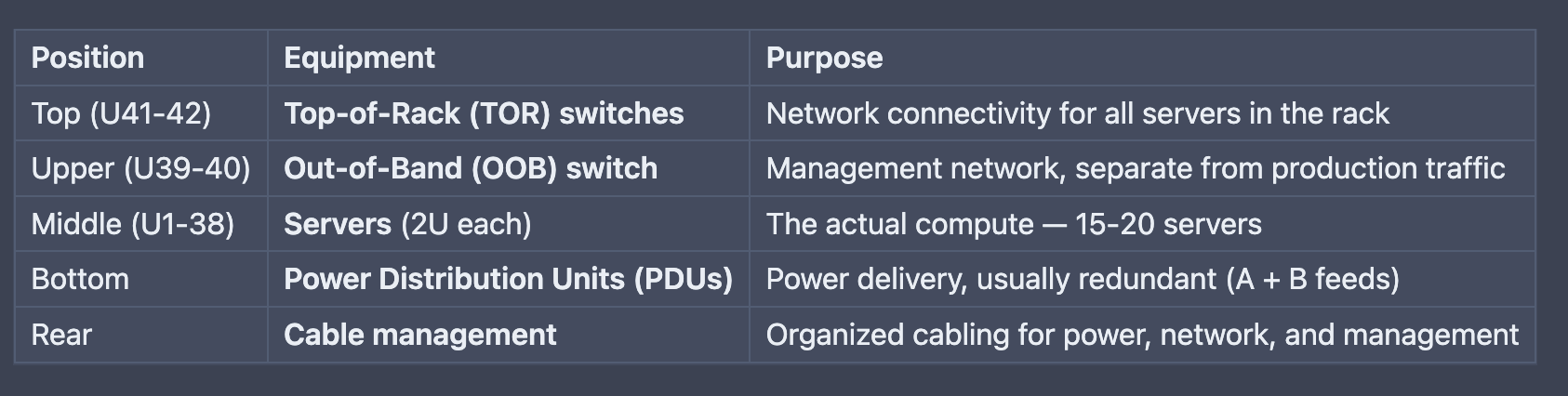
From top to bottom, a typical production rack contains:
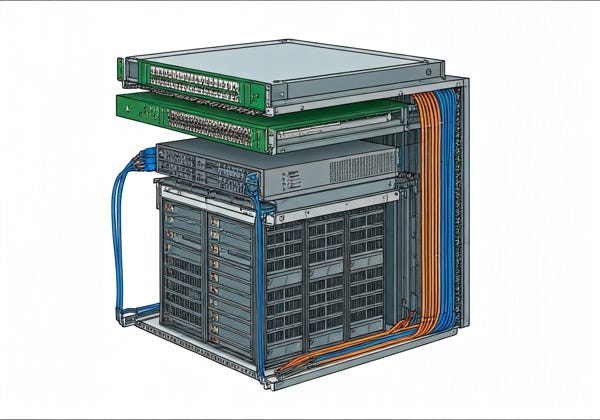
Every rack has two separate networks, and understanding this distinction is critical.
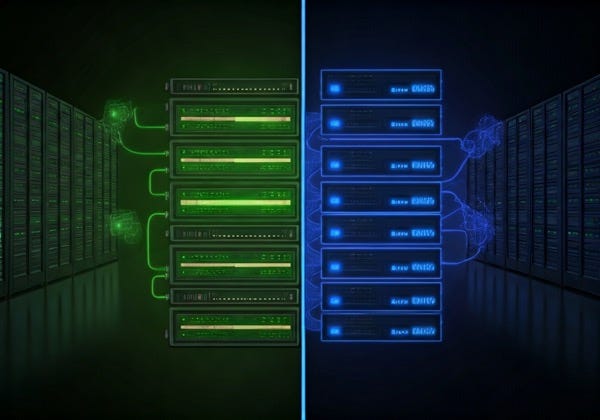
This is the “real” network — the one that carries actual application traffic.
Connected via the TOR (Top-of-Rack) switches
Each server has one or more NIC ports (Network Interface Cards) connected to the TOR
Carries: application traffic, customer data, inter-service communication
Uses production VLANs (typically VLAN 20 for inband)
IPv4 and IPv6 addresses allocated from the rack’s assigned subnets
This is the “hidden” network — used to manage servers even when they’re powered off or the OS has crashed.
Connected via the OOB switch
Each server has a BMC (Baseboard Management Controller) — a tiny computer embedded in the motherboard that’s always on, even when the server is off
The BMC connects to the OOB switch via a dedicated management port
Uses OOB VLANs (typically VLAN 600)
Enables: remote power on/off, boot device selection, serial console access, firmware updates
Why separate networks? Security and reliability. If the production network goes down, you can still reach the BMC via OOB to diagnose and fix the problem. You never want management traffic (which includes credentials and power controls) on the same network as production traffic.
The TOR switch is the rack’s gateway to the datacenter network.
Position: Usually at the top of the rack (hence the name)
Port count: Typically 48 ports (one per server) + uplink ports to the datacenter fabric
Speed: 10GbE, 25GbE, or 100GbE depending on the generation
Redundancy: Often deployed in pairs (TOR-A and TOR-B) for high availability
MTU: Usually configured with jumbo frames (MTU 9000) for better throughput
Role: Routes all production traffic from servers to the rest of the datacenter
The OOB switch handles management-only traffic.
Position: Usually adjacent to the TOR switches
Port count: Typically 24-48 ports
Speed: Usually 1GbE (management traffic is low bandwidth)
Purpose: Connects BMC management interfaces
Security: Isolated network — no routing to production traffic

A VLAN (Virtual Local Area Network) is a way to create separate logical networks on the same physical switch. Without VLANs, every device connected to a switch would be on the same broadcast domain — every packet would reach every device.
Security isolation — management traffic (OOB) stays separate from production traffic (inband)
Broadcast control — limits broadcast storms to the VLAN, not the entire switch
Logical grouping — servers with different roles can be on different VLANs even on the same switch
Multi-tenancy — different customers or teams can share physical switches safely
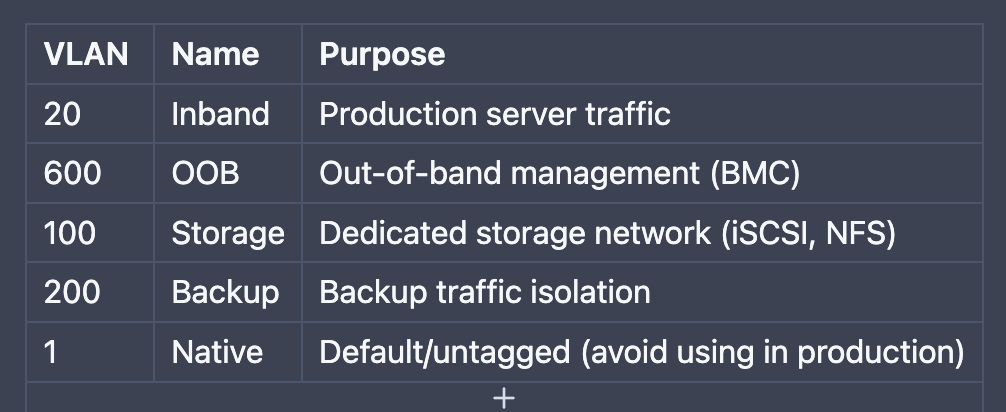
Each switch port is assigned to one or more VLANs:
Access port: Carries traffic for a single VLAN (most server ports)
Trunk port: Carries traffic for multiple VLANs, tagged with VLAN IDs (switch-to-switch connections)
When a server sends a packet, the switch checks the VLAN assignment of that port and only forwards the packet to other ports on the same VLAN.
Each VLAN on a switch gets its own subnet — a range of IP addresses.
IPv4 addresses are 32 bits long, written as four octets: 10.42.0.0/24
/24means 256 addresses (254 usable — first is network, last is broadcast)A typical rack might get a
/24for its inband VLAN — enough for ~250 serversThe TOR switch’s IP on this subnet acts as the gateway (e.g.,
10.42.0.1)
IPv6 addresses are 128 bits long: 2620:149:a:b::/64
/64is the standard subnet size — provides 18 quintillion addresses (more than enough)Every server gets a unique IPv6 address from this range
IPv6 is increasingly the primary protocol, with IPv4 as a secondary
Datacenter
  └── Building
       └── Row
            └── Rack
                 ├── TOR Switch (VLAN 20)
                 │    ├── IPv4 subnet: 10.42.0.0/24
                 │    └── IPv6 subnet: 2620:149:a:b::/64
                 └── OOB Switch (VLAN 600)
                      ├── IPv4 subnet: 10.42.100.0/24
                      └── IPv6 subnet: fd00::/64
Each rack gets its own subnets. When a new rack is provisioned, subnets are reserved from a larger pool managed by IPAM (IP Address Management) systems.

DHCP (Dynamic Host Configuration Protocol) automatically assigns IP addresses to devices when they boot. Without DHCP, you’d have to manually configure every server’s IP address.
DISCOVER — Server broadcasts: “I need an IP address!”
OFFER — DHCP server responds: “Here’s 10.42.0.15, want it?”
REQUEST — Server confirms: “Yes, I’ll take 10.42.0.15”
ACK — DHCP server acknowledges: “It’s yours for 24 hours”
SOLICIT — Server multicasts: “Any DHCPv6 servers out there?”
ADVERTISE — Server responds with available addresses
REQUEST — Server requests a specific address
REPLY — Confirmed and assigned
Here’s the challenge: DHCP DISCOVER messages are broadcasts — they only reach devices on the same subnet/VLAN. But the DHCP server is usually NOT on the same VLAN as the servers.
Server (VLAN 20) → BROADCAST "I need an IP!" → Only reaches VLAN 20
DHCP Server (different network) → Can't hear the broadcast!
Solution: DHCP Helpers (also called DHCP Relays)
A DHCP helper is configured on the TOR switch. When the switch sees a DHCP broadcast on a VLAN, it converts it to a unicast message and forwards it to the DHCP server:
Server (VLAN 20) → BROADCAST → TOR Switch (DHCP helper configured)
    → UNICAST forward to DHCP Server (10.252.252.11)
    ← DHCP Server responds
    ← TOR Switch relays response back to server
Without helpers, no server in the rack can get an IP address
Each VLAN on each switch needs its own helper configuration
Both IPv4 and IPv6 helpers must be set (DHCPv4 + DHCPv6)
Stale helpers (pointing to old/dead DHCP servers) are a common cause of boot failures — the switch forwards to the wrong server, which either doesn’t respond or gives incorrect configuration
When a brand-new server has no operating system, it uses PXE (Preboot eXecution Environment) to boot from the network.
Server powers on → BIOS/UEFI set to “network boot”
NIC firmware broadcasts DHCP DISCOVER
DHCP server responds with IP address + PXE boot options (next-server, boot filename)
Server downloads a bootloader (iPXE binary) via TFTP from the PXE server
Bootloader requests a boot script from the PXE server via HTTP
PXE server generates a custom boot script (kernel URL, initrd URL, boot arguments)
Server downloads and boots the specified OS image
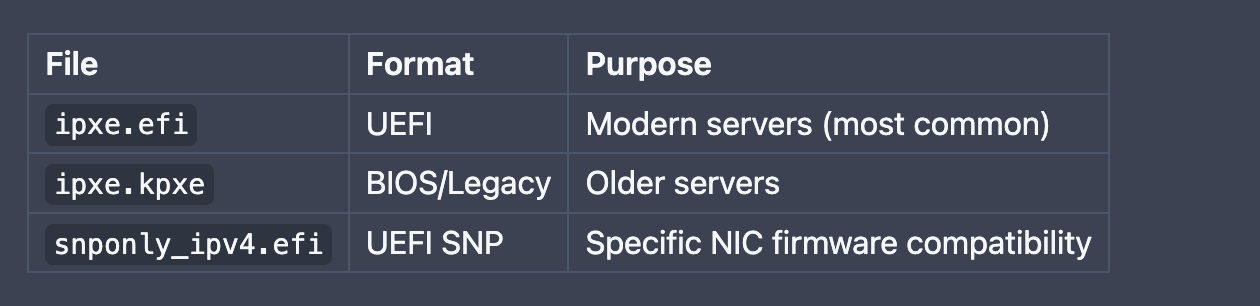
PXE is how every server in a datacenter gets its first operating system. It’s the difference between manually inserting USB drives into thousands of servers (impossible at scale) and having them self-provision from the network automatically.
Every server needs a hostname that maps to its IP address. DNS (Domain Name System) handles this.
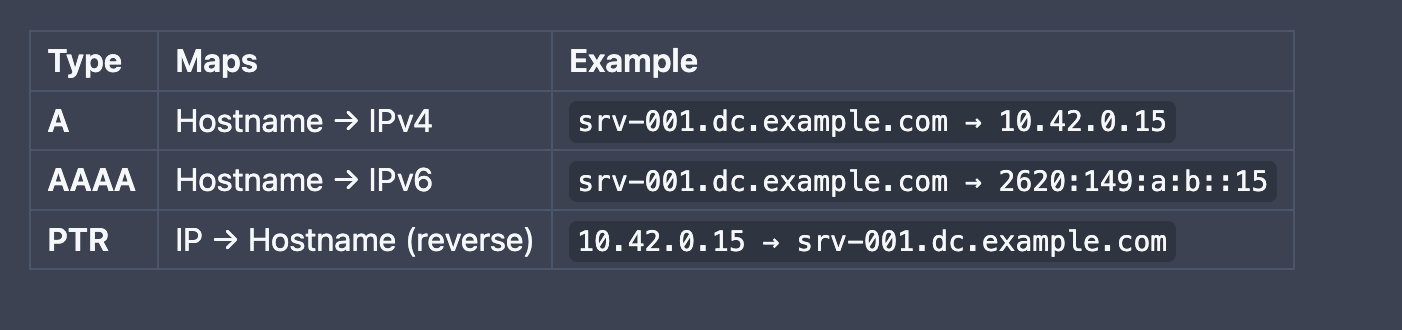
Forward DNS: “What IP does
srv-001have?” →10.42.0.15Reverse DNS: “What hostname does
10.42.0.15have?” →srv-001.dc.example.com
Both must be configured and matching for a server to be fully operational. Many services verify reverse DNS as a security check.
DNS records are organized into zones — hierarchical containers:
example.com (root zone)
  └── dc.example.com (datacenter zone)
       └── us-west.dc.example.com (location zone)
            └── srv-001.us-west.dc.example.com
When a new rack is provisioned, DNS records must be created for every server in the appropriate zone.
When a new rack arrives at a datacenter, here’s what must happen before any server can serve traffic:
Mount servers in the rack
Connect power (redundant A+B feeds)
Cable servers to TOR switch (production) and OOB switch (management)
Connect TOR/OOB switches to the datacenter fabric (uplinks)
Discover switches — identify TOR and OOB switch FQDNs
Configure VLANs — set up VLAN 20 (inband) and VLAN 600 (OOB) on each switch
Reserve subnets — allocate IPv4 and IPv6 address ranges for each VLAN
Create DNS records — A, AAAA, and PTR records for every server hostname
Set DHCP helpers — configure relay addresses on each switch so DHCP broadcasts reach the DHCP server
Power on servers → they PXE boot from the network
DHCP assigns IP addresses
PXE server provides boot instructions
Servers download and boot a provisioning OS
Hardware qualification runs (CPU, memory, disk, firmware checks)
Servers receive their production OS and role assignment
All servers are running, DNS resolves correctly
Production traffic flows through the TOR switches
Monitoring systems watch for failures
The rack is live and serving traffic
Rack: A standard 42U metal cabinet used to house servers, switches, and other gear.
U (Rack Unit): A unit of measurement equal to 1.75 inches of vertical space in a rack.
PDU (Power Distribution Unit): A heavy-duty power strip designed to deliver electricity to all equipment in a rack.
BMC (Baseboard Management Controller): A tiny, always-on chip inside a server that lets you manage it (power on/off, monitor sensors) even if the main OS is crashed.
TOR (Top-of-Rack): The main switch at the top of a rack that acts as the gateway for all servers in that cabinet.
OOB (Out-of-Band): A separate, dedicated management network used specifically to access BMCs and switches so you don’t lose control if the main network goes down.
VLAN (Virtual LAN): A way to virtually split one physical switch into multiple separate networks for better security and organization.
Subnet: A specific range of IP addresses assigned to a network (e.g.,
10.42.0.0/24).MTU (Maximum Transmission Unit): The largest data packet size allowed on the network. “Jumbo frames” usually use an MTU of 9000.
IPAM (IP Address Management): A software system or database used to track and manage how IP addresses are handed out.
DHCP: A protocol that automatically gives servers their IP addresses so you don’t have to type them in manually.
DHCP Helper/Relay: A setting
What is a template?
Templates are reusable content blocks you can insert into any post. Use them for content you repeat often, like:
Standard disclaimers or disclosures
Calls to action (subscribe, share, etc.)
Custom dividers or recurring sections
Post templates or boilerplate
To create a template, click "Template" in the editor toolbar and select one to insert. You can organize templates into groups by using "/" in the name (e.g. "Email/Welcome").
on a switch that catches “help” signals from servers and forwards them to a central DHCP server.
DNS (Domain Name System): The “phonebook” of the internet that turns human-friendly names (like
server01) into IP addresses.
A Record: Maps a hostname to an IPv4 address.
AAAA Record: Maps a hostname to an IPv6 address.
PTR Record: The reverse of an A record; it maps an IP address back to a hostname.
PXE: A technology that allows a server to boot up and install an operating system over the network instead of using a USB drive.
iPXE: A “pro” version of PXE that supports more features, like downloading files over the web (HTTP) and using scripts.
Download the comic from this link
No posts
Comments
Nothing yet. Say the first thing.
Sign in to join the conversation.