
The concept of an “LLM Wiki,” recently popularized by Andrej Karpathy, represents a paradigm shift in how we manage knowledge in the age of AI. While traditional RAG (Retrieval-Augmented Generation) treats every query like a brand-new search, the LLM Wiki approach treats your knowledge like a compiled codebase.
Here is an exploration of how to implement this “Second Brain” using Obsidian, local-first syncing, and automated compilation scripts.
Most users interact with LLMs by uploading a PDF, asking a question, and then closing the chat. This is “stateless” learning. Karpathy’s idea is different:
The Raw Layer: You have a folder of immutable sources (PDFs, transcripts, articles).
The Compilation Layer: Instead of searching the raw files every time, an LLM “compiles” them into a structured, interlinked collection of Markdown files.
The Persistence: These files live in a Wiki. When you add a new document, the LLM doesn’t just index it—it updates the existing wiki pages, notes contradictions with old data, and strengthens the overall synthesis.
The knowledge compounds. It gets richer over time, rather than staying a pile of disconnected documents.
While Notion and Evernote are popular, they are “walled gardens.” For an LLM Wiki, Obsidian is the superior choice for three reasons:
Local-First & Future-Proof: Obsidian stores everything as plain
.md(Markdown) files on your hard drive. If the company disappears tomorrow, your knowledge remains. LLMs also “speak” Markdown natively, making it the perfect bridge between human and machine.The Graph View: Obsidian visualizes connections. As your LLM compiles data, you can literally watch your knowledge web grow, identifying “hubs” of information and “orphans” that need more research.
Extensibility: Unlike Notion’s rigid structure, Obsidian’s plugin ecosystem allows you to turn a folder of notes into a powerful database (via Dataview) or a synced node (via community plugins).
Since Obsidian is local-first, how do you keep your “LLM Wiki” updated across your laptop, phone, and tablet without handing your data to a central server?
For those who want a true “Obsidian-to-Obsidian” sync that feels like Google Docs (real-time), the Obsidian-livesync plugin is the gold standard. It uses a CouchDB backend to sync your vault across devices with end-to-end encryption.
If you prefer a protocol-level solution (like the BEP protocol), Syncthing is the ultimate open-source implementation.
How it works: It’s a decentralized, peer-to-peer file synchronization system.
The Experience: You simply point Syncthing to your Obsidian Vault folder. When you edit a note on your laptop, the changes are beamed directly to your other devices. There is no central server, no “cloud” to trust, and no subscription fee. It’s fast, private, and—as many users describe it—a truly “wholesome” experience to see your files dance across screens.
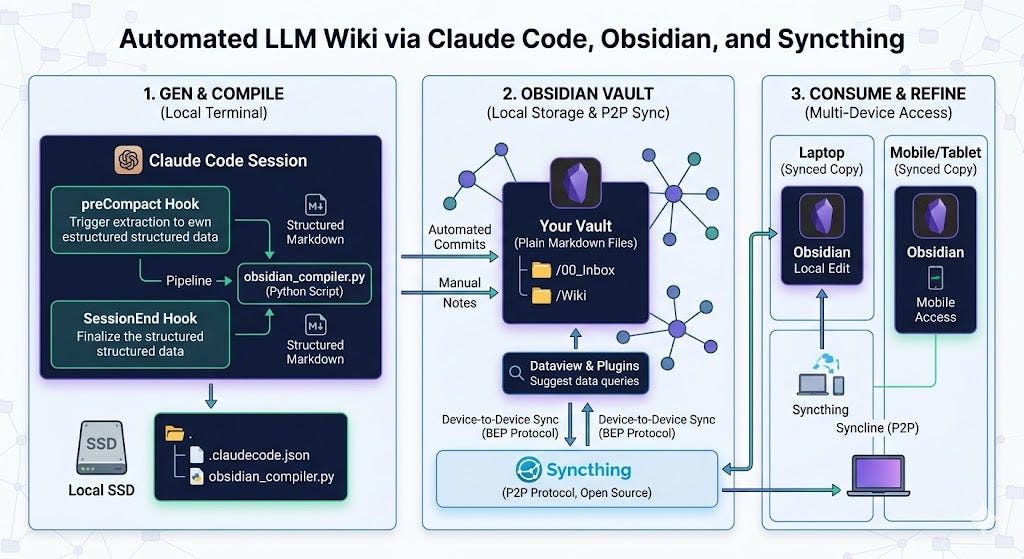
The true “Karpathy-style” implementation moves beyond manual copy-pasting. By using Claude Code, we can leverage lifecycle hooks to ensure your Obsidian vault is updated in real-time. This turns your local Markdown files into a “compiled” version of your digital brain.
The magic happens via three specific triggers:
PreCompactHook (The Extraction): This fires just before the conversation history is shortened. It allows your script to “harvest” the full context and insights before the LLM summarizes it.PostCompactHook (The Re-orientation): This fires after the history is shortened. It can be used to re-inject critical rules or summary notes back into the session to keep Claude aligned.SessionEndHook (The Final Archive): This triggers when the terminal session terminates, allowing for a final synthesis of the entire log into your vault.
In Claude Code, hooks use a matcher pattern. To set this up, modify your ~/.claude.json (or project settings). This configuration instructs Claude to act as its own librarian, streaming data directly into your Syncthing-synced vault.
JSON
{
  "hooks": {
    "PreCompact": [
      {
        "matcher": "*",
        "hooks": [
          {
            "type": "command",
            "command": "python3 ~/scripts/obsidian_compiler.py --mode compact"
          }
        ]
      }
    ],
    "SessionEnd": [
      {
        "matcher": "*",
        "hooks": [
          {
            "type": "command",
            "command": "python3 ~/scripts/obsidian_compiler.py --mode finalize"
          }
        ]
      }
    ]
  }
}
When a hook is triggered, Claude Code passes the session data (JSON) via stdin. Your script captures this, extracts the knowledge, and writes a Markdown file to your local drive.
By combining these specific hooks with Syncthing, you create a closed-loop system:
The PreCompact hook ensures that even during a long 12-hour session, no insight is “summarized away” without being archived first.
The SessionEnd hook creates a final, clean entry for your wiki.
Syncthing instantly beams these local files to your phone and tablet using its P2P protocol.
This is the ultimate implementation of the Karpathy Wiki: a private, local-first, P2P-synced intelligence engine that grows more valuable with every command you run.
By combining these hooks with Syncthing, you create a closed-loop intelligence system:
Generate: You research and code in the terminal.
Compile: The
onCompactandonSessionEndhooks automatically write structured Markdown to your disk.Sync: Syncthing instantly beams these updates to your phone and tablet using its P2P protocol.
Refine: You pick up your mobile device later, and your Obsidian vault is already populated with the “compiled” wisdom of your last session.
This setup ensures that your knowledge is never trapped in a cloud-hosted chat history. It is local, searchable, and—most importantly—it grows more valuable with every single command you run.
The “LLM Wiki” isn’t just a way to store data; it’s a way to grow a digital extension of your mind. By using Obsidian as the IDE, Syncthing as the private nervous system, and LLM Agents as the tireless librarians, you build a system that finally gets smarter the more you use it.
How are you implementing your Wiki? Are you using specific Python scripts to “lint” your notes, or have you found a unique way to hook your LLM into your local file system?
Share your implementation details in the comments below!
Andrej’s LLM-Wiki
No posts
Comments
Nothing yet. Say the first thing.
Sign in to join the conversation.