
From dusty wikis to structured, AI-navigable knowledge systems — what research tells us about organizing documents when machines are the primary readers.
For SRE/DevOps this is an essential knowledge and i hope you learn something from this experience of mine. And if you do please leave a comment at the bottom of the article 🙏
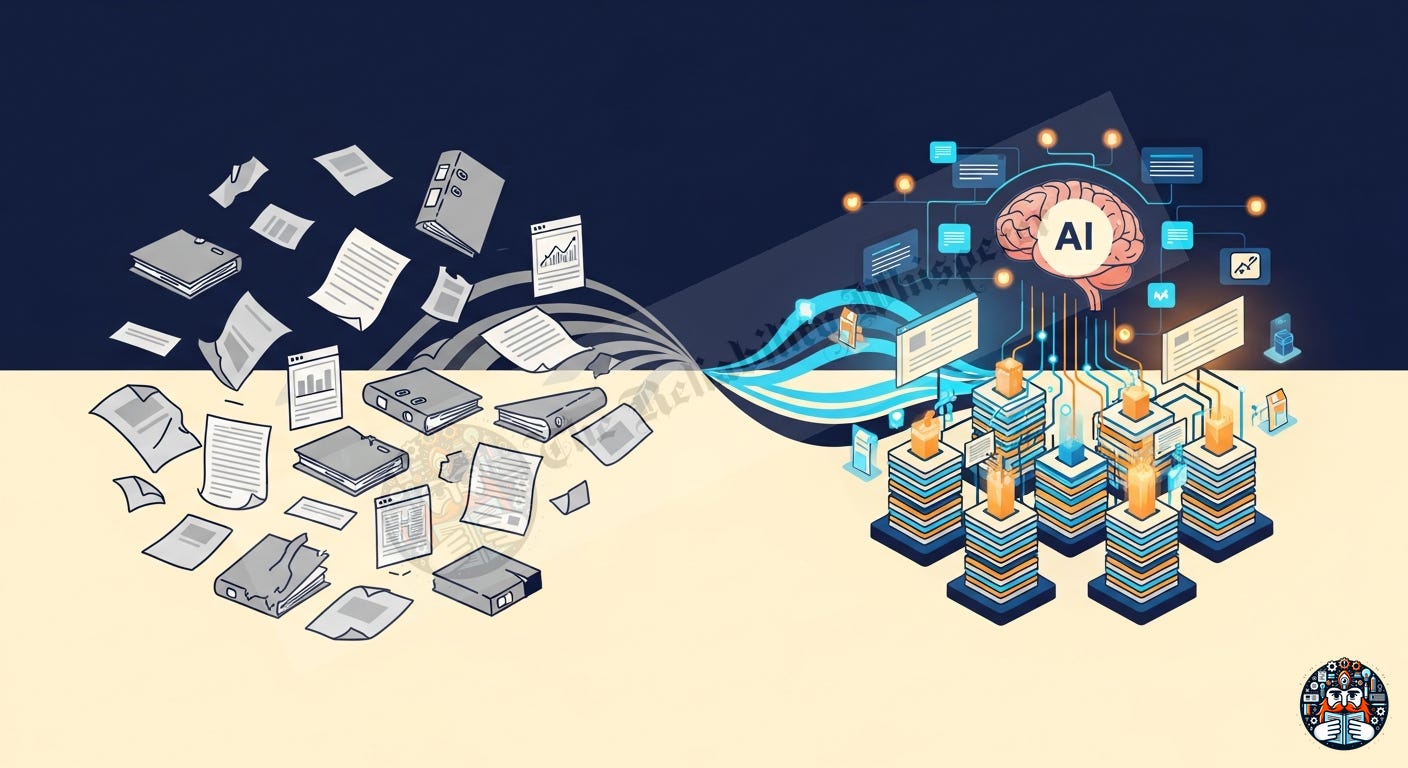
We’ve all lived through this:
A 100-page deployment guide that’s outdated the moment it’s exported
A wiki with 10,000 pages where nobody can find anything
A “Gold Master” PDF that references environments that no longer exist
A new engineer spending 3 weeks just figuring out where the docs ARE
Meta (Facebook) identified this internally: millions of wiki pages, no taxonomy enforcement, rampant staleness.
Google documented their approach in Software Engineering at Google (Winters et al., 2022).
Microsoft restructured their entire documentation platform (Microsoft Learn) around 10 content types after years of iteration.
The fundamental issue: Traditional documentation tries to be both the knowledge source and the execution guide. In the AI era, these are two different things with two different consumers.
The most cited documentation taxonomy. Adopted by Django, Python, NumPy, Cloudflare.
                    PRACTICAL                 THEORETICAL
                ┌─────────────────┬─────────────────────┐
   STUDYING     │   Tutorials     │    Explanation       │
   (learning)   │   (guided       │    (understanding,   │
                │    first steps) │     discussion)      │
                ├─────────────────┼─────────────────────┤
   WORKING      │   How-to Guides │    Reference         │
   (applying)   │   (solve a      │    (describe the     │
                │    problem)     │     machinery)       │
                └─────────────────┴─────────────────────┘
Why it’s useful: Clean 2×2 matrix with no overlap. Every doc has exactly one home.
Why it’s not enough: Missing: troubleshooting, decision records, architecture docs, operational runbooks, connection maps, changelogs. At enterprise scale, you need more than 4 types.
Organizes by actionability, not topic:
Projects — active work with deadlines
Areas — ongoing responsibilities
Resources — reference material
Archives — inactive, historical
Why it’s useful for AI: Maps directly to how an agent decides what to load: active context (Projects) vs. RAG corpus (Resources) vs. cold storage (Archives).
Why it’s not enough: PARA is an organizational system, not a content taxonomy. It tells you where to put a doc, not what kind of doc it should be.
No categories at all — just atomic notes connected by links. Popularized by Sönke Ahrens’ How to Take Smart Notes (2017).
Why it works: Each note is one concept. Links create a knowledge graph. No “where does this go?” problem. Luhmann produced 70+ books using ~90,000 connected index cards.
Why it matters for AI: Atomic notes = ideal chunk size for embedding vectors. The link structure IS a knowledge graph. This is how LLMs actually retrieve knowledge best — not through folders but through connections. Research on RAG systems (Lewis et al., NeurIPS 2020) confirms that document quality and structure matters more than quantity.
Documentation generated from the source of truth (code, tests, configs):
Evergreen docs — auto-generated, always current
Curated docs — human-written, linked to code
Decision records — immutable historical context
Conversations — ephemeral but searchable
Key insight: If it can be auto-generated from code, it should be. Humans should only write what requires human judgment.
Multiple independent sources converge on the same range:
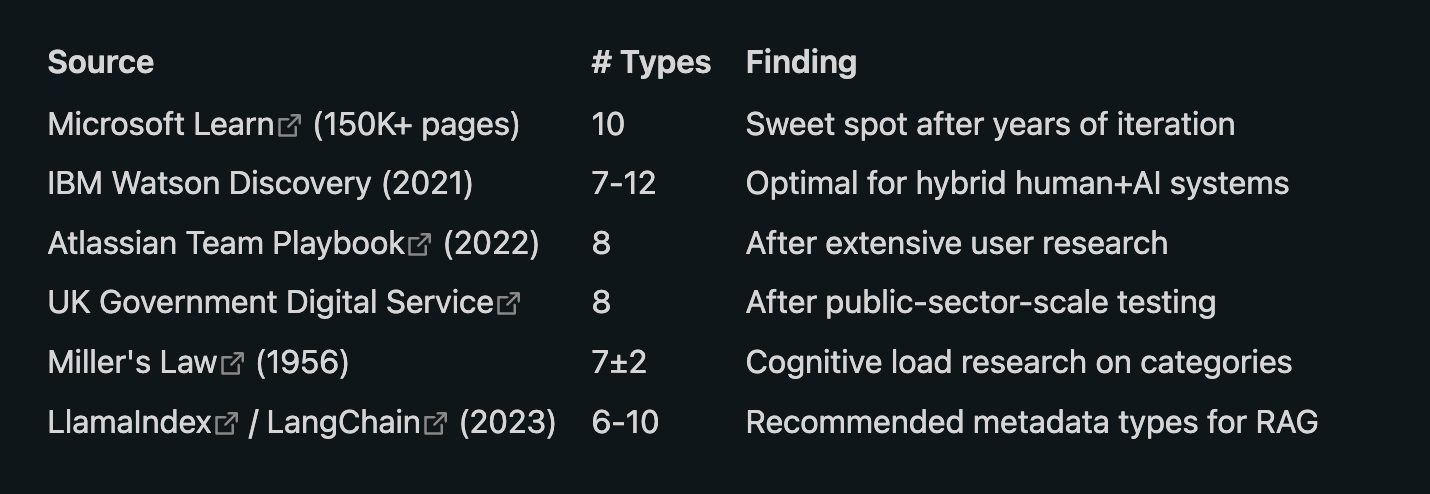
Why not 4? Creates category confusion. Where does an architecture decision record go? What about a code example? An operational playbook?
Why not 15+? Author decision fatigue. People don’t categorize correctly when there are too many options. AI classifiers lose precision with sparse per-class data.
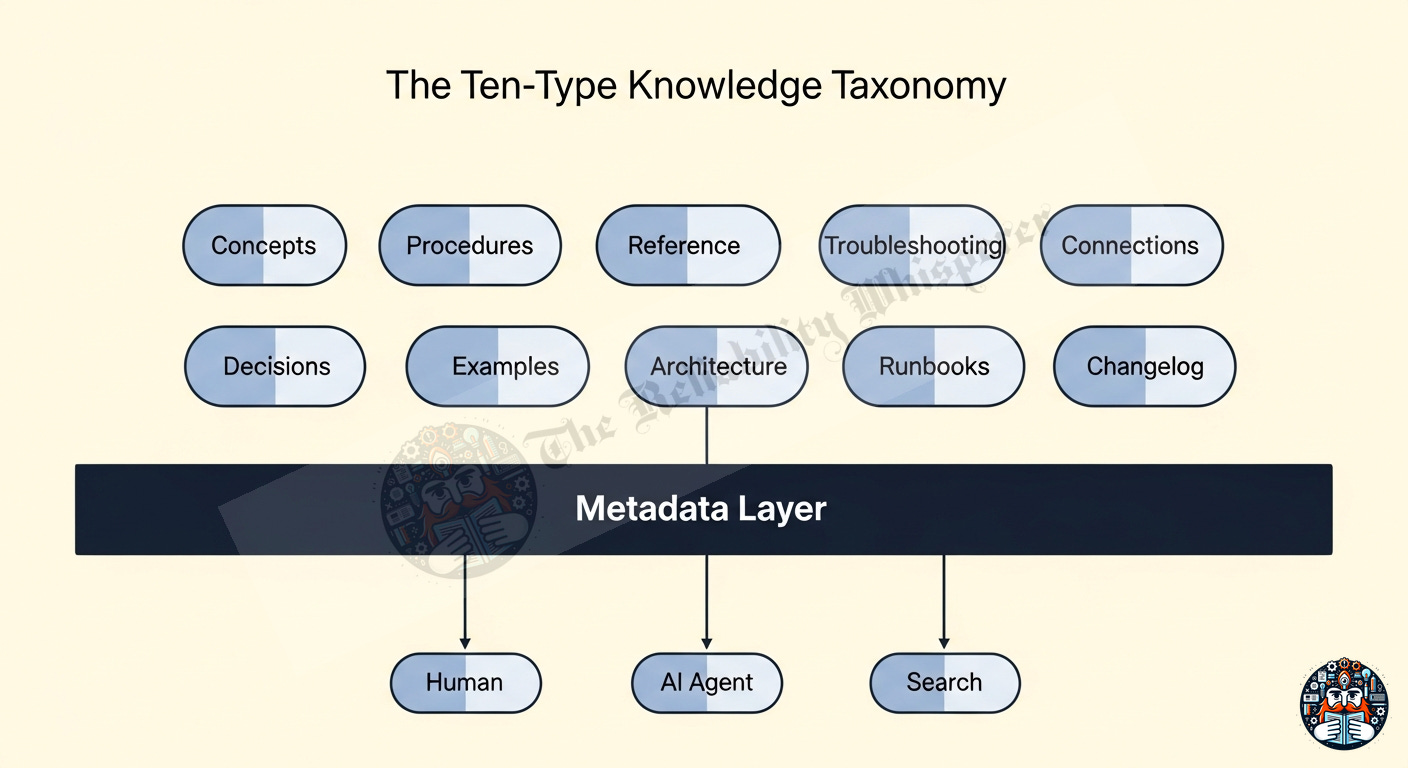
Based on research synthesis across Diátaxis, PARA, Microsoft Learn, Living Documentation, and enterprise knowledge graph patterns:
What is this thing? How does it work at a system level?
Architecture patterns, design decisions, business logic
Stable over time — changes only when the system changes
AI use: Grounding context for reasoning
Step-by-step instructions to accomplish a task.
One procedure = one goal (atomic)
Lean — references roles/patterns, not hardcoded values
AI use: Direct execution plan
Precise specifications — API schemas, config options, CLI flags.
Ideally auto-generated from code (OpenAPI, protobuf, GraphQL)
Never goes stale because it’s generated from source
AI use: Tool calling parameters, argument validation
Error state → diagnosis → fix mapping.
Documents the transition from fault state to functional state
Grows organically from real incidents
AI use: Error recovery, pattern matching against known issues
How X relates to Y — dependencies, causal links, data flows.
Only created when a real functional link is discovered
Not topical proximity — actual shared dependencies
AI use: Graph traversal, multi-hop reasoning, blast radius analysis
Why we chose X over Y — context, constraints, alternatives considered.
Immutable once written (they’re historical records)
Accumulate over time, never need updating
AI use: Constraint-aware planning, avoiding repeated mistakes
Working code, configuration snippets, real-world usage patterns.
Tested in CI (if samples break, docs get flagged)
Multiple implementations of the same concept
AI use: Few-shot prompting, pattern replication
System-level structure, data flows, component relationships.
Diagrams, deployment topology, scaling model
Updated on major architecture changes
AI use: System-level reasoning, scope determination
Operational procedures for time-sensitive situations.
Execution-focused, not learning-focused
Includes: prerequisites, steps, verification, rollback
AI use: Automated incident response, skill execution
Temporal evolution — versioned changes, migrations, breaking changes.
Machine-parseable format (semantic versioning, date-stamped)
Critical for recency-aware retrieval
AI use: “Was this relevant before or after the change on date X?”
Research from Anthropic (2024) and LlamaIndex/LangChain documentation shows:
“Flat structures with rich metadata outperform deep hierarchies for LLM consumption. Document type metadata improves retrieval precision by 15-30% versus untyped corpora.”
Every document should carry:
---
type: concept | procedure | reference | troubleshooting | connection |
      decision | example | architecture | runbook | changelog
scope: system | service | team | individual
freshness: evergreen | periodic-review | point-in-time
owner: team-or-person-responsible
audience: human | machine | both
relationships:
  depends-on: [list of related docs]
  supersedes: [older version if any]
  related-to: [topically connected]
created: 2024-01-15
last-verified: 2024-06-01
---
This metadata enables:
Filtered retrieval: “Give me only procedures for service X” (not concepts, not troubleshooting)
Freshness-aware responses: “This doc was last verified 6 months ago — flag as potentially stale”
Ownership enforcement: “This doc has no owner — flag for review or archive”
Graph traversal: “What else depends on this system?” (follow relationships)
Luhmann knew this in the 1960s. Embedding systems confirmed it in 2023. A document about “Database Setup AND Migration AND Troubleshooting” retrieves poorly because it matches everything vaguely. Three separate documents — one concept, one procedure, one troubleshooting guide — retrieve precisely.
Rule of thumb: If your doc has more than one ## H2 heading that could stand alone as its own article, split it.
Every document should explicitly declare its connections. This turns your doc corpus into a navigable graph that both humans and AI can traverse.
## Related
- [[concepts/redis-architecture]] — the cache layer this service uses
- [[troubleshooting/session-timeout-errors]] — common failure mode
- [[decisions/chose-redis-over-memcached]] — why we chose this approach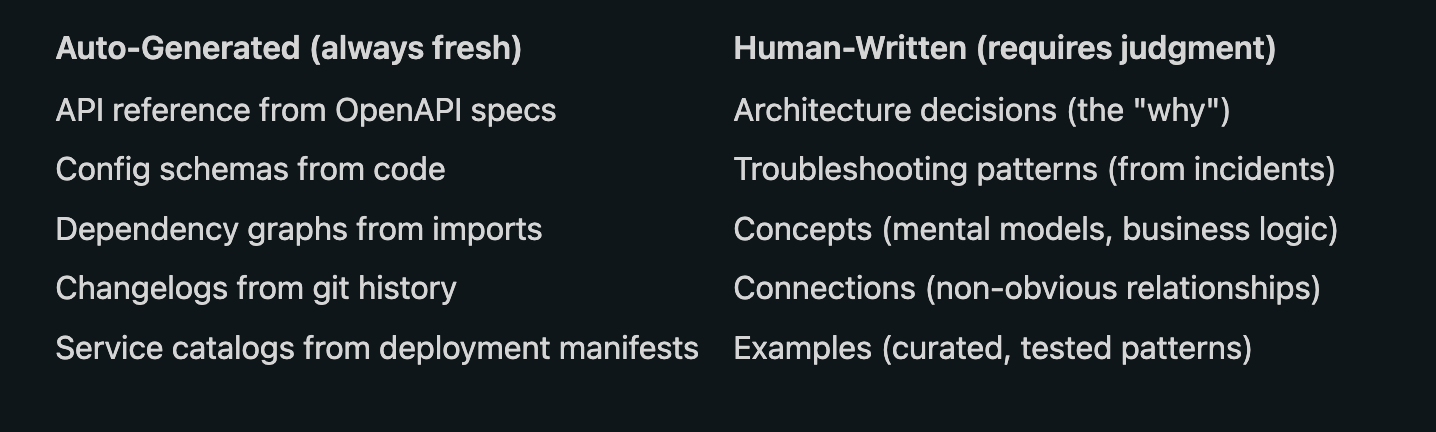
Create the 10 directories (one per document type)
Write an index (master catalog of all documents with one-line summaries)
Start with 3 concepts + 2 procedures (you don’t need to be exhaustive day one)
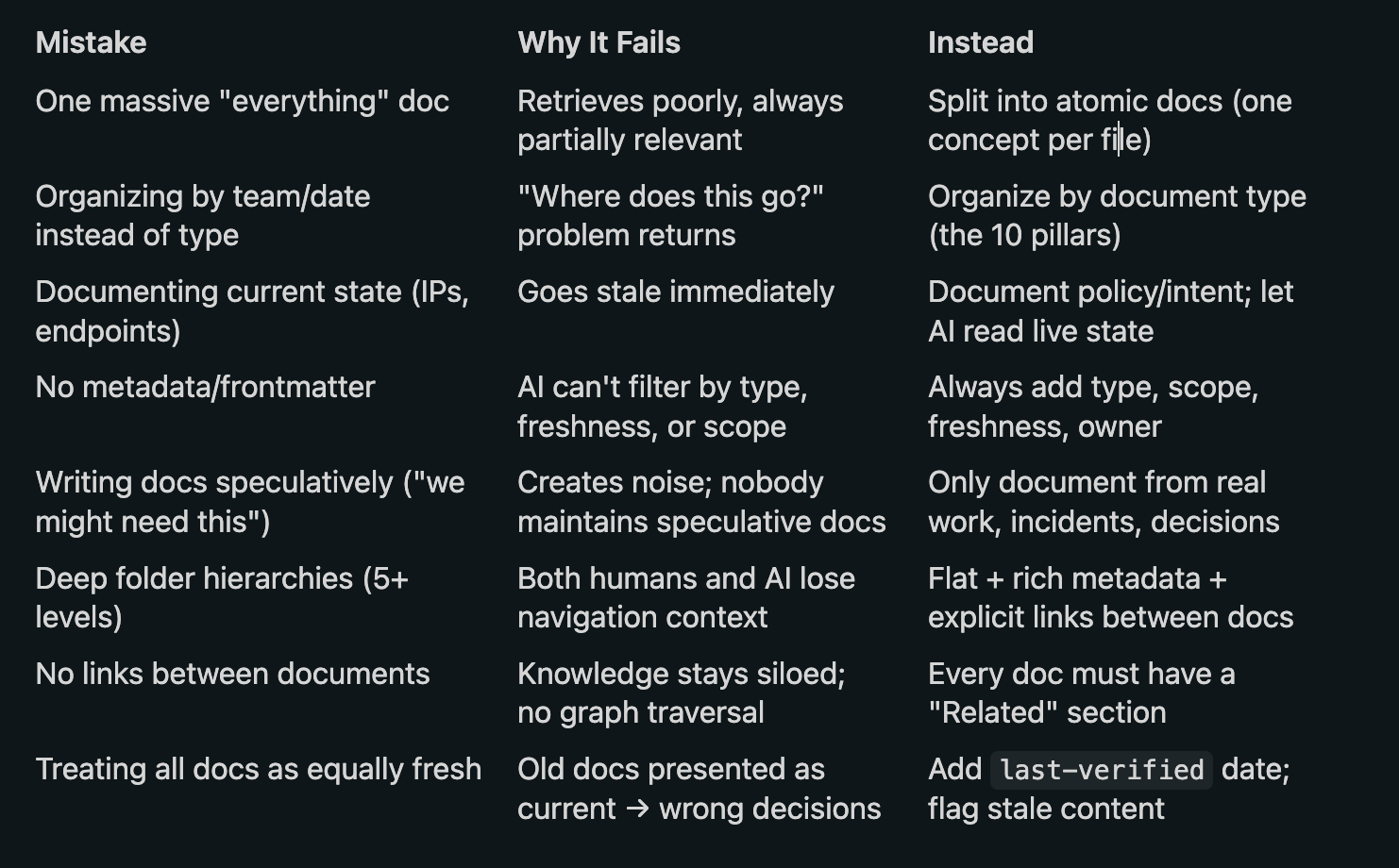
Add troubleshooting docs from real incidents (never speculatively — only from actual problems you solved)
Link everything (every doc should have a “Related” section)
Add metadata frontmatter to every doc (type, scope, freshness, owner)
Week 1:  5 docs (3 concepts, 2 procedures)
Week 4:  15 docs (+ troubleshooting from incidents + examples)
Week 12: 40 docs (+ connections discovered, + decisions recorded)
Week 24: 80 docs (organically grown, all linked, all typed)
You don’t build a knowledge base in one sitting. You grow it from real work — every incident adds a troubleshooting doc, every design session adds a decision record, every “how did that work again?” adds a concept.
4 categories isn’t enough. Research converges on 7-12 document types at enterprise scale.
10 types is the sweet spot: Concepts, Procedures, Reference, Troubleshooting, Connections, Decisions, Examples, Architecture, Runbooks, Changelog.
Metadata > folders. Flat structures with rich frontmatter (type, scope, freshness, owner) outperform deep hierarchies for both humans and AI.
Atomic documents. One idea per doc. If it has multiple standalone H2 sections, split it.
Links are first-class citizens. Every doc declares its connections — turns your corpus into a navigable graph.
Auto-generate what you can. API specs, changelogs, dependency graphs — generate from code. Write only what requires human judgment.
Document intent, not state. State changes constantly. Intent (why, constraints, policies) stays stable.
This article covers HOW to organize documentation for the AI era. The companion article covers how to turn operational procedures into executable AI skills:
Procida, D. (2023) — Diátaxis: A systematic approach to technical documentation. https://diataxis.fr/
Forte, T. (2022) — Building a Second Brain. Atria Books. (PARA method)
Ahrens, S. (2017) — How to Take Smart Notes. (Zettelkasten method)
Martraire, C. (2019) — Living Documentation: Continuous Knowledge Sharing by Design. Addison-Wesley.
Lewis, P. et al. (2020) — “Retrieval-Augmented Generation for Knowledge-Intensive NLP Tasks.” NeurIPS 2020.
Noy, N. et al. (2019) — “Industry-scale Knowledge Graphs: Lessons and Challenges.” Communications of the ACM.
Miller, G.A. (1956) — “The Magical Number Seven, Plus or Minus Two.” Psychological Review.
Rosenfeld, L. & Morville, P. (2015) — Information Architecture. 4th Edition. O’Reilly.
Winters, T., Manshreck, T., & Wright, H. (2022) — Software Engineering at Google. O’Reilly. (Chapter on Documentation)
Gentle, A. (2017) — Docs Like Code. Lulu Press.
No posts
Comments
Nothing yet. Say the first thing.
Sign in to join the conversation.