
AI products introduce a different design challenge.
A normal app asks:
“What does the user want to do?”
An AI-powered experience asks something deeper:
“What should AI handle, and where does the human need to participate?”
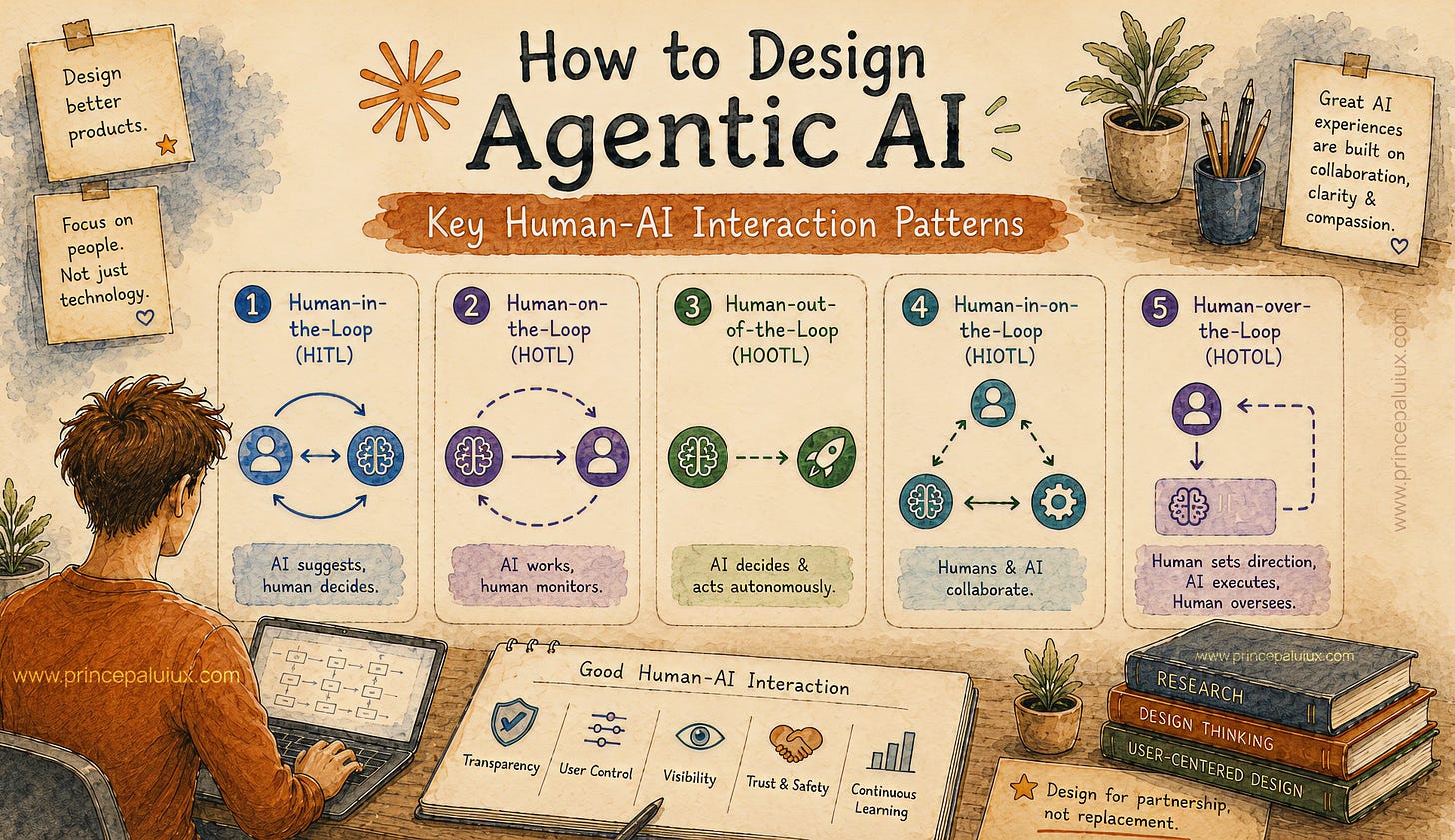
This cheat sheet explains common Human-AI Interaction Patterns with simple examples.
AI can analyze information quickly, but some decisions require human judgment.
Speed alone is not enough.
Some moments need review.
AI completes part of the work.
A human checks, approves, edits, or rejects the result.
Healthcare AI detects possible problems in medical scans.
The doctor reviews AI suggestions before making decisions.
Show:
AI recommendation
confidence level
supporting information
approve/edit/reject controls
The user should never feel like they are blindly accepting AI output.
Some AI systems work continuously.
Humans cannot review every tiny action.
AI works independently.
Humans monitor activity and step in during important moments.
AI customer support systems handle thousands of conversations.
Most answers are automatic.
Humans review unusual cases.
Create monitoring views showing:
AI activity
warnings
unusual patterns
areas needing attention
Think of it like a control room.
AI creates lots of information.
Showing everything immediately overwhelms people.
Reveal information gradually.
Simple first.
Details later.
First view:
“Here are three major findings.”
Expanded view:
sources, reasoning, deeper analysis.
Use:
expandable sections
“show details” actions
layered explanations
beginner/expert modes
Great AI UX respects attention.
AI is not always certain.
Users need to understand reliability.
Communicate confidence clearly.
AI fraud detection:
“Possible unusual activity detected.”
Confidence: High
Reason:
Transaction pattern changed.
Show confidence using:
labels
visual indicators
explanations
supporting evidence
Avoid making AI appear perfect.
Traditional software waits.
AI can contribute ideas.
The question becomes:
Who leads?
Control naturally moves between humans and AI.
AI writing assistant:
Human writes.
AI notices weak areas.
AI suggests improvements.
Human chooses.
Create experiences where users can:
accept,
ignore,
adjust,
redirect AI suggestions.
AI should assist without taking over.
Users feel uncomfortable when they cannot see what AI is doing.
Show AI progress and activity.
Instead of:
“Loading…”
Show:
Reading documents.
Finding patterns.
Preparing recommendations.
Use:
activity timelines
progress states
task indicators
completion updates
Invisible AI work needs visible communication.
Old chatbots feel mechanical.
Modern AI needs natural interaction.
Create flexible conversations where users can guide, correct, and continue.
ChatGPT-style experiences where users refine responses through conversation.
Support:
memory
corrections
follow-up questions
context awareness
Conversation design is becoming a UX skill.
Future AI systems may involve multiple agents working together.
Users need clarity.
Show collaboration between AI agents.
AI product team:
Research Agent → gathers insights
Design Agent → creates concepts
Testing Agent → finds problems
Show:
agent roles
task ownership
handoffs
progress
Users should understand who is doing what.
Large AI systems need supervision.
Create dashboards where humans monitor AI operations.
Enterprise AI operations center.
Managers view:
system performance,
agent activity,
problems needing review.
Focus on:
“What needs human attention?”
Avoid showing unnecessary noise.
AI mistakes feel different from normal software errors.
A broken link is simple.
A wrong AI answer affects trust.
Help users recover naturally.
Instead of:
“Unable to complete request.”
Better:
“I found conflicting information. Which source should I follow?”
Provide:
explanation
correction options
next actions
Mistakes are part of the experience.
Design for them.
AI systems can lose previous information.
Users may not understand why.
Show what information AI currently remembers.
AI workspace:
“Using these 5 documents for this answer.”
Allow users to:
add context,
remove context,
refresh information,
manage memory.
Different users need different experiences.
AI adjusts interaction based on user needs.
Analytics AI:
CEO view:
simple business summary.
Analyst view:
detailed reports.
Personalize:
content depth,
interface options,
recommendations,
communication style.
Keep users aware of changes.
AI often needs personal or business information.
Users need control.
Explain data usage clearly.
AI email assistant:
“I will access customer support emails only.”
Show:
what data is used,
why it is needed,
how users can manage access.
Trust begins with transparency.
People interact with technology differently.
Create AI experiences for different abilities and preferences.
Voice AI helping users who cannot easily type.
Image explanation tools helping users understand visual content.
Support:
voice,
text,
visual interaction,
simplified explanations.
Flexible design helps everyone.
Humans communicate beyond typing.
Combine multiple input and output methods.
User uploads a room photo:
“Suggest a new design.”
AI understands image + text together.
Combine:
voice,
images,
documents,
screens,
conversation.
AI interaction should match natural human behavior.
Before adding AI into any product, ask:
Can users understand what AI is doing?
Can users correct AI?
Can users control important decisions?
Can users see why something happened?
Can users recover after mistakes?
Great Human-AI Interaction is not about making AI look smarter.
It is about helping humans feel confident working with intelligent systems.
Comments
Nothing yet. Say the first thing.
Sign in to join the conversation.