
Once a week Pip delivers a short post with AI tips, copy-paste materials, and work shortcuts made specifically for real estate agents.
No theory, no fluff - just actionable stuff to use right away.
Pip tested something this week that almost no real estate agent is doing yet.
Beautifully styled HTML emails.
The kind that looks like it was made by a web designer - not the “plain-text-in-Gmail” look every other outreach has.
+ Pip's Vault is officially open - full details below 👇
Let’s dive in!
🔧 How to make beautiful emails using AI - about 90 seconds per email, no design skills needed
🎉 Pip’s Vault - the full content library, swipe files, templates, examples, and more
AI just unlocked something that used to take a web designer and $500.
Branded emails with header, brand colors, styled call-to-action buttons - sent straight from your Gmail.
Most don’t know this is possible yet.
Which means - the few who do are going to be the only ones standing out in a sea of plain text.
Here’s the difference:
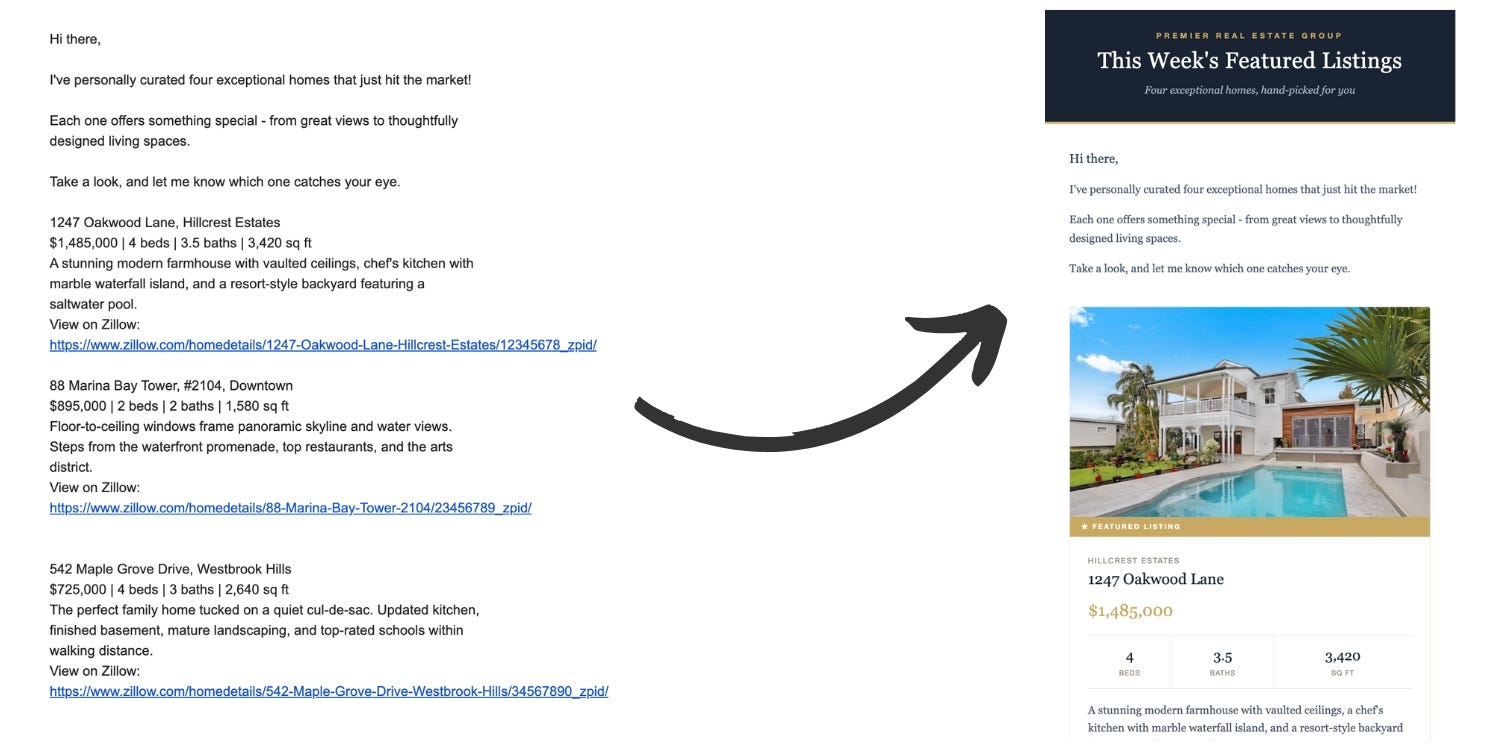
Same content. One looks like every other email. The other looks like a brand.
The reason we didn’t do this before is because HTML emails are genuinely hard to code by hand.
AI just made all of that go away.
And Pip spent the past week testing it for you!
AI does all the technical work. Just paste, fill in what you want the email to say, and you get a finished, styled email ready to send.
Design this html email and draft it in my Gmail.
WHAT TO SAY: [Write the main points, don’t worry about polish]
Subject line: [Optional. If left blank, suggest option.]
Recipient:
Branding & agent info: [Optional]
—
1. Write the email copy first. Make it sound like a real person, not a marketing template. Open with something specific (not “I hope this email finds you well”). Keep the body under 200 words. End with one clear next step.
2. Build the HTML email using the strict Gmail rules below:
Layout: Use <table role=”presentation”> only, never <div>. Container max-width:600px inside a 100%-width outer table. Single column. Total HTML under 102KB.
CSS: Inline every visual style. A <style> block in <head> is allowed only for @media (max-width:600px) rules — Gmail web ignores them, Gmail mobile respects them, so base inline styles must already work at any width.
Forbidden: JavaScript, <form>, <iframe>, @font-face, custom fonts, and background-image:url(...) inside <style> (strips the whole block).
Required <head>:
<!DOCTYPE html> <html lang=”en”> <meta charset=”UTF-8”>
<meta name=”viewport” content=”width=device-width, initial-scale=1”>
<meta name=”color-scheme” content=”light dark”>
<meta name=”supported-color-schemes” content=”light dark”>
Hidden preheader (immediately after <body>):
<div style=”display:none;max-height:0;overflow:hidden;font-size:1px;line-height:1px;color:#fff;opacity:0;”>Inbox preview text.</div>
Images: absolute URL; width and height attributes both set; alt text; inline display:block;width:100%;max-width:Xpx;height:auto;border:0;. Parent cell needs padding:0;font-size:0;line-height:0;.
Type: Web-safe stacks only (e.g. Georgia, serif). Body at least 16px. Unitless line-height like 1.6.
CTAs: Use <a> styled as a button (never <button>), wrapped in a single-cell <table>.
📮 The prompt above has 8 pre-tuned variations in the Vault - buyer follow-up, listing announcement, open house invite, and more!
There are two ways to use this in your daily workflow.
Pick the one that suits you better:
This is the magical path. Claude makes drafts from chat directly inside your Gmail, styled and ready to send.
All you need to do after is press send from your Drafts folder.
If you set up the Gmail connector last week, you’re already done with setup.
If you haven’t yet, it takes 30 seconds:
Open a chat at claude.ai
Click the + sign in the bottom-left of the chat input
Find Connectors → Gmail
A permission window opens in a new tab → accept it
Done. Claude can now draft emails directly in your Gmail account
Once connected, paste the prompt (with your details filled in), and Claude will create the email as a styled draft in your Gmail.
Don’t have the Gmail connector? Using ChatGPT or other AI? Or just want to keep things separate from your inbox?
Use the same prompt as Option 1, but change the first line from:
Design this html email and draft it in my Gmail.
to:
Create an HTML file for this email.
AI will return a downloadable HTML file.
Then:
Download the file and open it
Click anywhere in the page, then Cmd/Ctrl + A to select all content
Cmd/Ctrl + C to copy it
In Gmail, click Compose, then click in the message body and Cmd/Ctrl + V to paste
Give it a quick review and send!
🐦 Power move: pair this with last week’s buyer tracker
Remember the buyer contact tracker Pip built from Gmail last week? Here’s where it pays off.
Pull up the tracker. Pick the 5-10 dormant leads (the ones marked “Cold” or “Watching”). Ask Claude to draft a re-engagement email to each one using the prompt above, personalized from the notes in the tracker.
One pass. Dozens of styled emails sitting in your Gmail drafts.
🤫 If you like this one, Pip has a stack of pre-built email templates ready to swipe in the Vault - open house invites, just-sold announcements, buyer check-ins, the works.
Speaking of the Vault... keep reading!
Pip’s been building this in the background for the past month.
Every prompt Pip has ever shared lives there now. Plus the swipe files, examples, and templates that won’t fit in a weekly email.
Searchable, organized by category, updated weekly.
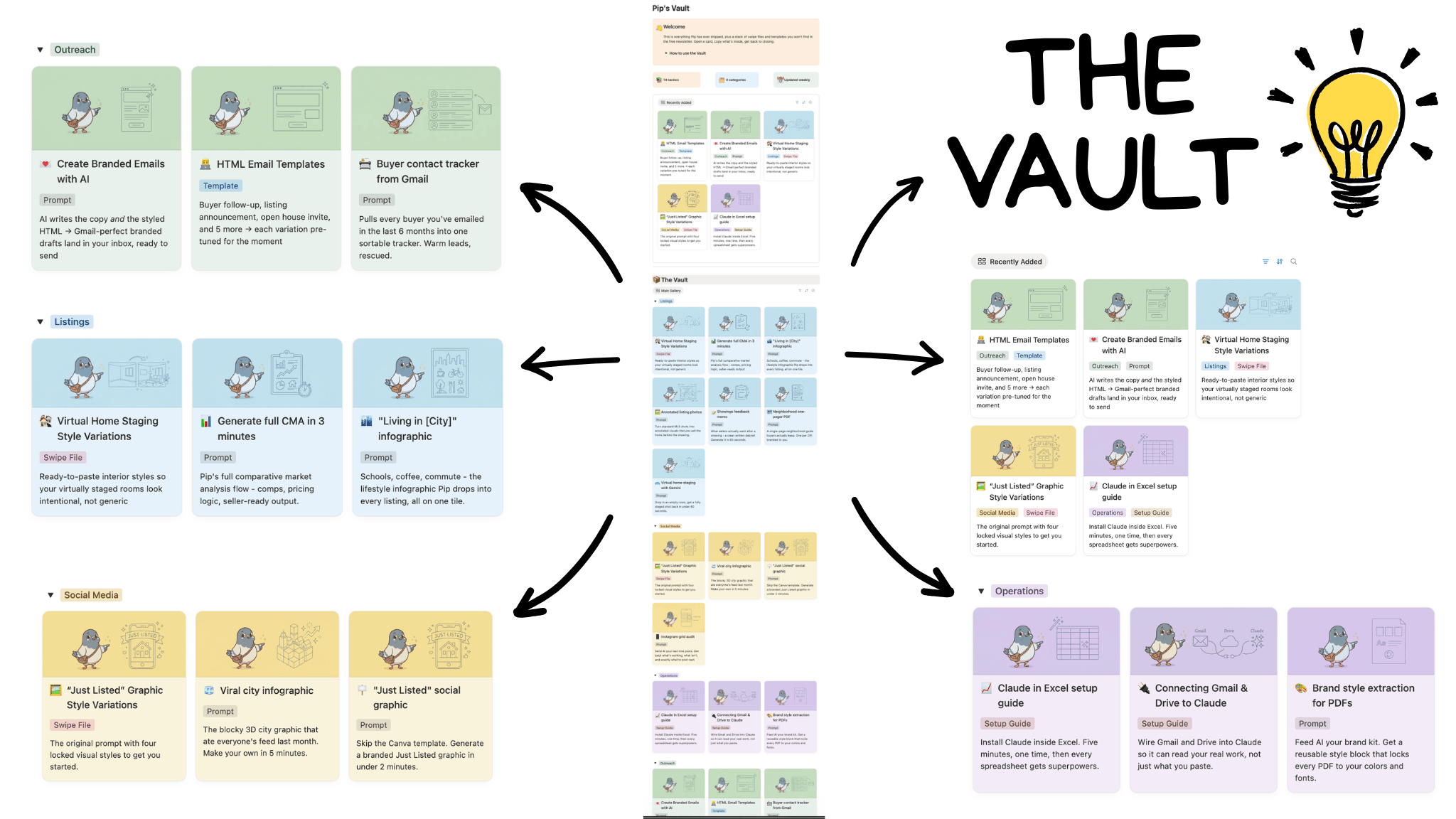
Here’s what’s inside:
📎 Swipe files & templates
The big stuff. Email templates, swipe files, infographic prompts, finished examples. Things that would make a Pip’s Post 10x longer if Pip tried to fit them in a weekly email.
🔍 A searchable home for every prompt
Every workflow Pip has shared since issue 1, organized by use case → listings, buyers, marketing, ops, etc.
🧪 Pip’s Lab - monthly deep-dive
One longer issue per month: a full workflow, setup guide, or case study built end-to-end. The kind that takes Pip few days to put together and saves you weeks of work after.
🐦 A personal note from Pip
Pip has a promise for you.
Pip's Post will forever be reader-funded. No sponsorships, no paid placements, and no 'best CRM' lists written by whoever paid the most this month - ever.
That’s how content and recommendations stay honest.
Free weekly Pip's Post isn't going anywhere. Same delivery, same shape, same Pip as always.
And as of today, Pip’s Post officially has a paid tier!
The Vault, the Lab, the swipe files, the templates - live inside it.
For agents who want all of it - and everything else Pip builds going forward - there’s a founding offer:
Half-price for life.
That makes it $85 for the whole year (less than half of the monthly subscription)
The founding early bird deal is open for the next 10 days only. After that the door closes - but price stays locked in for everyone inside👇
Comments
Nothing yet. Say the first thing.
Sign in to join the conversation.