
Here’s something I wish someone had told me when I started: you do not need a fancy setup, a paid platform, or a website to make your first sale.
When I made my very first $1000 selling Canva templates, I wasn’t using anything expensive, I used free tools, a free store & a free link in bio. The whole thing cost me exactly zero dollars to set up.
You don’t need to spend money to start making money from digital products. You need a product, a free store, and the courage to hit publish.
I eventually moved everything to Stan Store (it’s my main shop now, and I’ll always recommend it once you’re ready to take this seriously). But for total beginners who aren’t ready to commit yet? There are three genuinely free platforms that let you start selling today: Gumroad, Etsy and Ko-fi.
Also, you don’t need an Instagram to do this & you absolutely don’t need followers. If you build a freebie, and build an email list through Pinterest, or even Substack or a blog, you can have an income as well by promoting it on different sites.
Instagram → as a bookstagrammer (what I did)
Youtube → as a booktuber
Pinterest —> affiliate links or digital products tied to Etsy
Etsy directly → I still recommend connecting it with another platform (like Pinterest)
Tiktok → Tiktok shop as a booktoker
Substack → you can directly build an email list and send digital product offers and so on
Threads → I saw creators sell digital products through Threads, I mostly use it to promote my IG
First you need to decide on what platform you want to sell.
Option 1: Gumroad (best for a clean, product-first store)
Gumroad is one of the easiest places to sell a digital product fast. No monthly fee, no website needed, just a product and a link.
Here’s the honest math, because fees matter when you’re starting out:
Gumroad charges a flat 10% per sale plus $0.50 per transaction, with no monthly subscription
Payment processing of around 2.9% + $0.30 stacks on top, so your real all-in cost lands around 12.9% plus fixed fees per sale
If you sell through Gumroad’s own Discover marketplace instead of your own link, the fee jumps to 30%
So always drive your OWN traffic to your Gumroad link (from your bio, your posts, your Substack, Pinterest, etc). Don’t rely on their marketplace, that 30% cut is brutal.
This one matters for me specifically, and probably for a lot of you reading from outside the US:
Since 2025, Gumroad acts as a full Merchant of Record, which means it handles sales tax, VAT, and GST collection and remittance worldwide, so you don’t have to.
If you’re selling to a US/UK audience from somewhere else (like me, in Romania), handling international tax compliance yourself is a genuine nightmare. Gumroad just... does it for you. That alone can justify the fee when you’re starting out.
Ok, all the boring parts are out, let’s talk on how to set up Gumroad.
Go to gumroad.com and sign up (free)
Click New Product and choose “Digital Product”
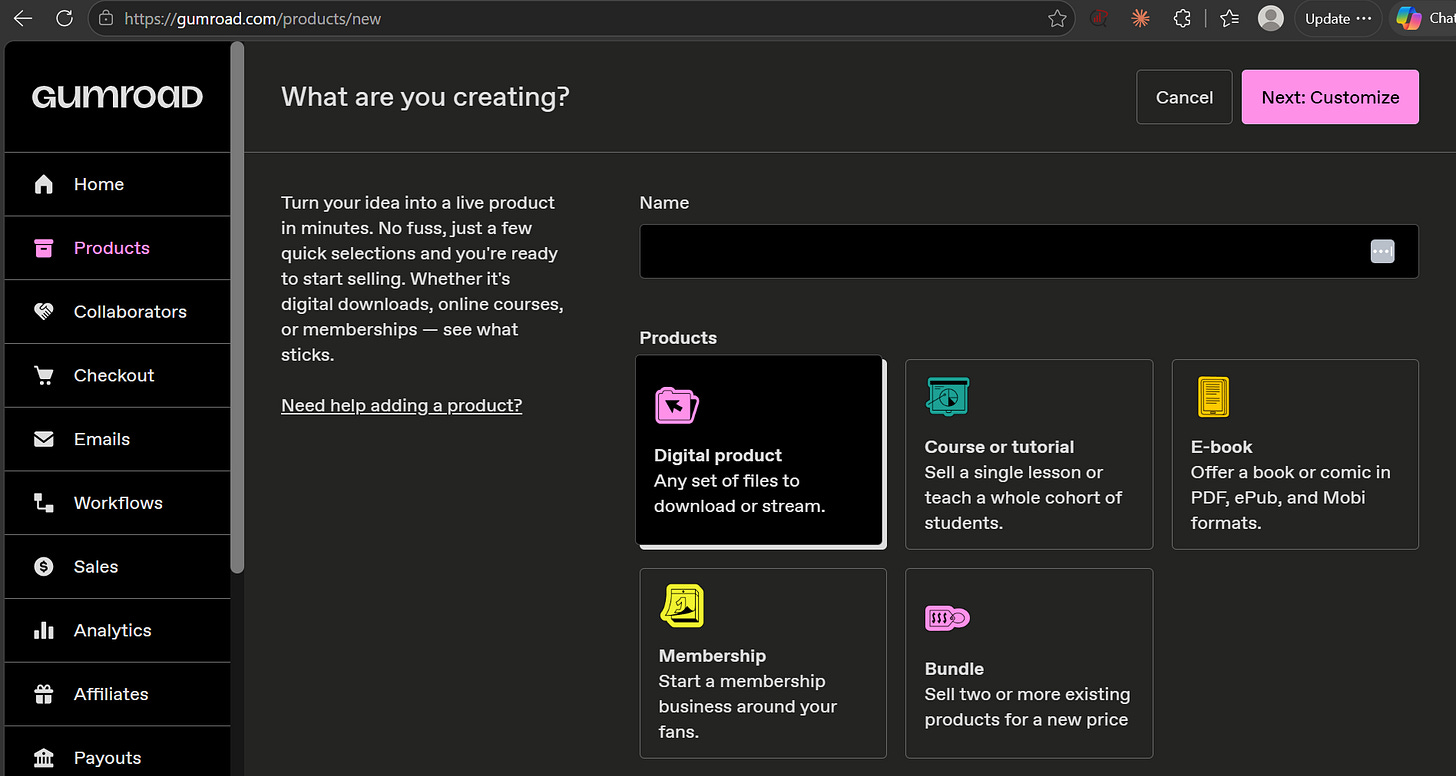
Upload your product file (your Canva template delivery PDF, more on that below)
Set your price, add a cover image, and write your description
Hit publish, copy your product link, and drop it in your Instagram bio using Linktree or Beacons.ai

Option 2: Ko-fi (best if you also want tips and a cozy creator vibes
Ko-fi started as a “buy me a coffee” tip jar, but it’s quietly become a really solid free shop for digital products, especially for the bookish, community-driven creator crowd.
Ko-fi’s free plan charges 0% on tips and donations, and 5% on shop and membership sales
On a $10 digital download on the free plan, Ko-fi takes about $0.50 and Stripe takes around $0.59, so you keep roughly $8.91
There’s a paid Ko-fi Gold tier that drops platform fees to 0%, but you still pay normal Stripe processing of 2.9% + $0.30 (check their current Gold price before committing, it’s changed recently)
For a beginner, the free plan’s 5% is genuinely good. Lower than Gumroad’s combined rate, actually.
Ko-fi is wonderful for community and simplicity, but it’s lighter on the storefront and marketing side. There are no email funnels, no upsells, and limited storefront customization, so you’ll likely outgrow it if digital products become your main income stream. Which is exactly why it’s a starter, not a forever platform.
Go to ko-fi.com and create your free account
Connect Stripe or PayPal for payouts
Go to your dashboard and click Shop, then Add Item
Upload your template delivery PDF, set a price, add a preview image
Publish, then add your Ko-fi link to your bio
Done. And bonus: people can also tip you, which is a sweet little extra income stream while you’re building (not, you can get tips on Gumroad too).
Comments
Nothing yet. Say the first thing.
Sign in to join the conversation.