
Here’s a question I kept sitting with recently: how much of your week is just collecting data you should already have?
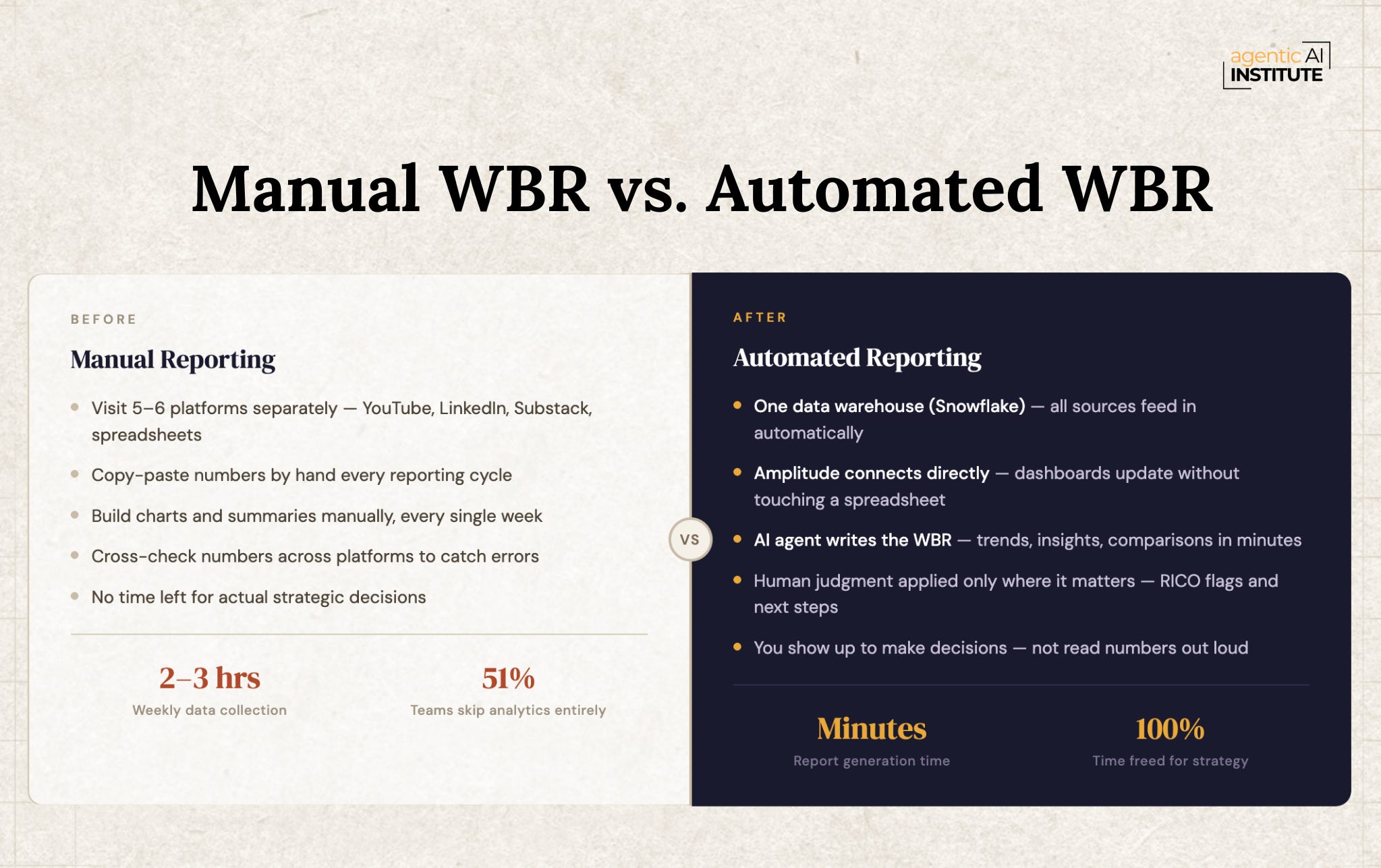
Not the flashy AI question. Not “which model should I use” or “how do I build a multi-agent system.” Just - why is my team spending two to three hours every Friday going to YouTube, then LinkedIn, then Substack, copying numbers, pasting into spreadsheets, and building charts by hand?
That’s the WBR problem. And it exists at every company, at every level.
It matters because time is not infinitely divisible. If your team’s best hours are going toward data collection, those are hours not going toward analysis, decisions, or action. A recent survey found that 51% of teams don’t use product analytics at all - not because they don’t care about data, but because the manual work never stops, and the setup always feels too hard to justify.
The answer is not to work faster. The answer is to stop doing it manually entirely. Build a system where the data collects itself, the report drafts itself, and you come to the WBR to make decisions - not to read numbers out loud.
That’s what I’ve been building, and what I want to share with you here.
There’s a concept that is gaining serious traction right now: the Company Brain. The idea is straightforward. All the data your company generates - social metrics, website behavior, call recordings, emails, product telemetry - lives in one place. Agents work on top of it. Humans make decisions on top of those agents.
When I was at AWS, we had a data team and a proper warehouse. Everything was already centralized. When I started my own company, none of that infrastructure existed. I was building it from scratch, and that’s the situation most of you are in.
So I put together a stack to solve this. Let me walk you through it.
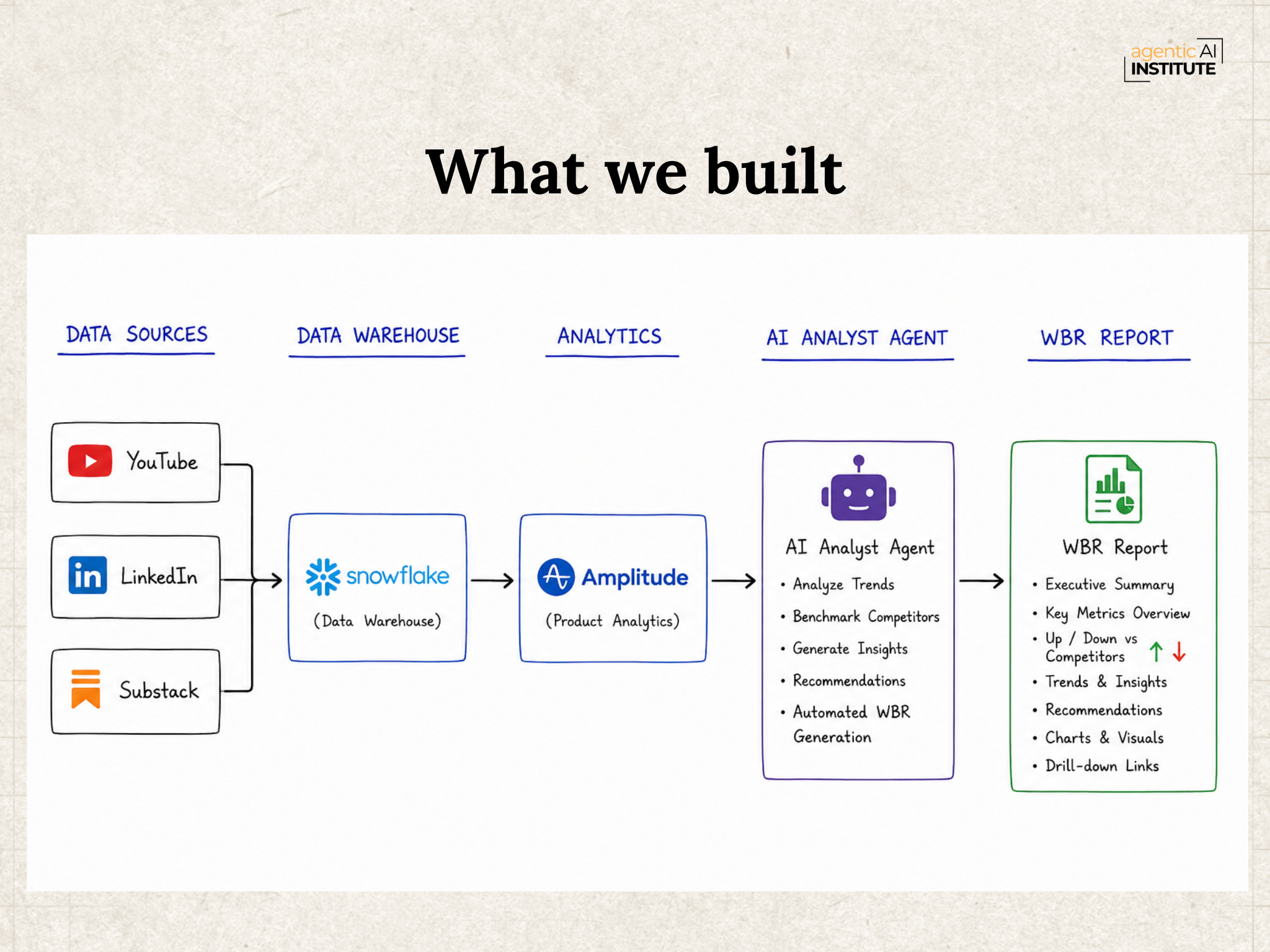
Step 1: Get all your data into one place - Snowflake
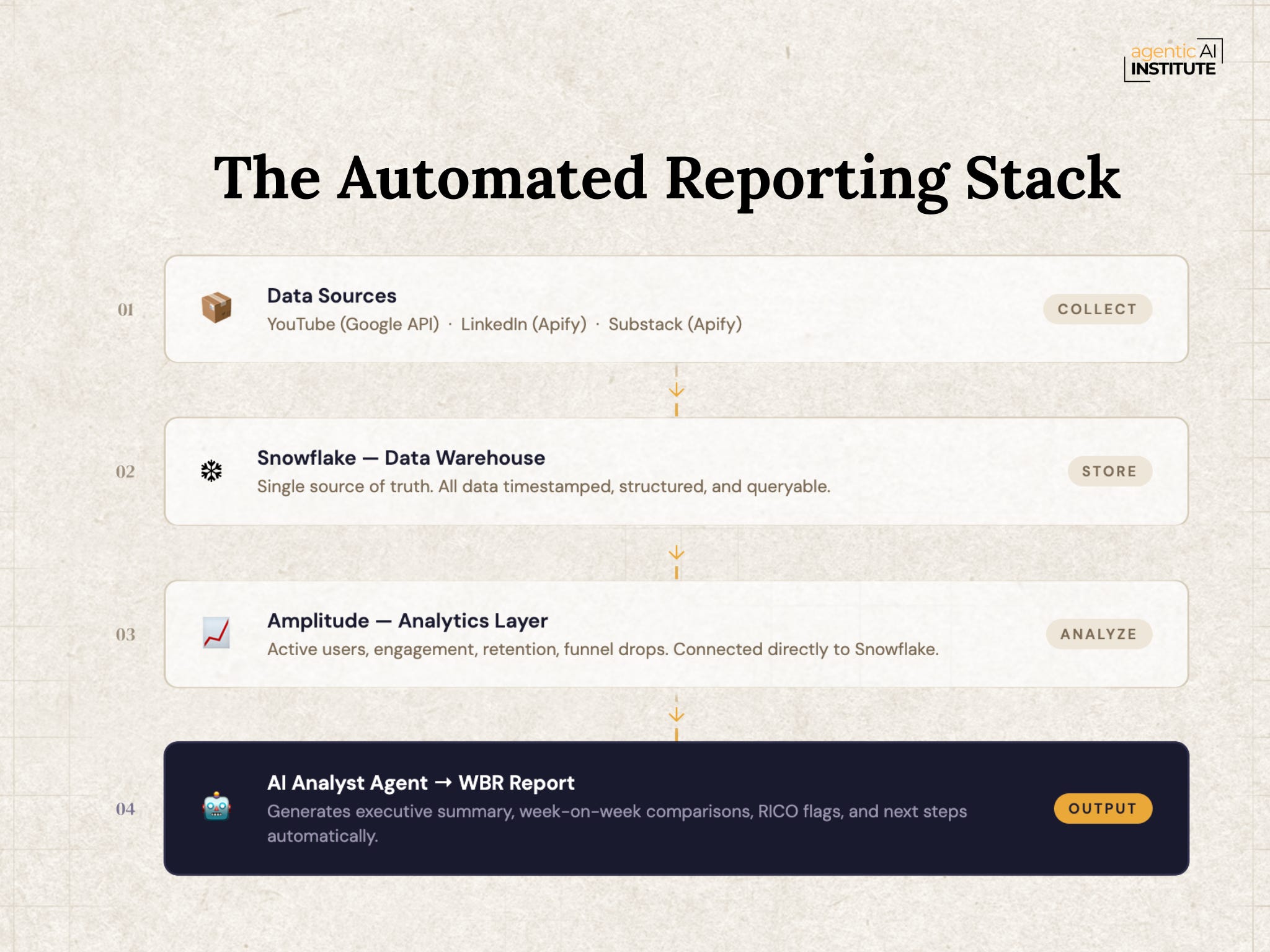
YouTube offers a proper API through Google’s developer platform, so connecting that was straightforward. LinkedIn and Substack don’t provide open APIs, so we used Apify actors - they handle the scraping on your behalf. Every week, you can run these and dump snapshots directly into Snowflake: YouTube stats, LinkedIn performance, Substack numbers, all timestamped and queryable.
The result is three tables in Snowflake - one per platform, that accumulate week over week. That’s your data lake.
If you’re on Azure, Synapse Analytics is a direct alternative. AWS Data Lake works the same way. I used Snowflake because they have a 30-day free trial, and it was the fastest way to get this running without immediate cost.
Step 2: Add an analytics layer - Amplitude
Once your data is in Snowflake, you connect Amplitude to it with a single credential handoff. From there, instead of you manually building charts, Amplitude pulls your data and generates dashboards out of the box: active users, engagement, funnel performance, retention curves, week-over-week comparisons.
What I didn’t anticipate: Amplitude now has agent dashboards. You configure an agent, give it your data sources, tell it what to monitor, and it automatically sends you a weekly summary. Not a static report. An agentic workflow that notices changes, surfaces anomalies, and writes the narrative.
Step 3: Ask it to write your WBR
This is where it comes together. I asked Amplitude’s assistant: Generate a WBR for me. It returned key findings within minutes - top YouTube video (800 views that week), LinkedIn engagement breakdown, Substack highlights with week-over-week comparisons already calculated and formatted.
The first two quadrants of your WBR, input metrics and output metrics, are now fully automated. You still add your own judgment to the risk flags and the next steps - that’s the human layer, and it should be. But the data collection and initial analysis? Fully offloaded.
This isn’t just a trick for automating a report. It’s a reusable architecture:
Data Lake (Snowflake) → Analytics Layer (Amplitude) → AI Analyst Agent → WBR Report
And it’s extensible. I’m planning to start dumping call recordings and session transcripts into Snowflake next. When an agent writes my WBR in three months, it will have context from everything - not just quantitative metrics, but why things happened, as captured in qualitative sources.
This is also the architecture that tells the right story in interviews. When a hiring manager asks “have you built an agent in production?”, this is a real answer. I took data from five sources, consolidated it in a data warehouse, connected it to an analytics platform, and now my WBR drafts itself. That’s not a side project, that’s a working system with real outputs.
Can we replace Snowflake and Amplitude with simpler tools like Airtable?
Airtable can serve some of what Amplitude does (the analytics and visualization layer), but it doesn’t replace Snowflake. Snowflake is a data warehouse - it handles structured SQL data and unstructured content like audio, video, and documents. Airtable is a CRM with analytics layered on. If you want the lowest-friction starting point, Claude Co-work connected directly to your Snowflake is surprisingly capable, especially if you’re good at prompting. But if you want richer visualizations and more sophisticated analysis, that’s where a dedicated analytics platform becomes worth the setup.
How does Amplitude handle root cause analysis on metric drops?
There’s a chat interface inside every dashboard. You can ask, Why is there a drop in this funnel step? and it queries your data and returns a hypothesis. In our live session, I showed a real example - an issue where a mobile “Accept” button wasn’t rendering correctly. That’s exactly the kind of friction that Amplitude’s anomaly detection is designed to flag automatically, before your users complain.
How does the agent actually generate the WBR?
My working model of what’s happening behind the scenes: your prompt and formatting preferences are passed to an orchestrating agent, which coordinates separate sub-agents - one to fetch data, one to validate data quality, one to draft the narrative, possibly one to QA it. The output is a scheduled notebook that runs weekly on a cron, produces the summary, and delivers it to whoever needs it. What was a Friday afternoon human task is now infrastructure.
What about data security?
If your data is in Snowflake, you pass Amplitude your Snowflake credentials - that’s the full configuration. Amplitude has completed SOC 2 certification and offers enterprise licensing with white-labeling and compliance management. If your data lives in S3 or Azure Blob instead, those connections work too.
Set up Snowflake. It takes 30 to 90 minutes with their onboarding tutorial. Start with something simple: your YouTube analytics, your content calendar, whatever you’re already tracking manually. Once the data is there and queryable, you’ll generate more ideas for what to automate than you have time to act on.
Not having a data layer is one of the most common limiting factors I see in people trying to build real AI workflows. Everything downstream - the agents, the automation, the WBR - depends on having clean, centralized data. Set it up once. It compounds from there.
We’re running a free three-session series starting now: Land Your AI PM Role: The 3-Session Preparation Path.
Session 1: What hiring managers actually look for in AI PM candidates - from choosing the right projects to evaluating AI products and defending technical decisions under pressure. Watch the recording here.
Session 2 (June 19): Inside real MAANG AI Product Sense interviews - what they’re actually testing and how to think through it live.
Session 3 (June 26): How to answer AI interview questions without falling back on generic frameworks.
If you’re actively interviewing or planning to, subscribe to this Substack. We’ll send the session links directly.
The WBR problem is solvable. The tools are available, the stack is learnable, and the time savings are real. But more than that - building this gives you something to point to. Something you shipped. Something that runs without you.
That matters both for your own productivity and for what you can say in your next interview.
Mahesh Yadav is a product leader with 17+ years at companies including Microsoft, Facebook, Google, and AWS. He runs the AI PM Community and teaches the #1 AI PM course on Maven. Subscribe to this newsletter for weekly insights on building and shipping AI products.
No posts
Comments
Nothing yet. Say the first thing.
Sign in to join the conversation.