
The one thing for this issue: Build in order. Every build you start should know its goal, its cost, and what it touches.

What this is: The second of three parts. Part 1, the foundation, is a private AI workspace built on Claude Code: files of its own, synced across my computers; a memory of my decisions, instruction files, a voice trained on hundreds of samples spanning years, hard safety rules enforced in code, recursive learning that turns mistakes into standing rules, a daily log, and watchers that catch silent failures.
Part 2, is the first things to build with that in place.
** When I say a ‘build’, I mean a scoped, self-contained project with a defined purpose. Some of mine deliver an email every morning. Others maintain a database, watch for a signal, verify records, or run a check on a schedule. What makes something a build is that its job is defined before it exists and you can tell when it’s done. **
Who it’s for: People who want real leverage out of their AI tools, explained in plain language.
You want Part 1 in place first. Part 2 hands keys to your live accounts, so get its safety rules in place first.
What you’ll leave with: A process for deciding what’s worth building, best practices for planing a build, and four instruments that I call a workbench.
From there, how to connect it to apps and platforms your probably already working in, and some early builds once it’s connected.
Every prompt is lifted from my working setup.
Read this with Claude open. When a section gets dense, paste it in and ask it to adapt the step to your setup. Every block labeled Steal this is written to be handed over as-is.
ORDER OF OPERATIONS
The first things we’ll set up improve everything built after them.
BEFORE YOU BUILD. How to decide what’s worth building, and how to scope and plan it. This is the shortest section, but it saves the most time.
THE WORKBENCH. A build tracker, sparring partner, release audit, cost meter. Budget a week for the whole bench, though you can probably do it in an afternoon.
CONNECTING TOOLS. AI gets really powerful when it’s connected to the platforms you already work in. Google Workspace, HubSpot, and Airtable are the examples here, but most tools connect the same way.
Three ways to give your setup access to these systems: ready-made connectors (the standard is called MCP), your own API credentials, and self-driven access (the system clicking through a website the way you would), the last resort for walled platforms.
This is where mistakes have real consequences, they happen inside your live accounts, so the section carries critical safety rules.
THE BUILDS, IN DEPENDENCY ORDER.
Foundations first: get your contacts out of a list and into a CRM where they become records code can query, connect the Google suite so your system can read and write your documents, and connect a base where your projects and accounts can live, mine is Airtable. Unglamorous, but these tools organize information in ways that let more complex builds sit on top.
My two daily emails read across all three. My art practice sources and tracks exhibition opportunities out of an Airtable base. My CRM now carries more than a dozen distinct jobs.
This issue gets you to a system that works. Issue 03 is the tooling that works on the system itself, so you stop being the one running it.
First, the workbench.
BEFORE YOU BUILD
In my first quarter this year, I shipped sixty-nine builds. I was proud of the number.
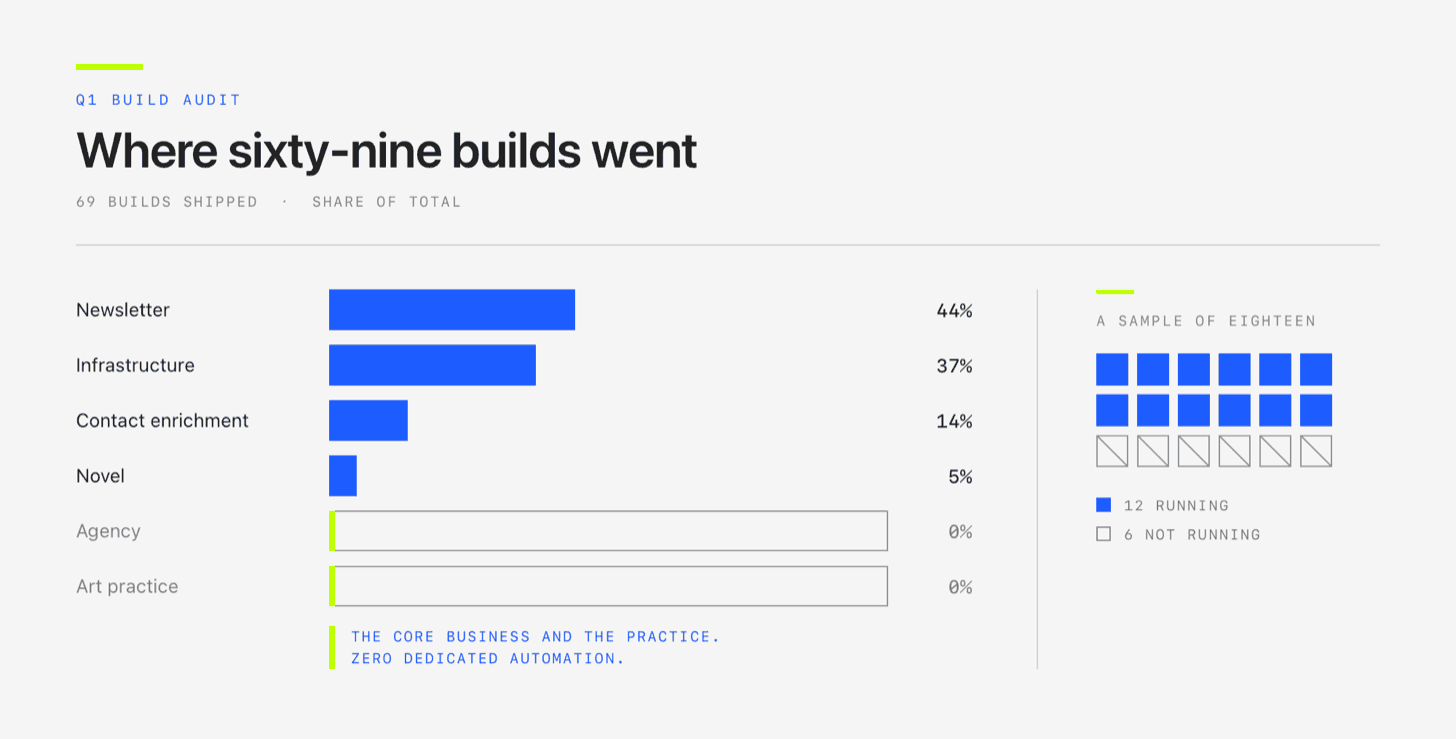
Then I inventoried it. Forty-four percent of everything I’d written served my newsletter. Fourteen percent served contact enrichment. Five percent served my novel. My agency, my core business, had zero dedicated automation, as did my art practice. The remaining thirty-seven percent was infrastructure, builds that served the system itself rather than any part of the business.
I sampled eighteen to see which were actually running. Six weren’t, never triggered, blocked on something I’d forgotten, or done with a one-time job months earlier and never removed.
That’s what happens when you build whatever is in front of you.
Dan Koe, who writes about learning, recently argued that learning fails without a goal, because a goal is what creates the filter:
“A goal creates the error signal. The error signal creates the filter. The filter creates relevance.”
That leads to a position: “when you want to learn something new, don’t start learning, take the first step toward the goal instead.”
Swap learn for build. Without a goal in front of it, everything looks equally worth building and you pick by interest.
Before any build: Name the goal it serves.
DECIDING WHAT NOT TO BUILD
Ironically, most of the value in planning is the builds that get killed.
Last quarter I killed many builds at the scoping stage.
One was a tollbooth for my AI spending, a single point everything would route through so I could see the bill. Planning found that almost nothing I ran would route through it. My scheduled jobs were calling OpenAI, xAI and Google directly, the tollbooth would have missed them. One planning session killed it.
Another was a retrieval system that turned out to duplicate something I’d already built and forgotten.
Another assumed LinkedIn had an API that would hand me contact data. It doesn’t hand it to anybody. Their developer program is only for incorporated companies, not individuals, arduous to apply for. An impossible build not worth my time.
START WITH PLANNING ONCE YOU PICK WHAT TO BUILD
Made to Stick has a great Army analogy: it plans more obsessively than anyone, despite knowing plans fall apart on contact. The point is the thinking it forces out of you. That thinking leads to a Commander’s Intent at the top of every order, a plain statement of what the mission has to accomplish, so that when the plan breaks, everyone still knows the core goal.
Before any code exists, work a plan until you agree on the intent, what this build does, and what done looks like. The steps could change mid-build, but a strong intent keeps it on the rails.
Simon Willison, the developer whose lethal trifecta test I borrowed for the security layer in Part 1, has a name for the disciplined version of all this: vibe engineering (creative, I know). His argument is that the practices AI tools reward most are the boring ones. Planning in advance, writing things down, version control, review, testing.
Never just build.
Messy code and bloated builds come from treating your system like a vending machine. If you describe what you want and hit go, it will build something. It will build it fast, and it will build the wrong thing confidently.
PLANNING IS A MODE
Make planning a setting your agent can’t override. In Claude Code this is plan mode: it can read your files, search your system, and propose a plan, but it will not edit your source until you approve. enter:
claude --permission-mode plan
Or press Shift+Tab mid-session to cycle from Manual / accept edits / plan. When it’s on, the status bar says so.
If you’re using a different tool, look for the same property: a mode where the assistant can read and suggest, but can’t change anything until you approve.
HOW TO PLAN
Write the spec first. What it’s for, what it must never do, and how you’ll know it worked:
What is the one job? One sentence.
What goal does it serve? What moves, and by how much, if this works.
What does it explicitly not do? “Watches my client threads for cooling signals” is a job. “Sends nothing, writes nothing to the CRM, ignores everything outside the client list” are guardrails.
What does it touch? Plenty of builds legitimately touch a lot.
How will you know it works? Name the check before you build it. Anthropic says the same thing in their own guidance: with no check, you get “looks done.”
Ask for the risks. Add “list the risks and edge cases”. Side effects, migrations, new credentials, things that break downstream.
Send the exploring out. Delegate the reading: “use a subagent to look into how X works.” The subagent reads in its own space and comes back with findings, so your working session doesn’t fill up with file contents. This is context control, which we covered in Part 1. Keep your planning session tight.
Turn the effort up. Planning is where more reasoning actually pays off, so spend it: `claude --effort xhigh`.
MAKE YOUR MODEL INTERROGATE YOU
You don’t have to carry those five questions into the session. Tell the model plainly: Ask me as many questions as you need until you understand this, and do not propose anything until you do. It generates its own from the gaps in what you actually said, and the five above are the floor, not the ceiling.
Answer honestly, including “I don’t know,” that names what the plan still has to resolve. Keep going until all five have real answers on one page. That page is the scope.
READ THE PLAN BEFORE YOU APPROVE IT
A real effect of AI work is repetitive ‘approve-clicking’. Be honest about how often you click to move work forward without reading what’s in front of you.
When you’re planning, Read your plan back slowly. Argue with it. Ask what it’s still unsure about and what it assumed without asking, because it always assumed something.
Reading the fine print is also where you catch the mistakes, the hallucinations, and the confident wrong answer on something critical.
STEAL THIS. SCOPING A BUILD IN PLAN MODE:
THE REST OF THIS ISSUE IS FOR PAID SUBSCRIBERS
Everything below is the building.
Comments
Nothing yet. Say the first thing.
Sign in to join the conversation.