
What actually goes wrong when you load a large, messy public dataset locally ,
and the settings that fix it.
I loaded the full 2025 NFIRS release , every fire, medical call and hazmat incident reported by US fire departments , into DuckDB on a laptop. Here’s the scoreboard before we get into how:
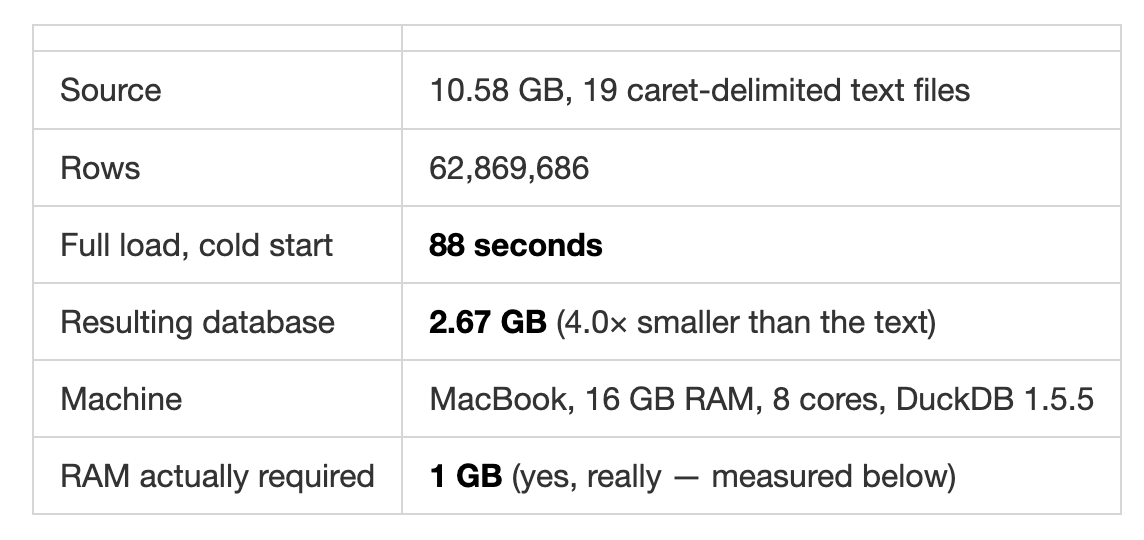
No server. No cluster. No cloud bill. The database is one file you can copy to a USB stick.
The loading itself is a CREATE TABLE AS SELECT and there’s no trick to it. What’s worth writing down is the four things that did fight back, and the handful of settings that decide whether this takes 88 seconds or doesn’t finish at all.

Before writing a single read_csv, read the bytes. Not with pandas , with Python’s open(path, 'rb'). You want four facts:
What’s the delimiter? Mine was
^. Not exotic, butpd.read_csvdefaultswould have silently produced one giant column.
Is it quoted, and how?
"AK"^"11100"^01012025, quoted strings, unquoted numbers. That mix matters.Is it actually UTF-8? Test it. Don’t assume.
How many rows?
chunk.count(b"\n")over the whole file. This is your ground truth for validating the load, and on 6 GB it takes seconds.
Five files out of nineteen had non-ASCII bytes. Three had bytes that would abort the entire load. I’d rather know that in five minutes than forty seconds into a six-minute job.
DuckDB’s read_csv takes an encoding parameter. It supports utf-8, utf-16, and latin-1. My files were Windows-1252, which is almost latin-1, so encoding='latin-1' looks like the answer.
It isn’t:
Here’s the subtlety. CP1252 and latin-1 agree on 0xA0–0xFF (accented characters), but differ on 0x80–0x9F , in CP1252 that’s where curly quotes, em dashes and the euro sign live; in latin-1 it’s C1 control characters. And DuckDB’s latin-1 reader doesn’t pass those bytes through, it rejects the whole file.
The blast radius is absurd. Across 30 million rows of basicincident, exactly two contained a curly apostrophe (0x92) , someone typed I' in a district name. Two rows. The entire 6 GB load fails.
There’s a community encodings extension that handles CP1252 properly. It isn’t built for DuckDB 1.5.5 on Apple Silicon yet:
So: detect and transcode. Scan for bytes in the C1 range, and only rewrite the files that need it:
This is much cheaper than it sounds: 4.0 GB transcoded in 5.0 seconds, about 800 MB/s. Write to a temp file, load from it, delete it. Files that are already clean skip the step entirely.
The general lesson: when a loader gives you an encoding option, find out whether it transliterates or validates. Those are very different failure modes, and the validating kind means one bad byte in ten billion kills the job.
DuckDB’s type sniffer is good, and it will still get you. It samples the head of the file. On a 6 GB table with 42 columns, many of them sparse, the first few thousand rows are not representative , and you find out either from a crash 80% of the way through, or from nothing at all.
The pattern that works: read everything as text, cast explicitly, one pass.
all_varchar = true means the read cannot fail on types. The casting happens in the projection, in the same statement, so there’s still only one pass over the file. A malformed value becomes NULL instead of killing a job that’s been running for a minute.
Three things this buys you beyond not crashing:
Codes keep their leading zeros. FDID is '06120'. DEPT_STA is '02'. Let those become integers and every join to the lookup table breaks , silently, permanently, and in a way that looks like “this code just isn’t in the dictionary.”
Dates that aren’t dates get parsed properly. INC_DATE is MMDDYYYY with no separators, unquoted. Sniffed as an integer, January through September lose their leading zero and the value becomes garbage. As text into TRY_STRPTIME, it’s fine.
Blank vs. NULL gets normalized once. NULLIF(TRIM(x), '') everywhere means '' and NULL never coexist in the same column, which otherwise haunts every downstream WHERE clause you write.
The cost of all this is essentially zero. basicincident , 30M rows, 6 GB , loads in 54 seconds with full explicit casting.
Since you’re already reading every column as text, count what the casts throw away:
Write those two numbers per column into a load_audit table. Then SELECT * FROM load_audit WHERE cast_failures > 0 should return nothing, forever.
Mine returned ALARMS: 250,534 non-blank values that became NULL. The NFIRS spec calls it a count of alarms, so I’d typed it INTEGER , but ~3% of departments write EM, MC, D or W1 in that field. Without the audit, those 250,534 values would have vanished with no error, no warning, and a table that had exactly the right number of rows.
One extra scan of the source, ~25 seconds on the big table, once. Best trade in the whole pipeline.
Four settings do almost all the work:
That last one is the sleeper. DuckDB defaults to preserving row order from your source, which forces it to buffer more during a large load. Source-file row order was meaningless to me, and turning it off measurably lowered peak memory. If you don’t need the order, say so.
Now the part I didn’t expect. DuckDB is genuinely out-of-core , it spills to disk rather than dying , so I tested how far that goes by loading the 6 GB, 30-million-row table with a deliberately punitive memory limit:
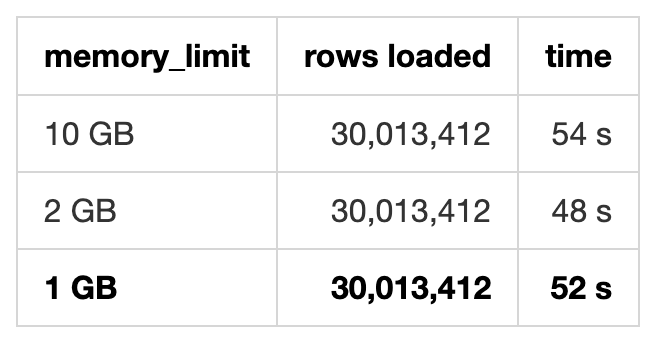
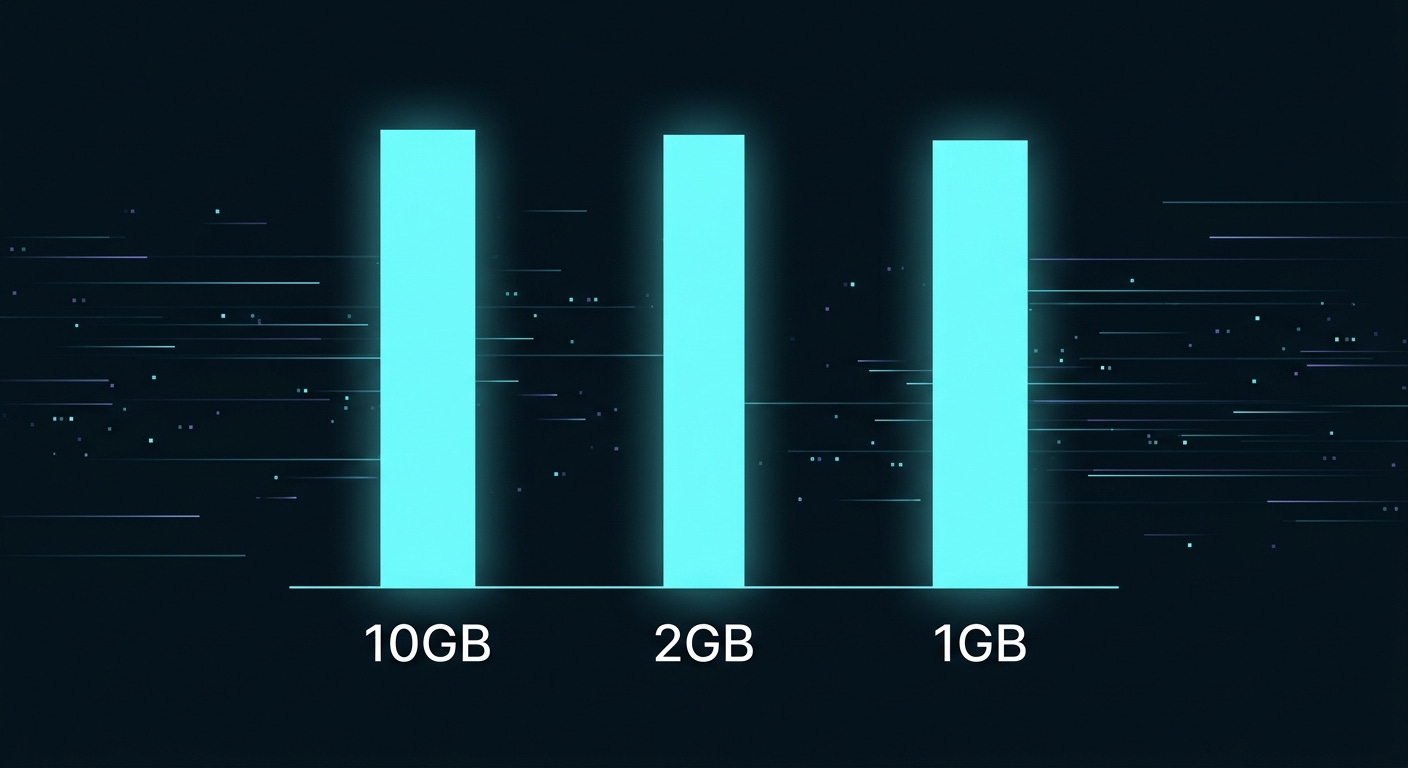
A 6 GB table into a 1 GB memory budget, and it’s not even meaningfully slower. The “your data must fit in RAM” instinct most of us carry from pandas simply does not apply here. Disk speed matters, RAM mostly doesn’t.
DuckDB queries CSV files in place. So the honest question is whether materializing into a table earns its keep. Same aggregation, 30M rows, grouped by state:
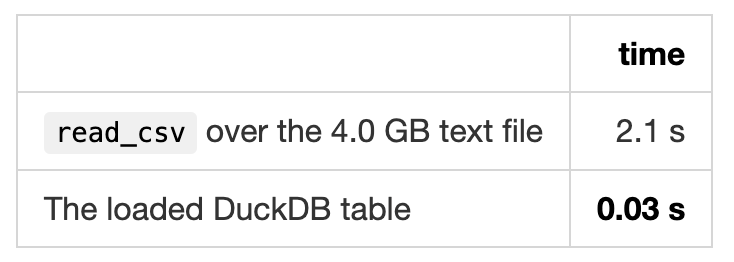
Two observations. First, scanning 4 GB of text and aggregating it in 2.1 seconds , about 1.9 GB/s , is genuinely impressive, and for a one-off question you should absolutely just point read_csv at the file and skip the load.
Second, it’s ~70× slower than the table. If you’re going to ask more than about ten questions, materialize. And the moment you need to join two 30M-row files, it isn’t close.
Reflex says put a PRIMARY KEY on the incident ID. Don’t. In DuckDB a primary key builds an ART index, and for full-scan analytics you get nothing back.
Loading a 3-column, 30M-row table both ways:
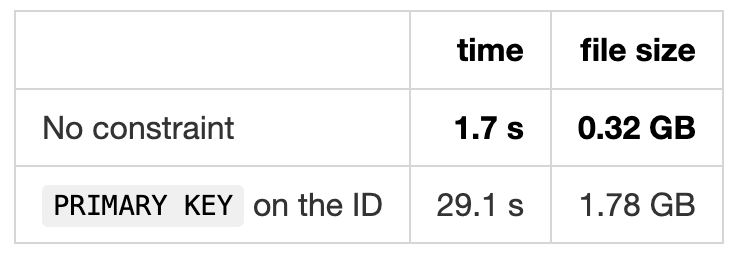
17× slower to build and 5.6× larger on disk. (The keyed run also deduplicates first, which accounts for a small part of that , the index dominates.)
If you want uniqueness verified, make it a query in your validation suite rather than a constraint in your schema:
You get the same information, you pay for it once, and you find out the answer instead of just getting an insert rejected. Mine returned 45 , the source genuinely contains 45 duplicate incident keys , which a PRIMARY KEY would have turned into a failed load rather than a documented fact.
Warm timings against the 2.67 GB database, all single-threaded-feeling but using all 8 cores:
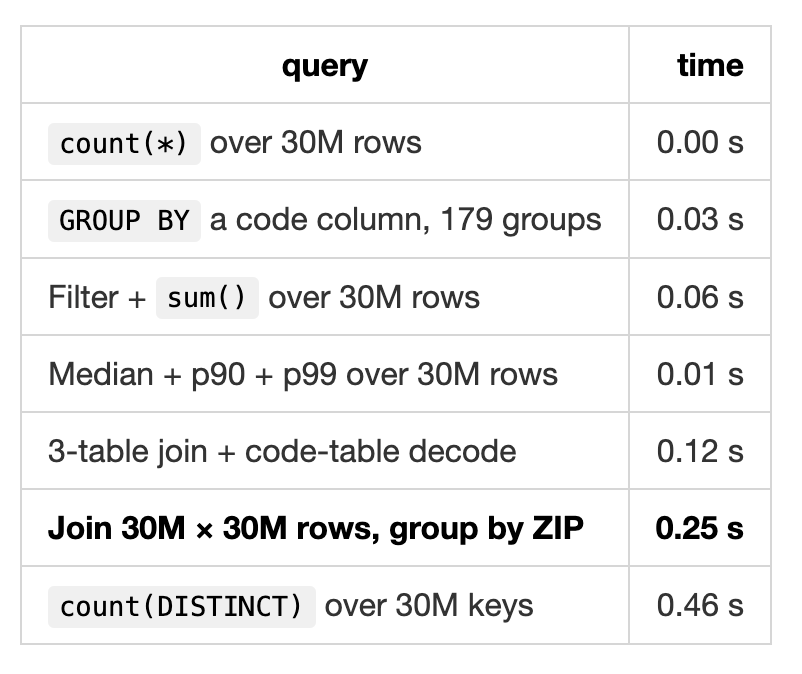
That 30M × 30M join is the one that reframes things. Joining every incident to every incident address and aggregating to 22,666 ZIP codes takes a quarter of a second, on a laptop, on battery. Interactive is the point , you stop batching up questions because asking one is free.
10.58 GB of text becomes 2.67 GB. That’s not gzip; it’s columnar layout doing what it’s good at.
NFIRS is mostly low-cardinality codes , INC_TYPE has 179 distinct values across 30 million rows, STATE has ~60, most flags are Y/N/U. Stored as rows, each of those is a few bytes plus delimiters plus quotes. Stored as a column, it’s a dictionary of 179 entries and a tight array of small integers, then run-length encoded because sorted-ish data repeats. The practical implication: **the more repetitive and code-heavy your data, the better this ratio gets.** Wide tables of free text won’t compress like this. Government and telemetry data usually will.
Not headline features, but each of these replaced something annoying:
That last one deserves emphasis. Filtering a 30M-row table against an arbitrary list from a client’s CSV, with no ETL step and no IN (...) string concatenation, is a genuinely nice property of a database that treats files as tables.
Being fair about the boundaries:
Concurrent writers. DuckDB allows one writer process. If this is the
backend for a web app taking writes, use Postgres.
OLTP. Point lookups and row-level updates are not what a columnar engine
is for.
Beyond one machine. There’s a ceiling. It’s much higher than you think,
people run this on hundreds of GB , but it exists.
Serious geospatial. The spatial extension is good and improving; PostGIS
is still deeper if that’s the core of your work.
For everything else in the “too big for pandas, too small to justify a warehouse” band , which is most analytical work most people actually do, this is the default now.

Read the raw bytes before you write any SQL.
Check whether your loader’s encoding option validates or transliterates.
all_varchar = true, then cast explicitly in the same statement.Audit what your casts discard, or you will never find out.
Set
preserve_insertion_order = falseand stop worrying about RAM.Query files in place for one-off questions; materialize past ten.
No primary keys.
88 seconds, 2.67 GB, one file, no infrastructure. The interesting constraint stopped being the machine a while ago.
Code isn’t public yet — reply if you want it and I’ll prioritize cleaning it up.
Thanks for reading The MLnotes Newsletter! This post is public so feel free to share it.
Comments
Nothing yet. Say the first thing.
Sign in to join the conversation.