
A new SeligSIM update (2024.5b, v18.4) is now available for download from the SeligSIM website. I’ll describe a new feature here and then more in later newsletters.
The update is free and installs on top of an existing full SeligSIM install.
This update has over 120 items in the Release Notes. Some are major, some minor. Below is the first feature (major) to talk about.
Watch the shadow of an airplane on the runway on a clear, sunny day, and you’ll see a crisp line around the edges. On an overcast or hazy day, the edges of the shadow go soft. That’s not because the sun is “dimmer”. It’s because the source of light has gotten bigger. The whole sky becomes the light, not just the disk of the sun, and a larger light source produces a softer-edged shadow.
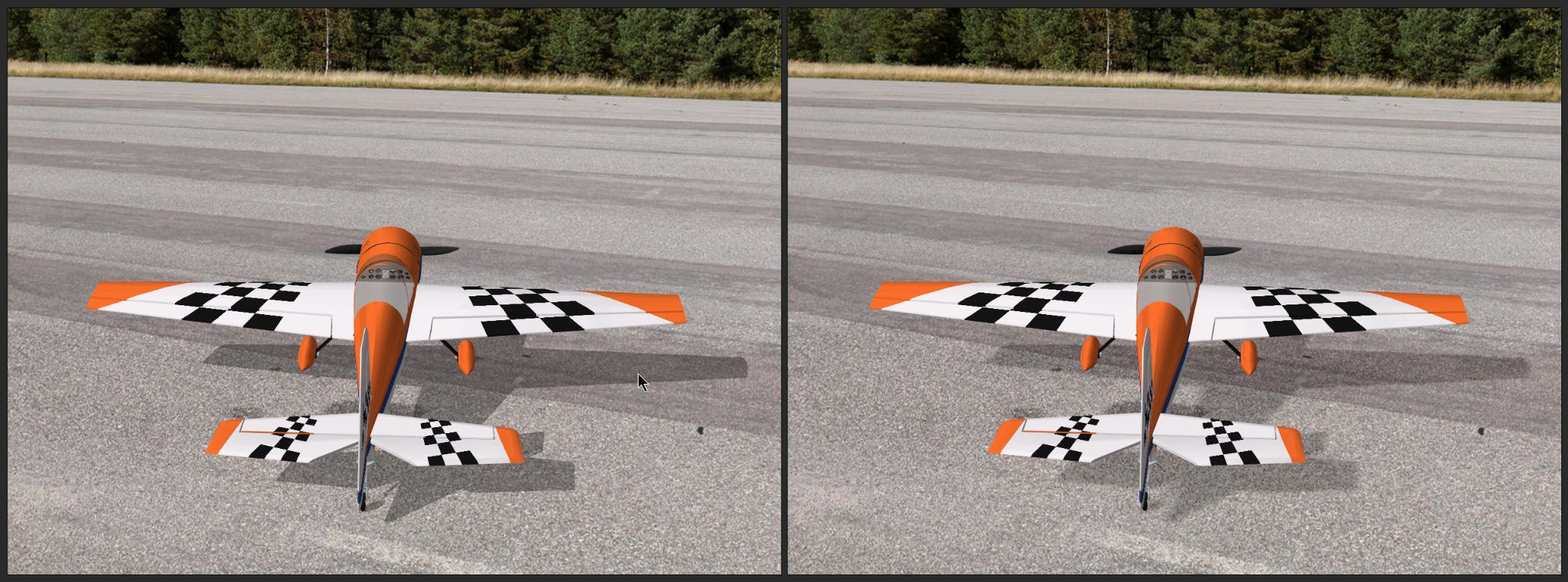
Since the first version of the simulator, airplane shadows in SeligSIM have been the sharp, clear-day kind. This update (SeligSIM 2024.5b) adds soft shadows, so the shadow on the ground now has a soft-edged look.
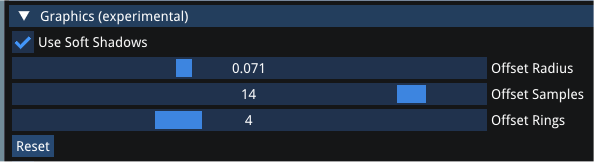
Soft shadows are turned on by default. If you prefer the original crisp look, open SeligSIM Power Tools, find the Graphics (experimental) section, and uncheck "Use Soft Shadows" — everything reverts to the older behavior. The same section exposes three tuning parameters: Offset Radius, Offset Samples, and Offset Rings. The screenshot below shows slightly higher values than the defaults, which produce the softer edge seen on the right side of the comparison above. Click "Reset" to drop back to the default values, which are a bit less soft. Experiment with your own values and share any feedback you have.
This release is an update built on top of SeligSIM 2024.5a, so you need 2024.5a already installed as the base. Install this update as a regular user. (Administrator rights are not required for version 2024.5a and this update 2024.5b).
To install the update, locate the downloaded file ending in “.iso”. Right-click on this file and select “mount”. Better: You can also double click the .iso file directly and it will “Mount.” It will appear as a DVD drive on your computer. Find the installer in this new drive, and double-click to start the installation. As with previous versions, Windows might ask for your permission during installation and when you run the program.
Until next time, happy landings!
If you’ve gotten a lot out of the sim, please consider supporting SeligSIM. Thank you!

Subscribe to Selig’s Newsletter
News about SeligSIM updates
Airplanes, features, flying tips, and more
Notes:
Comments
Nothing yet. Say the first thing.
Sign in to join the conversation.