
This newsletter introduces JoystickTools, a new program I’ve written to simplify controller setup for SeligSIM.
SeligSIM requires joystick axes to be in a specific order: aileron, elevator, rudder, throttle, and so on. The chances of your USB controller following that exact order? Practically zero unless you happen to have original FS One equipment that was designed to work with FS One/SeligSIM from the start.
Without remapping, you might connect a controller to SeligSIM and find the throttle controlling the rudder and other mismatched controls.
Up until now, the solution has been to either reprogram the axes order in your radio (if it has that capability, like EdgeTX) or use a remapping tool like Joystick Gremlin with vJoy. Joystick Gremlin works, but it’s complex if all you want to do is connect your controller and start flying.
I decided to write something simpler than either of those options.
JoystickTools remaps your real USB joystick axes and buttons to a virtual joystick device (vJoy) using a drag-and-drop interface. It’s optimized specifically for SeligSIM.
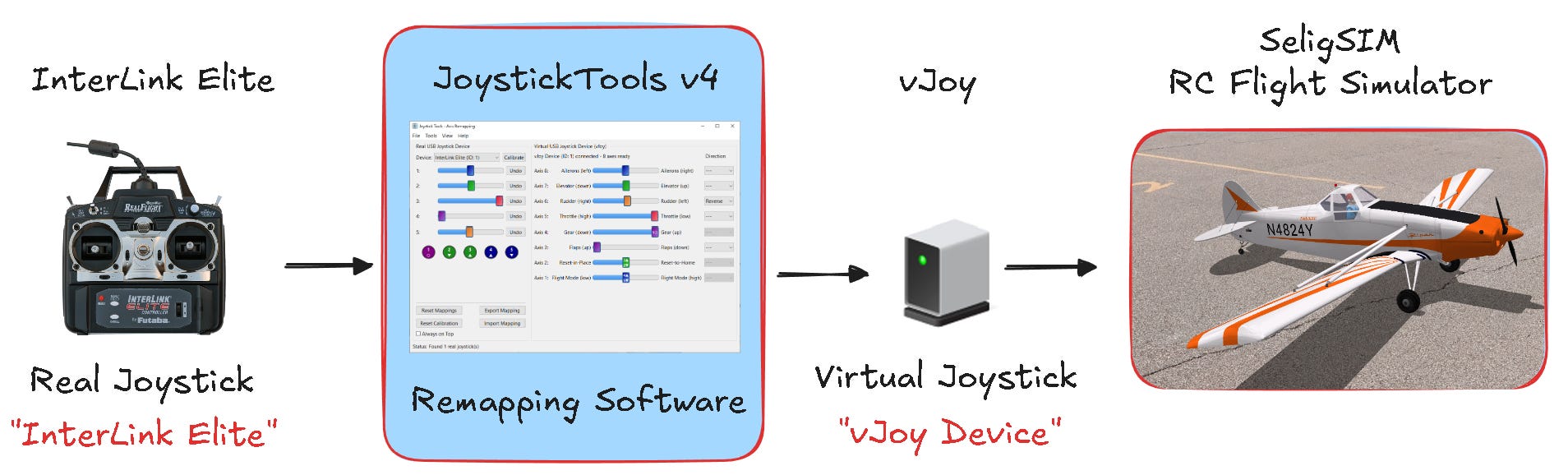
The concept is straightforward, as shown in the diagram below. Your real controller connects to JoystickTools, which remaps the axes and sends them to vJoy. The simulator then uses “vJoy Device” as its USB interface.
The screenshot below shows the JoystickTools interface in action. On the left, your physical controller’s axes appear as sliders that move in realtime when you move the sticks. Buttons show up there too if your controller has them. On the right, the virtual joystick axes are arranged in the order SeligSIM expects, with labels showing what each slider does and its direction (like “left/right” or “high/low”).
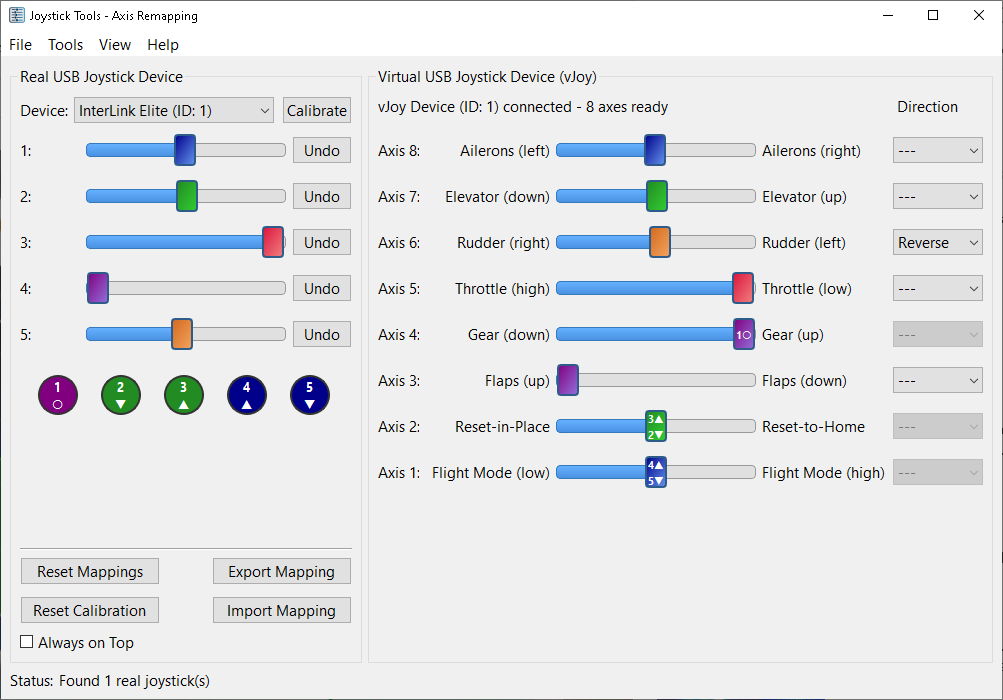
To create a mapping, click on a physical axis slider (left) and drag it to the corresponding virtual axis (right). Both sliders turn the same color to confirm the connection. It’s that simple.
You can also map buttons to axes. Click on a button and drag it to a virtual axis to control things like landing gear or resets. The program supports two-position control (single button) and three-position control (two buttons with center return).
Other features include per-axis reversing, button reversing, calibration storage, and export/import of mapping profiles.
The program saves separate profiles for each controller and automatically loads the correct one when you switch devices.
I’ve posted three tutorial videos showing the setup process with different controllers. The first is the most in-depth and worth watching before the other two.
Part 1: Spektrum NX10 Transmitter
Part 2: Spektrum DX6 (G2) Transmitter
Part 3: InterLink Elite Controller
JoystickTools v4.0 is available as a free download from the SeligSIM website:
https://www.seligsim.com/manual/downloads
Download the JoystickTools-v4.0-Windows.zip file and unzip it. The zip file includes JoystickTools.exe, a comprehensive README.txt file with setup instructions, and all necessary configuration files. You can place the folder anywhere on your system, or copy it to a USB drive and run it from there. All settings are stored in settings_jt.ini within the folder, so everything stays together.
Before running JoystickTools, you need to install the vJoy driver. The README.txt file includes a link to download vJoy (also available in the video descriptions). Install vJoy and configure it to enable 8 axes. Instructions are in the README.txt file and shown in the video tutorials.
Once vJoy is installed, run JoystickTools.exe from the unzipped folder. Run JoystickTools whenever you fly. It needs to be running to remap the controls. In the simulator, select “vJoy Device” as your USB interface.
The README.txt file also includes troubleshooting tips and details on advanced features. The video tutorials walk through the complete remapping process step by step for a range of controllers.
I’ve been using Substack as the first place to post new material, but I’m changing that. I’ll mainly post on this Substack and YouTube (https://www.youtube.com/@MichaelSelig), sometimes both but sometimes just one or the other. I occasionally also post to my blog on RCGroups.
For questions about the sim, I like using RCGroups at the link below. The community there helps with answers, and the public Q&A benefits everyone.
https://www.rcgroups.com/forums/showthread.php?4201309-SeligSIM
If you’ve gotten a lot out of the sim, please consider supporting it if you have not already. I’ve not turned on the knobs to “monetize” the sim since making it free, so donations are the place for that right now.

Until next time, happy landings!
I’ll be posting new SeligSIM content on both this newsletter and YouTube, sometimes both platforms, sometimes just one or the other. Topics include new airplanes and features, tips and techniques for flying, and occasional discussion of the finer details of RC flight simulation, aerodynamics, and flight dynamics. Keep an eye out for thoughts and ideas on other related topics in RC modeling as well.
Notes:
https://www.seligsim.com/manual/downloads
https://www.rcgroups.com/forums/member.php?u=73020 (MSelig blog on RCGroups)
Comments
Nothing yet. Say the first thing.
Sign in to join the conversation.