
We spend more time tracking Amazon packages than we do our own health.
The weird part is that we have more health data available to us now than at any time in history.
But it’s all scattered.
Your iPhone counts steps, your Apple Watch tracks sleep, and your doctor has your blood pressure written on a sticky note.
Just imagine if you could plug all of that data into AI and let it hunt for patterns in your own health.
You might find that the wine on Tuesday night is why you woke up exhausted on Thursday. Or that your resting heart rate started climbing four days before you felt sick. Or that spring wrecks you every year because you stop breathing well at night.
The gap between how you feel now and how you want to feel might just be one or two small data points you can’t see yet.
But what if you could?
In this article, I’ll show you how to build an AI-powered second brain for your health, and I’ll give you the prompt I used to build mine.
It works in both Claude Desktop and Codex, and takes about 10 minutes to set up. But before I give you the prompt, I want to show you how easy my system is and what it can do for you.
Ready? Let’s go 👇
I’m using AI to replace my family doctor.
Okay, that’s not literally true. I still have a family doctor. I still take medicine, get lab work, and all the normal stuff.
But now AI handles something I used to depend on my family doctor to do:
It keeps track of all of my health data over time.
That context used to be scattered across a ton of different apps, doctor visits, health portals, PDFs, and my own fuzzy memory of how I felt six months ago.
Now it lives in one folder on my computer.
This is the most important step to building a second brain for your health. If you can’t get all of your data in one place, AI won’t be able to mine it effectively.
So, navigate to wherever you want your “Health Log” folder to live on your computer and create it. This will act as the root folder for all of your health data.
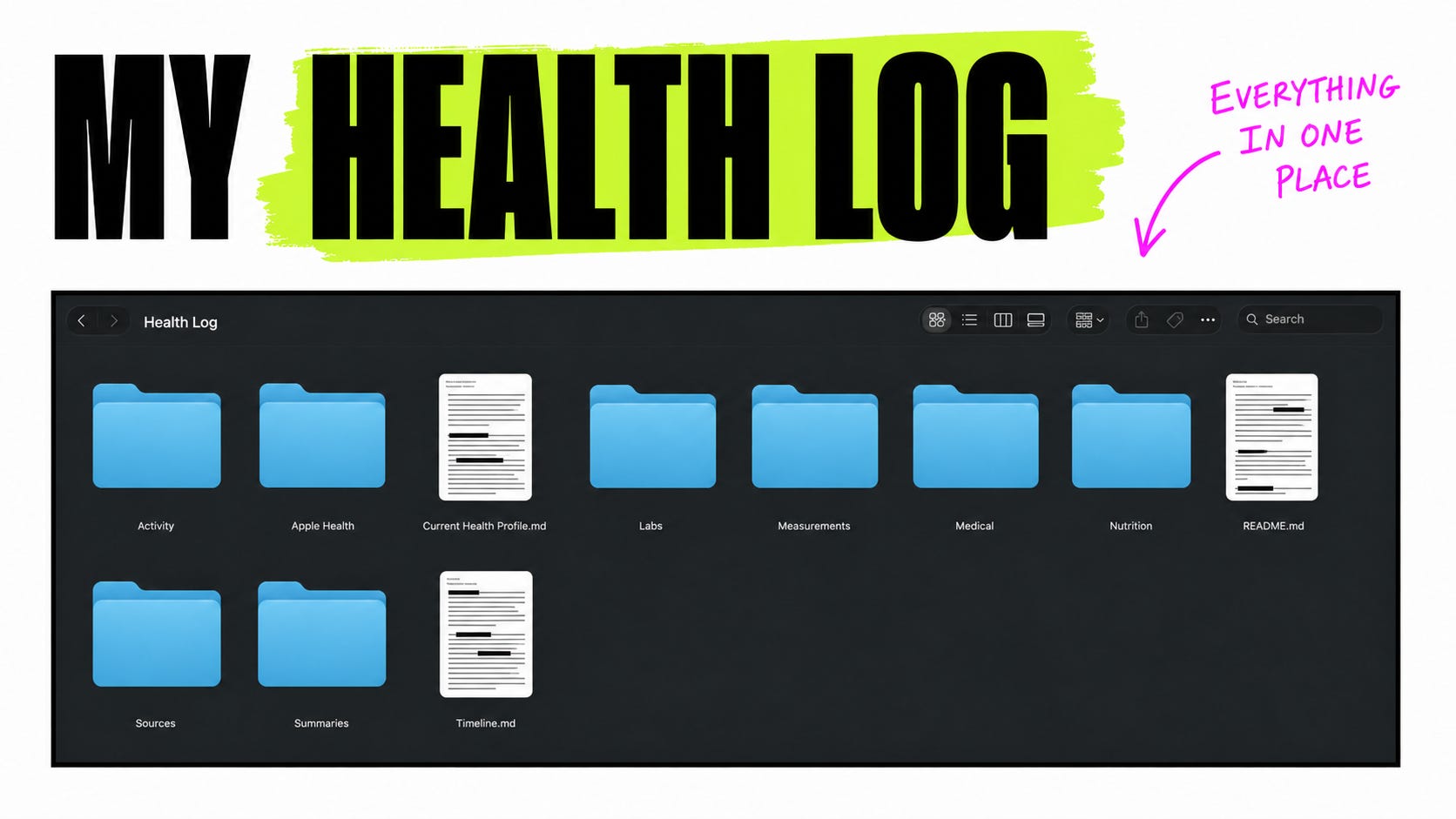
Don’t worry, there’s no need to create the subfolders as the screenshot above shows. The prompt I share later will set all of that up for you.
After creating my “Health Log” folder, I created a new project and connected it to that folder.
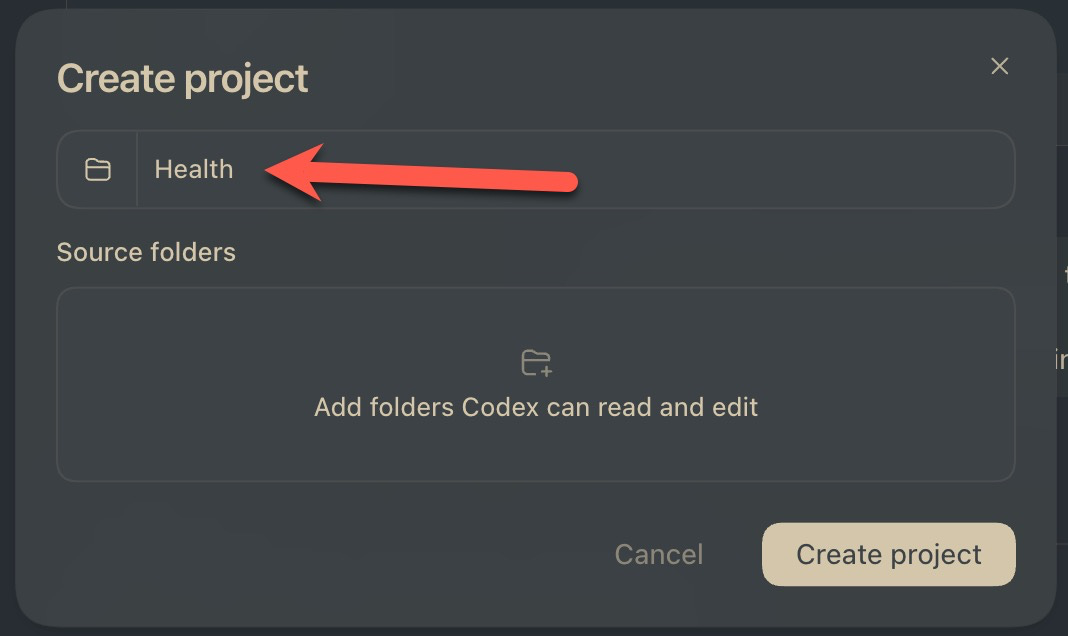
After that, I created a new thread called “Health Log”:
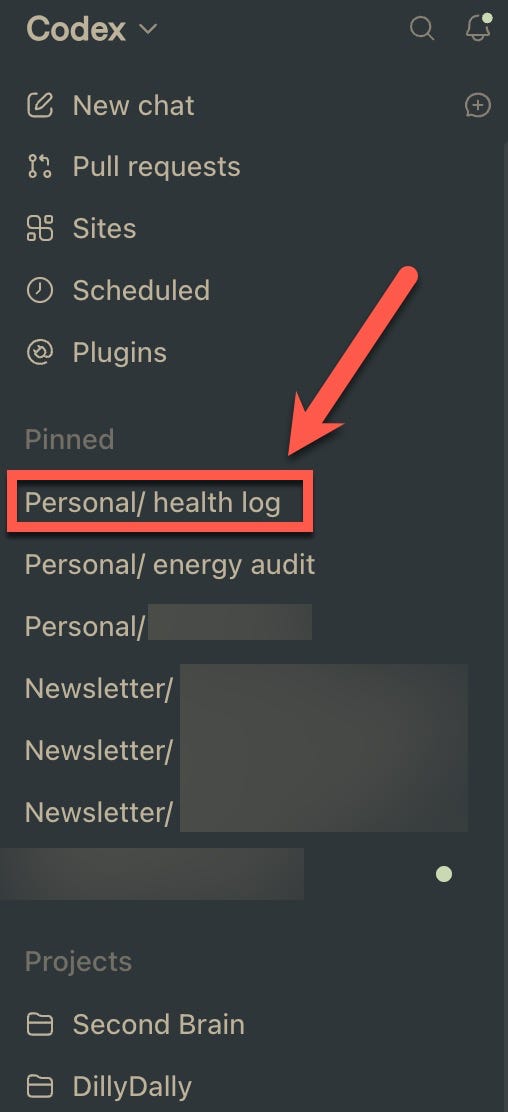
I did this in Codex, but this will work in Claude Desktop as well.
(The prompt below sets up the files and folders it works with.)
The easiest way to think about it is this:
The Health Log thread is the front door. It’s like an AI-powered receptionist at your doctor’s office that can take all your information, retrieve records, and act as an interface between you and your structured data.
The Health Folder is the permanent record for files and structured data. Imagine a huge office full of filing cabinets filled with your health data.
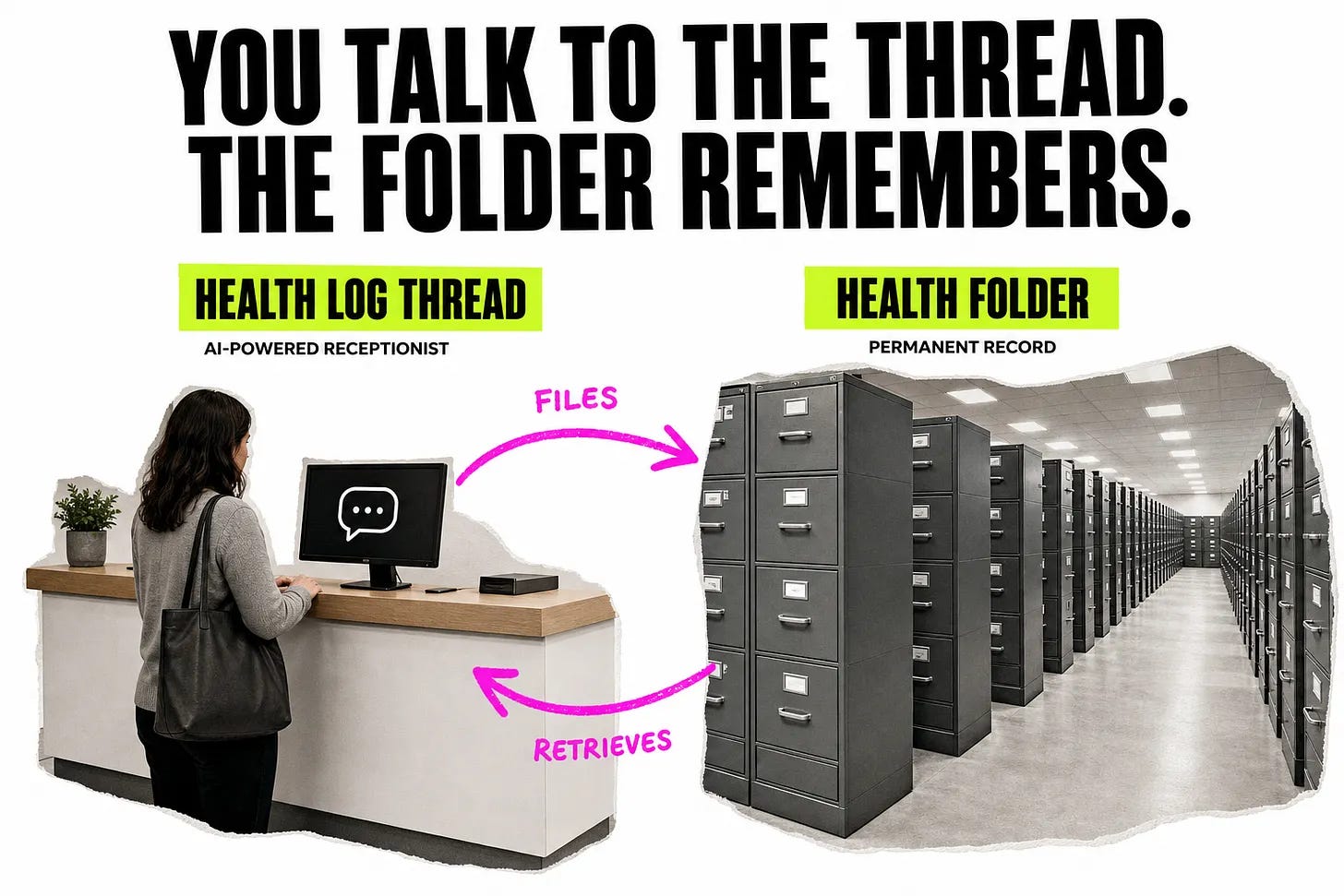
I quickly capture everything into the health log, then Codex grabs the date and time and figures out what kind of information I gave it. After it’s satisfied, it saves it into the appropriate file.
Over time, it has built multiple folders for different kinds of health information. I don’t have to decide where every new detail belongs because Codex handles the documentation for me.
After you have all your data in one place, the next step is to track everything.
The good news is that with modern tech like iPhones and Apple Watches it takes surprisingly little effort to keep track of ALL KINDS OF HEALTH DATA. For example, I currently track obvious things like food and calories, but I also track:
Sleep
Resting heart rate
Heart rate variability
Body temperature
Breathing rate
Blood oxygen
And more
My devices collect most of that data automatically.
Then I add the less structured stuff manually, like if I’m feeling weird, think I’m getting sick, start a new medication, or begin a treatment with my doctor, I’ll report that in the log too. When I get my weight, blood pressure, or new lab results, I drop those in. Doctor visits go in. PDFs from health portals go in.
The thing to remember is that the more data AI has to work with over time, the better its insights will be.
You want your AI to be drinking from a literal firehose of your health data.
Okay, confession time:
I’m lazy and I hate manual data entry. So, if I’m going to keep up with this over time... it needs to be super easy (as in, almost effortless) and ridiculously fast.
I’ve tried calorie counting before. I’ve tried it multiple times, actually, and I could never stick with it. Pulling up the app, then searching through a library of food choices, finding the right item, etc. I could never do it consistently and generally found calorie counting apps to be a royal pain in the you-know-what.
Thankfully, I built my system to solve for that.
I simply record things whenever they happen, and I record them however I want.
Sometimes I type a plain-English entry. Sometimes I use speech to text. Sometimes I send a photo or screenshot. If I receive a PDF from a doctor or health portal, I upload the PDF.
Most entries take me about 30 seconds or less. Here are a few screenshots of my messy captures:
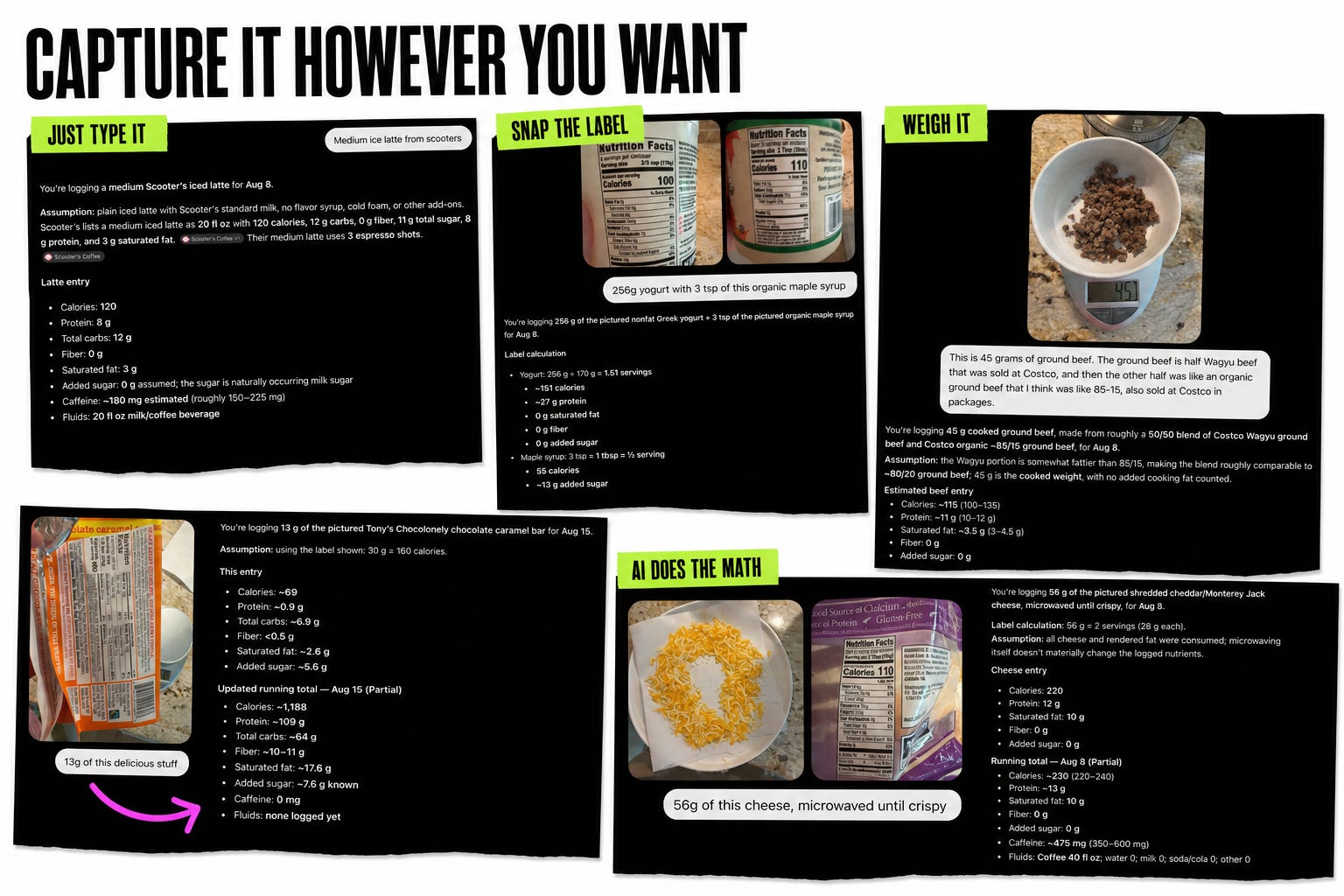
If I’m at a restaurant eating a steak, I can take a picture and tell it the restaurant, the kind of steak, and anything else I know about the meal. AI does a bunch of research in the background and gives me a reasonable calorie estimate. Obviously, an estimate is still an estimate, but 100% accuracy isn’t the goal.
Doing it consistently over time is the goal.
With this system, everything I hate about calorie counting has been solved for.
I leave little notes for AI and it does the rest. I don’t have to stop what I’m doing, search through a food database, find the exact serving size, and perform a small accounting exercise every time I eat something.
That’s the ONLY REASON this works for me.
Surprise:
This messy capture method also works for everything else, too.
There are a million wearables out there, and just as many databases and websites storing your info. It can be a royal pain in the butt to retrieve it all. I know.
Here’s what I do:
About once a week, I export my health data and drop it into Codex. There are probably clever ways to automate this, but I haven’t bothered yet. Exporting it once a week is fine for now.
Here’s a real example of how this little system can help you manage your health.
Back in February or March, I got the worst sinus infection I’ve ever had. Because I’m stubborn, I waited as long as I possibly could before going to the doctor. By the time I finally went, I was in a lot of pain.
The doctor prescribed an antibiotic. When I went to pick it up, the pharmacist warned me that it belonged to the same family as another antibiotic I’m allergic to. I called the doctor’s office to get something else, but the doctor was too busy to talk with me. The nurse eventually came back on the line and said the doctor “thought I would be okay.”
So... I didn’t take the antibiotic.
I’m a husband, I’m a dad, I’m running a business. I couldn’t afford to be down because I had an allergic reaction to an antibiotic. I decided to ride out the sinus infection for a few more days and see what happened.
Thankfully, it started to go away, but something never felt completely right afterwards. Within a few weeks, I was better but not well.
That continued for around 4 months, from March until July.
My nose still felt messed up. I wasn’t feeling great, and I wasn’t breathing well, but I had gradually adapted to it.
Then I started putting my health data into AI and I compared three periods:
before the infection -> during the acute infection -> and the months afterward
Before the infection, my HRV was higher. My resting heart rate, nighttime breathing rate, and body temperature were lower. After the worst symptoms passed, those measurements never completely returned to the old pattern. It looked like my body was still under some kind of background stress.
That data is what convinced me to go back to the doctor in early July.
I walked into his office and I was like, “Hey doc, I want to talk to you about a treatment plan for an infection I’ve got. A few months ago, I waltzed in here and you prescribed me antibiotics. I never took them. I don’t know how you feel about that, but as a patient, I found my performance lacking. After reviewing my current symptoms, I think I still have a lingering sinus infection. My proposed treatment plan is that you prescribe me another round of antibiotics, and this time, I’ll ensure that I - as a patient - take them as prescribed. Do you agree with this approach?”
He nodded.
“Good, I’m glad we’re on the same page. Is there anything else I can help you with today?”
Okay, maybe it didn’t go quite like that... but that’s the version that’s going in the health log 😉
After the infection cleared, I compared the data again. My HRV went up. My resting heart rate went down. My body temperature went down.
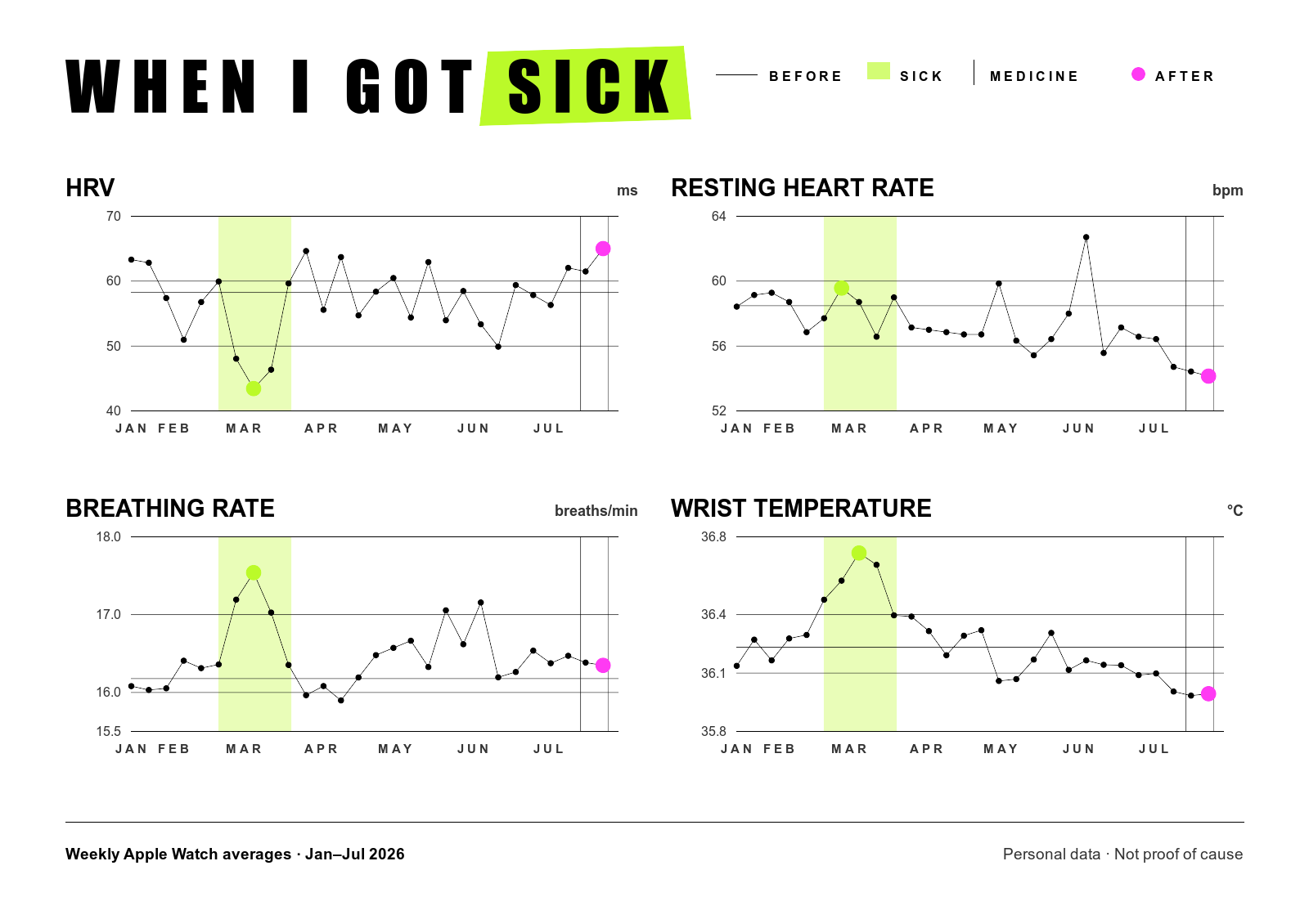
Sometimes our health is invisible to us. We’re inside of it, and we adapt. The data did not diagnose me. It showed me that something had changed and had stayed changed. That was enough to make me act.
Now, I finally feel better and well.
Alright, now let’s set up yours.
This entire system should take about 10 minutes to set up:
Create a folder on your computer for your health workspace.
Open that folder in Codex, Claude Desktop, or Cowork.
Start a new thread in that workspace and pin it.
Paste in the prompt below. It will create and maintain a
Healthsubfolder inside the workspace.Seed the log with whatever history you already have (an Apple Health export, recent labs, current medications, known conditions, or anything else you want it to remember).
From then on, add new health information to the thread whenever you have it.
You can call it Health Log, Doctor GPT, or whatever the heck you want. The name doesn’t matter.
Once it’s set up, symptoms, medications, lab results, PDFs, doctor visits, wearable exports, and questions can go directly into the thread. The files inside the Health subfolder remain the permanent record.
After you create the thread, copy and paste this prompt into it:
I want this task to be my permanent personal health journal and health-history workspace. Name it “Health Log” if possible.
My input will usually be informal and incomplete: short messages, photographs of food, weight readings, blood-pressure readings, symptoms, illnesses, exercise, doctor visits, medications, supplements, laboratory results, Apple Health exports, and miscellaneous observations. Treat each message as something to evaluate and add to my durable health record when appropriate.
Create and maintain a private `Health` folder in the current workspace (if it doesn't already exist). Use clearly organized files as the permanent source of truth rather than relying only on task memory. Design a simple structure for:
- A chronological health timeline
- Food and nutrition entries
- Daily nutrition totals
- Weight, blood pressure, pulse, and other measurements
- Exercise and activity
- Symptoms, illnesses, medications, and supplements
- Doctor visits and medical events
- Laboratory results
- Apple Health imports
- A concise current health profile and periodic summaries
For every new entry:
1. Determine the date and time from my message. If I do not provide one, use the current local date and time. Resolve phrases such as “yesterday” into an exact date.
2. Record the information in the appropriate file or files.
3. Preserve exact values, units, dates, and source information whenever available.
4. Clearly distinguish facts I supplied from estimates, interpretations, and uncertain information.
5. Avoid duplicate entries. If I correct something later, update the original record while preserving an appropriate correction note.
6. Give me a brief, plain-language confirmation of what was recorded. Do not overwhelm me with the underlying file-management details unless I ask.
Food and nutrition:
- When I describe food or provide a photograph, estimate its calories and its protein, carbohydrates, and fat.
- Use visible portion sizes, common serving sizes, preparation methods, and any context I provide.
- Account for likely oils, butter, sauces, beverages, dressings, and other calorie-dense additions.
- If uncertainty is meaningful, provide a reasonable range and record a best estimate, assumptions, and confidence level.
- Ask a clarification only when one answer would materially change the estimate. Otherwise, make sensible assumptions and keep the process frictionless.
- Mark nutrition figures as estimated unless they come from a label, restaurant nutrition listing, recipe, or value I supplied.
- Maintain running daily totals for calories, protein, carbohydrates, and fat.
- If I later provide more accurate portion or nutrition information, revise the meal and daily total.
- Do not moralize about food or label foods as “good” or “bad.”
Measurements and medical information:
- Record weight with units.
- Record blood pressure as systolic/diastolic and include pulse, circumstances, and measurement location when available.
- For laboratory results, preserve the test name, value, unit, reference range, collection date, and whether it was flagged high or low.
- For symptoms and illnesses, record onset, duration, severity, associated symptoms, treatment, and resolution when known.
- For medications and supplements, record name, dose, frequency, start or stop date, reason, and reported effects when available.
- For doctor visits, record the reason, important findings, diagnoses, recommendations, prescriptions, tests, and follow-up plans.
- For exercise, record activity type, duration, distance, intensity, and relevant heart-rate or calorie information when available.
Apple Health:
- I may periodically provide a complete Apple Health export, probably about once per month.
- Preserve each original export as a dated source.
- Import only records that are new or changed and prevent duplicate data across repeated full exports.
- Update the health history and relevant trends after each import.
- Tell me if an export contains a category that could be useful but is not yet incorporated.
Analysis and summaries:
- Build a useful longitudinal health history over time.
- When asked, calculate trends, averages, changes, correlations, and comparisons across nutrition, weight, blood pressure, sleep, exercise, symptoms, laboratory results, and Apple Health data.
- Be careful not to imply that correlation proves causation.
- Be ready to prepare concise doctor-visit summaries, medication lists, symptom histories, laboratory comparisons, charts, and questions I may want to discuss with a clinician.
- Periodically update my current health profile, but do not silently convert guesses into facts.
Safety and tone:
- This journal is for organization, recall, and pattern recognition—not a replacement for professional medical diagnosis or treatment.
- Do not turn every entry into medical advice. Usually, simply record it.
- If something I report suggests a potentially urgent or life-threatening situation, clearly recommend appropriate urgent care.
- Be calm, practical, nonjudgmental, and concise.
- Treat all of this information as sensitive personal health information and avoid putting it anywhere outside the designated private Health workspace without my explicit permission.
Begin by creating the durable Health record structure and then tell me, briefly, that the journal is ready. After that, accept informal entries such as “Lunch” with a photograph, “Weight 215.8,” “BP 128/82,” or “I woke up with a sore throat,” without requiring a special format.
You’ll notice that my original prompt says I’ll probably import Apple Health data once a month. In practice, I’m doing it about once a week right now. On my iPhone, I open Health, tap my profile picture, choose “Export All Health Data,” and share the resulting export to my computer. There are probably clever ways to automate this, but I haven't bothered yet.
This is still personal health information, so think carefully about what you upload and where it is stored. AI can also be wrong. Nutrition estimates are estimates, and patterns in your wearable data are not diagnoses.
MOST IMPORTANTLY: This does NOT replace your doctor, nor should it be considered as medical advice.
I still see a doctor. I still rely on qualified professionals for medical care. This system gives me better information, better visibility into my own health, and better questions to ask when I walk into an appointment.
One thing I didn’t realize before building this whole thing is that a lot of your health data only becomes useful in retrospect.
You collect it today, but you may not know the right question to ask until months later. Once that history exists, you can run new queries against it and find connections you never would have known to look for at the time.
That’s exactly what happened with my sinus infection. When I thought I had basically gotten over it, I wasn’t thinking about comparing my health before and after the infection. Several months later, when I realized something still wasn’t right, that comparison suddenly became useful.
Fortunately, the older data was already there. I had a baseline from before the infection, even though I had no idea I was going to need it.
The best time to start a health log is probably while your health is boring, long before anything goes wrong. I hope my log contains years of pretty uneventful data. I hope yours does too, because when we’re talking about health, uneventful is usually good.
But if something does change, I won’t have to use my memory to reconstruct what normal used to look like. I’ll have real data showing me what normal looked like before anything changed.
You will too.
Hope this helps & catch you in the next one!
-Michael ✌️
P.S. What are you going to use your AI health log for? Let me know in the comments 👇
No posts
Comments
Nothing yet. Say the first thing.
Sign in to join the conversation.