
The short version, for anyone in a hurry. Dormant connections are people you are connected to on LinkedIn but have never messaged. To find yours, download your LinkedIn data archive and cross-reference your connections file against your messages file, then reopen the conversation one person at a time. The rest of this piece is how to do that well.
You open LinkedIn to grow your network. You send a few connection requests. You accept a few more. The number next to your name creeps up and it feels like progress.
Except your accountant will tell you otherwise.
You are connected to hundreds of people you have never once spoken to. No message. No conversation. No client relationship. No revenue.
So what have you gained aside from a public number?
Let’s step back.
Those people have a name. They are your dormant connections, and for most senior professionals, they are the largest untapped opportunity on the platform.
This article shows you how to find every one of them, and how to reopen the conversation in a way that feels human. There is a name for the method and a set of templates you can lift straight out at the end.
The usual instinct, when LinkedIn feels flat, is to add more people. More connections, more followers, a bigger number. It rarely works, because a brand new connection knows nothing about you. You have to earn the right to a conversation from a standing start.
A dormant connection is different. At some point, one of you accepted the other. There was a reason. A shared event, a mutual contact, a company they were interested in, a piece of your content that caught their eye. That reason is a foothold, and it gives you something true to reference. A message with a true reference behind it gets a reply. A generic one does not.
There is a trust factor on top of that. When you appear in someone’s inbox as an existing first-degree connection, you are not a stranger arriving uninvited. You are someone they already chose to connect with. That single fact changes how the message is received before you have written a word.
Here is the framework the rest of this article hangs on. I call it the Dormant Connection Reset, and it has four moves: surface, sort, reopen, nurture.
Surface means pulling your own LinkedIn data and finding everyone you are connected to but have never messaged.
Sort means grouping that list so a past client and a near-stranger get different treatment.
Reopen means sending a short, warm, no-pitch message that restarts the relationship.
Nurture means following through when they reply, without lunging at the first opening.
You can run the whole system in an afternoon, then repeat it every few months as your network grows.
LinkedIn lets you download a copy of your own data, including your full connections list and your entire messaging history. You need both.
LinkedIn changes its menus from time to time, so look for the nearest equivalent if a label has moved.
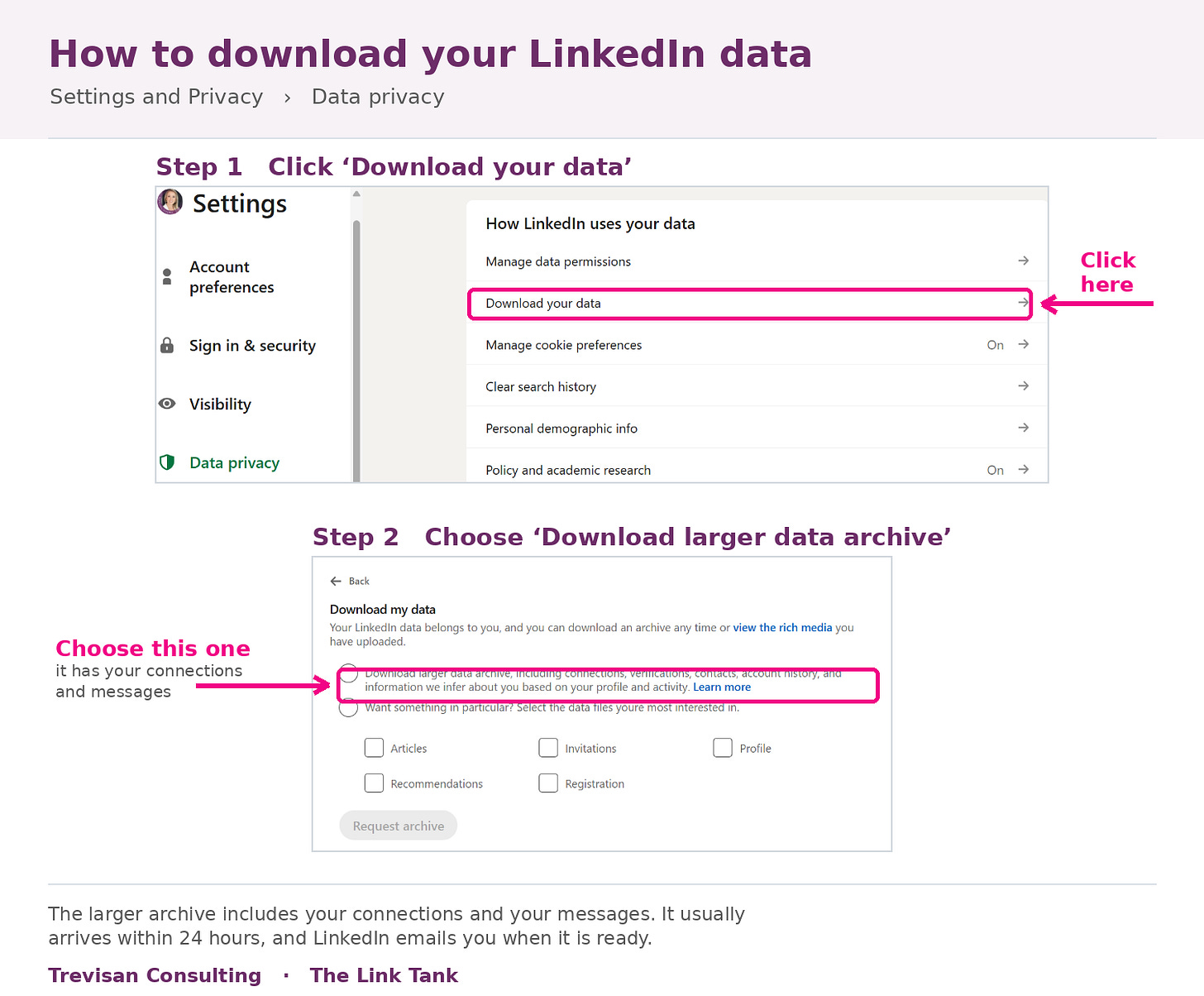
Click your profile photo, the Me icon, at the top of LinkedIn.
Choose Settings and Privacy.
In the left-hand menu, select Data privacy.
Click Get a copy of your data.
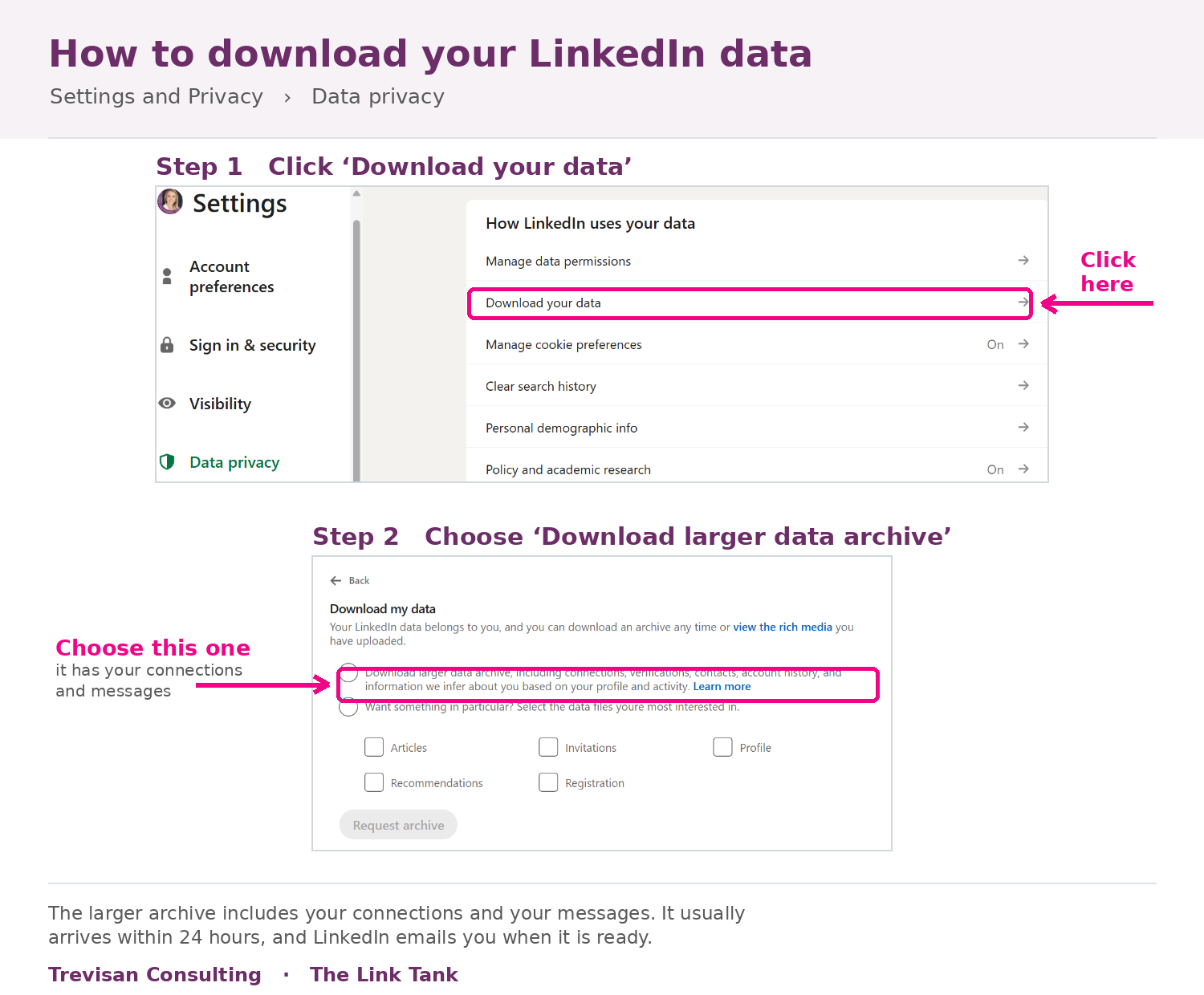
You will see two options.
Choose Download larger data archive and request that too. It arrives as messages.csv, usually within 24 hours, occasionally longer for a large or old account.
These files contain other people’s personal information. Handle them with the same care as any client data. If you use an AI tool for the cross-reference, use a paid business or enterprise plan with a data processing agreement in place, not a free consumer account, and check your firm’s policy first. Delete the files and the chat when you are finished.
Once both files have arrived, open Claude and upload Connections.csv and messages.csv together. Then give it a clear instruction. Here is one you can copy and adjust:
I’ve uploaded two files from my LinkedIn data export: Connections.csv, my full first-degree connections list, and messages.csv, my complete LinkedIn messaging history. Cross-reference them. Give me a list of every connection in Connections.csv who does not appear anywhere in messages.csv, either as a sender or a recipient. These are my dormant connections, the ones I have never messaged. Present them as a table with name, company, position and the date we connected, sorted by most recent first. Where a profile web address is available in both files, match on that rather than the name to avoid errors, and flag anything you were unsure about.
That last line in the above prompt matters. Names are not unique, and people change them, so matching on the profile web address is safer where the export includes it. Ask for uncertain matches to be flagged rather than guessed.
➡️What comes back is your dormant list. For most established professionals, it runs into the hundreds. That number tends to surprise people, and it is the whole point. Every row is a conversation you already have permission to start.
This newsletter is free because people like you share it with their network who also need this
Do not treat the list as one block. A past client and a conference contact from three years ago need different opening lines.
Be realistic about what the data can do here. Your export holds each person’s name, company, position and the date you connected. From that, Claude can group people by industry, by seniority, and by how well they match your target audience. It can also spot clusters of connections made around the same date, which often point to a single event or a post that did well.
What the data cannot tell Claude is your history with someone. It has no way of knowing that a name was a client three years ago, or that you met at a particular dinner, because none of that is in the file.
So you supply that part: Paste in a short list of your past clients or their companies, and the names of events you have spoken at or attended, and ask Claude to tag anyone on your dormant list who matches. Between the data it can read and the context only you hold, you end up with four workable groups: past clients and former colleagues, event or mutual-contact connections, people in your target audience who connected after your content, and cold adds where neither of you can remember why.
💡 There is a way to make the sort sharper still, if you use Outlook or another email account for work. Your LinkedIn export cannot see your history with someone BUT your inbox can!
Connect Claude to your email, or give it an export of your contacts and sent items, and it can cross-check your dormant LinkedIn list against the people you have actually corresponded with. Someone you have exchanged twenty emails with is not a cold connection, whatever LinkedIn says. That match shows you where a real relationship already exists, and it places people in the right group with far more confidence than company and job title alone.
Here is a prompt you can use once your email is connected.
Here is my dormant LinkedIn connections list, the people I am connected to but have never messaged on LinkedIn [paste the list or attach it]. Using my connected email account, check each person against my email history, matching on name and email address where you can. For anyone I have corresponded with, tell me roughly how many emails we have exchanged and when we last spoke, and mark them as a warm relationship rather than a cold connection. Then re-sort the whole list into four groups: past clients or people I clearly have a working relationship with, event or mutual-contact connections, target-audience connections, and cold adds where neither of us can remember why we connected. Flag anyone you were unsure about rather than guessing.
One word of caution here, particularly if you work in a regulated field. Connecting an inbox gives the tool access to correspondence that often contains confidential client material. That is a heavier data decision than exporting a LinkedIn file, and some firms will not allow it. Check your own rules before you connect anything.
Start with the first two groups. The shared reference does the work for you. The last group deserves a lighter touch, and some of them are fine to leave dormant ;)
Now you write, one message at a time, following a few principles that keep this human rather than salesy.
Lead with the connection point, not yourself. The first line should reference the real reason you are linked, which proves the message was written for them. Give before you ask, and often do not ask at all, because the strongest re-openers carry no request. Make it effortless to reply, since one easy question beats a paragraph of context. Keep it to two or three sentences, written the way you speak. Be honest about the gap, because a light acknowledgement that it has been a while is disarming and true.
The templates for each group are at the end, ready to lift.
Now you write, one message at a time, following a few principles that keep this human rather than salesy.
Lead with the connection point, not yourself. The first line should reference the real reason you are linked, which proves the message was written for them. Give before you ask, and often do not ask at all, because the strongest re-openers carry no request. Make it effortless to reply, since one easy question beats a paragraph of context. Keep it to two or three sentences, written the way you speak. Be honest about the gap, because a light acknowledgement that it has been a while is disarming and true.
The templates for each group are at the end, ready to lift.
Picture a commercial solicitor who came through one of my training programmes.
She ran her export and found more than 1,400 dormant connections. Fourteen hundred people she was connected to and had never once messaged. The number alone changed how she thought about her network. When she sorted the list, one group stood out: around 200 people she had met at conferences and industry events and never followed up with.
She started there. A two-line message to each that referenced the event and asked one real question about their work. She sent them in small batches over a month, written by hand, spaced across her days.
Close to half replied. Most were simple exchanges at first, a bit of catching up, a comment on a shared contact. Around a dozen of those conversations, over the following weeks, opened into something with real substance. Three led to live pieces of work, and one became the largest instruction her team took on that quarter. She did not sell to anyone. She reopened relationships, and the work came from the conversations, not from any ask.
Three failure modes account for most disappointing results.
The first is speed. People find 600 names and try to clear them in a day with copy and paste. The message stops being personal, the replies dry up, and the exercise teaches the network that you send noise. Batches of ten or fifteen, written properly, beat a hundred fired off at once.
The second is the early pitch. Someone replies warmly, and the temptation is to pivot straight to your services. That is precisely the move that trains people to stop replying. The reopening is not the sale. It is the return of a conversation, and the reason to talk further has to surface on its own.
The third is skipping the sort. A message that would land well with a former colleague reads as odd when sent to a near-stranger. The four groups exist so the words match the relationship. Spend the ten minutes to sort, and every message afterwards is easier to write.
Square brackets are prompts for you, not words to send. Send these one at a time, written and checked by you.
The core re-opener, with no pitch:
Hi [First name], we connected back in [month or year, or after the [event] event] and I don’t think we’ve actually spoken since. I’ve been [meaning to reach out / following your work at [company]] and wanted to say a proper hello. How are things going with [something specific and true to them]?
For a past client or former colleague:
Hi [First name], it’s been far too long. I still think about [specific project or moment you shared]. I’d love to hear what you’re working on these days. Are you still at [company], or has something new come along?
For an event or mutual-contact connection:
Hi [First name], we connected around [event or through [mutual contact]] and I’ve been meaning to reconnect properly ever since. I really enjoyed [something specific from that context]. What are you focused on at the moment?
For someone who connected after your content:
Hi [First name], thank you for connecting a while back. I noticed we’re both [shared interest or field] and I realised we’ve never actually spoken. What’s the biggest thing on your plate this quarter?
The speedy one for quicker results
Hi [First name], we connected a while back but never got the chance to talk properly, which I know is on me but feels like a shame. Would you be up for twenty minutes in the diary in the last week of [this month], if you are around? [optional add:I'd like to get to know you and what you're building, with no agenda beyond that.]
Warmest, Your Name
The highest converting one for my clients
Hi [First name], I hope you’re well and you’re enjoying the Summer. As a fellow X, could we please have a 1-to-1 to explore how we may be able to help each other in business? Regardless of my work, I like to cross-refer and collaborate where possible and indeed I encourage all my clients to do the same.
Warmest, Your Name
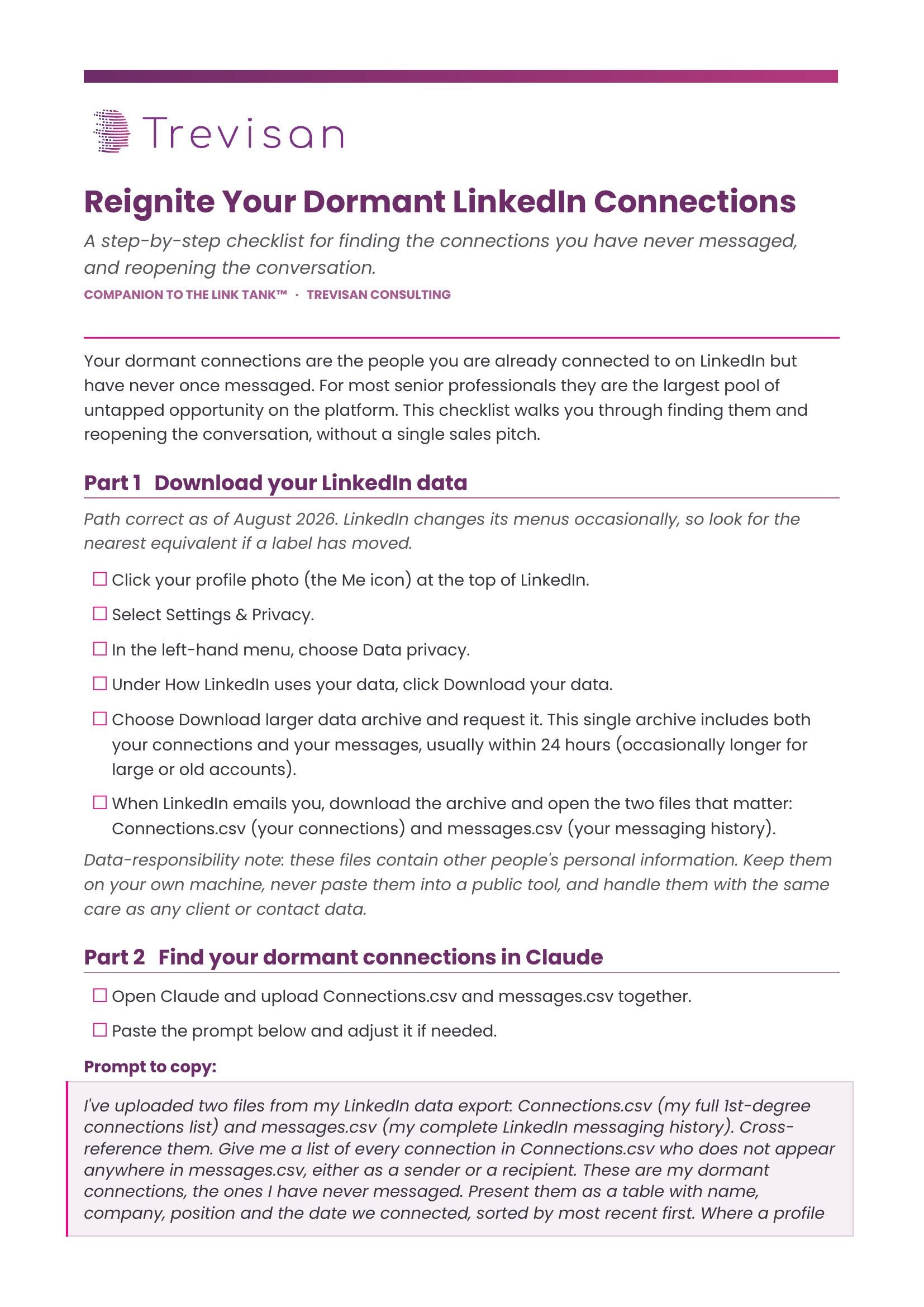
The full method, steps and templates, is in a one-page checklist here if it's useful:
Your network is the set of conversations you are actually having, whatever the number on your profile says. Most professionals have hundreds of connections and a handful of conversations, then try to fix the gap by adding more connections. The faster route runs the other way.
Surface the people you have never messaged. Sort them. Say a real hello, one at a time, and follow through when they reply. The opportunity was already sitting in your network. You simply had not spoken to it yet.
Reactivating dormant connections is one part of the managed LinkedIn business development programme I run for time-poor individuals and firms.
The first step is a paid strategy call, where I provide a written profile review in advance and then we look at your situation and work out together whether the programme is a fit. There is no obligation beyond the call, and we cover exactly what the programme involves and what it costs while we are on it.
If that is useful, you can book the call here.
One last question before you go. When you run your export, which group surprises you most, the old clients or the strangers you cannot place?
Comments
Nothing yet. Say the first thing.
Sign in to join the conversation.