Part 3 of an ongoing series working through the MITRE ATT&CK Evaluations APT29 dataset in Splunk. Part 1 found the initial dropper. Part 2 found credential access, a Python implant, and lateral movement. This part connects everything into one chain.
If you haven’t read Part 2:
Before I get into the findings, a quick note on why I am doing this.
I am learning advanced threat hunting by working through real adversary simulation data rather than reading about it. The dataset is the MITRE ATT&CK Evaluations APT29 simulation from the Open Threat Research Foundation. I document everything including the dead ends, not just the clean findings.
If I missed something or got something wrong, tell me in the comments. I would rather be corrected than have a wrong interpretation sitting in a published post.
One thing I will say. There is a tendency among experienced practitioners to assume certain investigative paths are not worth taking. Maybe that is sometimes true. But I think there is value in a learner going through data without assumptions and documenting exactly what they find. That is what this series is.
In Part 1 I found cod.3aka3.scr executing at 22:57:12. In Part 2 I found PowerShell dumping credentials from LSASS with full process access and a Python implant making 348 outbound connections in 3 seconds.
What I did not have was the line connecting them. The complete path from the dropper all the way to the PowerShell doing the damage.
ProcessID 2976 gave me that line.
546 events. 15 EventIDs. And inside EventID 1, the full process tree written out in the logs.
cod.3aka3.scr spawned cmd.exe at 22:57:12
cmd.exe spawned sdblt.exe at 22:58:42
sdblt.exe spawned control.exe at 22:58:44
control.exe spawned powershell.exe at 22:58:44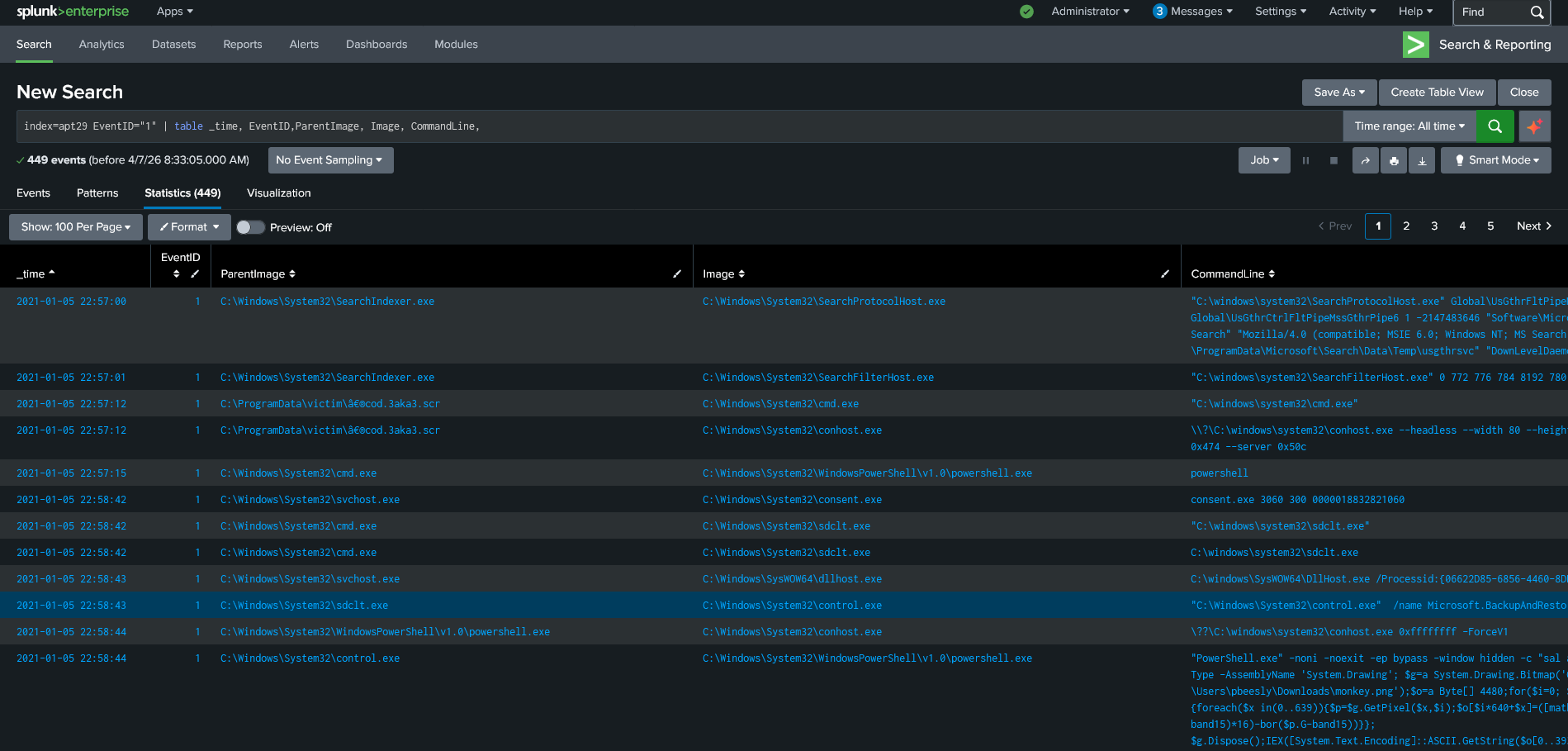
That is the complete execution chain. Every hop deliberate. Every process a legitimate Windows binary being used as a stepping stone. The dropper never touched PowerShell directly. It went through cmd, then sdblt, then control, then PowerShell. Four layers of indirection between the malicious file and the process doing the actual work.
sdblt.exe is the Application Compatibility Database tool. control.exe is the Windows Control Panel executable. Both are signed Microsoft binaries. Both appear in normal Windows environments constantly. That is the point.
What was running alongside the main chain
While I was tracing the main execution chain I noticed the .scr file did not just spawn cmd.exe. It spawned two processes at the same time. cmd.exe and conhost.exe.
conhost.exe is the Console Window Host. Normally it is a child of cmd.exe or other console applications, not something a screensaver file spawns directly. Finding it as a direct child of the .scr file was the first signal something was off.
Then conhost loaded a few DLL images and immediately accessed cmd.exe with 0x1FFFFF. Full process access. Then it accessed powershell.exe twice with the same permission level. Then it terminated.
A console host process requesting full memory access to PowerShell has no legitimate explanation. This was the second arm of the attack running in parallel with the main chain. While cmd was being used to build the execution ladder up to PowerShell, conhost was watching both processes with full access, likely supervising the execution chain and maintaining visibility into what it had spawned. Once the main chain completed and PowerShell was running, conhost had nothing left to do and exited cleanly.
Two processes spawned simultaneously from one dropper. One to execute. One to supervise.
The timestamp that was changed
EventID 2 showed the CARNYB.tmp file with its creation timestamp modified. Originally created at 2:58:44, the attacker changed it to 2:44:15 on the same date. A 14 minute and 29 second backward shift.
This is not random. Across the dataset APT29 consistently shifts timestamps backward by approximately 15 minutes. That consistency is itself a detection pattern. If you are hunting in your own environment and find files with timestamps shifted backward by 10 to 20 minutes from when they were actually created, that is a signature worth building a detection around.
EventID 7: The unsigned DLLs that looked legitimate
Every DLL loaded during this process lifecycle looked legitimate at first glance. Proper paths, proper signatures. But filtering for unsigned images revealed DLLs belonging to the native image cache, compiled versions of .NET assemblies stored in a system cache folder.
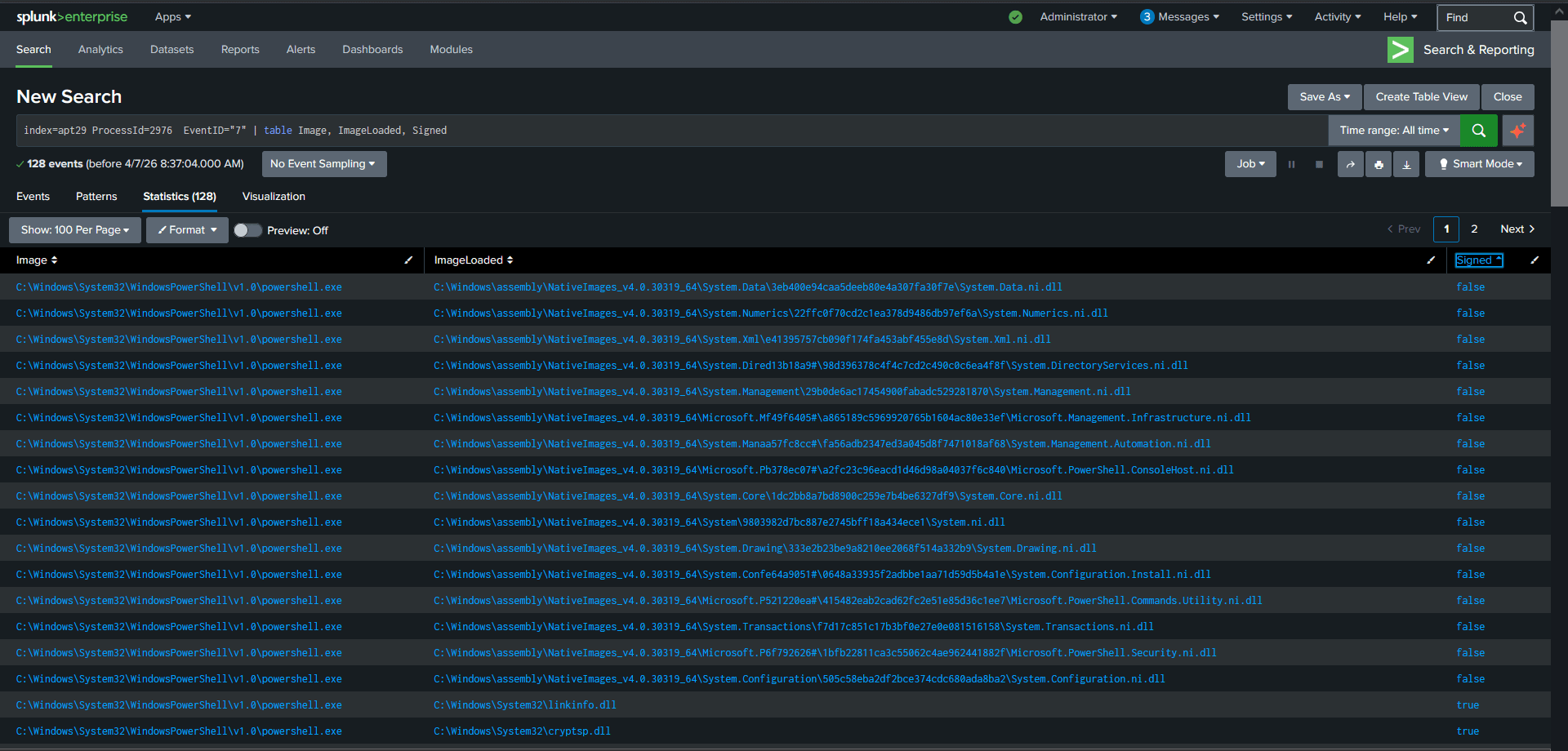
These unsigned native image DLLs are not malicious on their own. But their presence in this process context is worth noting because APT29 used .NET extensively throughout this attack. The in-memory compilation via csc.exe in Part 1 and the .pyd file from Part 2 both rely on .NET infrastructure. The native image cache being accessed here is part of that same infrastructure being leveraged.
EventID 8: Code injection into lsass
At 11:05:16 PowerShell created a remote thread inside lsass.exe.
EventID 8 is CreateRemoteThread. It is different from the memory access in EventID 10 documented in Part 2. EventID 10 was PowerShell reading lsass memory. EventID 8 is PowerShell inserting executable code into the lsass process itself.
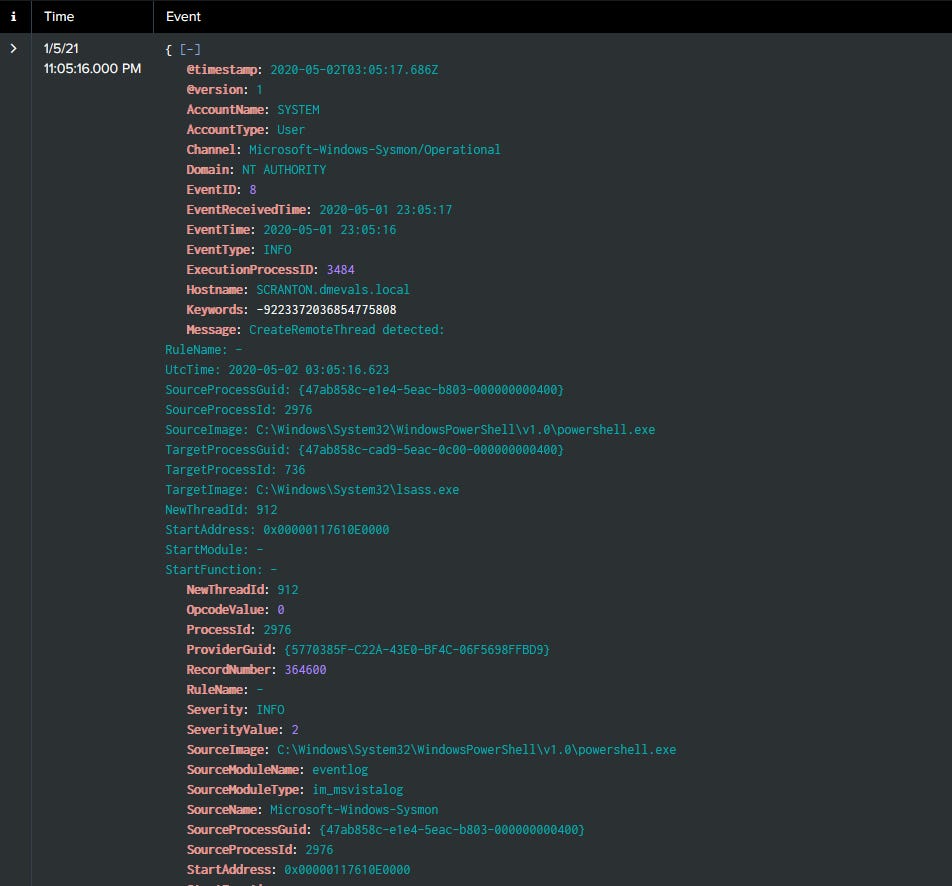
Together these two events tell the complete credential dumping story. First PowerShell requested full memory access to lsass with 0x1fffff. Then it injected a thread into lsass to execute code inside it. The credentials were not just read from memory. Code was running inside the credential store process itself.
EventID 10: PowerShell accessing 13 Windows processes
PowerShell requested 0x1fffff on almost every significant Windows process running on the machine.
explorer.exe, winlogon.exe, svchost.exe, dwm.exe, LogonUI.exe, fontdrvhost.exe, csc.exe, SearchFilterHost.exe, SearchProtocolHost.exe, wmiprvse.exe, conhost.exe, RuntimeBroker.exe, and lsass.exe.
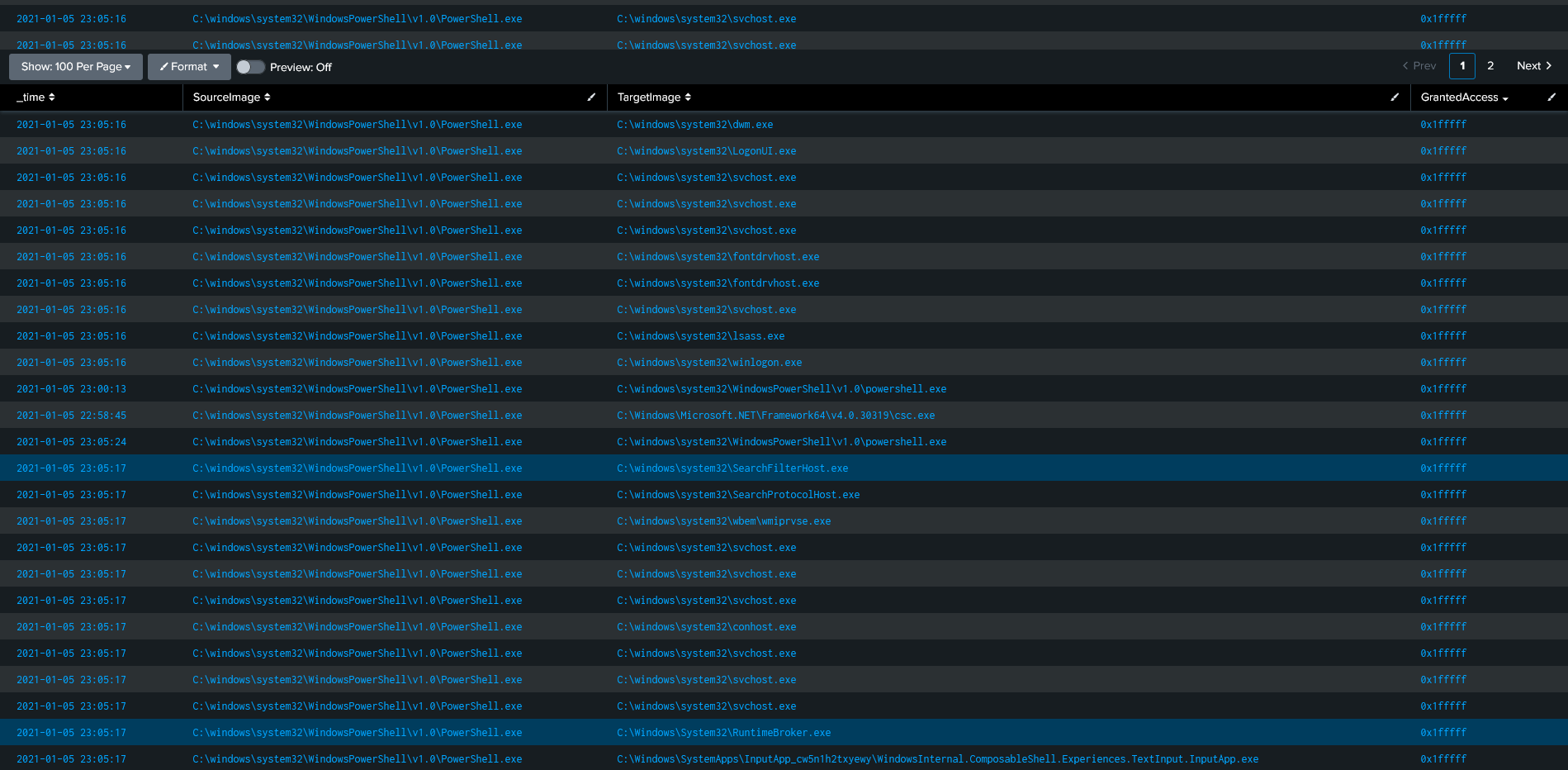
Except for 7 events every access used 0x1fffff. Full unrestricted access to every process systematically.
Most detections for credential dumping focus on lsass specifically. This finding suggests the detection needs to be broader. Any process requesting 0x1fffff on multiple different legitimate Windows processes in a short timeframe is worth investigating regardless of which specific target it is accessing. APT29 was not looking for one process. They were scanning all of them.
EventID 11: Files created during the operation
11 files were created in the Temp folder. 1 file in the Downloads folder. 1 file that looked like a registry export.
The Temp folder files follow the same randomised naming pattern seen throughout the dataset. The Downloads file is more interesting because user Downloads folders are less commonly monitored than Temp. The registry-looking file suggests APT29 was exporting registry data, possibly credential-related keys, as part of the collection phase.
EventID 12: 223 registry writes to certificate stores
223 events. All written by powershell.exe. All going to certificate store paths.
HKLM\Software\Policies\Microsoft\SystemCertificates\*
HKU\S-1-5-21-1830255721-3727074217-2423397540-1107\Software\Microsoft\SystemCertificates\*
APT29 was writing to the Windows certificate trust store. Both the machine-wide store and the user-specific store.
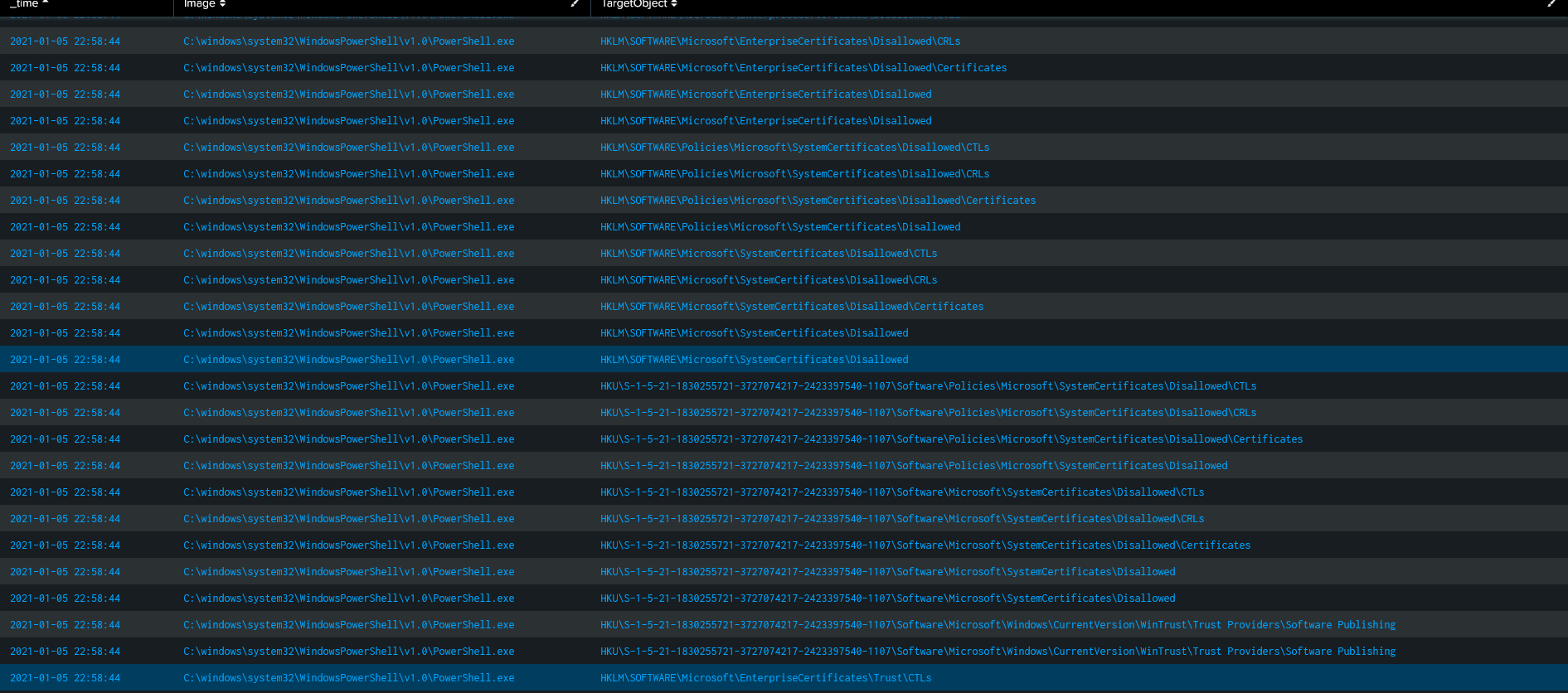
The reason an attacker writes certificates to the trust store is to make their infrastructure trusted by the machine. If you install your own root certificate into the Windows trust store, any HTTPS connection the implant makes will be treated as trusted by the operating system. No certificate errors. No SSL inspection alerts. The machine believes the attacker’s server is legitimate.
This is a persistence and trust manipulation technique that most detection rules do not cover. Certificate store modifications by non-system processes should always generate an alert.
EventID 13: Registry value sets
Only 11 events but the pattern matters. PowerShell setting values where 3 were binary data, 7 were DWORD(0x00000001), and 1 was DWORD(0x00000000).
The binary data values are the ones worth examining in your own Splunk instance by checking the raw event. Binary data written to registry keys by a malicious PowerShell session often contains encoded configuration, implant parameters, or encrypted credential material. The DWORD values are more likely configuration flags being enabled or disabled.
EventID 17 and 18: The pipes
EventID 17 showed 5 pipes created by PowerShell. 4 Anonymous Pipes and one named:
PSHost.13232861924325040.2976.DefaultAppDomain.powershell
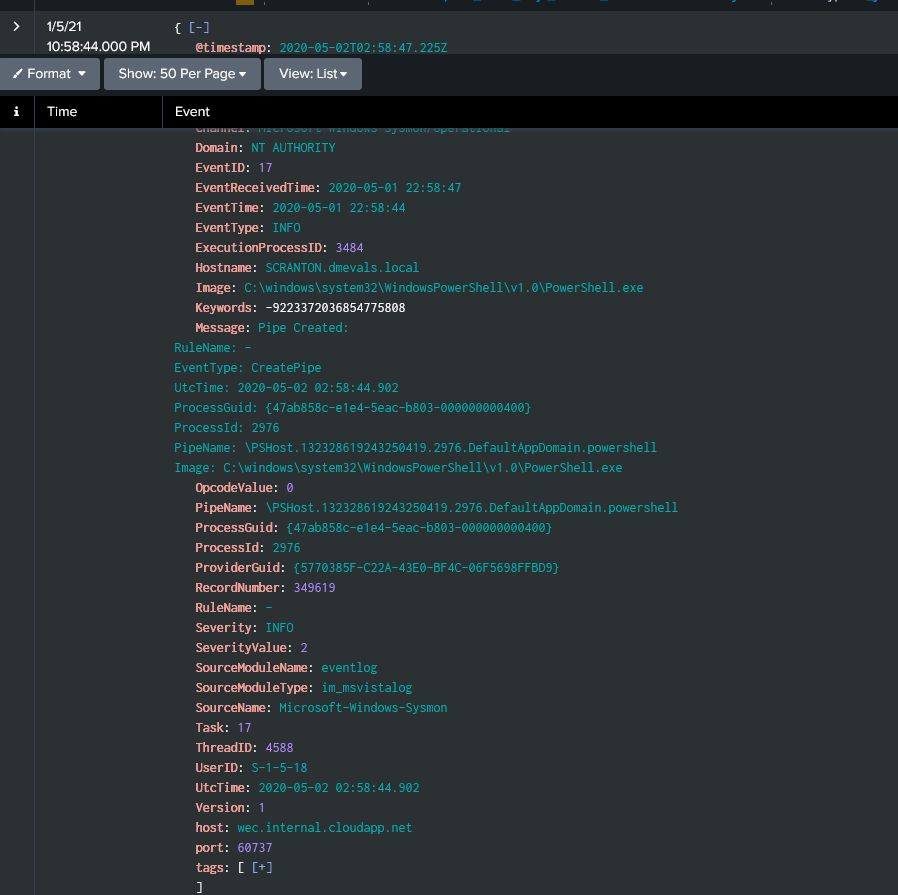
That name contains ProcessID 2976. PowerShell uses this naming convention for its own internal remoting infrastructure. The implant was using PowerShell’s legitimate pipe system as its own communication channel.
EventID 18 showed 6 pipes connected. 4 Anonymous Pipes, then \wkssvc and \srvcsvc.
Those last two are real Windows service pipe names. \wkssvc is the Workstation Service pipe. \srvcsvc is the Server Service pipe. These are not slightly modified fake names. They are the actual names of legitimate Windows service pipes. APT29 connected to these pipes to blend their implant communication with traffic that looks identical to normal Windows service activity. There is no way to distinguish this from legitimate service communication without additional context.
EventID 5156 and 5158: The Windows Filtering Platform
EventID 5156 showed the Windows Filtering Platform explicitly permitting an outbound connection.
Application:  powershell.exe
Direction:    Outbound
Source:       10.0.1.4
Port:         59845 / 31846
Destination:  192.168.0.5
Port:         443
Protocol:     6
EventID 5158 showed the WFP permitting a bind to local ports 59846 and 59845.
These two EventIDs matter because they show the local firewall actively allowed this traffic. The connection was not blocked, not filtered, not flagged. The Windows Filtering Platform saw PowerShell connecting to an internal IP on port 443 and permitted it as normal traffic. From the firewall’s perspective there was nothing unusual. An internal HTTPS connection from PowerShell. Happens all the time in enterprise environments.
That is precisely why APT29 routed C2 through internal IPs on port 443. Every defensive layer along that path was designed to trust exactly that kind of traffic.
EventID 23: 7 files deleted
6 deleted from the Temp folder. 1 from AppData\Roaming with a randomised name and .TMP extension. The same file category that started this entire investigation when I found the timestomped CARNYB.tmp in Part 2.
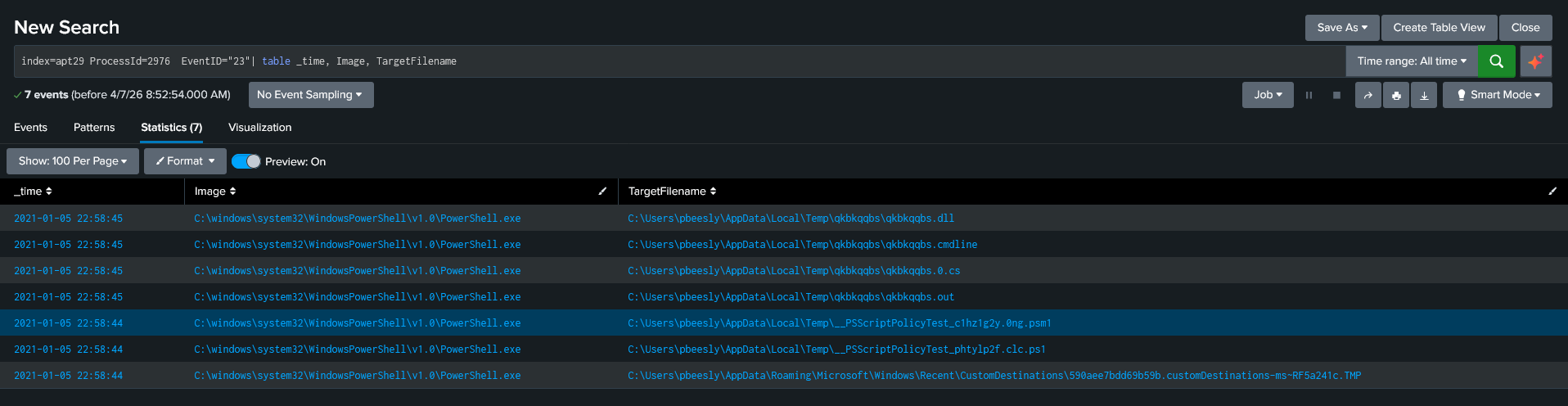
The process terminated at 11:18:32. Clean exit after cleanup. The implant created what it needed, did what it was designed to do, deleted the evidence, and stopped.
What this investigation has shown across three parts
A screensaver file executed at 22:57:12. 81 minutes later a PowerShell process terminated after systematically accessing 13 Windows processes with full memory permissions, injecting code into lsass, writing 223 certificates into the Windows trust store, creating and deleting temporary files, making outbound connections to an internal relay, and cleaning up after itself.
Simultaneously a second process, conhost.exe, ran in parallel watching the execution chain with full access to both cmd and PowerShell before terminating once the main payload was established.
The entire operation used nothing that does not already exist on a standard Windows machine. cmd.exe, sdblt.exe, control.exe, conhost.exe, PowerShell. All signed. All legitimate. All doing things they should never do in that combination.
That is the detection challenge. Not finding malicious tools. Finding legitimate tools behaving maliciously, in sequence, in a pattern that only makes sense when you connect the events across multiple EventIDs and trace the chain back to where it started.
What comes next
Part 4 is the Sigma detection rules. One rule per confirmed technique across the full series. Each one documented with ATT&CK mapping and tuning notes.
All findings are from the publicly available MITRE ATT&CK Evaluations APT29 dataset at github.com/OTRF/Security-Datasets. Tools used: Splunk Free tier.
If you found something different in the same dataset or want to compare methodology drop a comment.
I am currently open to SOC analyst and detection engineering roles, remote or India based. Resume and full series linked on my profile.
No posts
Comments
Nothing yet. Say the first thing.
Sign in to join the conversation.