

You fail when you treat AI tools like magic boxes.
The truth is, your results depend on how well you guide them. Boris Cherny, the creator of Claude Code, shared how he uses it daily. I listened to over five hours of his talks, podcasts, and interviews and distilled the lessons.
What follows are eight practical techniques you can copy today to raise your AI coding success rate from 30% to 80%.
For Boris, the real power of Claude Code is using it like a Unix utility.
Piping Data: Stream logs, traces, or GitHub output directly into claude. Claude processes them in context, just like a traditional Unix tool.
Debugging & Incident Triage: Pipe GCP or DataDog logs to quickly identify regressions and even get suggested fixes.
Post-Processing: Combine Claude’s output with other tools (e.g.,
jq) to build more complex workflows.
Lesson: Treat Claude Code as a command-line utility.
According to Boris, Claude Code “10 out of 10 good” at answering codebase questions.
When he’s working with unfamiliar code, he asks questions like: “Why is this function designed the way that it is?”. Claude will look up historic context via Git history.
At Anthropic, new engineers are encouraged to do the same: Ask Claude Code to explain a Codebase instead of a real human. The result: faster onboarding. What once took weeks now takes days
Boris emphasizes that the Claude Code SDK isn’t just for coding.
While it’s excellent for building coding agents, he notes it can also be used as a “generic agent SDK” for applications “totally unrelated to coding.” As he explains, “because Claude is a good coding agent, it means it’s a good agent generally.” That versatility makes the SDK suitable for “all sorts of totally agentic use cases.”
Treat the SDK as more than a developer tool, you open the door to building a wide range of agentic applications.
Easy, medium, hard. That’s how Boris thinks about coding tasks, and each level has its own Claude Code workflow.
Easy Tasks (One-Shotable): These are the quick wins. About half of Cherny’s daily work can be handled in a single prompt. He tags
@claudeon GitHub issues or pull requests and lets it put up a PR or answer a question. It’s fast, autonomous, and frees up his terminal.Medium Tasks (More Back-and-Forth): These require guidance. The trick is starting in plan mode (Shift + Tab) to workshop a plan before coding. Without planning, Claude succeeds only 20–30% of the time. With planning, success jumps to 70–80%. If Claude goes off track, Cherny simply hits Escape, corrects, and continues.
“I would say that without planning maybe it succeeds 20–30% of the time without a lot of intervention, but with planning that goes up to maybe 70 or 80% of the time.” — Boris Cherny
Hard Tasks (Engineer-Driven): For complex changes, the engineer stays in the driver’s seat. Boris writes a plan in markdown first, then uses Claude for codebase research, prototyping “vibe code,” or generating unit tests. Final polishing happens in his IDE, where he manually edits the last 20–30%.
The takeaway: Match the workflow to the task. One-shot the easy stuff, scaffold the medium ones, and stay hands-on for the hard problems.
Boris treats CLAUDE.md as the shared memory bank. Emphasizing that it is a team effort to have a well-defined CLAUDE.md
Only add when Claude struggles: “I wouldn’t try to kind of pre-add a bunch of stuff if you don’t actually see Claude struggling with it.” For example, if Claude keeps using the wrong test runner or looking in the wrong directory, log that correction in CLAUDE.md.
Avoid the common mistake: Many engineers keep these fixes local, which means no one else benefits. Cherny stresses, “When in doubt, always check it in to the codebase.”
Teach Claude new tools: Run a CLI tool’s help command (e.g.
my-custom-tool -help) and ask Claude to capture the output in CLAUDE.md. This eliminates the need for custom integrations or extensions.
CLAUDE.md should be a shared, evolving knowledge file. Don’t hoard fixes locally. Capture struggles, commit them, and let the whole team grow from it.
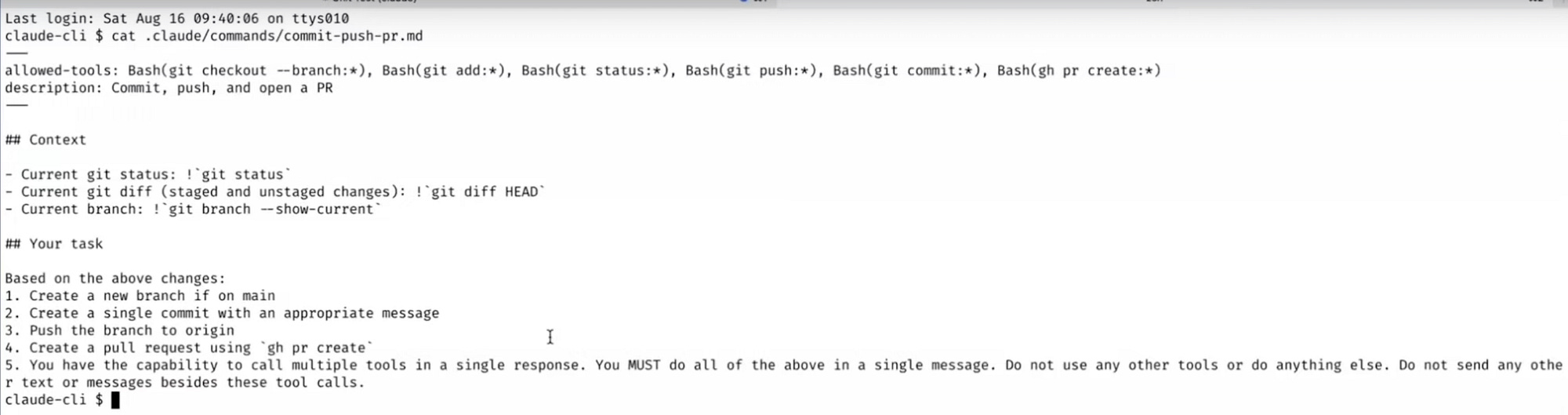
Boris builds custom slash with Pre-allow tools and Pre-evaluate with macros. On such example is his /commit-push-pr command.
fore sending the full prompt to Claude. For example,
!~ git statusor!~ git diffgive Claude the exact context upfront.Cut down back-and-forth: With pre-approved tools and macros, Claude has everything it needs in a single shot, and no need to ask, retry, or clarify.
The takeaway: by combining pre-allowed commands with macros, you turn slash commands into time-saving shortcuts that keep Claude focused and reduce friction in your workflow.
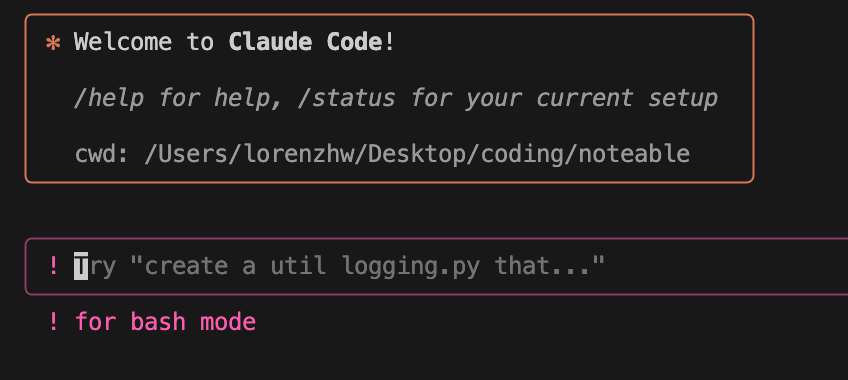
Hit ! to drop into Bash. Run commands like git status or git diff, and Claude keeps the context.
Boris relies on sub-agents to keep Claude Code from over-engineering solutions.
One teammate’s “code simplification agent” has become a go-to tool for trimming complex output down to clean, functional code. Cherny sees this as a valuable bridge for now but warns that sub-agents are “a bridge for models of today” and may disappear as models get better at “managing their own context.”
The takeaway: sub-agents can make today’s workflows smoother, but they’re likely a temporary bridge until future models take over their role.
Videos from where I synthesized this information:
Comments
Nothing yet. Say the first thing.
Sign in to join the conversation.